1. ആമുഖം
This manual provides essential information for the setup, operation, maintenance, and troubleshooting of your BenQ HT2550 4K UHD HDR Home Theater Projector. Please read this manual thoroughly before using the projector to ensure optimal performance and safety.
പ്രധാന സവിശേഷതകൾ:
- True 4K UHD Resolution: 8.3 million distinct pixels for stunning clarity.
- Projector-optimized HDR: HDR10 support with BenQ exclusive Auto HDR color rendition.
- Cinematic Color Technology: Reproduces >96% of Rec.709 color gamut.
- കോംപാക്റ്റ് ഡിസൈൻ: Light and sleek with Auto vertical Keystone and 1.2x zoom for easy installation.
2. പാക്കേജ് ഉള്ളടക്കം
താഴെ ലിസ്റ്റ് ചെയ്തിരിക്കുന്ന എല്ലാ ഇനങ്ങളും നിങ്ങളുടെ പാക്കേജിൽ ഉൾപ്പെടുത്തിയിട്ടുണ്ടെന്ന് ഉറപ്പാക്കുക:
- BenQ HT2550 Projector
- Remote Control with Battery (RCV015)
- പവർ കോർഡ് (3മീ.)
- User Manual CD (27L)
- Quick Start Guide (21L)
- വാറൻ്റി കാർഡ്
- ലെൻസ് കവർ
3. സജ്ജീകരണം
3.1 ഫിസിക്കൽ പ്ലേസ്മെന്റ്
The BenQ HT2550 features a compact design with 1.2x zoom and Auto vertical Keystone, allowing for flexible placement. Consider the throw ratio (1.47 - 1.76) to determine the optimal distance from the screen for your desired image size (60" to 200" clear image size).
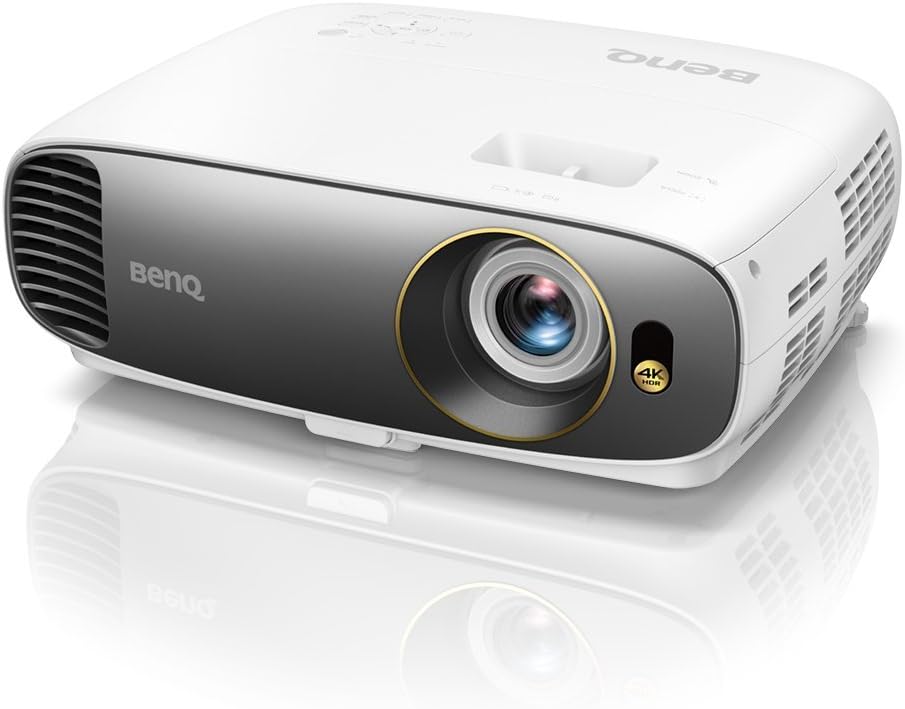
ചിത്രം 1: മുൻഭാഗം view of the BenQ HT2550 projector, showcasing അതിന്റെ ഒതുക്കമുള്ള രൂപകൽപ്പനയും ലെൻസും.
3.2 ഉപകരണങ്ങൾ ബന്ധിപ്പിക്കുന്നു
പ്രൊജക്ടർ വിവിധ കണക്റ്റിവിറ്റി ഓപ്ഷനുകൾ വാഗ്ദാനം ചെയ്യുന്നു:
- എച്ച്ഡിഎംഐ: 2 ports (HDMI 1: 2.0 / HDCP 2.2; HDMI 2: 1.4a / HDCP 1.4) for connecting Blu-ray players, gaming consoles, or streaming devices.
- യുഎസ്ബി ടൈപ്പ് എ: 1 port (2.0/Power Supply) for media playback or powering accessories.
- USB (Type mini B): 1 പോർട്ട്.
- പിസി (ഡി-സബ്): 1 port for computer connection.
- Audio In/Out (3.5mm Mini Jack): 1 each for external audio devices.
- RS232 (DB-9 പിൻ): 1 port for control systems.
- DC 12V Trigger (3.5mm Jack): 1 port for synchronized screen control.

ചിത്രം 2: പിൻഭാഗം view of the BenQ HT2550 projector, highlighting the various input and output ports for connectivity.
3.3 പ്രാരംഭ പവർ ഓണും ക്രമീകരണവും
- പ്രൊജക്ടറിലേക്കും പവർ ഔട്ട്ലെറ്റിലേക്കും പവർ കോർഡ് ബന്ധിപ്പിക്കുക.
- പ്രൊജക്ടറിലോ വിദൂര നിയന്ത്രണത്തിലോ ഉള്ള പവർ ബട്ടൺ അമർത്തുക.
- Adjust the focus and zoom using the rings on the lens.
- Utilize the vertical keystone adjustment (±40 degrees) to correct image distortion if the projector is not perfectly perpendicular to the screen.
4. പ്രൊജക്ടർ പ്രവർത്തിപ്പിക്കൽ
4.1 ചിത്ര മോഡുകൾ
The BenQ HT2550 offers several picture modes to optimize viewing for different content:
- ISF Disabled: Bright / Vivid / Cinema / Sport / User 1 / User 2
- ISF Enabled: Bright / Vivid / Cinema / Sport / User 1 / User 2 / ISF Night / ISF Day
Select the appropriate mode via the projector's menu or remote control for the best visual experience.
4.2 HDR and 3D Content
The projector supports HDR (High Dynamic Range) for enhanced contrast and color. It also features 3D compatibility with various formats:
- Frame Sequential: Up to 1280x720 120Hz
- Frame Packing: 1080p 24Hz വരെ
- Top Bottom: 720p 60Hz വരെ
Ensure your content source and 3D glasses (if applicable) are compatible with these formats.
4.3 ഓഡിയോ putട്ട്പുട്ട്
The projector includes a built-in 5W speaker. For a more immersive audio experience, connect external speakers via the 3.5mm Audio out jack or through your HDMI receiver.
5. പരിപാലനം
5.1 എൽamp ജീവിതം
പ്രൊജക്ടറിന്റെ എൽamp has an estimated lifespan depending on the usage mode:
- സാധാരണ മോഡ്: 4000 മണിക്കൂർ
- സാമ്പത്തിക മോഡ്: 10000 മണിക്കൂർ
- സ്മാർട്ട്ഇക്കോ മോഡ്: 8000 മണിക്കൂർ
- Lampസേവ് മോഡ്: 15000 മണിക്കൂർ
Regular cleaning of the lens and ensuring proper ventilation will help prolong the lamp's life and maintain image quality.
5.2 ഫേംവെയർ അപ്ഡേറ്റുകൾ
BenQ periodically releases firmware updates to improve performance and address issues. As of March 16, 2018, units include Firmware Update 1.0.3. For information on checking your current firmware version or obtaining updates, please refer to the official BenQ support resources.
6. പ്രശ്നപരിഹാരം
പൊതുവായ പ്രശ്നങ്ങളും പരിഹാരങ്ങളും:
- ചിത്രം/സിഗ്നൽ ഇല്ല: Ensure all cables (HDMI, PC) are securely connected and the correct input source is selected on the projector. Verify the source device is powered on and outputting a signal.
- ചിത്രം വക്രീകരണം: Use the keystone adjustment to correct trapezoidal images. Ensure the projector is placed on a stable, level surface.
- Fuzzy/Unclear Image: Adjust the focus ring on the lens until the image is sharp. Ensure the lens is clean.
- Projector Noise: A faint fan noise is normal. Check if the projector is in "Silence" mode (if available) which might limit resolution. Ensure adequate ventilation to prevent overheating, which can increase fan speed.
- Light Border Around Image: This can occur with some projectors. Ensure your screen has a black velvet border or consider LED backlighting around the screen to minimize its visibility.
7 സ്പെസിഫിക്കേഷനുകൾ
| ഫീച്ചർ | വിശദാംശങ്ങൾ |
|---|---|
| പ്രൊജക്ഷൻ സിസ്റ്റം | ഡി.എൽ.പി |
| നേറ്റീവ് റെസല്യൂഷൻ | 3840x2160 (XPR pixel shifting technology) |
| റെസല്യൂഷൻ സപ്പോർട്ട് | VGA (640 x 480) മുതൽ 4K UHD (3840 x 2160) വരെ |
| തെളിച്ചം (ANSI lumens) | 2200 ആൻസി ലുമെൻസ് |
| കോൺട്രാസ്റ്റ് റേഷ്യോ (FOFO) | 10,000:1 |
| ഡിസ്പ്ലേ കളർ | 30 ബിറ്റുകൾ (1.07 ബില്യൺ നിറങ്ങൾ) |
| നേറ്റീവ് വീക്ഷണ അനുപാതം | നേറ്റീവ് 16:9 (6 വീക്ഷണാനുപാതം തിരഞ്ഞെടുക്കാവുന്നതാണ്) |
| പ്രകാശ സ്രോതസ്സ് | Lamp (240W) |
| Light Source Life (Normal/Economic/SmartEco/LampSave) | 4000 / 10000 / 8000 / 15000 മണിക്കൂർ |
| ത്രോ അനുപാതം | 1.47 - 1.76 (100" @ 3.25 m) |
| സൂം അനുപാതം | 1.2X |
| കീസ്റ്റോൺ ക്രമീകരണം | 1D, ലംബമായ ± 40 ഡിഗ്രി |
| Clear Image Size (Diagonal) | 60" ~ 200" |
| സ്പീക്കർ | 5W 1 |
| HDMI പോർട്ടുകൾ | 2 (HDMI 1: 2.0 / HDCP 2.2; HDMI 2: 1.4a / HDCP 1.4) |
| യുഎസ്ബി ടൈപ്പ് എ | 1 (2.0/Power Supply) |
| അളവുകൾ (W x H x D) | 13.9 x 5.3 x 10.7 ഇഞ്ച് |
| മൊത്തം ഭാരം | 9.2 പൗണ്ട് |
8. വാറൻ്റിയും പിന്തുണയും
Your BenQ HT2550 projector comes with a warranty. Please refer to the included Warranty Card for detailed terms and conditions specific to your region. For technical assistance, product registration, or further inquiries, please visit the official BenQ support webസൈറ്റ് അല്ലെങ്കിൽ അവരുടെ ഉപഭോക്തൃ സേവനവുമായി ബന്ധപ്പെടുക.
BenQ is committed to providing excellent customer support. For any firmware-related concerns or assistance, contacting BenQ directly is recommended.
9. ഉൽപ്പന്ന വീഡിയോകൾ
ഔദ്യോഗിക ഉൽപ്പന്നം അവസാനിച്ചുview
Video: BenQ TK800 4K UHD HDR Home Theater Projector Overview. ഈ വീഡിയോയിൽ ഒരു പൊതുവായ വിവരണം നൽകുന്നു.view of BenQ's 4K HDR projector features, similar to the HT2550 model.
User Experience Highlights
Video: BenQ HT2550 4k HDR Projector Review. This video offers insights into the user experience and performance of the BenQ HT2550 projector.
Video: Great Budget 4k Projector with some minor quirks. This video provides a user's perspective on the BenQ HT2550, including its strengths and minor considerations.


