1. ആമുഖം
The CORSAIR K63 Wireless Mechanical Keyboard and Gaming Lapboard Combo provides a comfortable and responsive gaming experience from your living room. This manual details the setup, operation, and maintenance of your device to ensure optimal performance.
ബോക്സിൽ എന്താണുള്ളത്
- CORSAIR K63 Wireless Mechanical Gaming Keyboard
- CORSAIR K63 Wireless Gaming Lapboard
- യുഎസ്ബി വയർലെസ് റിസീവർ
- USB Charging / Data Cable
- യുഎസ്ബി കേബിൾ അഡാപ്റ്റർ
- Detachable Full-Length Wrist Rest
- Two Replacement Retention Tabs
- Two Replacement Retention Hooks
- Warranty Cards, Quick Start Guides, Safety Leaflet
2. സജ്ജീകരണം
Assembling the Keyboard and Lapboard
The K63 Wireless Mechanical Gaming Keyboard is designed to fit securely into the Gaming Lapboard. Align the keyboard with the recess in the lapboard and gently press down until it snaps into place. The tool-free design allows for easy insertion and removal.

Image: The CORSAIR K63 Wireless Mechanical Keyboard securely placed within the Gaming Lapboard, ready for use.
Attach the detachable wrist rest to the front of the keyboard for enhanced comfort during extended use.
കീബോർഡ് ബന്ധിപ്പിക്കുന്നു
The K63 Wireless Keyboard offers three connectivity options:
- Ultra-Fast 1ms 2.4GHz Wireless: For optimal gaming performance, plug the included USB Wireless Receiver into an available USB port on your PC. Ensure the keyboard's power switch (located on the back edge) is set to the wireless mode.
- Low Latency Bluetooth Wireless: Connect to Windows 8 or 10, or Android devices with Bluetooth 4.0 or higher. Activate Bluetooth pairing mode on the keyboard and select it from your device's Bluetooth settings.
- യുഎസ്ബി വയർഡ്: Connect the keyboard directly to your PC using the provided USB Charging / Data Cable. This also charges the keyboard's battery.

Image: The power switch and micro-USB port on the CORSAIR K63 Wireless Keyboard, used for wired connection and charging.
കീബോർഡ് ചാർജ് ചെയ്യുന്നു
The keyboard features a rechargeable Lithium Ion battery. Connect the USB Charging / Data Cable to the keyboard's micro-USB port and to an available USB port on your PC or a USB wall adapter. A full charge provides up to 15 hours of continuous battery-powered wireless gaming (depending on backlighting usage).
3. ഓപ്പറേഷൻ
പ്രധാന സവിശേഷതകൾ
- CHERRY MX Red Mechanical Keyswitches: Experience fast, precise key presses with gold contacts for reliable performance.
- Per-Key Blue LED Backlighting: Customize lighting effects and brightness for individual keys.
- സമർപ്പിത മൾട്ടിമീഡിയ നിയന്ത്രണങ്ങൾ: Easily adjust audio volume and playback with dedicated buttons.
- വിൻഡോസ് കീ ലോക്ക്: Prevent accidental Windows key presses during gaming sessions.
- 100% Anti-Ghosting with Full Key Rollover: Ensures simultaneous keystrokes are registered accurately.
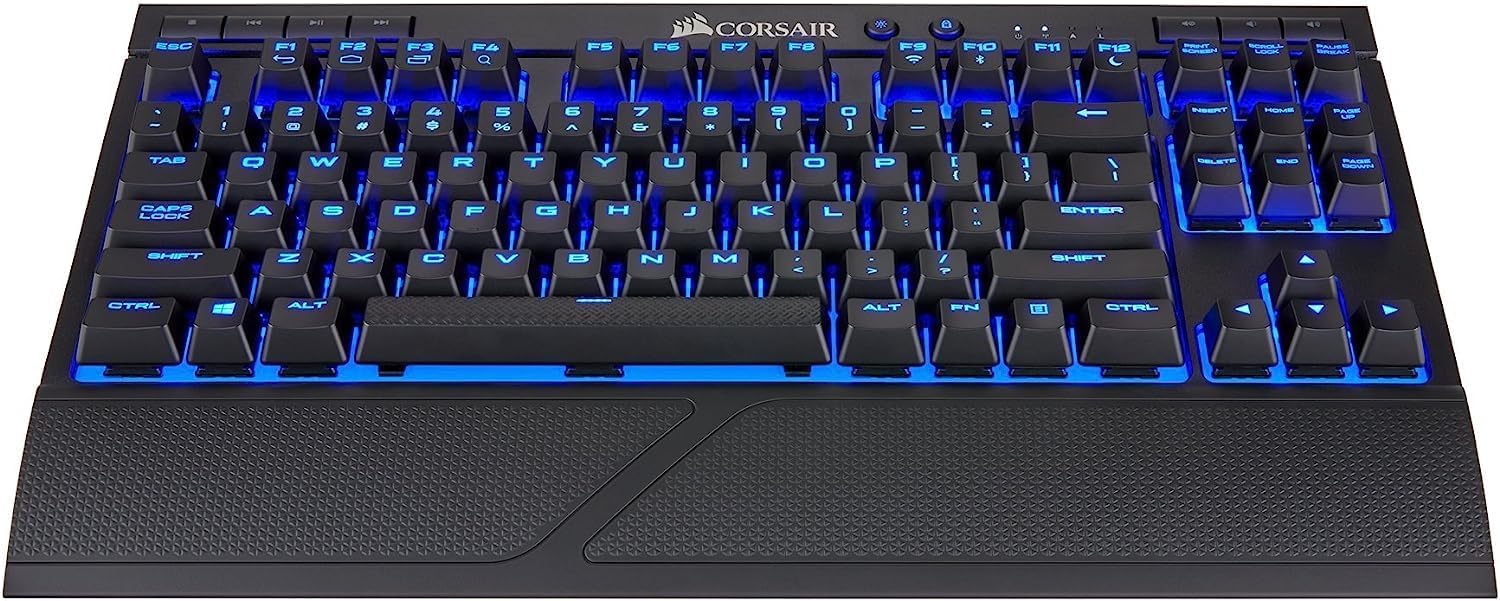
Image: The CORSAIR K63 Wireless Mechanical Keyboard showcasing its blue LED backlighting and compact layout.

ചിത്രം: ഒരു സൈഡ് പ്രോfile of the keyboard, illustrating the mechanical key switches beneath the keycaps.
CUE Software Customization
Download and install the CORSAIR Utility Engine (CUE) software from the official CORSAIR website to unlock advanced customization options. With CUE, you can:
- Assign macros to any key.
- Create dynamic lighting effects.
- Manage performance settings.
ഉൽപ്പന്ന സവിശേഷത കഴിഞ്ഞുview വീഡിയോ
വീഡിയോ: ഒരു ഉദ്യോഗസ്ഥൻview of the CORSAIR K63 Wireless Mechanical Gaming Keyboard, demonstrating its key features and functionality.
4. പരിപാലനം
Cleaning the Keyboard and Lapboard
- Use a soft, lint-free cloth to wipe down the surfaces of the keyboard and lapboard.
- കഠിനമായ അഴുക്കിന്, ചെറുതായി dampതുണിയിൽ വെള്ളം ഒഴിക്കുക. കഠിനമായ രാസവസ്തുക്കളോ ഉരച്ചിലുകളുള്ള ക്ലീനറുകളോ ഒഴിവാക്കുക.
- Periodically remove the keyboard from the lapboard to clean any debris that may accumulate in the recess.
- The cloth mouse pad on the lapboard is replaceable and can be cleaned with a damp തുണി.
5. പ്രശ്നപരിഹാരം
വയർലെസ് കണക്റ്റിവിറ്റി പ്രശ്നങ്ങൾ
- സിഗ്നൽ ഡ്രോപ്പ്ഔട്ടുകൾ: If experiencing intermittent disconnections, ensure the USB Wireless Receiver is in a clear line of sight to the keyboard and not obstructed by other devices or furniture.
- പരിധി പരിമിതികൾ: For setups where the PC is far from the gaming area (e.g., living room), consider using a USB extension cable to position the wireless receiver closer to the lapboard. This can significantly improve signal stability and range.
- ഇടപെടൽ: Other wireless devices operating on the 2.4GHz frequency band can cause interference. Try moving the receiver or other wireless devices to minimize this.
- ബ്ലൂടൂത്ത് കണക്ഷൻ: Ensure your device's Bluetooth is enabled and the keyboard is in Bluetooth pairing mode. For Windows, ensure you have Windows 8 or 10.
ബാറ്ററി ലൈഫ്
- കുറഞ്ഞ ബാറ്ററി ലൈഫ്: High backlighting brightness levels consume more power. Adjust backlighting to a lower setting to extend battery life.
- ചാർജിംഗ്: Ensure the USB Charging / Data Cable is securely connected to both the keyboard and a powered USB port. The battery indicator lights on the keyboard will show charging status.
6 സ്പെസിഫിക്കേഷനുകൾ
| ഫീച്ചർ | വിശദാംശങ്ങൾ |
|---|---|
| ബ്രാൻഡ് | കോർസെയർ |
| മോഡൽ നമ്പർ | CH-9515031-NA |
| പരമ്പര | K63 Wireless Mechanical Gaming Keyboard and Gaming Lapboard combo |
| ഹാർഡ്വെയർ പ്ലാറ്റ്ഫോം | PC |
| ഓപ്പറേറ്റിംഗ് സിസ്റ്റം അനുയോജ്യത | Windows 8, Windows 10 (for Bluetooth connectivity) |
| ഇനത്തിൻ്റെ ഭാരം | 6.49 പൗണ്ട് |
| ഉൽപ്പന്ന അളവുകൾ (LxWxH) | 26.4 x 10.9 x 2.1 ഇഞ്ച് |
| നിറം | നീല |
| പവർ ഉറവിടം | ബാറ്ററി പവർ |
| ബാറ്ററികൾ | 1 ലിഥിയം അയോൺ ബാറ്ററി (ഉൾപ്പെടുത്തിയിരിക്കുന്നു) |
| കണക്റ്റിവിറ്റി ടെക്നോളജി | 1ms 2.4GHz wireless, Bluetooth 4.2 |
| കീബോർഡ് വിവരണം | Gaming, Tenkeyless |
| ശുപാർശ ചെയ്യുന്ന ഉപയോഗങ്ങൾ | ഗെയിമിംഗ് |
| പ്രത്യേക സവിശേഷതകൾ | Backlit, Detachable Wrist Rest |
| കീബോർഡ് ബാക്ക്ലൈറ്റിംഗ് നിറം | Single Color (Blue) |
| മെറ്റീരിയൽ | Durable plastic or metal, memory foam, cloth |
7. വാറൻ്റിയും പിന്തുണയും
This CORSAIR product is covered by a limited warranty. For detailed warranty information, please refer to the warranty card included in your product packaging or visit the official CORSAIR webസൈറ്റ്.
For technical support, troubleshooting assistance, or to download the latest drivers and software (including CORSAIR Utility Engine), please visit the CORSAIR support page:


