1. ഉൽപ്പന്നം കഴിഞ്ഞുview
The TTEC 2KM102S Tone Bluetooth Headset is designed for wireless communication, offering convenience and clear audio. This manual provides instructions for setting up, operating, and maintaining your headset.
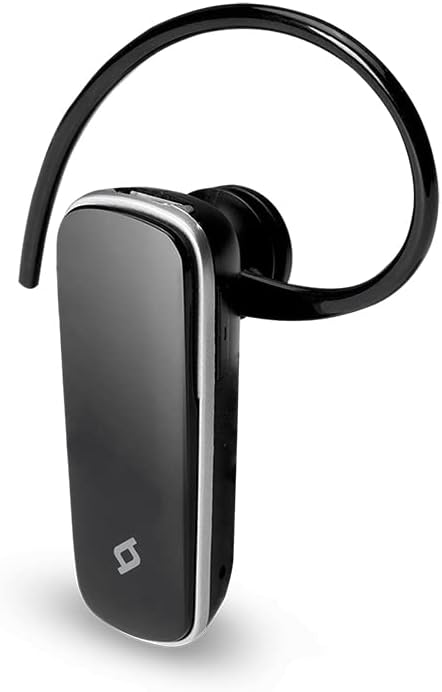
ചിത്രം 1: മുൻഭാഗം view of the TTEC 2KM102S Tone Bluetooth Headset.
2. പാക്കേജ് ഉള്ളടക്കം
പാക്കേജിൽ എല്ലാ ഇനങ്ങളും ഉണ്ടെന്ന് ഉറപ്പാക്കുക:
- TTEC 2KM102S Tone Bluetooth Headset
- ഇയർ ഹുക്ക്
- യുഎസ്ബി ചാർജിംഗ് കേബിൾ
3. സജ്ജീകരണ ഗൈഡ്
3.1 ഹെഡ്സെറ്റ് ചാർജ് ചെയ്യുന്നു
Before first use, fully charge the headset. Use the provided USB charging cable.
- യുഎസ്ബി ചാർജിംഗ് കേബിളിന്റെ ചെറിയ അറ്റം ഹെഡ്സെറ്റിലെ ചാർജിംഗ് പോർട്ടുമായി ബന്ധിപ്പിക്കുക.
- Connect the larger end of the USB cable to a USB power source (e.g., computer USB port, USB wall adapter).
- The LED indicator on the headset will show the charging status. Refer to the "LED Indicator" section for details.
- പൂർണ്ണമായി ചാർജ് ചെയ്തുകഴിഞ്ഞാൽ, ചാർജിംഗ് കേബിൾ വിച്ഛേദിക്കുക.
കുറിപ്പ്: The headset features an integrated rechargeable battery. Charging time may vary.
3.2 ഒരു ഉപകരണവുമായി ജോടിയാക്കൽ
To use the headset wirelessly, it must be paired with a Bluetooth-enabled device.
- ഹെഡ്സെറ്റ് ഓഫാണെന്ന് ഉറപ്പാക്കുക.
- Press and hold the multi-function button on the headset until the LED indicator flashes red and blue alternately. This indicates pairing mode.
- നിങ്ങളുടെ ഉപകരണത്തിൽ (സ്മാർട്ട്ഫോൺ, ടാബ്ലെറ്റ് മുതലായവ), ബ്ലൂടൂത്ത് പ്രവർത്തനക്ഷമമാക്കി ലഭ്യമായ ഉപകരണങ്ങൾക്കായി തിരയുക.
- Select "TTEC Tone" or "2KM102S" from the list of found devices.
- Once paired, the LED indicator will flash blue periodically, and you may hear a confirmation tone.
നുറുങ്ങ്: For iPhone and iPad users, the battery status of the headset can be monitored on your device's screen.
3.3 മൾട്ടി-ഡിവൈസ് ജോടിയാക്കൽ
The TTEC Tone headset supports simultaneous connection with two different Bluetooth devices.
- വിഭാഗം 3.2-ൽ വിവരിച്ചിരിക്കുന്നതുപോലെ ഹെഡ്സെറ്റ് ആദ്യ ഉപകരണവുമായി ജോടിയാക്കുക.
- ആദ്യത്തെ ഉപകരണത്തിൽ ബ്ലൂടൂത്ത് പ്രവർത്തനരഹിതമാക്കുക.
- Put the headset back into pairing mode (LED flashes red and blue).
- രണ്ടാമത്തെ ഉപകരണവുമായി ഹെഡ്സെറ്റ് ജോടിയാക്കുക.
- ആദ്യത്തെ ഉപകരണത്തിൽ ബ്ലൂടൂത്ത് വീണ്ടും പ്രവർത്തനക്ഷമമാക്കുക. ഹെഡ്സെറ്റ് രണ്ട് ഉപകരണങ്ങളിലേക്കും യാന്ത്രികമായി കണക്റ്റ് ചെയ്യണം.
The headset will manage audio from both connected devices, prioritizing incoming calls.
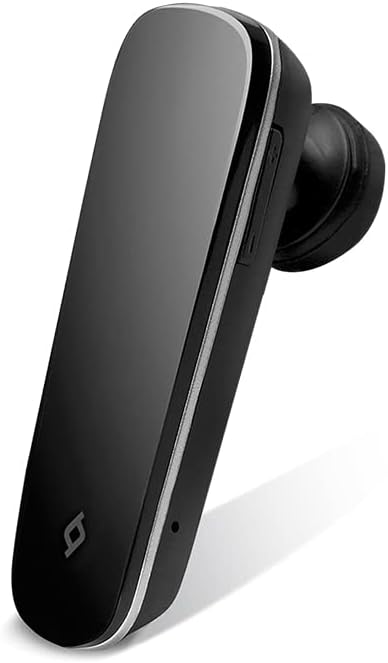
ചിത്രം 2: വശം view of the TTEC 2KM102S Tone Bluetooth Headset, showing control buttons.
4. പ്രവർത്തന നിർദ്ദേശങ്ങൾ
4.1 പവർ ഓൺ/ഓഫ്
- പവർ ഓൺ: എൽഇഡി നീല നിറത്തിൽ മിന്നുന്നത് വരെ മൾട്ടി-ഫംഗ്ഷൻ ബട്ടൺ ഏകദേശം 3 സെക്കൻഡ് അമർത്തിപ്പിടിക്കുക.
- പവർ ഓഫ്: Press and hold the multi-function button for approximately 5 seconds until the LED flashes red and then turns off.
4.2 കോൾ മാനേജ്മെന്റ്
The multi-function button controls call functions:
- മറുപടി കോൾ: Press the multi-function button once when a call comes in.
- കോൾ അവസാനിപ്പിക്കുക: ഒരു കോൾ സമയത്ത് മൾട്ടി-ഫംഗ്ഷൻ ബട്ടൺ ഒരിക്കൽ അമർത്തുക.
- കോൾ നിരസിക്കുക: ഒരു കോൾ വരുമ്പോൾ മൾട്ടി-ഫംഗ്ഷൻ ബട്ടൺ ഏകദേശം 2 സെക്കൻഡ് അമർത്തിപ്പിടിക്കുക.
- അവസാന നമ്പർ വീണ്ടും ഡയൽ ചെയ്യുക: കോളിൽ ഇല്ലാത്തപ്പോൾ മൾട്ടി-ഫംഗ്ഷൻ ബട്ടൺ രണ്ടുതവണ അമർത്തുക.
4.3 വോളിയം നിയന്ത്രണം
Use the dedicated volume buttons on the headset:
- വോളിയം വർദ്ധിപ്പിക്കുക: Press the Volume Up button (+).
- വോളിയം കുറയ്ക്കുക: Press the Volume Down button (-).
4.4 LED ഇൻഡിക്കേറ്റർ സ്റ്റാറ്റസ്
The LED indicator provides visual cues for the headset's status:
- Flashing Red & Blue: ജോടിയാക്കൽ മോഡ്.
- Flashing Blue (slowly): Connected/Standby.
- കടും ചുവപ്പ്: ചാർജിംഗ്.
- LED Off (after solid red): ഫുൾ ചാർജായി.
- മിന്നുന്ന ചുവപ്പ് (വേഗത്തിൽ): കുറഞ്ഞ ബാറ്ററി.
5. പരിപാലനം
ശരിയായ പരിചരണം നിങ്ങളുടെ ഹെഡ്സെറ്റിന്റെ ദീർഘായുസ്സ് ഉറപ്പാക്കുന്നു.
- വൃത്തിയാക്കൽ: Use a soft, dry cloth to clean the headset. Do not use abrasive cleaners or immerse in water.
- സംഭരണം: ഹെഡ്സെറ്റ് നേരിട്ട് സൂര്യപ്രകാശം ഏൽക്കാത്തതും ഉയർന്ന താപനില ഏൽക്കാത്തതുമായ ഒരു തണുത്ത വരണ്ട സ്ഥലത്ത് സൂക്ഷിക്കുക.
- ബാറ്ററി കെയർ: ബാറ്ററി ലൈഫ് നിലനിർത്താൻ, ഹെഡ്സെറ്റ് ഇടയ്ക്കിടെ പൂർണ്ണമായും ഡിസ്ചാർജ് ചെയ്യുന്നത് ഒഴിവാക്കുക. ദീർഘനേരം ഉപയോഗിച്ചിട്ടില്ലെങ്കിൽ പോലും പതിവായി ചാർജ് ചെയ്യുക.
6. പ്രശ്നപരിഹാരം
| പ്രശ്നം | സാധ്യമായ പരിഹാരം |
|---|---|
| ഹെഡ്സെറ്റ് ഓണാകുന്നില്ല. | ഹെഡ്സെറ്റ് ചാർജ് ചെയ്തിട്ടുണ്ടെന്ന് ഉറപ്പാക്കുക. USB കേബിൾ ഉപയോഗിച്ച് ഒരു പവർ സ്രോതസ്സിലേക്ക് അത് ബന്ധിപ്പിക്കുക. |
| ഒരു ഉപകരണവുമായി ജോടിയാക്കാൻ കഴിയില്ല. |
|
| ഓഡിയോ ഇല്ല അല്ലെങ്കിൽ മോശം ഓഡിയോ നിലവാരം. |
|
| ഹെഡ്സെറ്റ് ഇടയ്ക്കിടെ വിച്ഛേദിക്കപ്പെടുന്നു. |
|
7. ഉൽപ്പന്ന സവിശേഷതകൾ
| മോഡലിൻ്റെ പേര്: | ടോൺ |
| മോഡൽ നമ്പർ: | 2KM102S |
| ബ്രാൻഡ്: | ടി.ടി.ഇ.സി. |
| കണക്റ്റിവിറ്റി: | ബ്ലൂടൂത്ത് |
| ഉപകരണ തരം: | ബ്ലൂടൂത്ത് ഹെഡ്സെറ്റ് |
| സംസാര സമയം: | 4 മണിക്കൂർ വരെ |
| സ്റ്റാൻഡ്ബൈ സമയം: | 100 മണിക്കൂർ വരെ |
| മൾട്ടി-പോയിന്റ് കണക്ഷൻ: | Yes, connect to 2 devices simultaneously |
| അളവുകൾ (L x W x H): | 4.5 x 1.7 x 2 സെ.മീ |
| നിറം: | കറുപ്പ് |
| ചാർജിംഗ് പോർട്ട്: | USB |
8. വാറൻ്റിയും പിന്തുണയും
For warranty information and customer support, please refer to the warranty card included with your product or visit the official TTEC webസൈറ്റ്. വാങ്ങിയതിന്റെ തെളിവായി നിങ്ങളുടെ വാങ്ങൽ രസീത് സൂക്ഷിക്കുക.
നിർമ്മാതാവ്: ttec


