1. ആമുഖം
The MOZA AirCross S is a versatile 3-axis handheld gimbal stabilizer designed for a wide range of cameras, including mirrorless cameras, action cameras, and mobile phones. Its compact and lightweight design, combined with advanced stabilization technology, allows users to capture smooth, professional-grade footage. This manual provides detailed instructions for setting up, operating, and maintaining your AirCross S gimbal.
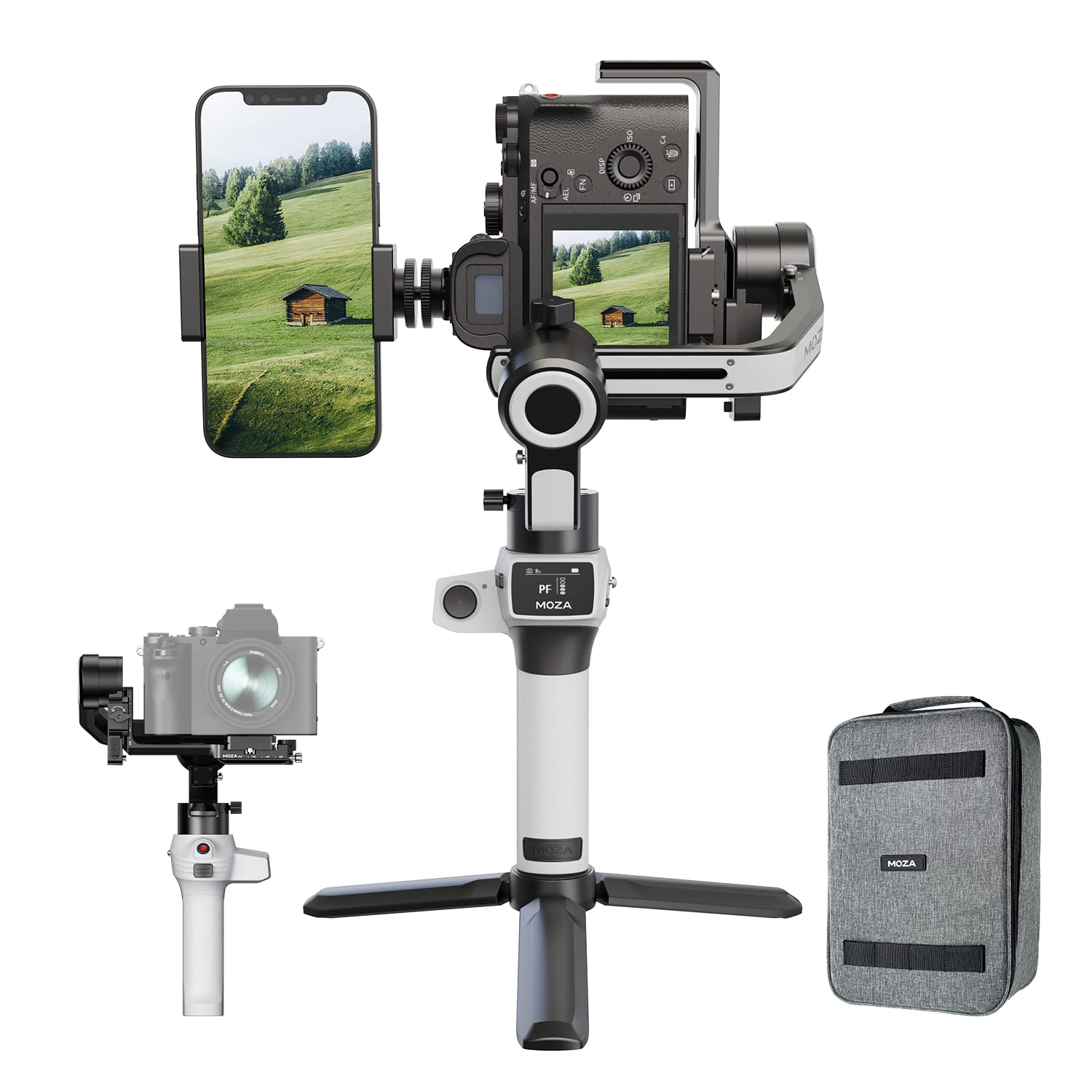
Image 1.1: MOZA AirCross S Gimbal Stabilizer with camera and phone mounted, illustrating its multi-device compatibility.
2. സജ്ജീകരണ ഗൈഡ്
2.1 അൺബോക്സിംഗും പ്രാരംഭ പരിശോധനയും
Upon receiving your MOZA AirCross S, carefully unpack all components. Verify that the package contains the gimbal and any included accessories as listed in the product packaging. Inspect the device for any visible damage.
- MOZA AirCross S Gimbal
- ദ്രുത റിലീസ് പ്ലേറ്റ്
- മിനി ട്രൈപോഡ്
- ചാർജിംഗ് കേബിൾ
- ഉപയോക്തൃ മാനുവൽ (ഈ പ്രമാണം)
2.2 ബാറ്ററി ചാർജ് ചെയ്യുന്നു
The MOZA AirCross S is equipped with a built-in high-capacity battery. Before first use, fully charge the gimbal using the provided charging cable. The gimbal supports fast charging up to 9V 2A. A full charge provides approximately 10 hours of operation.
- Connect the charging cable to the gimbal's charging port.
- Connect the other end to a USB power adapter (not included) or a power bank.
- The indicator light will show charging status and turn off when fully charged.
2.3 Mounting Your Camera or Mobile Phone
The AirCross S features a dual-layer quick-release plate for easy mounting of various devices.
- Attach the quick-release plate to the bottom of your camera or to the mobile phone holder.
- Slide the quick-release plate with the mounted device onto the gimbal's mounting platform until it locks securely.
- Ensure the device is centered and stable.

Image 2.1: The MOZA AirCross S demonstrating its dual camera mount capability, holding both a camera and a smartphone.

ചിത്രം 2.2: വിശദമായത് view of the dual camera mount on the MOZA AirCross S, highlighting its adjustable design.
2.4 ഗിംബലിനെ സന്തുലിതമാക്കൽ
Proper balancing is crucial for optimal performance and to prevent motor strain. Adjust the camera position on the quick-release plate and the gimbal arms until the camera remains level when powered off.
- ടിൽറ്റ് ആക്സിസ് ബാലൻസ്: Adjust the camera forward or backward until it stays level.
- റോൾ ആക്സിസ് ബാലൻസ്: Adjust the camera left or right until it stays level.
- പാൻ ആക്സിസ് ബാലൻസ്: Adjust the horizontal arm until the gimbal remains stable when tilted.
2.5 ഓട്ടോ-ട്യൂണിംഗ്
After balancing, use the auto-tune function for optimal motor parameters. This feature, powered by DeepRed technology, automatically adjusts the gimbal's settings based on the total weight of your mounted device.
- Ensure the gimbal is powered on and balanced.
- Access the MOZA App and initiate the auto-tune function.
- The gimbal will perform a series of movements to calibrate itself.
3. പ്രവർത്തന നിർദ്ദേശങ്ങൾ
3.1 പവർ ഓൺ/ഓഫ്
Press and hold the power button located on the handle to turn the gimbal on or off. The indicator lights will confirm the power status.
3.2 അടിസ്ഥാന നിയന്ത്രണങ്ങൾ
The integrated two-button handgrip provides intuitive control over the gimbal's movements and modes.
- ജോയ്സ്റ്റിക്ക്: പാൻ, ടിൽറ്റ് ചലനങ്ങൾ നിയന്ത്രിക്കുന്നു.
- മോഡ് ബട്ടൺ: Cycles through different operating modes (e.g., Pan-Follow, Lock Mode, FPV Mode). Refer to the MOZA App for detailed mode descriptions.
- ട്രിഗർ ബട്ടൺ: Often used for quick re-centering or activating specific functions.

Image 3.1: The control panel on the MOZA AirCross S handle, showing the joystick and mode buttons.
3.3 അഡ്വാൻസ്ഡ് ഷൂട്ടിംഗ് മോഡുകൾ
The MOZA AirCross S supports several advanced shooting modes accessible via the MOZA App.
- ലംബ മോഡ്: Allows for native vertical video capture without additional accessories. This is ideal for social media content.
- Long-Exposure Motion Timelapse: Create dynamic timelapses with defined shutter time, duration, intervals, and path.
- ഡോളി സൂം: Achieve the classic "Vertigo effect" by smoothly zooming while moving the camera.

Image 3.2: The MOZA AirCross S configured for vertical mode shooting, ideal for social media content.

Image 3.3: User operating the MOZA AirCross S gimbal with a camera, demonstrating typical usage.
3.4 MOZA App Connectivity
Download the MOZA App from your device's app store to unlock the full potential of your AirCross S. The app allows for fine-tuning parameters, accessing advanced shooting modes, and remote control.
- നിങ്ങളുടെ മൊബൈൽ ഉപകരണത്തിൽ ബ്ലൂടൂത്ത് പ്രവർത്തനക്ഷമമാക്കുക.
- Open the MOZA App and select your AirCross S from the list of available devices.
- Follow the on-screen prompts for connection.
4. പരിപാലനം
4.1 വൃത്തിയാക്കൽ
Regularly clean the gimbal with a soft, dry cloth. Avoid using liquid cleaners or solvents, as these can damage the electronic components. Ensure no dust or debris accumulates in the motor joints.
4.2 സംഭരണം
When not in use, store the MOZA AirCross S in a dry, cool place, away from direct sunlight and extreme temperatures. It is recommended to store the gimbal in its original packaging or a protective case to prevent damage.
4.3 ബാറ്ററി കെയർ
To prolong battery life, avoid fully discharging the battery frequently. If storing for extended periods, charge the battery to approximately 50-60% every three months.
5. പ്രശ്നപരിഹാരം
| പ്രശ്നം | സാധ്യമായ കാരണം | പരിഹാരം |
|---|---|---|
| Gimbal vibrates or motors twitch. | Improper balancing; payload exceeds limits; auto-tune not performed. | Ensure the camera is perfectly balanced. Perform auto-tuning via the MOZA App. Verify payload is within the 4lb limit. |
| ഗിംബാൽ പവർ ഓൺ ചെയ്യുന്നില്ല. | ബാറ്ററി തീർന്നു. | Charge the gimbal battery fully. |
| Cannot connect to MOZA App. | Bluetooth is off; app not updated; gimbal not in pairing mode. | Ensure Bluetooth is enabled on your phone. Restart the app and gimbal. Check for app updates. |
| Gimbal overheats and shuts down. | Overloaded motors; prolonged heavy use; poor ventilation. | Reduce payload if possible. Allow the gimbal to cool down. Ensure proper balancing to reduce motor strain. |
6 സ്പെസിഫിക്കേഷനുകൾ
| ഫീച്ചർ | വിശദാംശങ്ങൾ |
|---|---|
| ബ്രാൻഡ് | മോസ |
| മോഡലിൻ്റെ പേര് | AirCross S |
| ഉൽപ്പന്ന അളവുകൾ | 24 x 17 x 39 സെ.മീ |
| ഇനത്തിൻ്റെ ഭാരം | 1.1 കി.ഗ്രാം |
| പരമാവധി പേലോഡ് | 4 പൗണ്ട് (ഏകദേശം 1.8 കി.ഗ്രാം) |
| അനുയോജ്യമായ ഉപകരണങ്ങൾ | Mirrorless Cameras, Action Cameras, Mobile Phones |
| ബാറ്ററി ശരാശരി ആയുസ്സ് | 10 മണിക്കൂർ |
| ചാർജിംഗ് നിരക്ക് | Up to 9V 2A (Fast Charging) |
| Image Stabilization Technology | അതെ |
| മാതൃരാജ്യം | ചൈന |

Image 6.1: Compatibility chart showing various camera models supported by the MOZA AirCross S.
7. വാറൻ്റിയും പിന്തുണയും
7.1 വാറൻ്റി വിവരങ്ങൾ
The MOZA AirCross S Gimbal Stabilizer comes with a 1 വർഷത്തെ വാറൻ്റി from the date of purchase. This warranty covers manufacturing defects and malfunctions under normal use. Please retain your proof of purchase for warranty claims. The warranty does not cover damage caused by misuse, accidents, unauthorized modifications, or improper maintenance.
7.2 ഉപഭോക്തൃ പിന്തുണ
For technical assistance, troubleshooting, or warranty inquiries, please contact MOZA customer support. You can also visit the official MOZA webപതിവുചോദ്യങ്ങൾക്കും അധിക ഉറവിടങ്ങൾക്കുമുള്ള സൈറ്റ്.
- ഇമെയിൽ: care@nikitadistributors.com
- ഫോൺ: 18002668571
- ഓൺലൈൻ ഉറവിടങ്ങൾ: Refer to the official MOZA website for updated support information.


