ആമുഖം
Welcome to your new SportPlus Mini Exercise Bike SP-HT-0001. This compact and versatile leg trainer is designed for convenient fitness training at home or in the office. It features a magnetic resistance system, 8 adjustable levels, and a training computer to track your progress. This manual provides essential information for safe assembly, operation, and maintenance, ensuring you get the most out of your device.
പ്രധാനപ്പെട്ട സുരക്ഷാ നിർദ്ദേശങ്ങൾ
Please read all safety instructions carefully before using the SportPlus Mini Exercise Bike. Failure to follow these instructions may result in injury or damage to the product.
- Consult a physician before starting any new exercise program, especially if you have pre-existing health conditions.
- Place the device on a stable, level, and non-slip surface to prevent movement during use.
- Ensure adequate clear space (at least 0.6 meters) around the device during use to avoid obstructions.
- The maximum user weight for this device is 110 kg. Do not exceed this limit.
- പ്രവർത്തന സമയത്ത് കുട്ടികളെയും വളർത്തുമൃഗങ്ങളെയും ഉപകരണത്തിൽ നിന്ന് അകറ്റി നിർത്തുക.
- Regularly inspect all parts for wear, damage, or loose connections. Do not use the device if any parts are damaged or missing.
- Use the device only as intended for leg and arm exercise. Do not stand on the pedals or use it for purposes other than its design.
- വ്യായാമ സമയത്ത് ഉചിതമായ അത്ലറ്റിക് പാദരക്ഷകൾ ധരിക്കുക.
- Stop exercising immediately if you feel dizzy, faint, or experience pain.
പാക്കേജ് ഉള്ളടക്കം
The SportPlus Mini Exercise Bike SP-HT-0001 package includes the following components:
- Main unit with magnetic resistance system
- Training computer with LCD display
- Left and Right Pedals with adjustable straps
- മുന്നിലും പിന്നിലും സ്റ്റെബിലൈസർ ബാറുകൾ
- Assembly hardware (screws, washers, tools)
- ഉപയോക്തൃ മാനുവൽ
- 1 AA battery (for training computer)
അസംബ്ലി നിർദ്ദേശങ്ങൾ
Follow these steps to assemble your SportPlus Mini Exercise Bike. It is recommended to assemble the device on a soft, clean surface to prevent damage.
- സ്റ്റെബിലൈസർ ബാറുകൾ ഘടിപ്പിക്കുക: Securely attach the front and rear stabilizer bars to the main unit using the provided screws and tools. Ensure all connections are tight.
- പെഡലുകൾ ഇൻസ്റ്റാൾ ചെയ്യുക: Identify the left (L) and right (R) pedals. The left pedal screws counter-clockwise, and the right pedal screws clockwise. Thread them into the corresponding crank arms and tighten firmly with a wrench.
- Insert Battery and Connect Computer: Open the battery compartment on the training computer and insert the included 1 AA battery, observing polarity. Connect the sensor cable from the main unit to the port on the training computer.
- Mount Training Computer: Slide the training computer onto its designated holder on the main unit until it clicks into place.

പ്രാരംഭ സജ്ജീകരണവും ക്രമീകരണങ്ങളും
പ്രതിരോധ ക്രമീകരണം
The mini exercise bike features an 8-level magnetic resistance system. To adjust the resistance, turn the resistance knob located on the front of the unit. Turn it clockwise to increase resistance for a more challenging workout, and counter-clockwise to decrease resistance for an easier session. Start with a low resistance and gradually increase as your fitness improves.

പെഡൽ സ്ട്രാപ്പുകൾ
Adjust the pedal straps to comfortably secure your feet. Ensure your feet are firmly in place to prevent slipping during exercise. The straps are adjustable to accommodate various foot sizes.

പരിശീലന കമ്പ്യൂട്ടർ
The training computer displays various workout metrics. Press the മോഡ് button to cycle through functions such as Time, Speed, Distance, Calories, and Odometer. The സ്കാൻ ചെയ്യുക mode will automatically cycle through these displays every few seconds. The computer automatically activates when you start pedaling and turns off after a period of inactivity to save battery life.

Operating Your SportPlus Mini Exercise Bike
ഒരു വർക്ക്ഔട്ട് ആരംഭിക്കുന്നു
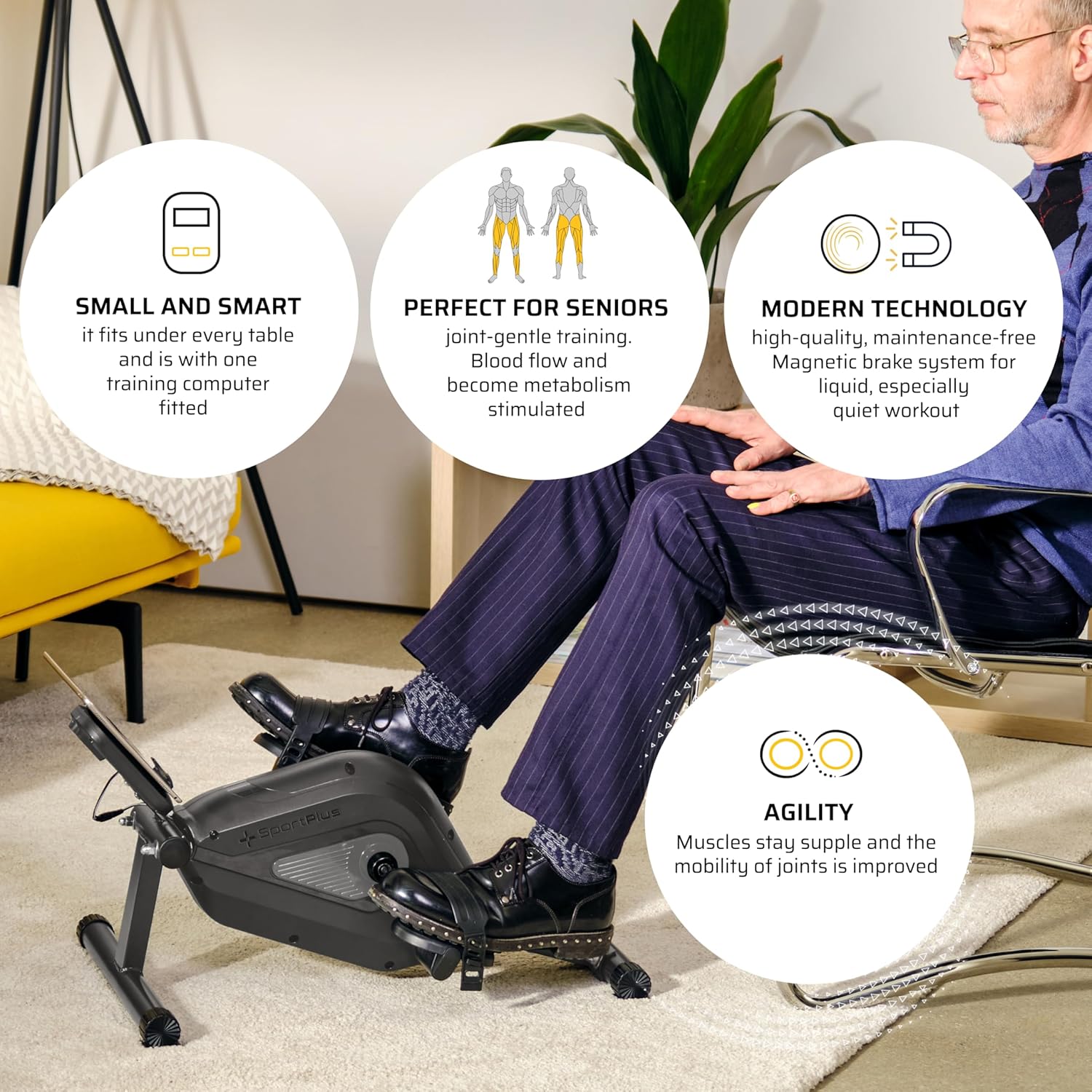
To begin your exercise session, sit comfortably in a chair or on a sofa. Place the mini exercise bike on a stable surface in front of you. Position your feet into the pedal straps and adjust them for a snug fit. Begin pedaling smoothly. The training computer will automatically activate and start tracking your workout metrics.
അപ്ലിക്കേഷൻ കണക്റ്റിവിറ്റി
This SportPlus Mini Exercise Bike model is app-compatible, allowing you to connect it with various fitness applications for an enhanced training experience. For detailed instructions on connecting your device to compatible apps like Kinomap, please refer to the specific app's instructions or visit the official SportPlus webമാർഗ്ഗനിർദ്ദേശത്തിനുള്ള സൈറ്റ്.

മെയിൻ്റനൻസ്
വൃത്തിയാക്കൽ
To maintain your mini exercise bike, wipe down the device with a damp cloth after each use to remove sweat and dust. Do not use abrasive cleaners, solvents, or harsh chemicals, as these can damage the finish and electronic components.
സംഭരണം
Store the mini exercise bike in a dry, cool place away from direct sunlight and extreme temperatures. Its compact design allows for easy storage under a desk, in a closet, or any small space when not in use.
ട്രബിൾഷൂട്ടിംഗ്
If you encounter any issues with your SportPlus Mini Exercise Bike, please refer to the following common problems and solutions:
- Computer Display Not Working:
Check if the AA battery is correctly inserted or needs replacement. Ensure the sensor cable is securely connected to both the training computer and the main unit. - Pedals Feel Loose:
Ensure the pedals are tightened firmly. Remember that the left pedal (marked 'L') is reverse-threaded and screws counter-clockwise, while the right pedal (marked 'R') screws clockwise. - Device Slides During Use:
Ensure the device is placed on a non-slip surface. For added stability, consider placing it against a wall or using an exercise mat underneath to prevent movement during your workout. - അസാധാരണമായ ശബ്ദങ്ങൾ:
Check for any loose parts or connections. Ensure the device is on a level surface. If noises persist, discontinue use and contact customer support.
സാങ്കേതിക സവിശേഷതകൾ
| ഫീച്ചർ | വിശദാംശങ്ങൾ |
|---|---|
| മോഡൽ നമ്പർ | SP-HT-0001 |
| അളവുകൾ (L x W x H) | ഏകദേശം. 64.5 x 43 x 35 സെ |
| ഭാരം | ഏകദേശം 8.5 കിലോ |
| പരമാവധി ഉപയോക്തൃ ഭാരം | 110 കി.ഗ്രാം |
| റെസിസ്റ്റൻസ് സിസ്റ്റം | കാന്തിക |
| പ്രതിരോധ നിലകൾ | 8 (manual adjustment) |
| ഡിസ്പ്ലേ തരം | എൽസിഡി |
| പവർ സ്രോതസ്സ് (കമ്പ്യൂട്ടർ) | 1 AA ബാറ്ററി |
| മെറ്റീരിയൽ | അലോയ് സ്റ്റീൽ |
| പ്രത്യേക സവിശേഷതകൾ | Calorie monitoring, adjustable resistance, distance monitor, speed monitoring, adjustable foot straps, app-compatible |
വാറൻ്റിയും പിന്തുണയും
For detailed warranty information regarding your SportPlus Mini Exercise Bike SP-HT-0001, please refer to the warranty card or documentation included with your original purchase. You can also visit the official SportPlus webഏറ്റവും കാലികമായ വാറന്റി നിബന്ധനകൾക്കും വ്യവസ്ഥകൾക്കുമുള്ള സൈറ്റ്.
For technical support, assistance with assembly, troubleshooting, or to inquire about spare parts, please contact SportPlus customer service. Contact details can typically be found on the SportPlus website or through the retailer from whom you purchased the product. When contacting support, please have your model number (SP-HT-0001) and purchase information ready.
ഉദ്യോഗസ്ഥൻ Webസൈറ്റ്: www.sportplus.org


