1. ആമുഖം
This manual provides detailed instructions for the safe and correct installation, operation, and maintenance of your RICOO R23-F TV Wall Mount. Please read this manual thoroughly before installation and retain it for future reference. Proper installation is crucial for the safety and stability of your television.
2 സുരക്ഷാ വിവരങ്ങൾ
- ഭാരം ശേഷി: പരമാവധി ഭാരം 209 പൗണ്ട് (95 കിലോഗ്രാം) കവിയരുത്. ഈ പരിധി കവിയുന്നത് ഗുരുതരമായ പരിക്കോ സ്വത്ത് നാശമോ ഉണ്ടാക്കിയേക്കാം.
- ചുമർ തരം: The included screws and Fischer dowels/plugs are suitable for solid concrete walls only. For other wall types (e.g., wood stud, brick, drywall), consult a professional installer or use appropriate mounting hardware (not included).
- VESA അനുയോജ്യത: Ensure your TV's VESA mounting pattern is compatible with the mount (200x200, 300x300, 400x200, 400x300, 400x400).
- പ്രൊഫഷണൽ ഇൻസ്റ്റാളേഷൻ: If you are unsure about the installation process or wall type, seek assistance from a qualified professional.
- ഉപകരണങ്ങൾ: ഇൻസ്റ്റാളേഷന് ഉചിതമായ ഉപകരണങ്ങൾ ഉപയോഗിക്കുക. സുരക്ഷാ ഗ്ലാസുകളും കയ്യുറകളും ധരിക്കുക.
- കുട്ടികൾ: ഇൻസ്റ്റാളേഷൻ ഏരിയയിൽ നിന്ന് കുട്ടികളെ അകറ്റി നിർത്തുക.
3. പാക്കേജ് ഉള്ളടക്കം
Please verify that all components are present and undamaged before proceeding with installation. If any parts are missing or damaged, contact RICOO customer support.
- RICOO R23-F TV Wall Mount assembly
- Mounting hardware kit (screws, washers, spacers)
- Fischer dowels/plugs (for solid concrete walls)
- ഇൻസ്ട്രക്ഷൻ മാനുവൽ
കുറിപ്പ്: Specific quantities of screws and dowels may vary. Refer to the included hardware bag for exact counts.
4. സവിശേഷതകൾ
- Adjustable Swivel: Swivels up to 180 degrees (if display width is max 80cm) for optimal viewകോണുകൾ.
- ക്രമീകരിക്കാവുന്ന ടിൽറ്റ്: Tilts +/-15 degrees to reduce glare and improve viewആശ്വാസം.
- Front Plate Rotation: Rotates +/-6 degrees for ideal horizontal alignment after installation.
- VESA അനുയോജ്യത: Supports VESA patterns 200x200, 300x300, 400x200, 400x300, 400x400.
- ശുപാർശ ചെയ്യുന്ന സ്ക്രീൻ വലുപ്പങ്ങൾ: Suitable for 32" to 65" displays.
- ഉയർന്ന ഭാരം ശേഷി: Supports up to 209 lbs (95 kg) thanks to durable cold-rolled steel construction.
- Adjustable Wall Distance: Extends from 115mm to 522mm from the wall.
5. സജ്ജീകരണവും ഇൻസ്റ്റാളേഷനും
ആവശ്യമായ ഉപകരണങ്ങൾ (ഉൾപ്പെടുത്തിയിട്ടില്ല): Drill, stud finder (if not concrete wall), level, screwdriver, pencil, measuring tape.
5.1. Prepare the TV
- പോറലുകൾ ഉണ്ടാകാതിരിക്കാൻ നിങ്ങളുടെ ടിവി മുഖം മൃദുവായതും വൃത്തിയുള്ളതുമായ ഒരു പ്രതലത്തിൽ ശ്രദ്ധാപൂർവ്വം വയ്ക്കുക.
- നിങ്ങളുടെ ടിവിയുടെ പിൻഭാഗത്തുള്ള VESA മൗണ്ടിംഗ് ദ്വാരങ്ങൾ തിരിച്ചറിയുക.
- Attach the vertical TV brackets to the back of your TV using the appropriate screws, washers, and spacers from the hardware kit. Ensure they are securely fastened but do not overtighten. The rails are continuously adjustable to fit various TV sizes.
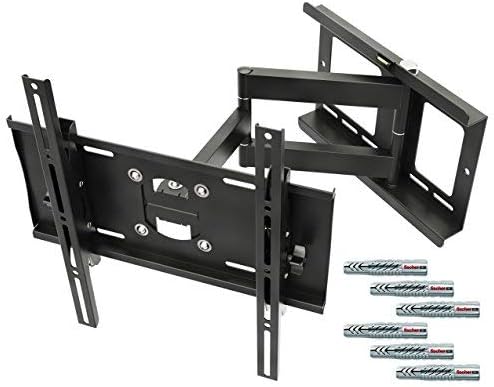
ചിത്രം 1: കഴിഞ്ഞുview of the RICOO R23-F TV Wall Mount components and included hardware.
5.2. Mount the Wall Plate
- Determine the desired height and position for your TV. Use a pencil to mark the drill holes for the wall plate.
- For Solid Concrete Walls: Drill pilot holes at the marked locations. Insert the Fischer dowels/plugs into the holes.
- Position the wall plate over the drilled holes and secure it to the wall using the provided screws. Use a level to ensure the wall plate is perfectly horizontal before fully tightening all screws.
- പ്രധാനപ്പെട്ടത്: For other wall types (e.g., wood stud, brick, drywall), specialized anchors and screws are required and are not included. Consult a professional for proper installation on these surfaces.
5.3. Attach the TV to the Wall Mount
- With assistance, carefully lift the TV (with attached brackets) and hook the brackets onto the arms of the wall mount.
- Ensure the TV is securely seated on the mount. Engage any safety locking mechanisms if present.
6. പ്രവർത്തന നിർദ്ദേശങ്ങൾ (ക്രമീകരണങ്ങൾ)
The RICOO R23-F mount offers various adjustments for optimal viewing.
6.1. സ്വിവൽ ക്രമീകരണം
The mount allows for 180-degree continuous swiveling. Gently push or pull the TV to the desired left or right angle. Ensure the TV's width does not exceed 80cm for full 180-degree movement.

Image 2: Demonstrates the 180-degree swivel capability and the extendable/retractable arm of the mount.
6.2. ടിൽറ്റ് അഡ്ജസ്റ്റ്മെന്റ്
To adjust the tilt angle (+/-15 degrees), loosen the tilt adjustment knobs or bolts on the TV brackets, set the TV to the desired vertical angle, and then securely tighten the knobs/bolts.
6.3. Front Plate Rotation
For minor horizontal alignment adjustments after installation, the front plate can be rotated +/-6 degrees. Loosen the rotation screws, adjust the TV to be perfectly level, and then retighten the screws.

Image 3: Illustrates the +/-6 degree front plate rotation, adjustable rails for various TV sizes, and +/-15 degree tilt adjustment.
6.4. വിപുലീകരണവും പിൻവലിക്കലും
The articulating arm allows the TV to be extended from the wall (115mm to 522mm) or pushed back closer to the wall. Gently pull or push the TV to achieve the desired wall distance.
7. പരിപാലനം
- പതിവ് പരിശോധന: എല്ലാ സ്ക്രൂകളും കണക്ഷനുകളും ഇറുകിയതും സുരക്ഷിതവുമാണെന്ന് ഉറപ്പാക്കാൻ ഇടയ്ക്കിടെ പരിശോധിക്കുക.
- വൃത്തിയാക്കൽ: മൃദുവായതും ഉണങ്ങിയതുമായ തുണി ഉപയോഗിച്ച് മൗണ്ട് വൃത്തിയാക്കുക. ഫിനിഷിന് കേടുവരുത്തുന്ന അബ്രസിവ് ക്ലീനറുകളോ ലായകങ്ങളോ ഉപയോഗിക്കരുത്.
- ലൂബ്രിക്കേഷൻ: Moving parts are designed for smooth operation. No regular lubrication is typically required. If movement becomes stiff, contact customer support.
8. പ്രശ്നപരിഹാരം
- ടിവി നിലവാരമില്ലാത്തതാണ്: Check the front plate rotation adjustment (Section 6.3) and ensure the wall plate was installed level.
- മൗണ്ട് അസ്ഥിരമായി തോന്നുന്നു: Recheck all wall and TV attachment screws for tightness. Ensure the wall type is appropriate for the installed hardware. Do not exceed the weight capacity.
- ടിൽറ്റ്/സ്വിവൽ ക്രമീകരിക്കുന്നതിലെ ബുദ്ധിമുട്ട്: Ensure no cables are snagged. For tilt, loosen adjustment knobs before attempting to change the angle.
- ടിവി യോജിക്കുന്നില്ല: Verify your TV's VESA pattern matches the mount's compatibility (200x200, 300x300, 400x200, 400x300, 400x400) and that your screen size is within the recommended 32"-65" range.
9 സ്പെസിഫിക്കേഷനുകൾ
| ഫീച്ചർ | സ്പെസിഫിക്കേഷൻ |
|---|---|
| മോഡൽ നമ്പർ | R23F |
| ബ്രാൻഡ് | റിക്കോ |
| മൗണ്ടിംഗ് തരം | മതിൽ മൗണ്ട് |
| ചലന തരം | ആർട്ടിക്കുലേറ്റിംഗ്, സ്വിവൽ |
| VESA അനുയോജ്യത | 200x200, 300x300, 400x200, 400x300, 400x400 |
| ശുപാർശചെയ്ത സ്ക്രീൻ വലുപ്പം | 32" - 65" |
| പരമാവധി ഭാരം ശേഷി | 209 പൗണ്ട് (95 കി.ഗ്രാം) |
| ടിൽറ്റ് ആംഗിൾ | +/-15 ഡിഗ്രി |
| സ്വിവൽ ആംഗിൾ | 180 Degrees (max, if display width < 80cm) |
| Front Plate Rotation | +/-6 ഡിഗ്രി |
| മതിൽ ദൂരം | 115mm - 522mm |
| മെറ്റീരിയൽ | കോൾഡ്-റോൾഡ് സ്റ്റീൽ |
| ഉൽപ്പന്ന അളവുകൾ | 20.55 x 15.75 x 16.93 inches (approximate, mount folded) |
| ഇനത്തിൻ്റെ ഭാരം | 15.18 പൗണ്ട് |
| നിറം | കറുപ്പ് |
10. വാറൻ്റിയും പിന്തുണയും
For warranty information, technical support, or to inquire about replacement parts, please contact RICOO customer service directly. Refer to the product packaging or the official RICOO webബന്ധപ്പെടാനുള്ള വിശദാംശങ്ങൾക്കുള്ള സൈറ്റ്.


