1. ആമുഖം
This user manual provides detailed instructions for the installation, operation, and maintenance of the AKO D14012 12V Panel-Mounted Digital Temperature Display. This device is designed for precise temperature indication in either Celsius (°C) or Fahrenheit (°F), featuring selectable NTC/PTC probe programs and a simple single-button interface for settings. Please read this manual thoroughly before using the device to ensure correct operation and to prevent damage.
2 സുരക്ഷാ വിവരങ്ങൾ
- ഇലക്ട്രിക്കൽ സുരക്ഷ: Ensure the power supply is disconnected before installation or maintenance. The device operates on 12V DC. Incorrect voltage അല്ലെങ്കിൽ പോളാരിറ്റി യൂണിറ്റിന് കേടുവരുത്തും.
- ഇൻസ്റ്റലേഷൻ: Installation should only be performed by qualified personnel. Follow all local electrical codes and regulations.
- പരിസ്ഥിതി: Do not expose the device to excessive moisture, dust, or extreme temperatures outside its specified operating range.
- അന്വേഷണം കൈകാര്യം ചെയ്യൽ: Handle the temperature probe carefully. Do not bend or crimp the cable excessively.
- വൃത്തിയാക്കൽ: വൃത്തിയാക്കാൻ മൃദുവായതും ഉണങ്ങിയതുമായ തുണി ഉപയോഗിക്കുക. അബ്രസീവ് ക്ലീനറുകളോ ലായകങ്ങളോ ഉപയോഗിക്കരുത്.
3. പാക്കേജ് ഉള്ളടക്കം
പാക്കേജ് തുറക്കുമ്പോൾ എല്ലാ ഇനങ്ങളും ഉണ്ടെന്നും കേടുപാടുകൾ സംഭവിച്ചിട്ടില്ലെന്നും ഉറപ്പാക്കുക:
- AKO D14012 Digital Temperature Display Unit
- Temperature Probe (NTC/PTC compatible)
- മൗണ്ടിംഗ് ക്ലിപ്പുകൾ (2 യൂണിറ്റുകൾ)
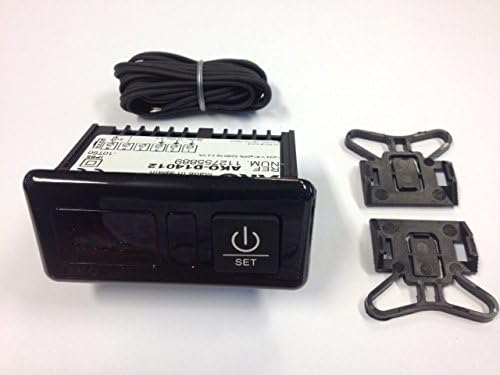
ചിത്രം 3.1: Contents of the AKO D14012 package, showing the main display unit, the coiled temperature probe, and two mounting clips.
4. ഉൽപ്പന്നം കഴിഞ്ഞുview
The AKO D14012 is a compact digital temperature display designed for integration into control panels. It features a clear digital display for temperature readings and a single "SET" button for configuration. The unit is powered by 12V DC and connects to an external temperature probe.
4.1. പ്രധാന ഘടകങ്ങൾ
- ഡിജിറ്റൽ ഡിസ്പ്ലേ: നിലവിലെ താപനില കാണിക്കുന്നു.
- SET ബട്ടൺ: Used to access and adjust device settings and parameters.
- Probe Input: Connection point for the NTC/PTC temperature sensor.
- പവർ ഇൻപുട്ട്: Terminals for 12V DC power supply.
5. സജ്ജീകരണം
5.1 പാനൽ മൗണ്ടിംഗ്
The AKO D14012 is designed for panel mounting. Create an opening in your control panel with the following dimensions:
- വീതി: 70.5 മി.മീ
- ഉയരം: 28.5 മി.മീ
Insert the display unit into the opening and secure it using the provided mounting clips on the sides of the unit.

ചിത്രം 5.1: Panel cutout dimensions and rear wiring diagram for the AKO D14012 unit.
5.2. വയറിംഗ് കണക്ഷനുകൾ
Refer to Figure 5.1 for the wiring diagram. Ensure power is disconnected before making any connections.
- അന്വേഷണ കണക്ഷൻ: Connect the temperature probe to the designated terminals on the left side of the unit (labeled "Sonda" in the diagram).
- വൈദ്യുതി വിതരണം: Connect the 12V DC power supply to the terminals on the right side. Ensure correct polarity: connect 12V to the positive terminal and 0V to the negative terminal (labeled "12V=" and "0V" respectively in the diagram). The device is designed for 12V DC operation.
After all connections are made, you can apply power to the unit.
6. പ്രവർത്തന നിർദ്ദേശങ്ങൾ
6.1. പവർ ഓൺ
Once correctly wired and powered, the display will illuminate and show the current temperature measured by the probe.
6.2. Viewതാപനില
The primary function of the device is to continuously display the temperature. The reading will update automatically as the temperature changes.
6.3. Accessing Settings (SET Button)
The "SET" button is used to access and modify various parameters of the device, such as temperature units (°C/°F) and probe type (NTC/PTC). Specific programming steps will depend on the firmware version. Generally:
- ഷോർട്ട് പ്രസ്സ്: May display a specific parameter or confirm a selection.
- ലോംഗ് പ്രസ്സ്: Typically enters programming mode or saves changes.
Consult the full programming guide for detailed instructions on setting specific parameters, including temperature alarms or calibration, if applicable to your model.
7. പരിപാലനം
7.1. വൃത്തിയാക്കൽ
To clean the display unit, gently wipe the surface with a soft, dry, or slightly damp cloth. Do not use harsh chemicals, abrasive cleaners, or solvents, as these can damage the display or casing.
7.2. Probe Inspection
Periodically inspect the temperature probe and its cable for any signs of damage, wear, or corrosion. Replace the probe if any damage is observed to ensure accurate readings.
8. പ്രശ്നപരിഹാരം
| പ്രശ്നം | സാധ്യമായ കാരണം | പരിഹാരം |
|---|---|---|
| No display / Unit not powering on | No power supply; Incorrect wiring (polarity); Faulty unit. | Check 12V DC power connection and polarity. Ensure power source is active. Verify wiring. If problem persists, contact support. |
| തെറ്റായ താപനില വായന | Faulty probe; Incorrect probe type selected; Probe not properly connected; Environmental interference. | Check probe connection. Ensure correct NTC/PTC probe type is configured in settings. Inspect probe for damage. Relocate probe if exposed to external heat sources. |
| Display shows "Err" or similar error code | Probe disconnected or faulty; Out of temperature range. | Check probe connection and integrity. Ensure measured temperature is within -50°C to +150°C range. |
9 സ്പെസിഫിക്കേഷനുകൾ
| മോഡൽ നമ്പർ | D14012 |
| ബ്രാൻഡ് | എ.കെ.ഒ |
| നിർമ്മാതാവ് | AKO Electronica |
| പവർ ഉറവിടം | 12V DC |
| ഡിസ്പ്ലേ തരം | ഡിജിറ്റൽ |
| താപനില പരിധി | -50 °C മുതൽ +150 °C വരെ |
| സെൻസർ ഇൻപുട്ട് | NTC Thermistor (PTC selectable) |
| മൗണ്ടിംഗ് തരം | പാനൽ-മൌണ്ട് |
| പാനൽ കട്ട്ഔട്ട് അളവുകൾ | 70.5 mm (വീതി) x 28.5 mm (ഉയരം) |
| പ്രത്യേക സവിശേഷതകൾ | Programmable, °C/°F selectable |
10. വാറൻ്റിയും പിന്തുണയും
For warranty information, technical support, or service inquiries, please contact your local AKO distributor or the point of purchase. Keep your purchase receipt as proof of purchase for warranty claims.