ആമുഖം
This user manual provides comprehensive instructions for the installation, operation, and maintenance of your Eonon GA8163 car stereo. Please read this manual thoroughly before using the product to ensure proper functionality and to maximize your user experience. This unit is specifically designed for Mazda 3 models from 2010 to 2013.
ഉൽപ്പന്നം കഴിഞ്ഞുview ഫീച്ചറുകളും
The Eonon GA8163 is an advanced car multimedia system offering a wide range of features for an enhanced in-car entertainment and navigation experience.
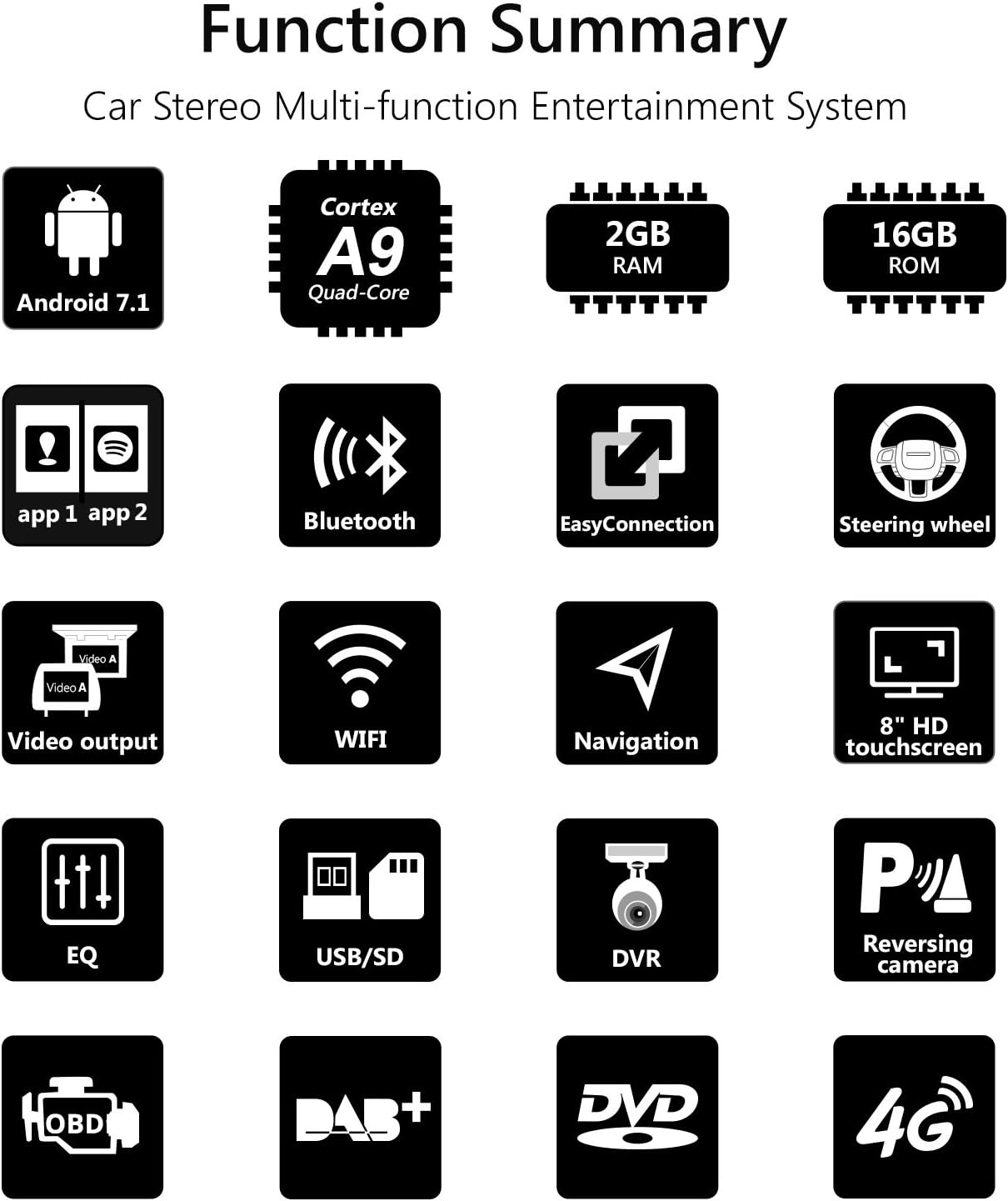
ചിത്രം 1: ഓവർview of Eonon GA8163 key functions and features.
- Applicable Car Models: Specifically designed for Mazda 3 (2010-2013). Compatible with the analog hose system for seamless integration and improved sound quality.
- ഓപ്പറേറ്റിംഗ് സിസ്റ്റം: Runs on the latest Android 7.1 Nougat.
- പ്രകടനം: Equipped with a RK3188 1.6 GHz Cortex A9 Quad-Core CPU, 2GB RAM for smooth multi-application operation, and 16GB ROM for ample app installations and storage.
- ഡിസ്പ്ലേ: Features an 8-inch high-resolution 1024x600 digital capacitive touchscreen.
- EasyConnection: Allows for screen mirroring from Android devices via USB and iPhones via WiFi, with regular updates.
- ഓഡിയോ നിയന്ത്രണം: Independent subwoofer, audio, and AV output control. Integrated amplifier output of 4 x 45W. Features a 7-band parametric equalizer function.
- കണക്റ്റിവിറ്റി: Built-in WiFi, supports 4G and 3G Internet Dongle (optional, extra required).
- ബ്ലൂടൂത്ത്: Includes a special external microphone for clearer hands-free calls. Supports Bluetooth music playback.
- സ്റ്റിയറിംഗ് വീൽ നിയന്ത്രണം: Compatible with most steering wheel control functions for easy song, channel, and volume adjustments, enhancing safety and convenience.
- മൾട്ടിടാസ്കിംഗ്: Split-screen mode enables running two applications side by side, e.g., navigation while listening to music.
- മീഡിയ പ്ലേബാക്ക്: Integrated DVD player compatible with AVI, DVD, DVD+R, DVD-R, DVD+RW, DVD-RW, MP3, CD, CD-RW, JPEG formats. Supports USB flash drives and micro SD cards up to 64GB.
- Optional Accessories Support: Supports Eonon V0054 external DAB+ (not included), Eonon R0008 Camera (not included), and Eonon V0056 OBD2 diagnostic tool (not included).
സ്പെസിഫിക്കേഷനുകൾ
| ഫീച്ചർ | സ്പെസിഫിക്കേഷൻ |
|---|---|
| നിർമ്മാതാവ് | ഇയോനോൺ |
| പാക്കേജ് അളവുകൾ | 38.86 x 26.67 x 21.34 സെ.മീ |
| ആകെ ഭാരം | 4 കി.ഗ്രാം |
| ASIN | B079HXH8WN |
| Product Available on Amazon.es Since | ഫെബ്രുവരി 22, 2018 |
| ഓപ്പറേറ്റിംഗ് വോളിയംtage | DC12 V. |
| പരമാവധി പ്രവർത്തന കറന്റ് | 15 എ |
| സ്ക്രീൻ വലിപ്പം | 8 ഇഞ്ച് |
| സ്ക്രീൻ തരം | LCD, Capacitive Touchscreen |
| കണക്റ്റിവിറ്റി ടെക്നോളജി | ബ്ലൂടൂത്ത്, വൈഫൈ |
| പിന്തുണയ്ക്കുന്ന മീഡിയ തരങ്ങൾ | CD, MP3, DVD-R, DVD, AVI, DVD-RW, DVD+RW, DVD+R, JPEG |
ഇൻസ്റ്റാളേഷനും സജ്ജീകരണവും
Proper installation is crucial for the optimal performance of your Eonon GA8163 unit. It is recommended that installation be performed by a qualified professional.
Retaining Original Car Functions
The GA8163 is designed to integrate seamlessly with your Mazda 3, retaining many original car functions.

Figure 2: Illustration of retained original car functions after Eonon GA8163 installation.
- Dashboard Function: Retains original dashboard display and functionality.
- LCD സ്ക്രീൻ: Retains the original LCD screen.
- സ്റ്റിയറിംഗ് വീൽ നിയന്ത്രണങ്ങൾ: Most steering wheel control functions are retained for convenience.
- Reversing Control: The head unit automatically switches to reverse mode when reversing.
- Handbrake Control: The head unit enters safe mode and video playback is disabled when the handbrake is engaged. This can be enabled/disabled in settings.
- Car Headlights: Buttons on the head unit illuminate when headlights are turned on.
Wiring Diagram and Included Components
Refer to the diagram below for proper wiring connections and identification of included accessories.

Figure 3: Detailed wiring diagram and list of included components for the Eonon GA8163.
ഉൾപ്പെടുത്തിയ ഘടകങ്ങൾ:
- 1 x GPS Antenna (3m)
- 1 x പവർ കേബിൾ
- 1 x Audio Output Harness
- 1 x AUX Input Harness
- 1 x Reversing Video Adapter Cable
- 1 x 3G/USB Adapter Cable
- 1 x AUX Harness
- 1 x CAN ബസ്
- 1 x യുഎസ്ബി അഡാപ്റ്റർ കേബിൾ
- 1 x Audio Cable Designed For Bose System
- 2 x മൗണ്ടിംഗ് ബ്രാക്കറ്റുകൾ
- 1 x HDMI Adapter Cable
- 1 x ബാഹ്യ മൈക്രോഫോൺ
- 1 x Disassembly Tool
- 2 x 15A ഫ്യൂസ്
- 1 x HDMI Adapter Cable
- 8 x സ്ക്രൂകൾ
Ensure all components are present before beginning installation. Connect the cables as indicated in the diagram, paying close attention to the power, audio, and video connections.
Post-Installation Appearance
See how the Eonon GA8163 integrates into your Mazda 3 dashboard after installation.

Figure 4: Comparison of the car dashboard before and after installing the Eonon GA8163 unit.
ഓപ്പറേഷൻ
Once installed, the Eonon GA8163 offers an intuitive interface for various functions.
Basic Interface and Navigation
The main screen provides access to core features like music, navigation, and settings.
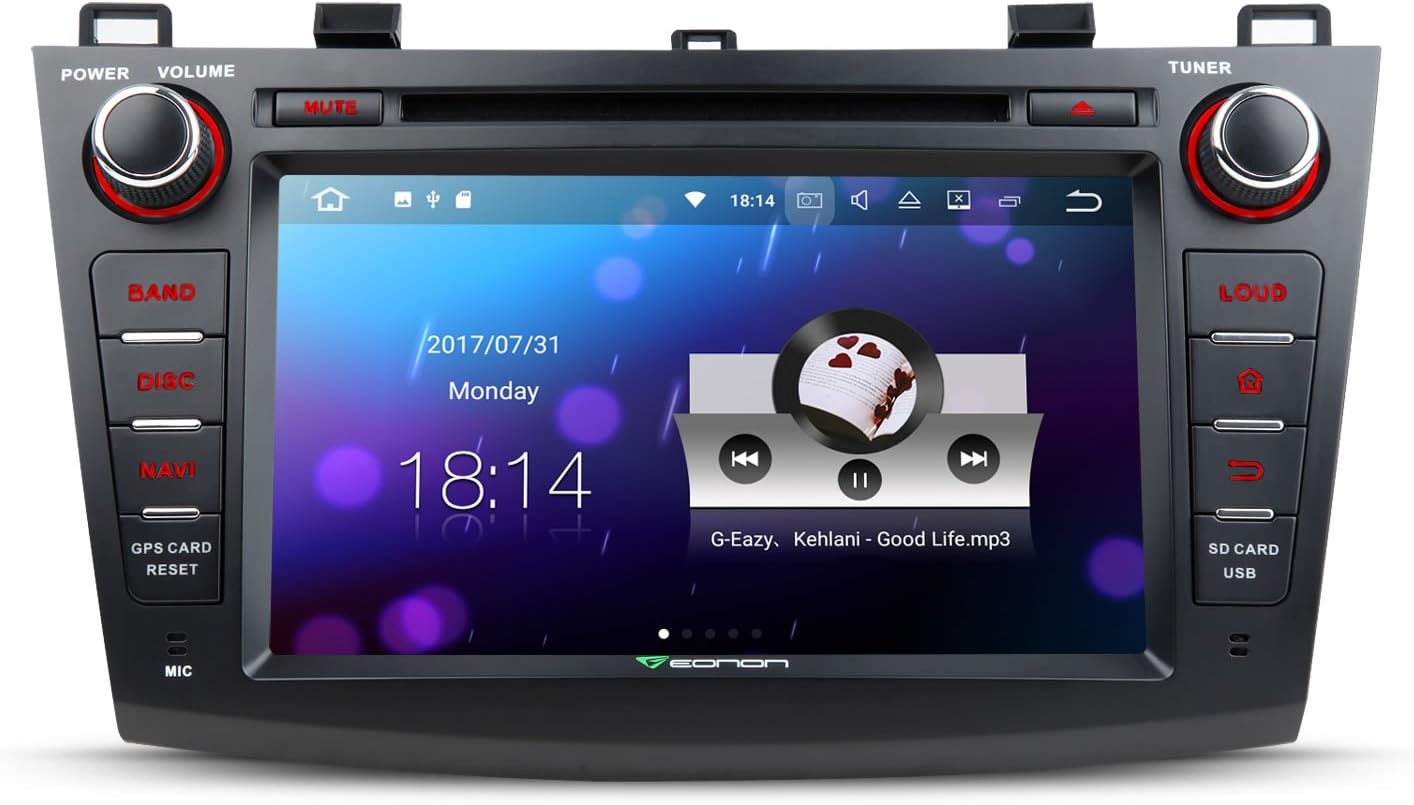
Figure 5: The main user interface of the Eonon GA8163, showing media playback and time display.
സ്പ്ലിറ്റ് സ്ക്രീൻ മൾട്ടിടാസ്കിംഗ്
Utilize the split-screen feature to run two applications simultaneously, enhancing convenience and productivity.

ചിത്രം 6: ഉദാample of split-screen multitasking, showing navigation and music playback simultaneously.
- To activate split screen, open one app, then long-press the recent apps button (usually a square icon) or drag another compatible app from the recent apps list to one side of the screen.
- Adjust the size of each app window by dragging the divider bar.
Media Playback (DVD, USB, SD)
Insert a DVD into the disc slot or connect a USB drive/SD card to the designated ports. The system will automatically detect and allow you to browse media files.
- ഡിവിഡി: Insert disc into the slot. Select 'Disc' from the main menu.
- USB/SD: Connect your storage device. Select 'USB' or 'SD' from the main menu to access files.
ബ്ലൂടൂത്ത് കണക്റ്റിവിറ്റി
Pair your mobile device via Bluetooth for hands-free calling and music streaming.
- Go to the 'Bluetooth' application on the head unit.
- നിങ്ങളുടെ മൊബൈൽ ഉപകരണത്തിൽ ബ്ലൂടൂത്ത് പ്രവർത്തനക്ഷമമാക്കുകയും ലഭ്യമായ ഉപകരണങ്ങൾക്കായി തിരയുകയും ചെയ്യുക.
- Select 'Eonon GA8163' (or similar name) from the list on your phone.
- രണ്ട് ഉപകരണങ്ങളിലും ജോടിയാക്കൽ കോഡ് സ്ഥിരീകരിക്കുക.
- പെയർ ചെയ്തുകഴിഞ്ഞാൽ, നിങ്ങൾക്ക് കാർ സ്പീക്കറുകളിലൂടെ കോളുകൾ വിളിക്കാനും സ്വീകരിക്കാനും സംഗീതം പ്ലേ ചെയ്യാനും കഴിയും.
മെയിൻ്റനൻസ്
To ensure the longevity and optimal performance of your Eonon GA8163, follow these maintenance guidelines:
- വൃത്തിയാക്കൽ: ടച്ച്സ്ക്രീനും എക്സ്റ്റീരിയറും വൃത്തിയാക്കാൻ മൃദുവായതും ഉണങ്ങിയതുമായ തുണി ഉപയോഗിക്കുക. കഠിനമായ പാടുകൾക്ക്, ചെറുതായി dampതുണിയിൽ വെള്ളം അല്ലെങ്കിൽ സ്ക്രീൻ-സേഫ് ക്ലീനർ ഉപയോഗിക്കുക. ഉരച്ചിലുകൾ ഉള്ള വസ്തുക്കളോ കഠിനമായ രാസവസ്തുക്കളോ ഒഴിവാക്കുക.
- താപനില: യൂണിറ്റിന് തീവ്രമായ താപനില, ദീർഘനേരം നേരിട്ടുള്ള സൂര്യപ്രകാശം, അല്ലെങ്കിൽ അമിതമായ ഈർപ്പം എന്നിവ ഏൽക്കുന്നത് ഒഴിവാക്കുക.
- ഡിസ്ക് പരിചരണം: Handle DVDs and CDs by their edges. Keep them clean and free of scratches to prevent playback issues.
- സോഫ്റ്റ്വെയർ അപ്ഡേറ്റുകൾ: Periodically check the Eonon official website for any available software or firmware updates to ensure the system runs efficiently and securely.
ട്രബിൾഷൂട്ടിംഗ്
If you encounter issues with your Eonon GA8163, refer to the following common troubleshooting steps:
- ശക്തിയില്ല:
- എല്ലാ പവർ കണക്ഷനുകളും സുരക്ഷിതമായി പ്ലഗ് ഇൻ ചെയ്തിട്ടുണ്ടെന്ന് ഉറപ്പാക്കാൻ അവ പരിശോധിക്കുക.
- Verify the car's fuse box and the unit's inline fuse (15A) are intact. Replace if blown.
- ശബ്ദമില്ല:
- വോളിയം മ്യൂട്ട് ചെയ്തിട്ടില്ല അല്ലെങ്കിൽ ഏറ്റവും കുറഞ്ഞതായി സജ്ജീകരിച്ചിട്ടില്ലെന്ന് ഉറപ്പാക്കുക.
- സ്പീക്കർ വയർ കണക്ഷനുകൾ പരിശോധിക്കുക.
- സിസ്റ്റം മെനുവിൽ ഓഡിയോ ഔട്ട്പുട്ട് ക്രമീകരണങ്ങൾ പരിശോധിക്കുക.
- ടച്ച്സ്ക്രീൻ പ്രതികരിക്കുന്നില്ല:
- Perform a soft reset by pressing the 'RESET' button (usually a small pinhole, refer to unit diagram).
- സ്ക്രീൻ വൃത്തിയുള്ളതും അവശിഷ്ടങ്ങൾ ഇല്ലാത്തതുമാണെന്ന് ഉറപ്പാക്കുക.
- ബ്ലൂടൂത്ത് കണക്ഷൻ പ്രശ്നങ്ങൾ:
- ഹെഡ് യൂണിറ്റിലും നിങ്ങളുടെ മൊബൈൽ ഉപകരണത്തിലും ബ്ലൂടൂത്ത് പ്രവർത്തനക്ഷമമാക്കിയിട്ടുണ്ടെന്ന് ഉറപ്പാക്കുക.
- രണ്ട് ഉപകരണങ്ങളിലും മുമ്പത്തെ ജോടിയാക്കലുകൾ ഇല്ലാതാക്കി വീണ്ടും ജോടിയാക്കാൻ ശ്രമിക്കുക.
- Move your mobile device closer to the head unit.
- Disc Playback Errors:
- ഡിസ്ക് വൃത്തിയുള്ളതും പോറലുകൾ ഇല്ലാത്തതുമാണെന്ന് ഉറപ്പാക്കുക.
- Verify the disc format is supported by the unit (refer to Specifications).
If the issue persists after attempting these steps, please contact Eonon customer support for further assistance.
വാറൻ്റിയും പിന്തുണയും
For warranty information, please refer to the warranty card included with your product packaging or visit the official Eonon webസൈറ്റ്. വാറന്റി നിബന്ധനകളും വ്യവസ്ഥകളും പ്രദേശത്തിനും വാങ്ങൽ തീയതിക്കും അനുസരിച്ച് വ്യത്യാസപ്പെടാം.
ഉപഭോക്തൃ പിന്തുണ:
If you require technical assistance, have questions about your product, or need to report a defect, please contact Eonon customer support through their official website or the contact information provided in your product documentation. When contacting support, please have your product model (GA8163) and purchase details ready.
You can visit the Eonon store on Amazon for more information: Eonon Amazon Store


