1. ആമുഖം
The BRESSER Temeo Life Weather Station provides essential weather information for your home. This wireless system includes a main display unit and an outdoor sensor, offering real-time data on indoor and outdoor temperatures, humidity, and a 12-24 hour weather trend forecast. It also features a DCF 77 time signal for accurate time and date, along with mould, frost, and heat warning functions.
Please read this manual carefully before operating the device to ensure proper use and to maximize its functionality.
2. പാക്കേജ് ഉള്ളടക്കം
നിങ്ങളുടെ പാക്കേജിൽ എല്ലാ ഇനങ്ങളും ഉണ്ടെന്ന് ഉറപ്പാക്കുക:
- BRESSER Temeo Life Colour Weather Station (Main Unit)
- വയർലെസ് Outട്ട്ഡോർ സെൻസർ
- Power Adapter for Main Unit
- നിർദ്ദേശ മാനുവൽ (ഈ പ്രമാണം)
3. ഉൽപ്പന്നം കഴിഞ്ഞുview
3.1 പ്രധാന ഡിസ്പ്ലേ യൂണിറ്റ്
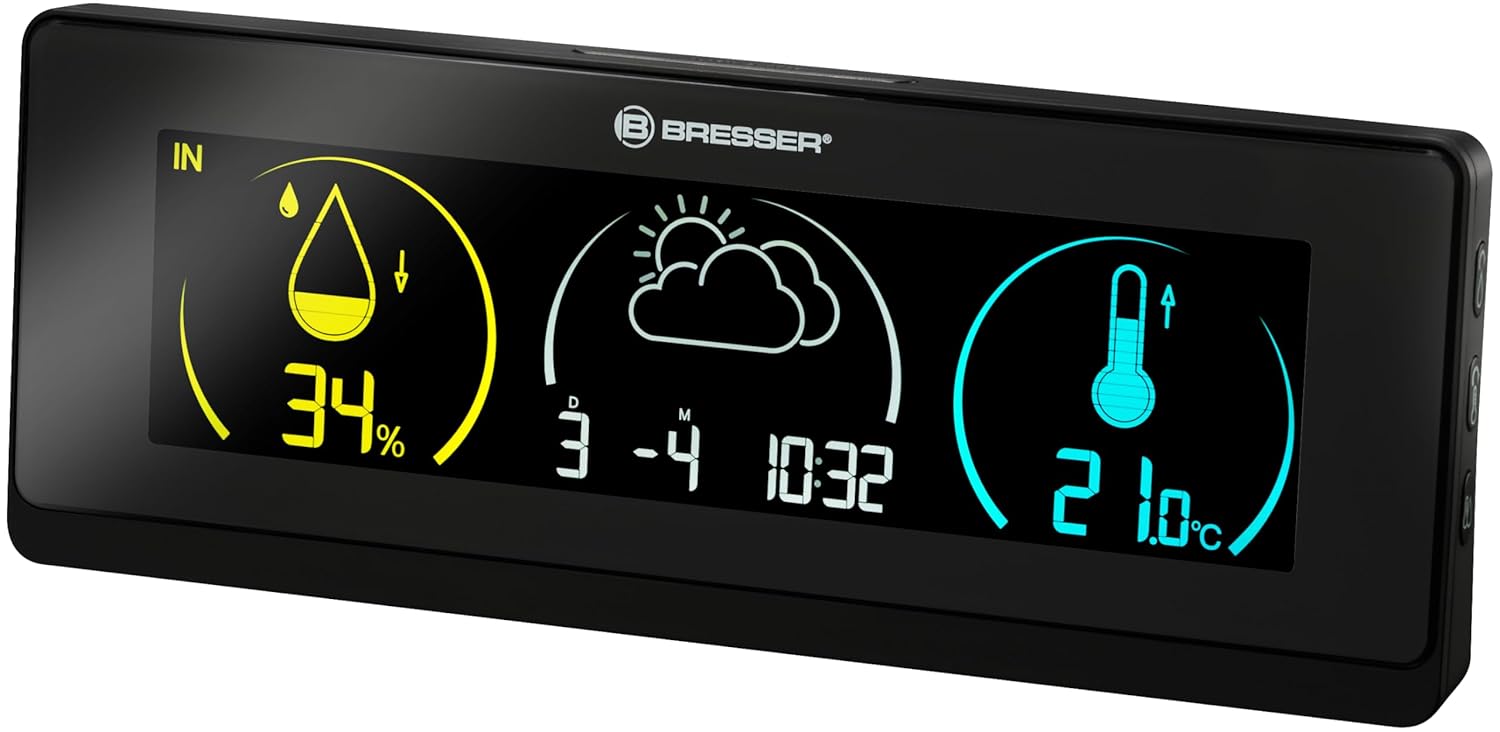
The main unit features a large, clear colour display that shows all relevant weather data, time, and warnings. It is powered by the included power adapter.
3.2 വയർലെസ് ഔട്ട്ഡോർ സെൻസർ

The compact outdoor sensor measures external temperature and humidity. It transmits data wirelessly to the main unit. The sensor requires 2x AA batteries (not included).

The back of the outdoor sensor includes the battery compartment and a channel selection switch, which must match the main unit for proper communication.
4. സജ്ജീകരണം
4.1 പ്രധാന യൂണിറ്റിന് പവർ നൽകുന്നു
- Connect the included power adapter to the main unit's power input port.
- Plug the power adapter into a standard electrical outlet. The display will illuminate.
4.2 Installing Batteries in the Outdoor Sensor
- ഔട്ട്ഡോർ സെൻസറിന്റെ പിൻഭാഗത്തുള്ള ബാറ്ററി കമ്പാർട്ട്മെന്റ് തുറക്കുക.
- Insert 2x AA batteries (not included), observing the correct polarity (+/-).
- ബാറ്ററി കമ്പാർട്ട്മെൻ്റ് സുരക്ഷിതമായി അടയ്ക്കുക.
4.3 Initial Synchronization and DCF Signal Reception
After powering both units, the main unit will automatically attempt to connect with the outdoor sensor and receive the DCF 77 time signal. This process may take a few minutes.
- Ensure the outdoor sensor is within range of the main unit (typically up to 30 meters in open air).
- Place the main unit away from large metal objects or electronic devices that may interfere with the DCF signal.
- Once synchronized, the outdoor temperature and humidity will appear on the main display, and the time and date will be automatically set.
4.4 ഔട്ട്ഡോർ സെൻസർ പ്ലേസ്മെന്റ്
For accurate readings, place the outdoor sensor in a shaded, dry location, protected from direct sunlight and precipitation. Avoid placing it near heat sources or reflective surfaces.
5. ഓപ്പറേഷൻ
5.1 വിവരങ്ങൾ പ്രദർശിപ്പിക്കുക
The colour display provides the following information at a glance:
- ഇൻഡോർ ഈർപ്പം: ശതമാനംtage of relative humidity inside.
- ഇൻഡോർ താപനില: Current temperature inside.
- Hട്ട്ഡോർ ഈർപ്പം: ശതമാനംtage of relative humidity from the outdoor sensor.
- ഔട്ട്ഡോർ താപനില: Current temperature from the outdoor sensor.
- Weather Trend: Graphical representation of the weather forecast for the next 12-24 hours.
- സമയവും തീയതിയും: Automatically updated via DCF 77 signal.
- ആഴ്ചയിലെ ദിവസം: Can be displayed at the touch of a button.
5.2 Mould Alarm
The weather station features a mould alarm that triggers when indoor humidity levels are excessively high, indicating a potential risk for mould growth. Refer to the specific settings section in the full manual for adjustment options.
5.3 Frost and Heat Warnings
The device provides warnings for frost (low temperatures) and excessive heat (high temperatures) to help you monitor outdoor conditions. These thresholds are typically pre-set but may be adjustable.
5.4 Display Colour Customization
The main unit's display allows you to choose from 256 different background colours to suit your preference or environment.

Example of the display with a customized background color.
6. പരിപാലനം
6.1 വൃത്തിയാക്കൽ
Wipe the main unit and outdoor sensor with a soft, damp cloth. Do not use abrasive cleaners or solvents, as these may damage the surfaces or electronic components.
6.2 Battery Replacement (Outdoor Sensor)
When the battery indicator on the main unit shows low battery for the outdoor sensor, replace the 2x AA batteries. Ensure correct polarity during replacement.
7. പ്രശ്നപരിഹാരം
- No Outdoor Temperature Display:
Ensure the outdoor sensor has fresh batteries and is within range. Check that the channel selection switch on the sensor matches the setting on the main unit. Re-synchronize by removing and reinserting batteries in both units, starting with the outdoor sensor. - കൃത്യമല്ലാത്ത വായനകൾ:
Verify the outdoor sensor's placement. It should be in a shaded, well-ventilated area, away from direct sunlight, rain, and heat sources. - Time/Date Not Updating (DCF Signal):
Relocate the main unit to a position with better reception, away from electronic interference. The DCF signal is strongest at night. Manual time setting may be an option if automatic reception is consistently poor. - ഡിസ്പ്ലേ പ്രവർത്തിക്കുന്നില്ല:
Check the power adapter connection to the main unit and the electrical outlet. Ensure the outlet is functional.
8 സ്പെസിഫിക്കേഷനുകൾ
| ഫീച്ചർ | സ്പെസിഫിക്കേഷൻ |
|---|---|
| മോഡൽ നമ്പർ | 7008001CM3000 |
| ഉൽപ്പന്ന അളവുകൾ (പ്രധാന യൂണിറ്റ്) | 83 x 220 x 39 മിമി (ഏകദേശം 3.27 x 8.66 x 1.54 ഇഞ്ച്) |
| ഇനത്തിൻ്റെ ഭാരം | 0.29 കിലോഗ്രാം (ഏകദേശം 10.23 ഔൺസ്) |
| പവർ സോഴ്സ് (മെയിൻ യൂണിറ്റ്) | എസി പവർ അഡാപ്റ്റർ (ഉൾപ്പെടുത്തിയിരിക്കുന്നു) |
| പവർ സ്രോതസ്സ് (ഔട്ട്ഡോർ സെൻസർ) | 2 x AA ബാറ്ററികൾ (ഉൾപ്പെടുത്തിയിട്ടില്ല) |
| മെറ്റീരിയൽ | പ്ലാസ്റ്റിക് |
| വയർലെസ് ഫ്രീക്വൻസി | 433 MHz (for sensor communication) |
9. വാറൻ്റിയും പിന്തുണയും
For warranty information, technical support, or service inquiries, please refer to the warranty card included with your product or visit the official BRESSER webസൈറ്റ്. വാങ്ങിയതിന്റെ തെളിവായി നിങ്ങളുടെ വാങ്ങൽ രസീത് സൂക്ഷിക്കുക.
For further assistance, you may contact BRESSER customer service directly.


