1. ആമുഖം
The Gator Frameworks Deluxe Adjustable Quadpod LCD/LED TV Monitor Stand (GFW-AV-LCD-25) is engineered for stable and portable support of flat panel displays. This stand features a robust quad-leg design for enhanced stability, a LiftEEZ piston for assisted height adjustment, and universal VESA compatibility. It is designed to accommodate screens up to 65 inches and supports a maximum weight of 100 lbs, offering versatile display options for various professional and personal environments.
2 സുരക്ഷാ വിവരങ്ങൾ
- Ensure all components are securely fastened before mounting a display. Loose connections can lead to instability.
- Do not exceed the maximum weight capacity of 100 lbs (45 kg). Overloading can cause damage to the stand or display.
- Always use two people when lifting and mounting large or heavy displays to prevent injury.
- Verify the stability of the stand on a flat, level surface before use. Uneven surfaces can compromise stability.
- Be aware of the red safety trim on the feet, especially in low-light conditions, to prevent tripping hazards.
- Keep children and pets away from the stand during setup and operation to avoid accidents.
3. പാക്കേജ് ഉള്ളടക്കം
അസംബ്ലി ആരംഭിക്കുന്നതിന് മുമ്പ് എല്ലാ ഭാഗങ്ങളും ലഭ്യമാണെന്ന് ദയവായി പരിശോധിക്കുക:
- Quadpod Stand Base with LiftEEZ Piston
- Universal VESA Mounting Bracket
- Mounting Hardware (various screws and spacers for VESA patterns)
- കേബിൾ മാനേജ്മെന്റ് ക്ലിപ്പ്
- Red Safety Trim Rings (pre-installed on feet)
4. സജ്ജീകരണ നിർദ്ദേശങ്ങൾ
4.1 Unfolding the Stand
- സ്റ്റാൻഡ് ഒരു പരന്നതും സ്ഥിരതയുള്ളതുമായ പ്രതലത്തിൽ വയ്ക്കുക.
- Loosen the comfort grip knob located at the base of the center pole by turning it counter-clockwise.
- Gently extend the four legs outwards until they are fully spread and stable. Ensure the legs are evenly spaced for maximum stability.
- Tighten the comfort grip knob securely by turning it clockwise to lock the legs in position.

Image: The Gator Frameworks Quadpod TV Stand with its VESA mounting bracket attached, ready for display installation. The four legs are extended for stability.
4.2 Attaching the VESA Mounting Bracket to Your Display
- Lay your LCD/LED TV or monitor face down on a soft, clean surface to prevent scratches.
- Identify the VESA mounting holes on the back of your display. The stand supports VESA patterns from 100x100mm to 640x400mm.
- Select the appropriate screws and spacers from the included hardware kit that match your display's VESA pattern.
- Attach the universal VESA mounting bracket to the back of your display using the selected hardware. Ensure all screws are tightened securely.

ചിത്രം: ഒരു ക്ലോസ്-അപ്പ് view of the VESA mounting bracket, showing the adjustable arms and central plate for attaching to a display.
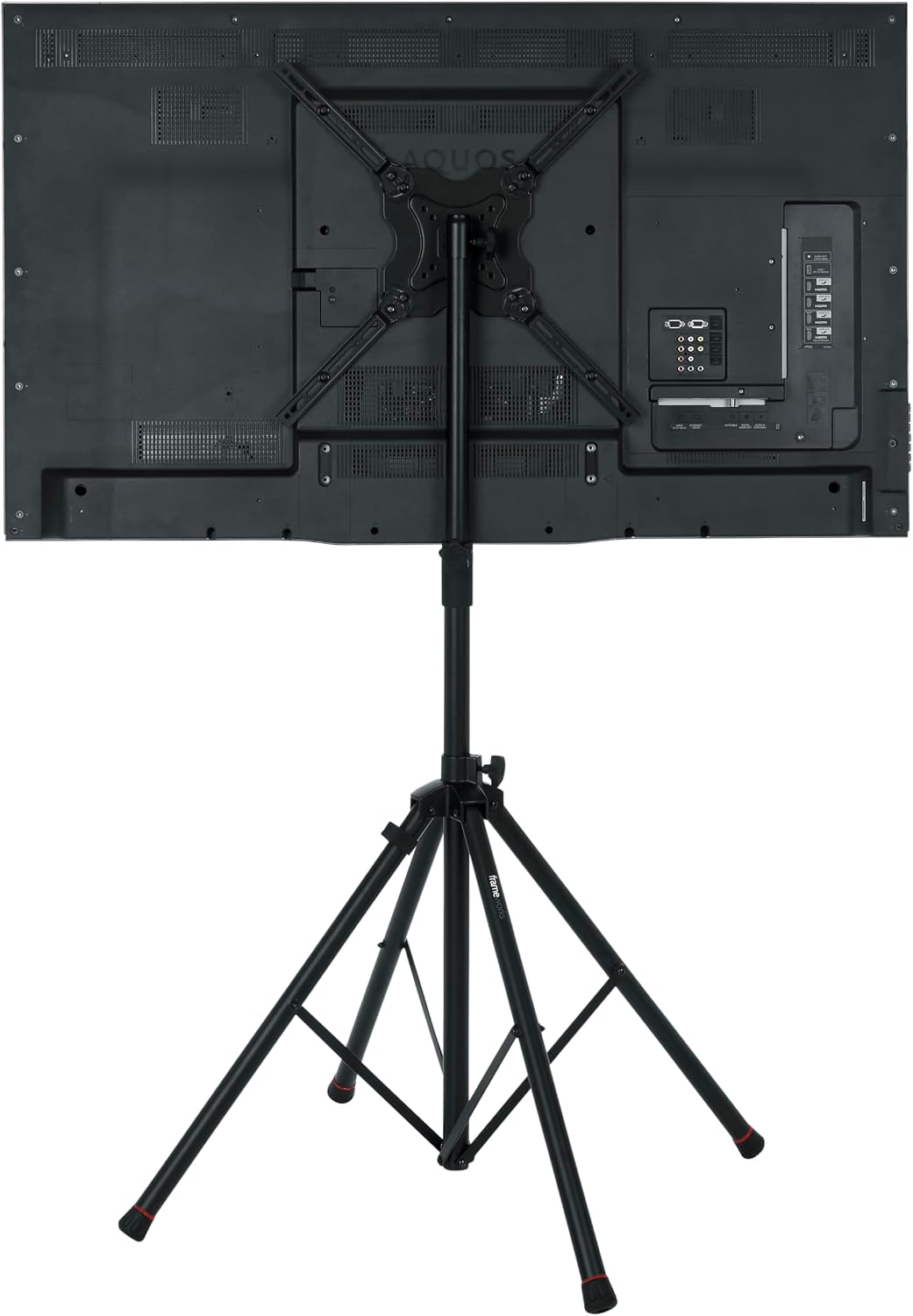
ചിത്രം: പിൻഭാഗം view of a television securely mounted onto the Gator Frameworks stand, demonstrating the VESA bracket attachment.
4.3 Mounting the Display onto the Stand
- With the VESA bracket attached to your display, carefully align the bracket with the top of the stand's center pole.
- Slide the display down onto the center pole until it is fully seated.
- Secure the display to the stand by tightening the locking knob on the stand's center pole. Ensure it is firm and the display does not wobble.

Image: A television display mounted on the Gator Frameworks Quadpod stand, showcasing its stable setup.
5. പ്രവർത്തന നിർദ്ദേശങ്ങൾ
5.1 Adjusting Height with LiftEEZ Piston
The GFW-AV-LCD-25 features a LiftEEZ piston for assisted height adjustment. This piston helps to effortlessly lift screens up to 40 pounds. For displays heavier than 40 pounds, minimal assistance may be required.
- To adjust the height, loosen the height adjustment knob on the center pole by turning it counter-clockwise.
- The LiftEEZ piston will assist in raising the display. Guide the display to your desired height.
- Once at the desired height, tighten the height adjustment knob firmly by turning it clockwise to lock the pole in place.

Image: A close-up of the comfort grip knob used for adjusting and locking the stand's height.
5.2 Adjusting Display Orientation
The universal VESA mount allows for both horizontal and vertical display orientation. To change the orientation, you may need to detach the display from the stand, rotate the VESA bracket on the display, and then re-mount it. Refer to the VESA bracket instructions for specific rotation capabilities.
5.3 കേബിൾ മാനേജ്മെന്റ്
Utilize the included cable management clip to keep cables organized and prevent tripping hazards. Attach the clip to one of the stand's legs and route your display cables through it for a clean setup.

Image: A cable management clip attached to one of the stand's legs, designed to keep cables tidy and secure.
5.4 Safety Trim
The stand's feet are equipped with red safety trim rings to enhance visibility, particularly in dimly lit environments, reducing the risk of accidental trips.

Image: A close-up of the stand's foot, showing the red safety trim ring for improved visibility.
6. പരിപാലനം
- Regularly inspect all knobs, screws, and connections to ensure they are tight and secure. Tighten any loose components immediately.
- Clean the stand with a soft, dry cloth. Avoid abrasive cleaners, solvents, or harsh chemicals, as these can damage the finish.
- Store the stand in a dry, cool place when not in use to prevent rust or material degradation.
- Check the red safety trim rings on the feet for wear and tear. Replace if damaged to maintain visibility and safety.
7. പ്രശ്നപരിഹാരം
| പ്രശ്നം | സാധ്യമായ കാരണം | പരിഹാരം |
|---|---|---|
| സ്റ്റാൻഡ് അസ്ഥിരമായി തോന്നുന്നു. | കാലുകൾ പൂർണ്ണമായും നീട്ടിയിട്ടില്ല അല്ലെങ്കിൽ ബന്ധിച്ചിട്ടില്ല; അസമമായ പ്രതലം. | Ensure legs are fully extended and the comfort grip knob is tightened. Move the stand to a level surface. |
| Display wobbles on the stand. | Mounting knob loose; VESA screws not tight. | Tighten the locking knob on the center pole. Verify VESA screws are securely fastened to the display. |
| ഉയരം ക്രമീകരിക്കുന്നതിൽ ബുദ്ധിമുട്ട്. | Height adjustment knob too tight; display weight exceeds piston assistance. | Loosen the height adjustment knob. For heavier displays, apply gentle upward pressure while adjusting. |
8 സ്പെസിഫിക്കേഷനുകൾ
- മോഡൽ: GFW-AV-LCD-25
- മെറ്റീരിയൽ: പൗഡർ-കോട്ടിഡ് ഫിനിഷുള്ള ഹെവി-ഡ്യൂട്ടി സ്റ്റീൽ
- പരമാവധി സ്ക്രീൻ വലിപ്പം: 65 ഇഞ്ച് വരെ
- പരമാവധി ഭാരം ശേഷി: 100 പൗണ്ട് (45 കി.ഗ്രാം)
- ക്രമീകരിക്കാവുന്ന ഉയരം പരിധി: 40.5 ഇഞ്ച് മുതൽ 72 ഇഞ്ച് വരെ (102.8 സെ.മീ മുതൽ 182.8 സെ.മീ വരെ)
- VESA അനുയോജ്യത: 100x100mm മുതൽ 640x400mm വരെ
- ഫീച്ചറുകൾ: LiftEEZ Piston, Quad-Leg Design, Cable Management Clip, Red Safety Trim
- Product Dimensions (folded): 40.5 x 5.8 x 5.8 ഇഞ്ച്
- ഇനത്തിൻ്റെ ഭാരം: 18.4 പൗണ്ട്
9. ഔദ്യോഗിക ഉൽപ്പന്ന വീഡിയോ
വീഡിയോ: ഒരു ഉദ്യോഗസ്ഥൻview of Gator Frameworks Quad-Pod Video Display Stands, highlighting their features and benefits for various applications.
10. വാറൻ്റിയും പിന്തുണയും
For detailed warranty information and customer support, please refer to the official Gator Frameworks website or contact their customer service directly. It is recommended to keep your purchase receipt for any warranty claims.
നിങ്ങൾക്ക് സന്ദർശിക്കാം Gator Frameworks Store on Amazon കൂടുതൽ ഉൽപ്പന്നങ്ങൾക്കും വിവരങ്ങൾക്കും.


