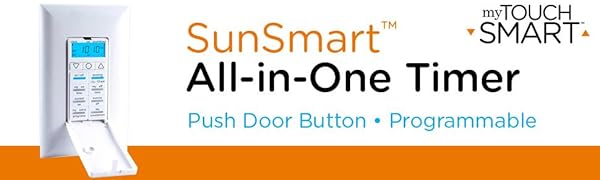
1. ആമുഖം
The myTouchSmart 33861 LE One In-Wall Digital Timer is designed to automate the control of indoor and outdoor lighting, fans, and other devices. This timer offers various programming options, including custom ON/OFF times, a countdown mode, and daily/weekly settings. It features SunSmart technology, which automatically adjusts to local sunset and sunrise times, and a backlit LED screen for clear visibility. The timer is equipped with a push-door switch for manual operation and access to programming buttons.

Image: The myTouchSmart 33861 LE One In-Wall Digital Timer shown with its packaging, highlighting key features like 7-day daily/weekly settings, custom countdown mode, and SunSmart technology. The timer itself is visible with its backlit screen and push-door switch.
2 സുരക്ഷാ വിവരങ്ങൾ
- ഇലക്ട്രിക്കൽ ഇൻസ്റ്റാളേഷൻ: Installation should be performed by a qualified electrician or a knowledgeable individual familiar with electrical wiring. Always turn off power at the circuit breaker before installation.
- ന്യൂട്രൽ വയർ ആവശ്യമാണ്: A neutral wire is required for the proper operation and installation of this timer. Ensure your electrical box has a neutral wire available.
- ഇലക്ട്രിക്കൽ റേറ്റിംഗുകൾ: This timer is rated for 120 VAC, 60Hz, 15A Resistive, 10A Tungsten, 5A Electronic Ballast, and 1/2HP Motor. Do not exceed these ratings.
- ഇൻഡോർ ഉപയോഗം: ഈ ഉപകരണം ഇൻഡോർ ഉപയോഗത്തിന് മാത്രമുള്ളതാണ്.
3. പാക്കേജ് ഉള്ളടക്കം
ഇൻസ്റ്റാളേഷൻ ആരംഭിക്കുന്നതിന് മുമ്പ് എല്ലാ ഘടകങ്ങളും നിലവിലുണ്ടെന്ന് ഉറപ്പാക്കുക:
- myTouchSmart 33861 LE One In-Wall Digital Timer
- White interchangeable ON/OFF switch cover
- Light almond interchangeable ON/OFF switch cover
- ഉപയോക്തൃ മാനുവൽ (ഈ പ്രമാണം)
Note: Wall plate is not included.
4. ഇൻസ്റ്റലേഷൻ
പ്രധാനപ്പെട്ടത്: Turn off power at the circuit breaker before proceeding with installation. A neutral wire is required.
- വയറിംഗ് തയ്യാറാക്കുക: Carefully remove the existing wall switch. Identify the Line (hot), Load, Neutral, and Ground wires. It is recommended to label each wire.
- വയറുകൾ ബന്ധിപ്പിക്കുക: Connect the wires from the wall box to the corresponding screw terminals on the myTouchSmart timer. Ensure connections are secure and tight (8.85 - 12.39 lbf-in or 1.0 - 1.4 Nm).
- വരി: Connect the incoming power wire (hot) to the 'Line' terminal.
- ലോഡ്: Connect the wire going to the light/device to the 'Load' terminal.
- ന്യൂട്രൽ: Connect the neutral wire to the 'Neutral' terminal. This connection is mandatory.
- ഗ്രൗണ്ട്: Connect the ground wire to the 'Ground' terminal.
- Mount Timer: Carefully push the wired timer into the wall box. Secure it with the provided screws.
- ഫെയ്സ് പ്ലേറ്റ് ഇൻസ്റ്റാൾ ചെയ്യുക: Attach your desired wall plate (not included) over the timer.
- പവർ പുന ore സ്ഥാപിക്കുക: സർക്യൂട്ട് ബ്രേക്കറിൽ പവർ വീണ്ടും ഓണാക്കുക.

Image: Detailed wiring diagram showing connections for Load, Traveler (not used for single-pole), Neutral, Line, and Ground terminals on the back of the myTouchSmart timer. Caution regarding high voltage and wire gauge is also visible.
Clarification on Line vs. Load: The 'Line' wire provides power from the electrical panel. The 'Load' wire carries power from the switch to the connected device (e.g., light, fan). Ensure these are connected correctly as per the diagram.
5. പ്രാരംഭ സജ്ജീകരണം
After installation and restoring power, the timer's backlit LED screen will activate. Follow these steps for initial setup:
- നിലവിലെ സമയവും തീയതിയും സജ്ജമാക്കുക: ഉപയോഗിക്കുക UP (▲) കൂടാതെ താഴേക്ക് (▼) arrow buttons to adjust the current time and date displayed on the screen. Press the ക്ലോക്ക് button to cycle through setting hours, minutes, and day of the week.
- Select Region for SunSmart Technology: അമർത്തുക സെറ്റ് button to enter the region selection mode. Use the UP (▲) കൂടാതെ താഴേക്ക് (▼) arrows to select your geographical region. This allows the SunSmart technology to automatically adjust sunset/sunrise times.
- ഡേലൈറ്റ് സേവിംഗ് ടൈം (DST): The timer includes an adjustment for daylight saving. Refer to the full manual for specific instructions on enabling or disabling DST.

Image: Visual guide illustrating the three simple setup steps: 1. Scroll to set current time & date, 2. Select region for SunSmart technology, 3. Choose from preset options or set custom times. The timer's screen and buttons are clearly visible.
6. പ്രവർത്തന നിർദ്ദേശങ്ങൾ
The myTouchSmart timer offers various programming options and manual controls. Open the push-door switch to access the programming buttons.

Image: Close-up of the myTouchSmart 33861 timer's control panel, showing the backlit LED screen, ON/OFF override buttons, two programmable ON/OFF buttons, and additional program/countdown buttons.
6.1 മാനുവൽ ഓൺ/ഓഫ് ഓവർറൈഡ്
വലിയ ഓൺ/ഓഫ് button (or the push-door switch itself) allows for immediate manual control of the connected device, overriding any active program without deleting it.
6.2 Custom ON/OFF Programs
The timer allows for up to 8 custom ON/OFF times. Use the MY ON TIME ഒപ്പം MY OFF TIME buttons to set specific schedules.
- അമർത്തുക MY ON TIME (അല്ലെങ്കിൽ MY OFF TIME) once to view the current setting. Press again to enter programming mode.
- ഉപയോഗിക്കുക UP (▲) കൂടാതെ താഴേക്ക് (▼) arrows to adjust the time.
- അമർത്തുക MY ON TIME (അല്ലെങ്കിൽ MY OFF TIME) again to save the setting.
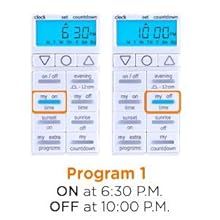
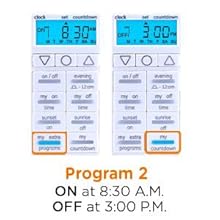
ചിത്രം: രണ്ട് മുൻ കാമുകിമാർamples of custom program settings. The first shows an ON time of 6:30 P.M. and OFF time of 10:00 P.M. The second shows an ON time of 8:30 A.M. and OFF time of 3:00 P.M.
6.3 Preset Options
The timer includes convenient preset options:
- വൈകുന്നേരം: Activates the device at a preset evening time (e.g., ON at 5:30 P.M., OFF at 12:00 A.M.). Press the വൈകുന്നേരം button to activate or adjust.
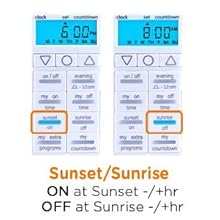
- Sunset ON / Sunrise OFF: Utilizes SunSmart technology to automatically turn the device ON at sunset and OFF at sunrise, adjusting daily based on your selected region. Press the SUNSET ON or SUNRISE OFF buttons to activate.
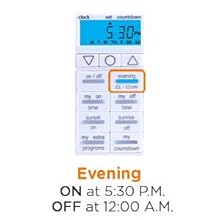
ചിത്രം: രണ്ട് മുൻ കാമുകിമാർamples of preset options. One shows the 'Evening' preset with ON at 5:30 P.M. and OFF at 12:00 A.M. The other shows the 'Sunset/Sunrise' preset, where ON occurs at sunset and OFF at sunrise.
6.4 കൗണ്ട്ഡൗൺ മോഡ്
ദി കൗണ്ട്ഡൗൺ button allows you to set a specific duration for the device to remain ON before automatically turning OFF. This is useful for temporary lighting needs.
- അമർത്തുക കൗണ്ട്ഡൗൺ സജീവമാക്കാൻ.
- ഉപയോഗിക്കുക UP (▲) കൂടാതെ താഴേക്ക് (▼) arrows to set the desired countdown duration.
- The device will turn OFF once the countdown expires.
7. പരിപാലനം
- വൃത്തിയാക്കൽ: Wipe the timer's surface with a soft, dry cloth. Do not use abrasive cleaners or solvents.
- ബാക്കപ്പ് ബാറ്ററി: The timer includes a backup battery to maintain your programmed settings in the event of a power outage. No user maintenance is required for this battery.

Image: Icon depicting a cloud with a lightning bolt, symbolizing the timer's ability to retain settings during power outages thanks to its backup battery.
8. പ്രശ്നപരിഹാരം
- Timer Not Functioning After Installation:
- Ensure power is restored at the circuit breaker.
- Verify all wiring connections (Line, Load, Neutral, Ground) are correct and secure. A common issue is incorrect identification of Line and Load wires. Refer to the installation section and diagram.
- Confirm a neutral wire is connected; it is required for this timer.
- Programs Not Activating:
- Check that the current time and day are set correctly.
- Ensure the desired program (e.g., MY ON/OFF TIME, Evening, Sunset/Sunrise) is activated and not overridden by manual ON/OFF.
- For SunSmart features, confirm your region is correctly selected.
- സ്ക്രീൻ ശൂന്യമാണ്:
- Check power at the circuit breaker.
- വയറിംഗ് കണക്ഷനുകൾ പരിശോധിക്കുക.
- പ്രോഗ്രാമിംഗിലെ ബുദ്ധിമുട്ട്:
- Refer to the detailed programming steps in Section 6.
- Ensure you are pressing the correct buttons to enter and save programming modes.
9 സ്പെസിഫിക്കേഷനുകൾ
| സ്പെസിഫിക്കേഷൻ | മൂല്യം |
|---|---|
| മോഡൽ നമ്പർ | 33861 |
| ഓപ്പറേഷൻ മോഡ് | ഓൺ-ഓഫ്-ഓൺ |
| നിലവിലെ റേറ്റിംഗ് | 15 Amps |
| ഓപ്പറേറ്റിംഗ് വോളിയംtage | 125 വോൾട്ട് (എസി) |
| ബന്ധപ്പെടാനുള്ള തരം | സാധാരണയായി അടച്ചിരിക്കുന്നു |
| കണക്റ്റർ തരം | സ്ക്രൂ |
| അതിതീവ്രമായ | സ്ക്രൂ |
| ഇനത്തിന്റെ അളവുകൾ (L x W x H) | 6.6 x 8.64 x 11.18 ഇഞ്ച് |
| സർക്യൂട്ട് തരം | 1-വഴി |
| ആക്യുവേറ്റർ തരം | പുഷ് ബട്ടൺ |
| കോൺടാക്റ്റ് മെറ്റീരിയൽ | നിക്കൽ |
| അന്താരാഷ്ട്ര സംരക്ഷണ റേറ്റിംഗ് | IP01 |
| ഉയർന്ന താപനില റേറ്റിംഗ് | 40 ഡിഗ്രി സെൽഷ്യസ് |
| നിയന്ത്രണ രീതി | സ്പർശിക്കുക |
| ഇനത്തിൻ്റെ ഭാരം | 6.4 ഔൺസ് |
| സർട്ടിഫിക്കേഷനുകൾ | UL ലിസ്റ്റുചെയ്തു |

Image: Diagram showing the dimensions of the myTouchSmart 33861 timer: 4.06 inches (10.31cm) in height and 1.75 inches (4.45cm) in width.
10. വാറൻ്റിയും പിന്തുണയും
For detailed warranty information, additional support, or to download the latest version of this manual, please visit the official product support page:
jascoproducts.com/HEP-ET/20000-99999/26892
This product is UL Listed, ensuring it meets recognized safety standards.


