1. ആമുഖം
വാങ്ങിയതിന് നന്ദി.asing the Sharp HT-SB140MT 2.0 150W Soundbar. This soundbar is designed to enhance your audio experience, providing clear and powerful sound for your television, music, and other media. With its sleek design and versatile connectivity options, including Bluetooth, HDMI ARC/CEC, Optical, and Auxiliary inputs, it integrates seamlessly into any home entertainment setup. This manual provides essential information for safe and effective use, including setup, operation, maintenance, and troubleshooting.
2 സുരക്ഷാ വിവരങ്ങൾ
- ഊർജ്ജ സ്രോതസ്സ്: വൈദ്യുതി വിതരണം വോളിയം ഉറപ്പാക്കുകtage matches the requirements specified on the soundbar. Use only the provided power cable.
- വെൻ്റിലേഷൻ: Do not block any ventilation openings. Maintain adequate space around the soundbar for proper airflow.
- ജലവും ഈർപ്പവും: Do not expose the soundbar to dripping or splashing water. Do not place objects filled with liquids, such as vases, on the apparatus.
- ചൂട്: Do not place the soundbar near heat sources such as radiators, heat registers, stoves, or other apparatus (including ampലൈഫയറുകൾ) ചൂട് ഉത്പാദിപ്പിക്കുന്നത്.
- വൃത്തിയാക്കൽ: Unplug the soundbar from the power outlet before cleaning. Use a dry, soft cloth for cleaning. Do not use liquid cleaners or aerosol cleaners.
- സേവനം: ഈ ഉൽപ്പന്നം സ്വയം സേവിക്കാൻ ശ്രമിക്കരുത്. യോഗ്യതയുള്ള സേവന ഉദ്യോഗസ്ഥർക്ക് എല്ലാ സേവനങ്ങളും റഫർ ചെയ്യുക.
- ബാറ്ററികൾ: The remote control uses a CR2 battery. Ensure correct polarity when inserting batteries. Do not mix old and new batteries.
3. പാക്കേജ് ഉള്ളടക്കം
പാക്കേജിൽ എല്ലാ ഇനങ്ങളും ഉണ്ടോ എന്ന് ദയവായി പരിശോധിക്കുക:
- Sharp HT-SB140MT Soundbar
- റിമോട്ട് കൺട്രോൾ
- പവർ കേബിൾ
- ഉപയോക്തൃ മാനുവൽ (ഈ പ്രമാണം)
4. ഉൽപ്പന്നം കഴിഞ്ഞുview

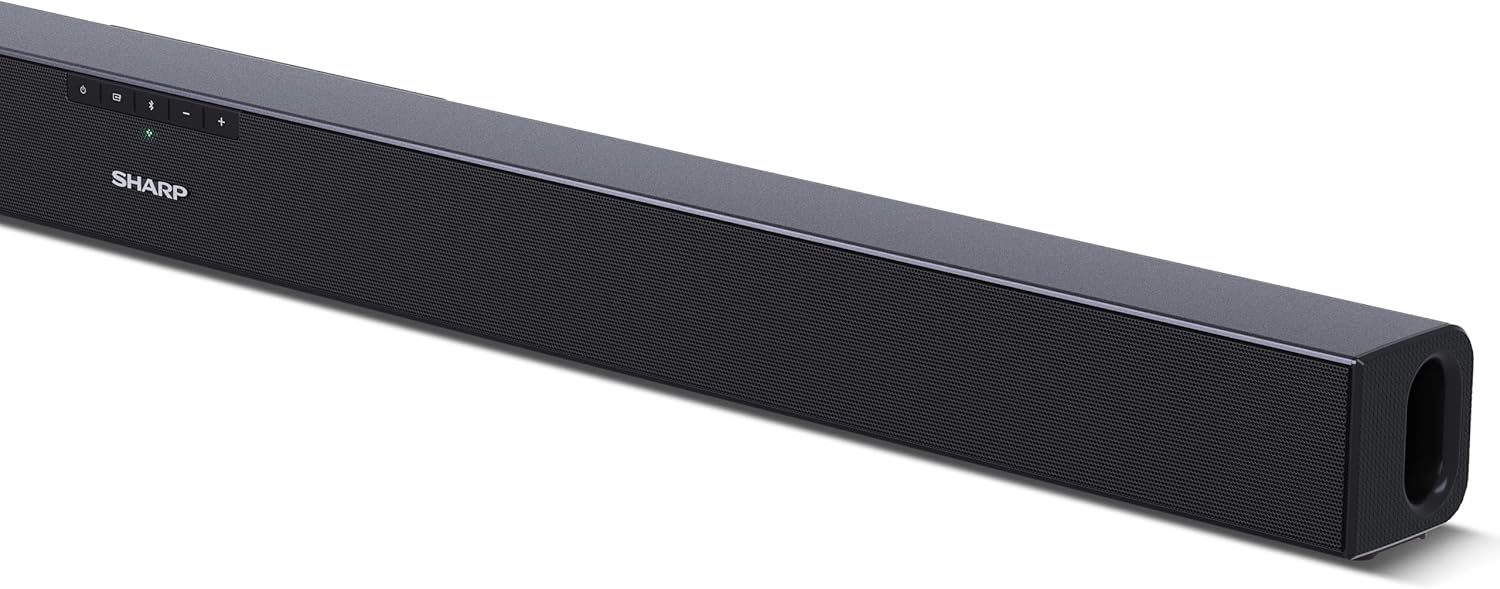
ചിത്രം 4.1: മുൻഭാഗം View
The front of the soundbar features the Sharp logo and LED indicators for source selection and status. Control buttons for power, input, and volume are located on the top panel.
ചിത്രം 4.2: പിൻഭാഗം View (Connections)
The rear panel provides all necessary connection ports: HDMI ARC, Optical (S/PDIF), and Auxiliary (3.5mm) input, along with the power input.

ചിത്രം 4.3: റിമോട്ട് കൺട്രോൾ
The included remote control allows for convenient operation of the soundbar, including power, input selection, volume, bass, and treble adjustments.
5. സജ്ജീകരണം
5.1 പ്ലേസ്മെൻ്റ്
The Sharp HT-SB140MT Soundbar can be placed on a flat surface, such as a TV stand, or wall-mounted. Its slim profile of 6 cm allows it to fit easily under most TV screens without obstructing the view.

Figure 5.1: Soundbar Placement
The soundbar is ideally positioned directly in front of your television for optimal sound projection.
5.2 നിങ്ങളുടെ ടിവിയിലേക്ക് കണക്റ്റുചെയ്യുന്നു
ഇനിപ്പറയുന്ന കണക്ഷൻ രീതികളിൽ ഒന്ന് തിരഞ്ഞെടുക്കുക:
- HDMI ARC/CEC (ശുപാർശ ചെയ്യുന്നത്): Connect an HDMI cable (not included) from the HDMI ARC port on your TV to the HDMI ARC port on the soundbar. This allows your TV remote to control the soundbar's volume and power. Ensure HDMI ARC/CEC is enabled in your TV's settings.
- Digital Optical Audio (S/PDIF): Connect an optical cable (not included) from the Optical Out port on your TV to the OPTICAL IN port on the soundbar. Select the Optical input on the soundbar.
- ഓക്സിലറി (AUX): Connect a 3.5mm audio cable (not included) from the headphone jack or AUX Out port on your TV to the AUX IN port on the soundbar. Select the AUX input on the soundbar.
5.3 പവർ കണക്ഷൻ
After connecting the audio cable, plug the power cable into the soundbar's power input and then into a wall outlet (220-240V / 50Hz).
6. പ്രവർത്തന നിർദ്ദേശങ്ങൾ
6.1 പവർ ഓൺ/ഓഫ്
യൂണിറ്റ് ഓണാക്കാനോ ഓഫാക്കാനോ സൗണ്ട്ബാറിലോ റിമോട്ട് കൺട്രോളിലോ ഉള്ള പവർ ബട്ടൺ അമർത്തുക.
6.2 ഉറവിട തിരഞ്ഞെടുപ്പ്
Press the Input button on the soundbar or the remote control repeatedly to cycle through the available input sources: HDMI ARC, Optical, AUX, and Bluetooth. The LED indicator on the soundbar will change to reflect the selected source.
6.3 വോളിയം ക്രമീകരണം
Use the Volume Up (+) and Volume Down (-) buttons on the soundbar or the remote control to adjust the sound level.
6.4 ബ്ലൂടൂത്ത് ജോടിയാക്കൽ
ഒരു ബ്ലൂടൂത്ത് ഉപകരണം ബന്ധിപ്പിക്കുന്നതിന്:
- Select Bluetooth input on the soundbar. The Bluetooth LED indicator will flash, indicating pairing mode.
- On your smart device (smartphone, tablet, etc.), enable Bluetooth and search for available devices.
- Select "SHARP HT-SB140MT" from the list of devices.
- Once connected, the Bluetooth LED indicator will stop flashing and remain solid. You can now stream audio wirelessly to the soundbar.
6.5 Sound Modes (Equalizer)
The soundbar features an equalizer with different sound modes to optimize audio for various content types. Use the EQ button on the remote control to cycle through these modes (e.g., Movie, Music, News). You can also adjust Bass and Treble levels using dedicated buttons on the remote.
7. പരിപാലനം
7.1 വൃത്തിയാക്കൽ
To clean the soundbar, unplug it from the power outlet. Use a soft, dry, lint-free cloth to wipe down the surfaces. Do not use abrasive cleaners, waxes, or solvents as they may damage the finish.
7.2 സംഭരണം
If you plan to store the soundbar for an extended period, disconnect it from the power supply and store it in a cool, dry place, away from direct sunlight and extreme temperatures.
8. പ്രശ്നപരിഹാരം
നിങ്ങളുടെ സൗണ്ട്ബാറിൽ പ്രശ്നങ്ങൾ നേരിടുകയാണെങ്കിൽ, ഇനിപ്പറയുന്ന പൊതുവായ പ്രശ്നങ്ങളും പരിഹാരങ്ങളും പരിശോധിക്കുക:
| പ്രശ്നം | സാധ്യമായ കാരണം | പരിഹാരം |
|---|---|---|
| സൗണ്ട്ബാറിൽ നിന്ന് ശബ്ദമില്ല. | സൗണ്ട്ബാർ ഓഫാണ് അല്ലെങ്കിൽ മ്യൂട്ട് ചെയ്തിരിക്കുന്നു. തെറ്റായ ഇൻപുട്ട് ഉറവിടം തിരഞ്ഞെടുത്തു. Cables are not connected properly. ടിവി ഓഡിയോ ഔട്ട്പുട്ട് ക്രമീകരണങ്ങൾ തെറ്റാണ്. | സൗണ്ട്ബാർ ഓണാക്കിയിട്ടുണ്ടെന്നും നിശബ്ദമാക്കിയിട്ടില്ലെന്നും ഉറപ്പാക്കുക. Select the correct input source (HDMI ARC, Optical, AUX). എല്ലാ കേബിൾ കണക്ഷനുകളും പരിശോധിക്കുക (HDMI, ഒപ്റ്റിക്കൽ, AUX). Verify your TV's audio output settings are set to external speakers or the correct digital output. |
| ബ്ലൂടൂത്ത് ഉപകരണം ബന്ധിപ്പിക്കാൻ കഴിയുന്നില്ല. | Soundbar is not in pairing mode. ഉപകരണം പരിധിക്ക് പുറത്താണ്. മറ്റ് ഉപകരണങ്ങളിൽ നിന്നുള്ള ഇടപെടൽ. | Ensure the soundbar is in Bluetooth input mode and the LED is flashing. Move your Bluetooth device closer to the soundbar (within 10 meters). Turn off other Bluetooth devices nearby. Try unpairing and re-pairing. |
| റിമോട്ട് കൺട്രോൾ പ്രവർത്തിക്കുന്നില്ല. | Battery is low or inserted incorrectly. റിമോട്ടിനും സൗണ്ട്ബാറിനും ഇടയിലുള്ള തടസ്സം. Remote control is faulty. | Replace the CR2 battery and ensure correct polarity. Remove any obstructions between the remote and the soundbar's sensor. പ്രശ്നങ്ങൾ നിലനിൽക്കുകയാണെങ്കിൽ, ഉപഭോക്തൃ പിന്തുണയുമായി ബന്ധപ്പെടുക. |
9 സ്പെസിഫിക്കേഷനുകൾ
| മോഡലിൻ്റെ പേര് | HT-SB140(MT) |
| സ്പീക്കർ തരം | സൗണ്ട്ബാർ |
| സറൗണ്ട് സൗണ്ട് ചാനൽ കോൺഫിഗറേഷൻ | 2.0 |
| പരമാവധി സ്പീക്കർ ഔട്ട്പുട്ട് പവർ | 150 വാട്ട്സ് |
| ഫ്രീക്വൻസി പ്രതികരണം | 60 Hz |
| കണക്റ്റിവിറ്റി ടെക്നോളജി | Bluetooth, HDMI ARC/CEC, Digital Optical Audio (S/PDIF), 3.5mm Auxiliary (AUX) |
| വയർലെസ് കമ്മ്യൂണിക്കേഷൻ ടെക്നോളജി | ബ്ലൂടൂത്ത് |
| പരമാവധി ശ്രേണി (ബ്ലൂടൂത്ത്) | 10 മീറ്റർ |
| നിയന്ത്രണ രീതി | റിമോട്ട് കൺട്രോൾ |
| പവർ ഉറവിടം | എസി (മെയിൻ) |
| ഇൻപുട്ട് വോളിയംtage | 220-240 വോൾട്ട് |
| നിറം | കറുപ്പ് |
| മെറ്റീരിയൽ | പ്ലാസ്റ്റിക്, മെറ്റൽ |
| മൗണ്ടിംഗ് തരം | വാൾ മൗണ്ട്, ടേബിൾടോപ്പ് |
| ഉൽപ്പന്ന അളവുകൾ (L x W x H) | 95 x 6 x 6 സെ.മീ |
| ഇനത്തിൻ്റെ ഭാരം | 1.5 കിലോഗ്രാം |
| ഉൾപ്പെടുത്തിയ ഘടകങ്ങൾ | റിമോട്ട് കൺട്രോൾ |
| ബാറ്ററി ആവശ്യമാണ് | 1 CR2 ബാറ്ററി |
| വാട്ടർപ്രൂഫ് | ഇല്ല |
| സ്പെയർ പാർട്സ് ലഭ്യത | 5 വർഷം |
| സോഫ്റ്റ്വെയർ അപ്ഡേറ്റുകൾ ലഭിക്കുന്നതുവരെ ഉറപ്പ് | വിവരങ്ങൾ ലഭ്യമല്ല |
10. വാറൻ്റിയും പിന്തുണയും
The Sharp HT-SB140MT Soundbar comes with a Limited Warranty. Please refer to the warranty card included in your package for specific terms and conditions. Spare parts are available for up to 5 years from the date of purchase.
For technical support, service, or warranty claims, please contact Sharp customer service through their official website or the contact information provided in your product documentation. When contacting support, please have your product model number (HT-SB140(MT)) and purchase details ready.


