1. ആമുഖം
The MOOER Radar is a full-featured professional speaker cabinet simulator designed for guitar and bass. This compact pedal offers a wide array of features including 30 different speaker cabinet models, 11 microphone models, and 4 power amplifier models. It allows for extensive tone shaping with a customizable EQ stage and the ability to load custom Impulse Responses (IRs). With 36 user preset slots, the Radar is a versatile tool for recording, practice, and live performance, transforming your pedalboard into a complete guitar rig.
2. ഉൽപ്പന്ന സവിശേഷതകൾ
- Extensive Modeling: Features 30 diverse speaker cabinet models, 11 microphone models, and 4 distinct power ampലൈഫയർ മോഡലുകൾ.
- ഇഷ്ടാനുസൃതമാക്കാവുന്ന EQ: Integrated customizable EQ stage for precise tone sculpting.
- IR Loading Capability: Supports loading of custom Impulse Responses (IRs) for expanded tonal options.
- ഉപയോക്തൃ പ്രീസെറ്റുകൾ: Store and recall up to 36 user-defined presets for quick access to your favorite sounds.
- USB കണക്റ്റിവിറ്റി: Connects to a PC editor via USB for advanced editing and IR management.
- ബഹുമുഖ ഔട്ട്പുട്ടുകൾ: Equipped with headphone and line-out outputs, making it ideal for silent practice, recording, or direct connection to a PA system.
- കോംപാക്റ്റ് ഡിസൈൻ: Small footprint integrates easily into any pedalboard setup.
3. നിയന്ത്രണങ്ങളും കണക്ഷനുകളും

Figure 1: MOOER Radar Pedal - Front View. This image shows the compact size and overall design of the Radar pedal, highlighting its small form factor suitable for any pedalboard.
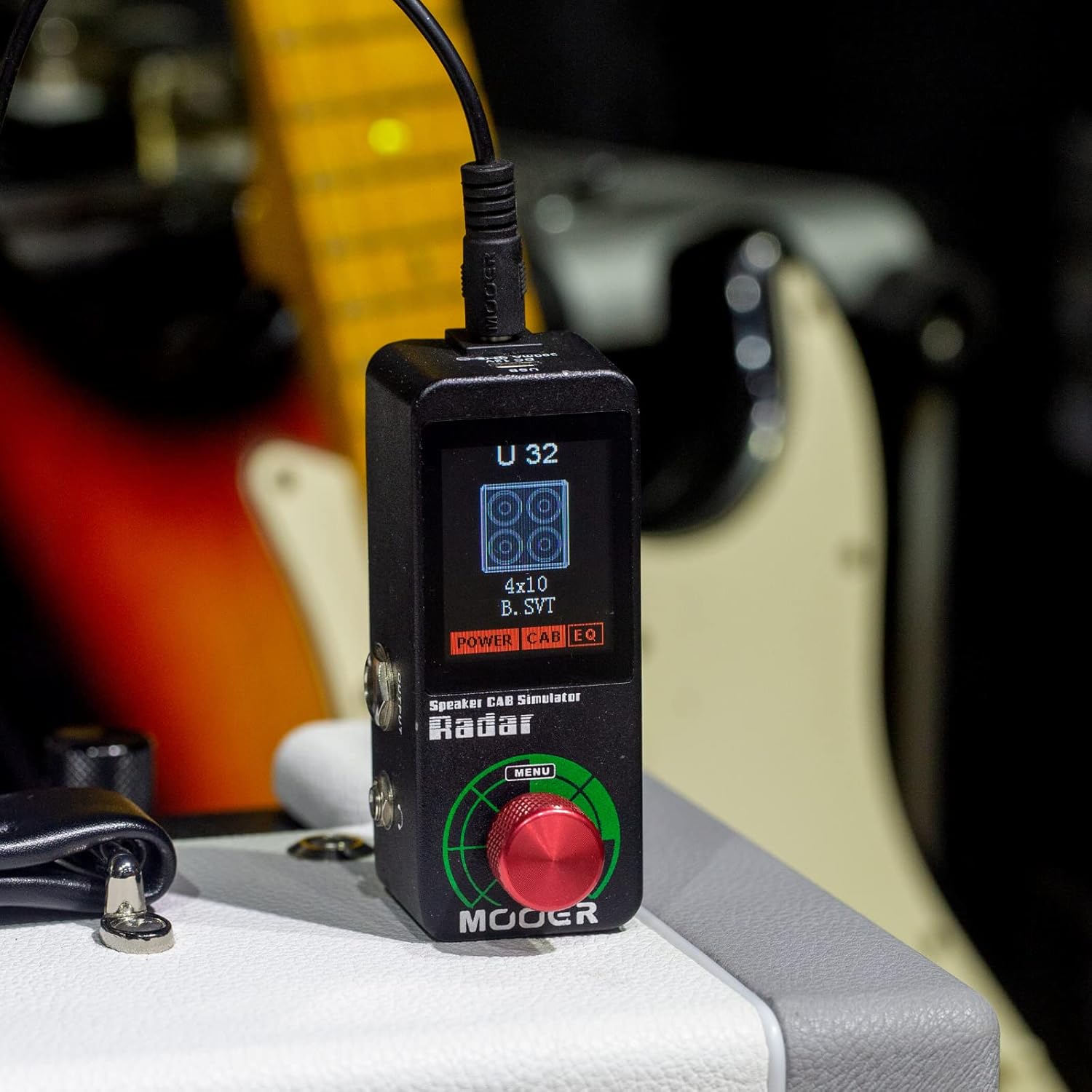
Figure 2: MOOER Radar Pedal - Top View. This image displays the pedal's screen, rotary encoder for menu navigation, and the main output and headphone jacks.
- സ്ക്രീൻ: Displays current preset, selected cabinet, mic, power amp models, and EQ settings.
- Rotary Encoder (MENU): Used to navigate menus, select options, and adjust parameters. Press to confirm selection.
- Output Jack (1/4" TS): നിങ്ങളുടെ amplifier, audio interface, or PA system.
- Headphone Jack (1/8" TRS): For silent practice with headphones.

Figure 3: MOOER Radar Pedal - Rear View. This image shows the USB port and the DC 12V power input.
- USB പോർട്ട്: Connects to a computer for firmware updates, IR loading, and software editing.
- DC 12V പവർ ഇൻപുട്ട്: Connects to a 12V DC power supply (300mA, center negative).
4. സജ്ജീകരണ ഗൈഡ്
- പവർ കണക്ഷൻ: Connect a 12V DC power supply (300mA, center negative) to the DC 12V input jack on the rear of the pedal.
- ഉപകരണ കണക്ഷൻ: Connect your guitar or the output of your pedalboard to the input jack (usually on the side, not explicitly shown but standard for pedals).
- ഔട്ട്പുട്ട് കണക്ഷൻ: ഔട്ട്പുട്ട് ജാക്ക് നിങ്ങളിലേക്ക് ബന്ധിപ്പിക്കുക amplifier's effects return, an audio interface, or a PA system. For silent practice, connect headphones to the headphone jack.
- Software Setup (Optional): For advanced editing and custom IR loading, connect the pedal to your computer via the USB port. Download and install the MOOER Studio software from the official MOOER webസൈറ്റ്.
5. പ്രവർത്തന നിർദ്ദേശങ്ങൾ
5.1 അടിസ്ഥാന പ്രവർത്തനം
- പവർ ഓൺ: Once connected to power, the pedal will automatically power on and display the current preset.
- മുൻകൂട്ടി നിശ്ചയിച്ച തിരഞ്ഞെടുപ്പ്: Use the rotary encoder to scroll through the 36 available user presets. Press the encoder to select a preset.
- പാരാമീറ്റർ അഡ്ജസ്റ്റ്മെന്റ്: Within a selected preset, rotate the encoder to adjust parameters such as cabinet type, mic model, power amp model, and EQ settings. Press the encoder to confirm changes.
5.2 Loading Custom IRs
The MOOER Radar supports loading third-party Impulse Responses (IRs) to expand your tonal palette. This process requires connecting the pedal to a computer with the MOOER Studio software installed.
- പിസിയിലേക്ക് കണക്റ്റുചെയ്യുക: Ensure the Radar pedal is powered on and connected to your computer via USB.
- സോഫ്റ്റ്വെയർ സമാരംഭിക്കുക: Open the MOOER Studio software on your computer. The software should detect your Radar pedal.
- Navigate to IR Section: Within the software, locate the section for IR management.
- സ്ലോട്ട് തിരഞ്ഞെടുക്കുക: Choose an empty or existing preset slot where you wish to load your custom IR.
- Import IR: Use the software's import function to browse for your IR files (typically .wav format) on your computer and upload them to the selected slot on the pedal.
- മാറ്റങ്ങൾ സംരക്ഷിക്കുക: After loading, save the changes to the pedal's memory.
5.3 Tone Shaping with EQ
The customizable EQ stage allows for fine-tuning your sound. Access the EQ settings through the pedal's menu or the MOOER Studio software to adjust frequency bands, gain, and other parameters to achieve your desired tone.
Video 1: MOOER Radar Guitar Speaker CAB Simulator. This video provides an overview of the MOOER Radar pedal's features and sound capabilities.
Video 2: MOOER Radar Cab Speaker Simulator. This video demonstrates various cabinet simulations available on the MOOER Radar pedal.
6 സ്പെസിഫിക്കേഷനുകൾ
- മോഡൽ: റഡാർ
- ബ്രാൻഡ്: മൂർ
- അളവുകൾ: 3.68 x 1.65 x 2.05 ഇഞ്ച്
- ഭാരം: 1.15 പൗണ്ട് (0.52 കിലോഗ്രാം)
- പവർ ഇൻപുട്ട്: DC 12V, 300mA (മധ്യ നെഗറ്റീവ്)
- കാബിനറ്റ് മോഡലുകൾ: 30
- Microphone Models: 11
- ശക്തി Amp മോഡലുകൾ: 4
- ഉപയോക്തൃ പ്രീസെറ്റുകൾ: 36
- കണക്റ്റിവിറ്റി: USB, 1/4" TS Output, 1/8" TRS Headphone Output
7. പരിപാലനം
- വൃത്തിയാക്കൽ: Use a soft, dry cloth to clean the pedal. Avoid using abrasive cleaners or solvents.
- വൈദ്യുതി വിതരണം: Always use the specified 12V DC, 300mA (center negative) power supply to prevent damage.
- സംഭരണം: Store the pedal in a dry, cool place away from direct sunlight and extreme temperatures.
- ഫേംവെയർ അപ്ഡേറ്റുകൾ: Periodically check the MOOER webഒപ്റ്റിമൽ പ്രകടനവും പുതിയ സവിശേഷതകളിലേക്കുള്ള ആക്സസും ഉറപ്പാക്കാൻ ഫേംവെയർ അപ്ഡേറ്റുകൾക്കായുള്ള സൈറ്റ്.
8. പ്രശ്നപരിഹാരം
- ശബ്ദമില്ല:
- എല്ലാ കേബിളുകളും സുരക്ഷിതമായി ബന്ധിപ്പിച്ചിട്ടുണ്ടെന്ന് ഉറപ്പാക്കുക.
- പവർ സപ്ലൈ ശരിയായി ബന്ധിപ്പിച്ചിട്ടുണ്ടെന്നും പ്രവർത്തിക്കുന്നുണ്ടെന്നും ഉറപ്പാക്കുക.
- Check the volume levels on the pedal, your ampലൈഫയർ, ഹെഡ്ഫോണുകൾ.
- Confirm that the correct preset is selected and not bypassed (if applicable).
- മോശം ശബ്ദ നിലവാരം:
- Check cable quality and connections.
- Adjust EQ settings to fine-tune the tone.
- Ensure the correct cabinet, mic, and power amp models are selected for your instrument.
- If using custom IRs, verify they are loaded correctly and are compatible.
- Pedal Not Responding to Software:
- USB കേബിൾ ശരിയായി ബന്ധിപ്പിച്ചിട്ടുണ്ടെന്ന് ഉറപ്പാക്കുക.
- Restart the MOOER Studio software and/or your computer.
- Check for updated USB drivers or software versions on the MOOER webസൈറ്റ്.
9. പിന്തുണയും വാറന്റിയും
For technical support, firmware updates, and additional resources, please visit the official MOOER website. Information regarding product warranty can also be found on the MOOER website or by contacting MOOER customer service directly. Please retain your proof of purchase for warranty claims.


