1. ആമുഖം
This user manual provides comprehensive instructions for the installation, operation, and maintenance of the Mitel IP 480G Gigabit Telephone. Designed for professional communication environments, this device offers advanced features and reliable performance for Voice over IP (VoIP) telephony. Please read this manual thoroughly before using the telephone to ensure proper functionality and to maximize your experience.

ചിത്രം 1.1: മുൻഭാഗം view of the Mitel IP 480G Gigabit Telephone, showcasing its display, keypad, and function buttons.
2. പാക്കേജ് ഉള്ളടക്കം
Verify that all items listed below are present in your product package. If any items are missing or damaged, please contact your vendor or Mitel support.
- Mitel IP 480G Gigabit Telephone Unit
- ഹാൻഡ്സെറ്റ്
- Handset Cord (coiled)
- ഇഥർനെറ്റ് കേബിൾ
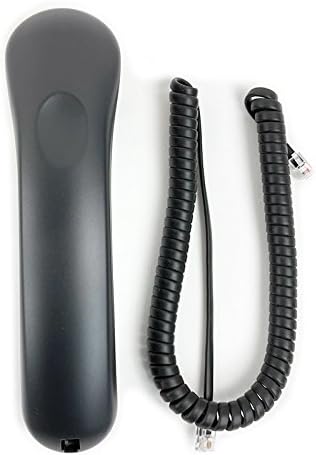
Figure 2.1: The telephone handset and its coiled cord.

Figure 2.2: Standard Ethernet cable included for network connection.

Figure 2.3: The product packaging box.
3. സജ്ജീകരണം
3.1 ഭൗതിക ബന്ധങ്ങൾ
- ഹാൻഡ്സെറ്റ് ബന്ധിപ്പിക്കുക: Plug one end of the coiled handset cord into the handset and the other end into the handset port on the side of the telephone base.
- Connect to Network/Power:
- If using Power over Ethernet (PoE): Connect one end of the Ethernet cable to the LAN port on the back of the telephone and the other end to a PoE-enabled network switch or injector.
- If not using PoE: Connect one end of the Ethernet cable to the LAN port on the back of the telephone and the other end to your network switch or router. Connect an optional 12V power adapter (not included) to the power port on the back of the telephone and then to a power outlet.
- Optional Headset Connection: If using a headset, connect it to the dedicated RJ-22 headset port on the side of the telephone.

ചിത്രം 3.1: പിൻഭാഗം view of the telephone, showing the LAN port for network and power connection.
3.2 പ്രാരംഭ പവർ ഓണും നെറ്റ്വർക്ക് കോൺഫിഗറേഷനും
Once connected, the telephone will power on automatically. The backlit display will illuminate, and the phone will begin its boot sequence. During this process, it will attempt to obtain network settings.
- DHCP: By default, the phone is configured to obtain an IP address and other network settings automatically via DHCP. This is the most common setup for most networks.
- Static IP Addressing: If your network requires a static IP address, you may need to access the phone's network settings menu to manually configure the IP address, subnet mask, gateway, and DNS servers. Consult your network administrator for these details.
4. പ്രവർത്തന നിർദ്ദേശങ്ങൾ
4.1 അടിസ്ഥാന കോൾ പ്രവർത്തനങ്ങൾ
- ഒരു കോൾ ചെയ്യുന്നു:
- ഹാൻഡ്സെറ്റ് ഉയർത്തുക അല്ലെങ്കിൽ അമർത്തുക സ്പീക്കർഫോൺ ബട്ടൺ.
- കീപാഡ് ഉപയോഗിച്ച് ആവശ്യമുള്ള നമ്പർ ഡയൽ ചെയ്യുക.
- അമർത്തുക ഡയൽ ചെയ്യുക or അയക്കുക soft key (if available on display) or wait for the call to connect.
- ഒരു കോളിന് മറുപടി നൽകുന്നു:
- ഫോൺ റിംഗ് ചെയ്യുമ്പോൾ, ഹാൻഡ്സെറ്റ് ഉയർത്തുക അല്ലെങ്കിൽ അമർത്തുക സ്പീക്കർഫോൺ ബട്ടൺ.
- ഒരു കോൾ അവസാനിപ്പിക്കുന്നു:
- Replace the handset in the cradle or press the സ്പീക്കർഫോൺ ഹാംഗ് അപ്പ് ചെയ്യാൻ വീണ്ടും ബട്ടൺ.
4.2 ഫീച്ചർ കീകൾ
The Mitel IP 480G includes dedicated feature keys for enhanced call management:
- കൈമാറ്റം: Used to transfer an active call to another extension or external number.
- സമ്മേളനം: Initiates a multi-party conference call (supports up to 6 parties).
- പിടിക്കുക: Places the current active call on hold.
- History/Redial: Accesses a filterable and unlimited call history. Allows redialing previous numbers.
- വോയ്സ്മെയിൽ: Direct access to your voicemail messages.
- ഡയറക്ടറി: Provides access to a searchable and filterable directory of contacts stored on the system.
4.3 ഓഡിയോ നിയന്ത്രണങ്ങൾ
Manage your audio experience with the following controls:
- വോളിയം: Independent volume control for handset, speakerphone, headset, and alert/ring tones. Use the dedicated volume buttons.
- നിശബ്ദമാക്കുക: Press to mute your microphone during a call. An LED indicator will illuminate when muted.
- സ്പീക്കർഫോൺ: Toggles the speakerphone function on or off. An LED indicator will illuminate when the speakerphone is active.
- ഹെഡ്സെറ്റ്: Activates or deactivates the headset mode. An LED indicator will illuminate when the headset is active.
4.4 ഡിസ്പ്ലേ നാവിഗേഷൻ
The 297 x 160 pixels backlit display provides clear information. Use the navigation cluster (up, down, left, right arrows, and select button) to browse menus, directories, and call history. Soft keys located below the display provide context-sensitive options.
5. പരിപാലനം
5.1 വൃത്തിയാക്കൽ
To maintain the appearance and functionality of your telephone, clean it regularly.
- ഒരു സോഫ്റ്റ് ഉപയോഗിക്കുക, ഡിamp പുറംഭാഗങ്ങൾ തുടയ്ക്കാൻ തുണി.
- Avoid using abrasive cleaners, solvents, or strong chemicals, as these can damage the plastic and finish.
- Do not spray cleaning liquids directly onto the phone.
- Ensure the phone is unplugged from power before cleaning.
5.2 സോഫ്റ്റ്വെയർ അപ്ഡേറ്റുകൾ
Periodically, Mitel may release software updates to improve performance, add features, or address security vulnerabilities. These updates are typically managed by your system administrator. Do not attempt to manually update the phone's firmware unless instructed by qualified personnel.
6. പ്രശ്നപരിഹാരം
This section addresses common issues you might encounter with your Mitel IP 480G Gigabit Telephone.
| പ്രശ്നം | സാധ്യമായ കാരണം | പരിഹാരം |
|---|---|---|
| ഫോൺ പവർ ഓൺ ആകുന്നില്ല. | No power from PoE switch or power adapter. | Verify that the Ethernet cable is securely connected to a PoE-enabled port or that the optional power adapter is correctly plugged in and receiving power. |
| ഡയൽ ടോൺ ഇല്ല. | Network connectivity issue; phone not registered with SIP server. | Check network cable connection. Ensure your network is operational. Contact your system administrator to verify SIP registration status. |
| കോളുകൾ വിളിക്കാനോ സ്വീകരിക്കാനോ കഴിയില്ല. | Network configuration error; SIP account issues. | Confirm network settings (DHCP/Static IP). Verify SIP account credentials with your system administrator. |
| മോശം ഓഡിയോ നിലവാരം (എക്കോ, സ്റ്റാറ്റിക്). | Network congestion; faulty cable; environmental interference. | Check network cable. Ensure sufficient bandwidth. Try a different handset or headset. If issues persist, contact support. |
If you encounter problems not listed here or if the suggested solutions do not resolve the issue, please contact your IT department or Mitel technical support for further assistance.
7 സ്പെസിഫിക്കേഷനുകൾ
- മോഡൽ: Mitel IP 480G
- ഭാഗം നമ്പർ: 10577
- അളവുകൾ (L x W x H): ഏകദേശം 10 x 7 x 3 ഇഞ്ച്
- ഭാരം: ഏകദേശം 1.06 പൗണ്ട് (480 ഗ്രാം)
- നിറം: കറുപ്പ്
- മെറ്റീരിയൽ: പ്ലാസ്റ്റിക്
- ഡിസ്പ്ലേ: 297 x 160 pixels backlit display
- ഇഥർനെറ്റ് പോർട്ടുകൾ: 10/100/1000 Gigabit Ethernet Switch
- ഊർജ്ജ സ്രോതസ്സ്: 802.3af Power over Ethernet (PoE) or optional 12V power adapter (not included)
- പ്രോട്ടോക്കോളുകൾ: SIP Protocol, VLAN and DiffServ/ToS supported Quality of Service
- ഹെഡ്സെറ്റ് അനുയോജ്യത: RJ-22 ഹെഡ്സെറ്റ് പോർട്ട്
- സ്പീക്കർഫോൺ: ഫുൾ ഡ്യുപ്ലെക്സ് സ്പീക്കർഫോൺ
- Feature Keys: Transfer, Conference (6 party), Hold, History/Redial, Voicemail, Directory
- ഓഡിയോ നിയന്ത്രണങ്ങൾ: Independent volume control for handset, speakerphone, headset, alert/rings; Mute (LED indicator); Speakerphone (LED indicator); Headset (LED indicator)
8. വാറൻ്റിയും പിന്തുണയും
ഉൽപ്പന്ന വാറണ്ടിയെക്കുറിച്ചുള്ള വിവരങ്ങൾക്ക്, ദയവായി നിങ്ങളുടെ വാങ്ങലിനൊപ്പം ഉൾപ്പെടുത്തിയിരിക്കുന്ന വാറന്റി കാർഡ് പരിശോധിക്കുകയോ ഔദ്യോഗിക മിറ്റൽ സന്ദർശിക്കുകയോ ചെയ്യുക. website. Technical support and additional resources can also be found on the Mitel support portal.
Mitel Official Webസൈറ്റ്: www.mitel.com


