1. ആമുഖം
This manual provides important information regarding the safe operation, assembly, and maintenance of your Amazon Basics Digital Oscillating 3 Speed Tower Fan. Please read this manual thoroughly before using the product and retain it for future reference.
2 സുരക്ഷാ വിവരങ്ങൾ
മുന്നറിയിപ്പ്: ഈ ഉൽപ്പന്നത്തിന് നിങ്ങളെ ലെഡ് ഉൾപ്പെടെയുള്ള രാസവസ്തുക്കൾ തുറന്നുകാട്ടാൻ കഴിയും, ഇത് ക്യാൻസറിനും ജനന വൈകല്യങ്ങൾക്കും മറ്റ് പ്രത്യുൽപാദന വൈകല്യങ്ങൾക്കും കാരണമാകുമെന്ന് കാലിഫോർണിയ സംസ്ഥാനത്തിന് അറിയാം. കൂടുതൽ വിവരങ്ങൾക്ക് പോകുക www.P65Warnings.ca.gov.
തീപിടുത്തം, വൈദ്യുതാഘാതം, വ്യക്തികൾക്ക് പരിക്കേൽക്കൽ എന്നിവ കുറയ്ക്കുന്നതിന് വൈദ്യുത ഉപകരണങ്ങൾ ഉപയോഗിക്കുമ്പോൾ എല്ലായ്പ്പോഴും അടിസ്ഥാന സുരക്ഷാ മുൻകരുതലുകൾ പാലിക്കുക.
For detailed safety guidelines, please refer to the "Safety Information (PDF)" document available for download from the product's Amazon page.
3. പാക്കേജ് ഉള്ളടക്കം
- ടവർ ഫാൻ യൂണിറ്റ്
- Two-piece Base
- Base Fastening Nut
- റിമോട്ട് കൺട്രോൾ
- ഉപയോക്തൃ മാനുവൽ (ഈ പ്രമാണം)
4. സജ്ജീകരണം
Follow these steps to assemble your tower fan:
- പാക്കേജിംഗിൽ നിന്ന് എല്ലാ ഘടകങ്ങളും ശ്രദ്ധാപൂർവ്വം നീക്കം ചെയ്യുക.
- Assemble the two-piece base by aligning the halves and snapping them together.
- Place the tower fan unit onto the assembled base, ensuring the power cord passes through the designated opening in the base.
- Secure the fan to the base using the large plastic fastening nut located at the bottom of the fan unit. Twist the nut clockwise until it is firmly tightened. No tools are required for assembly.
- Insert two AAA batteries (not included) into the remote control.
- പരന്നതും സുസ്ഥിരവുമായ പ്രതലത്തിൽ ഫാൻ സ്ഥാപിക്കുക.

Figure 4.1: Assembled Amazon Basics Digital Oscillating Tower Fan.
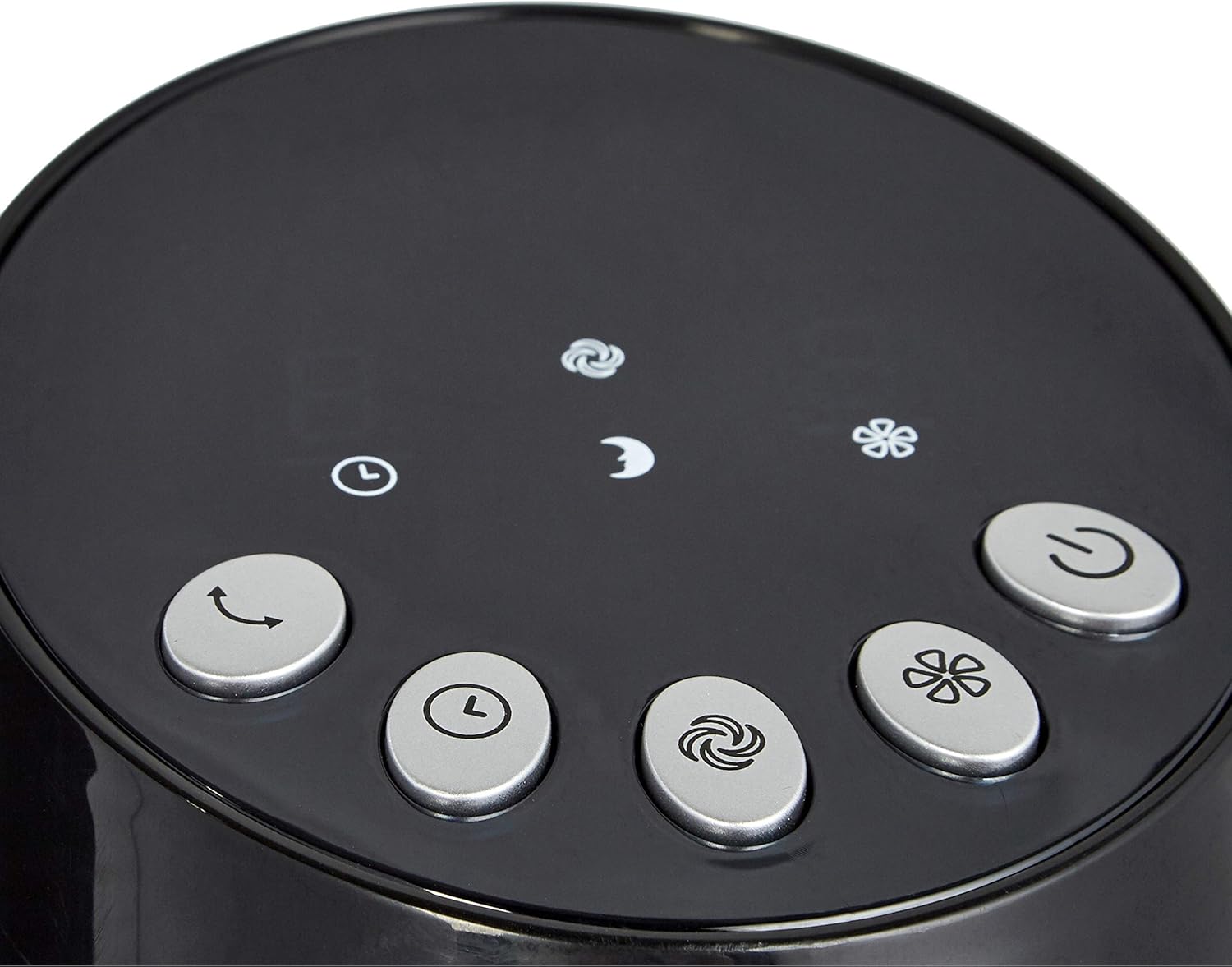
Figure 4.2: The two-piece base of the tower fan before assembly.
5. പ്രവർത്തന നിർദ്ദേശങ്ങൾ
Your tower fan can be operated using the digital control panel on top of the unit or the included remote control.
5.1 നിയന്ത്രണ പാനലും റിമോട്ട് പ്രവർത്തനങ്ങളും

Figure 5.1: Digital control panel with various function buttons.

ചിത്രം 5.2: സൗകര്യപ്രദമായ പ്രവർത്തനത്തിനായി റിമോട്ട് കൺട്രോൾ.
- പവർ ബട്ടൺ: ഫാൻ ഓൺ അല്ലെങ്കിൽ ഓഫ് ചെയ്യുന്നു.
- വേഗത ക്രമീകരണങ്ങൾ: Cycle through 3 speed levels (Low, Medium, High). The display will show the current speed (1, 2, or 3).
- മോഡുകൾ: Select from different airflow modes:
- സാധാരണ മോഡ്: സ്ഥിരമായ വായുസഞ്ചാരം നൽകുന്നു.
- സ്വാഭാവിക മോഡ്: ഫാൻ വേഗതയിൽ വ്യത്യാസമുണ്ടാക്കി പ്രകൃതിദത്തമായ കാറ്റിനെ അനുകരിക്കുന്നു.
- സ്ലീപ്പ് മോഡ്: Offers a softer, quieter airflow, ideal for nighttime use.
- ഓസിലേഷൻ ബട്ടൺ: Activates or deactivates the oscillating function, allowing the fan to rotate and distribute air across a wider area.
- ടൈമർ പ്രവർത്തനം: Set the fan to automatically turn off after a specified period, up to 8 hours. Repeatedly press the timer button to cycle through available time settings.
6. പരിപാലനം
പതിവ് അറ്റകുറ്റപ്പണികൾ നിങ്ങളുടെ ഫാനിന്റെ മികച്ച പ്രകടനവും ദീർഘായുസ്സും ഉറപ്പാക്കുന്നു.
- വൃത്തിയാക്കുന്നതിന് മുമ്പ് എല്ലായ്പ്പോഴും ഫാൻ അൺപ്ലഗ് ചെയ്യുക.
- ഒരു സോഫ്റ്റ് ഉപയോഗിക്കുക, ഡിamp പുറംഭാഗങ്ങൾ തുടയ്ക്കാൻ തുണി ഉപയോഗിക്കുക. അബ്രസീവ് ക്ലീനറുകളോ ലായകങ്ങളോ ഉപയോഗിക്കരുത്.
- Periodically clean the air intake and exhaust vents with a vacuum cleaner or a soft brush to prevent dust buildup, which can affect performance.
- ഉപയോഗത്തിലില്ലാത്തപ്പോൾ തണുത്തതും വരണ്ടതുമായ സ്ഥലത്ത് ഫാൻ സൂക്ഷിക്കുക.
7. പ്രശ്നപരിഹാരം
നിങ്ങളുടെ ഫാനിൽ പ്രശ്നങ്ങൾ നേരിടുകയാണെങ്കിൽ, ഇനിപ്പറയുന്ന പൊതുവായ പ്രശ്നങ്ങളും പരിഹാരങ്ങളും പരിശോധിക്കുക:
| പ്രശ്നം | സാധ്യമായ കാരണം | പരിഹാരം |
|---|---|---|
| ഫാൻ ഓണാകുന്നില്ല. | വൈദ്യുതി വിതരണം ഇല്ല. | പ്രവർത്തിക്കുന്ന ഒരു ഇലക്ട്രിക്കൽ ഔട്ട്ലെറ്റിൽ പവർ കോർഡ് സുരക്ഷിതമായി പ്ലഗ് ചെയ്തിട്ടുണ്ടെന്ന് ഉറപ്പാക്കുക. |
| റിമോട്ട് കൺട്രോൾ പ്രവർത്തിക്കുന്നില്ല. | ഡെഡ് അല്ലെങ്കിൽ തെറ്റായി ചേർത്ത ബാറ്ററികൾ. | Replace batteries (2 AAA) and ensure they are inserted with correct polarity. |
| കുറഞ്ഞ വായുപ്രവാഹം. | Dust buildup in vents. | Clean the air intake and exhaust vents as described in the Maintenance section. |
| ഫാൻ മുഴങ്ങുന്നു. | Fan not on a stable surface or internal issue. | Ensure the fan is on a flat, stable surface. If noise persists, contact customer support. |
If the problem persists after trying these solutions, please contact Amazon Basics customer support.
8 സ്പെസിഫിക്കേഷനുകൾ
| ഫീച്ചർ | വിശദാംശങ്ങൾ |
|---|---|
| ബ്രാൻഡ് | ആമസോൺ അടിസ്ഥാനങ്ങൾ |
| മോഡൽ നമ്പർ | FZ10-9LR |
| നിറം | കറുപ്പ് |
| ഉൽപ്പന്ന അളവുകൾ | 11.81"D x 11.81"W x 35.91"H |
| ഇനത്തിൻ്റെ ഭാരം | 8.18 പൗണ്ട് |
| പവർ ഉറവിടം | കോർഡഡ് ഇലക്ട്രിക് |
| വാട്ട്tage | 35 വാട്ട്സ് |
| വാല്യംtage | 110-120 വോൾട്ട് |
| പ്രത്യേക ഫീച്ചർ | ആന്ദോളനം |
| നിയന്ത്രണ രീതി | റിമോട്ട് |
| പവർ ലെവലുകളുടെ എണ്ണം | 3 (വേഗത) |
9. വാറണ്ടിയും പിന്തുണയും
For warranty information and customer support, please refer to the "Warranty (PDF)" document available for download from the product's Amazon page or visit the official ആമസോൺ ബേസിക്സ് സ്റ്റോർ.


