1. ആമുഖം
This manual provides comprehensive instructions for the installation, operation, and maintenance of your WOBANE Under Cabinet LED Strip Light Kit. This kit is designed to provide efficient and warm white illumination (2700K) for various indoor applications such as cabinets, cupboards, desks, shelves, and more. Please read this manual thoroughly before installation and use to ensure proper function and safety.
2. പാക്കേജ് ഉള്ളടക്കം
നിങ്ങളുടെ പാക്കേജിൽ എല്ലാ ഘടകങ്ങളും ഉണ്ടെന്ന് ഉറപ്പാക്കുക:
- 4 x LED Light Bars (20 inches each)
- 1 x Power Adapter (ETL Listed, 12V DC)
- 1 x In-line On/Off Switch
- Connectors (various types for straight and angled connections)
- കേബിൾ ഉടമകൾ
3. ഉൽപ്പന്ന സവിശേഷതകൾ
| ഫീച്ചർ | സ്പെസിഫിക്കേഷൻ |
|---|---|
| ബ്രാൻഡ് | വോബൻ |
| മോഡൽ നമ്പർ | LED cabinet light CS2 |
| ഇളം നിറം | ചൂടുള്ള വെള്ള |
| വർണ്ണ താപനില | 2700 കെൽവിൻ |
| തെളിച്ചം | 1200 ല്യൂമെൻസ് (ആകെ) |
| LED- കളുടെ എണ്ണം | 120 |
| വാട്ട്tage | 12 വാട്ട്സ് |
| വാല്യംtage | 12 വോൾട്ട് (DC) |
| മെറ്റീരിയൽ | ചെമ്പ്, പ്ലാസ്റ്റിക് |
| ഉൽപ്പന്ന അളവുകൾ | 4"L x 2"W x 3"H (overall kit packaging) |
| Light Bar Length | 4 x 20 ഇഞ്ച് |
| ഇൻഡോർ/ഔട്ട്ഡോർ ഉപയോഗം | ഇൻഡോർ മാത്രം |
| ജല പ്രതിരോധ നില | വാട്ടർ റെസിസ്റ്റൻ്റ് അല്ല |
4. പ്രധാന സുരക്ഷാ നിർദ്ദേശങ്ങൾ
- ഉൽപ്പന്നം ഉപയോഗിക്കുന്നതിന് മുമ്പ് എല്ലാ നിർദ്ദേശങ്ങളും വായിക്കുക.
- ഈ ഉൽപ്പന്നം രൂപകൽപ്പന ചെയ്തിരിക്കുന്നത് ഇൻഡോർ ഉപയോഗം മാത്രം. വെള്ളത്തിലോ ഉയർന്ന ആർദ്രതയിലോ സമ്പർക്കം പുലർത്തരുത്.
- ഇൻസ്റ്റാളേഷൻ അല്ലെങ്കിൽ അറ്റകുറ്റപ്പണിക്ക് മുമ്പ് വൈദ്യുതി വിതരണം വിച്ഛേദിച്ചിട്ടുണ്ടെന്ന് ഉറപ്പാക്കുക.
- Use only the provided power adapter. Using an incompatible adapter may damage the product or pose a fire hazard.
- Do not cut the LED strips unless specifically instructed and at designated cut marks. Improper cutting can damage the strip and void the warranty.
- Avoid bending the LED strips sharply, especially at connection points, to prevent damage to the circuit.
- കുട്ടികൾക്ക് ലഭ്യമാകാതെ സൂക്ഷിക്കുക.
- If any part of the product is damaged, discontinue use immediately and contact customer support.
5. ഇൻസ്റ്റാളേഷൻ ഗൈഡ്
Follow these steps for a simple and secure installation:
5.1. ഉപരിതല തയ്യാറാക്കൽ
Before attaching the LED strips, ensure the installation surface is clean, dry, and smooth. Wipe the area with a clean cloth to remove dust, grease, or moisture. This will ensure optimal adhesion of the tape.

Figure 5.1: Clean the installation surface thoroughly before applying the LED strips.
5.2. Attaching LED Strips
- Carefully peel off the protective backing from the adhesive tape on the back of each LED light bar.
- Press the LED strip firmly onto the desired surface. Apply even pressure along the entire length to ensure good contact.
5.3. ഘടകങ്ങൾ ബന്ധിപ്പിക്കുന്നു
Connect the LED light bars to each other and to the power adapter using the provided connectors and the in-line switch. Ensure all connections are secure.

Figure 5.2: Use the provided connectors to link multiple LED light bars.
Use the included cable holders to manage and secure any loose wiring, keeping the installation neat and tidy. Connect the in-line switch and power adapter to the assembled LED strips, then plug the adapter into a standard electrical outlet.

Figure 5.3: Secure cables with cable holders for a clean installation.
5.4. Customizing Layout with Connectors
The kit includes flexible connectors that allow for versatile installation around corners or across gaps between surfaces. These connectors ensure a continuous lighting effect even in complex layouts.
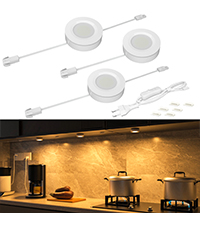
Figure 5.4: Flexible connectors enable seamless corner installations.
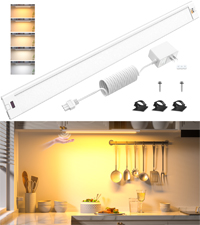
Figure 5.5: Achieve various angles with the flexible connectors.
6. ഓപ്പറേഷൻ
Once installed and connected to power, operate the WOBANE LED Strip Light Kit using the in-line switch. Simply toggle the switch to turn the lights ON or ഓഫ്.
7. പരിപാലനം
To maintain the performance and appearance of your LED strip lights:
- വൃത്തിയാക്കുന്നതിന് മുമ്പ് വൈദ്യുതി വിച്ഛേദിച്ചിട്ടുണ്ടെന്ന് ഉറപ്പാക്കുക.
- Wipe the LED strips and other components with a soft, dry cloth. Do not use abrasive cleaners or solvents.
- വെള്ളവുമായുള്ള നേരിട്ടുള്ള സമ്പർക്കം ഒഴിവാക്കുക.
8. പ്രശ്നപരിഹാരം
| പ്രശ്നം | സാധ്യമായ കാരണം | പരിഹാരം |
|---|---|---|
| വിളക്കുകൾ തെളിയുന്നില്ല. | No power, loose connection, faulty switch/adapter. | Check if the power adapter is securely plugged into the outlet. Verify all connectors are firmly attached. Test the switch. Ensure the outlet is functional. |
| ലൈറ്റുകൾ മങ്ങുകയോ മിന്നിമറയുകയോ ചെയ്യുന്നു. | Insufficient power, loose connection, damaged strip. | Ensure the power adapter is providing adequate power. Check all connections for looseness. Inspect the LED strip for visible damage. |
| LED strip does not stick. | Improper surface preparation, old adhesive. | Clean the surface thoroughly before re-applying. For persistent issues, consider using additional adhesive clips or double-sided tape. |
9. വാറൻ്റിയും പിന്തുണയും
For warranty information or technical support, please refer to the product packaging or contact WOBANE customer service directly. Keep your purchase receipt as proof of purchase.


