1. ഉൽപ്പന്നം കഴിഞ്ഞുview
The Maxwest Nitro 5N is an Android 7.0 smartphone designed for reliable communication and multimedia use. It features a 5-inch display, a Quad Core processor, and dual SIM capability, making it suitable for various global GSM networks.

ചിത്രം 1.1: മുന്നിലും പിന്നിലും view of the Maxwest Nitro 5N smartphone, showcasing its sleek black design and display.
2. ബോക്സിൽ എന്താണുള്ളത്?
Upon opening your Maxwest Nitro 5N package, please ensure all the following items are present:
- Maxwest Nitro 5N Smartphone
- ബാറ്ററി (2000 mAh)
- ചാർജർ അഡാപ്റ്റർ
- USB കേബിൾ
- Protective Case Cover
3. പ്രാരംഭ സജ്ജീകരണം
3.1. സിം കാർഡും ബാറ്ററിയും ചേർക്കൽ
- പവർ ഓഫ്: Ensure your Maxwest Nitro 5N is powered off before proceeding.
- പിൻ കവർ നീക്കം ചെയ്യുക: ഫോണിന്റെ പിൻ കവർ ശ്രദ്ധാപൂർവ്വം നീക്കം ചെയ്യുക.
- സിം കാർഡ്(കൾ) ചേർക്കുക: Locate the SIM card slots. This device supports dual SIM cards. Insert your GSM SIM card(s) into the designated slots with the gold contacts facing down. Ensure they are securely seated.
- ബാറ്ററി ചേർക്കുക: Place the 2000 mAh battery into its compartment, aligning the gold contacts on the battery with those in the phone.
- പിൻ കവർ മാറ്റിസ്ഥാപിക്കുക: Carefully reattach the back cover until it clicks into place.
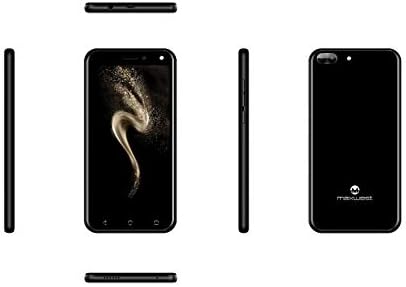
ചിത്രം 3.1: വശം views of the Maxwest Nitro 5N, illustrating the location of buttons and ports for SIM/battery access.
3.2. പവർ ഓൺ, പ്രാരംഭ കോൺഫിഗറേഷൻ
- പവർ ഓൺ: Press and hold the Power button (usually on the side) until the Maxwest logo appears.
- ഭാഷ തിരഞ്ഞെടുക്കൽ: നിങ്ങളുടെ ഇഷ്ടപ്പെട്ട ഭാഷ തിരഞ്ഞെടുക്കാൻ ഓൺ-സ്ക്രീൻ നിർദ്ദേശങ്ങൾ പാലിക്കുക.
- Wi-Fi കണക്ഷൻ: സജ്ജീകരണ പ്രക്രിയ പൂർത്തിയാക്കുന്നതിനും ആവശ്യമായ അപ്ഡേറ്റുകൾ ഡൗൺലോഡ് ചെയ്യുന്നതിനും ഒരു Wi-Fi നെറ്റ്വർക്കിലേക്ക് കണക്റ്റുചെയ്യുക.
- Google അക്കൗണ്ട്: നിങ്ങളുടെ ഗൂഗിൾ അക്കൗണ്ട് ഉപയോഗിച്ച് സൈൻ ഇൻ ചെയ്യുകയോ പുതിയൊരെണ്ണം സൃഷ്ടിക്കുകയോ ചെയ്യുക. ഗൂഗിൾ പ്ലേ സ്റ്റോറും മറ്റ് ഗൂഗിൾ സേവനങ്ങളും ആക്സസ് ചെയ്യുന്നതിന് ഇത് അത്യാവശ്യമാണ്.
- തീയതിയും സമയവും: ശരിയായ തീയതിയും സമയവും സജ്ജമാക്കുക, അല്ലെങ്കിൽ നെറ്റ്വർക്കിന് അത് യാന്ത്രികമായി സജ്ജമാക്കാൻ അനുവദിക്കുക.
- സുരക്ഷ: Configure screen lock options such as PIN, pattern, or password for device security.
പ്രധാന കുറിപ്പ്: This device is designed to work with GSM carriers such as AT&T, T-Mobile, and Metro PCS. It will NOT work with CDMA carriers like Verizon, Sprint, or Boost Mobile.
4. Operating Your Maxwest Nitro 5N
4.1. അടിസ്ഥാന നാവിഗേഷൻ
- ടച്ച് സ്ക്രീൻ: Interact with the device by tapping, swiping, pinching, and spreading on the 5-inch LCD display.
- ഹോം സ്ക്രീൻ: നിങ്ങളുടെ ആപ്പുകൾക്കും വിജറ്റുകൾക്കുമുള്ള കേന്ദ്ര ഹബ്. അധിക സ്ക്രീനുകൾ ആക്സസ് ചെയ്യാൻ ഇടത്തോട്ടോ വലത്തോട്ടോ സ്വൈപ്പ് ചെയ്യുക.
- അറിയിപ്പ് പാനൽ: അറിയിപ്പുകളും ദ്രുത ക്രമീകരണങ്ങളും ആക്സസ് ചെയ്യാൻ സ്ക്രീനിന്റെ മുകളിൽ നിന്ന് താഴേക്ക് സ്വൈപ്പ് ചെയ്യുക.
- നാവിഗേഷൻ ബട്ടണുകൾ: Use the on-screen navigation buttons (Back, Home, Recent Apps) at the bottom of the display.
4.2. കോളുകൾ ചെയ്യുക, സന്ദേശങ്ങൾ അയയ്ക്കുക
- ഫോൺ ആപ്പ്: Tap the Phone icon to access the dialer, call logs, and contacts.
- മെസേജ് ആപ്പ്: Tap the Messages icon to send and receive SMS/MMS messages.
4.3. ക്യാമറ ഉപയോഗം
Your Nitro 5N is equipped with 5MP front and rear cameras.
- ക്യാമറ തുറക്കുക: നിങ്ങളുടെ ഹോം സ്ക്രീനിലോ ആപ്പ് ഡ്രോയറിലോ ഉള്ള ക്യാമറ ഐക്കണിൽ ടാപ്പ് ചെയ്യുക.
- ക്യാമറകൾ മാറുക: മുൻ ക്യാമറയും പിൻ ക്യാമറയും തമ്മിൽ മാറാൻ ക്യാമറ സ്വിച്ച് ഐക്കണിൽ ടാപ്പ് ചെയ്യുക.
- ഫോട്ടോ/വീഡിയോ എടുക്കുക: ഒരു ഫോട്ടോ എടുക്കാൻ ഷട്ടർ ബട്ടൺ ടാപ്പ് ചെയ്യുക അല്ലെങ്കിൽ വീഡിയോ റെക്കോർഡിംഗ് ആരംഭിക്കുക/നിർത്തുക.
4.4. Screen Pinning Feature
Screen Pinning allows you to lock your phone to a single application, preventing others from accessing other apps or settings. This is useful when sharing your phone temporarily.
- Enable Screen Pinning: പോകുക Settings > Security > Screen pinning അത് ഓണാക്കുക.
- Pin an App: Open the app you wish to pin. Tap the Recent Apps button (square icon). Swipe up on the app's preview and tap the pin icon.
- Unpin an App: To unpin, simultaneously press and hold the Back and Recent Apps buttons. You may need to enter your PIN/pattern/password if required by your security settings.
5. പരിപാലനവും പരിചരണവും
5.1. ബാറ്ററി പരിചരണം
- ചാർജിംഗ്: Use only the provided charger and USB cable. Avoid overcharging by disconnecting the charger once the battery is full.
- താപനില: Avoid exposing the phone to extreme temperatures, as this can degrade battery life.
- സംഭരണം: If storing the phone for an extended period, ensure the battery is partially charged (around 50%).
5.2. നിങ്ങളുടെ ഉപകരണം വൃത്തിയാക്കൽ
- സ്ക്രീൻ: മൃദുവായ, ലിന്റ് രഹിത തുണി ഉപയോഗിക്കുക, ചെറുതായി നനവ് ഉണ്ടാകരുത്.ampened with water or a screen cleaner, to gently wipe the display.
- ശരീരം: Use a soft, dry cloth to clean the phone's body. Avoid harsh chemicals or abrasive materials.
5.3. സോഫ്റ്റ്വെയർ അപ്ഡേറ്റുകൾ
Periodically check for system updates to ensure optimal performance and security. Go to ക്രമീകരണങ്ങൾ > ഫോണിനെക്കുറിച്ച് > സിസ്റ്റം അപ്ഡേറ്റുകൾ ലഭ്യമായ അപ്ഡേറ്റുകൾ പരിശോധിച്ച് ഇൻസ്റ്റാൾ ചെയ്യാൻ.
6. പൊതുവായ പ്രശ്നങ്ങൾ പരിഹരിക്കുന്നു
| പ്രശ്നം | സാധ്യമായ പരിഹാരം |
|---|---|
| ഫോൺ പവർ ഓൺ ആകുന്നില്ല. | ബാറ്ററി ശരിയായി ഇട്ടിട്ടുണ്ടെന്നും ചാർജ്ജ് ചെയ്തിട്ടുണ്ടെന്നും ഉറപ്പാക്കുക. ചാർജർ കണക്റ്റ് ചെയ്ത് വീണ്ടും ശ്രമിക്കുക. |
| നെറ്റ്വർക്ക് സിഗ്നൽ ഇല്ല. | Verify SIM card insertion. Check if you are within network coverage. Ensure your carrier is GSM compatible (e.g., AT&T, T-Mobile). Restart the phone. |
| ആപ്പുകൾ മന്ദഗതിയിലാണ് അല്ലെങ്കിൽ ക്രാഷാകുന്നു. | പശ്ചാത്തല ആപ്പുകൾ അടയ്ക്കുക. ആപ്പ് കാഷെ മായ്ക്കുക (ക്രമീകരണങ്ങൾ > ആപ്പുകൾ > [ആപ്പ് നാമം] > സംഭരണം > കാഷെ മായ്ക്കുക). Restart the phone. Ensure sufficient storage space. |
| ബാറ്ററി പെട്ടെന്ന് തീരുന്നു. | Reduce screen brightness. Disable Wi-Fi, Bluetooth, and GPS when not in use. Close unnecessary background apps. Check battery usage in settings to identify power-hungry apps. |
| Wi-Fi-ലേക്ക് കണക്റ്റ് ചെയ്യാൻ കഴിയില്ല. | Ensure Wi-Fi is enabled. Restart your router and phone. Forget the network and reconnect. |
7. ഉൽപ്പന്ന സവിശേഷതകൾ
| ഫീച്ചർ | വിശദാംശങ്ങൾ |
|---|---|
| മോഡലിൻ്റെ പേര് | Nitro 5N |
| ഓപ്പറേറ്റിംഗ് സിസ്റ്റം | ആൻഡ്രോയിഡ് 7.0 |
| പ്രോസസ്സർ | Quad Core 1.2 GHz (1.2GHz Cortex A9 Processor) |
| റാം | 1 ജിബി |
| ആന്തരിക സംഭരണം | 8 GB (approximately 5.6 GB user available) |
| പ്രദർശിപ്പിക്കുക | 5.0 inch LCD, 480 x 854 pixels, 2.5D TP |
| പിൻ ക്യാമറ | 5 എം.പി |
| മുൻ ക്യാമറ | 5 എം.പി |
| ബാറ്ററി ശേഷി | 2000 mAh ലിഥിയം അയോൺ |
| നെറ്റ്വർക്ക് അനുയോജ്യത | 3G H+ 850/1900/2100 MHz, 2G: 850/900/1800/1900 MHz (GSM Carriers only) |
| കണക്റ്റിവിറ്റി | USB, Cellular, GPS, Wi-Fi, Bluetooth (Wireless) |
| ഓഡിയോ ജാക്ക് | 3.5 മി.മീ |
| അളവുകൾ (L x W x H) | 5.73 x 2.83 x 0.38 ഇഞ്ച് |
| ഭാരം | 5.4 ഔൺസ് (153 ഗ്രാം) |
| നിറം | കറുപ്പ് |
8. വാറൻ്റി വിവരങ്ങൾ
The Maxwest Nitro 5N comes with a one-year parts and labor warranty from the date of purchase. This warranty covers manufacturing defects and workmanship under normal use. It does not cover damage caused by misuse, accidents, unauthorized repairs, or normal wear and tear.
വാറൻ്റി ക്ലെയിമുകൾക്കായി നിങ്ങളുടെ വാങ്ങിയതിൻ്റെ തെളിവ് സൂക്ഷിക്കുക.
9. ഉപഭോക്തൃ പിന്തുണ
For technical assistance, troubleshooting beyond this manual, or warranty inquiries, please contact Maxwest customer support. Refer to the contact information provided with your product packaging or visit the official Maxwest webഏറ്റവും കാലികമായ പിന്തുണാ വിശദാംശങ്ങൾക്കായി സൈറ്റ്.
When contacting support, please have your product model (Nitro 5N) and proof of purchase readily available.


