1. ആമുഖം
The iFi Audio xDSD is a high-resolution portable Digital-to-Analog Converter (DAC) and headphone amplifier designed to elevate your audio experience. It supports a wide range of audio formats, including PCM up to 768kHz, DSD up to 512, and MQA, ensuring compatibility with the latest high-fidelity music. With its powerful headphone amplification and versatile connectivity options, the xDSD delivers exceptional sound quality for both wired and wireless listening.
This manual provides detailed instructions for setting up, operating, and maintaining your iFi Audio xDSD to ensure optimal performance and longevity.
2. പാക്കേജ് ഉള്ളടക്കം
നിങ്ങളുടെ ഉൽപ്പന്ന പാക്കേജിൽ എല്ലാ ഇനങ്ങളും ഉണ്ടെന്ന് ദയവായി പരിശോധിക്കുക:
- iFi Audio xDSD Unit
- USB 3.0 Cable (Blue)
- USB-A to USB-B Adapter
- USB-A മുതൽ USB-C അഡാപ്റ്റർ വരെ
- Optical Adapter
- Velcro Strips (for attaching to devices)
- സോഫ്റ്റ് കാരിയറിംഗ് പൗച്ച്
- ദ്രുത ആരംഭ ഗൈഡ്
- വാറൻ്റി കാർഡ്

Figure 2.1: Included accessories and the xDSD unit.
3. ഉൽപ്പന്ന സവിശേഷതകൾ
- True Native Playback: Supports DSD, DXD, and PCM formats for uncompromised audio fidelity.
- Powerful Headphone Ampജീവപര്യന്തം: Delivers robust output to drive a wide range of headphones.
- നീണ്ട ബാറ്ററി ലൈഫ്: Integrated lithium-polymer battery provides up to 10 hours of playback.
- ബഹുമുഖ കണക്റ്റിവിറ്റി: Features USB, S/PDIF (optical/coaxial), and Bluetooth inputs.
- MQA പിന്തുണ: Ready for MQA (Master Quality Authenticated) playback.
- വയർലെസ് സ്വാതന്ത്ര്യം: Bluetooth with aptX and AAC codecs for high-quality wireless audio.
- S-Balanced Output: 3.5mm headphone output designed for balanced connection benefits with single-ended headphones.
- Advanced Analogue Signal Processing (ASP): Includes 3D+ and XBass+ features to enhance soundstage and bass response.
- Pure Analogue Volume Control: Maintains signal integrity across all volume levels.
- Digital Filter Selection: 'Measure' and 'Listen' digital filter options for tailored sound.
- നീണ്ടുനിൽക്കുന്ന നിർമ്മാണം: Extruded Magnesium-Aluminum body for robust and lightweight design.
4. നിയന്ത്രണങ്ങളും കണക്ഷനുകളും
4.1 ഫ്രണ്ട് പാനൽ

Figure 4.1: xDSD Front Panel
- Volume Knob / Power Button: Rotates to adjust volume. Press and hold for 2 seconds to power on/off. Quick press to mute/unmute.
- 3.5mm ഹെഡ്ഫോൺ ഔട്ട്പുട്ട്: നിങ്ങളുടെ ഹെഡ്ഫോണുകൾ ഇവിടെ ബന്ധിപ്പിക്കുക.
- Input LEDs (kHz): നിലവിലെ എസ് സൂചിപ്പിക്കുന്നുampലിംഗ് നിരക്കും ഇൻപുട്ട് മോഡും.
- 3D+ Button: Activates/deactivates the 3D+ soundstage enhancement.
- XBass+ Button: Activates/deactivates the XBass+ bass enhancement.
4.2 പിൻ പാനൽ

Figure 4.2: xDSD Rear Panel
- S/PDIF ഇൻപുട്ട്: For connecting optical or coaxial digital audio sources.
- USB-A ഇൻപുട്ട്: For connecting to computers or mobile devices via USB.
- Micro USB (5V) Power Input: ഉപകരണം ചാർജ് ചെയ്യുന്നതിനായി.
- Filter Switch (Measure/Listen): Selects between two digital filter modes. 'Measure' provides a more technically accurate sound, while 'Listen' offers a more natural and musical presentation.
5. സജ്ജീകരണം
5.1 Charging the xDSD
Before first use, fully charge the xDSD. Connect the supplied USB cable to the Micro USB (5V) port on the rear panel and plug the other end into a USB power adapter (not included) or a computer's USB port. The LED indicator will show charging status.
5.2 ഒരു ഉറവിട ഉപകരണത്തിലേക്ക് ബന്ധിപ്പിക്കുന്നു
The xDSD offers multiple input options:
- USB Connection (Computers/Smartphones): Use the supplied USB cable and appropriate adapters to connect the xDSD's USB-A input to your computer or smartphone. Ensure your device's audio output is set to the xDSD.
- ബ്ലൂടൂത്ത് കണക്ഷൻ: For wireless audio, ensure the xDSD is in Bluetooth mode (see Section 6.2). Pair it with your Bluetooth-enabled device.
- എസ്/പിഡിഐഎഫ് കണക്ഷൻ: Use an optical or coaxial cable (not included) to connect your digital audio source to the S/PDIF input.
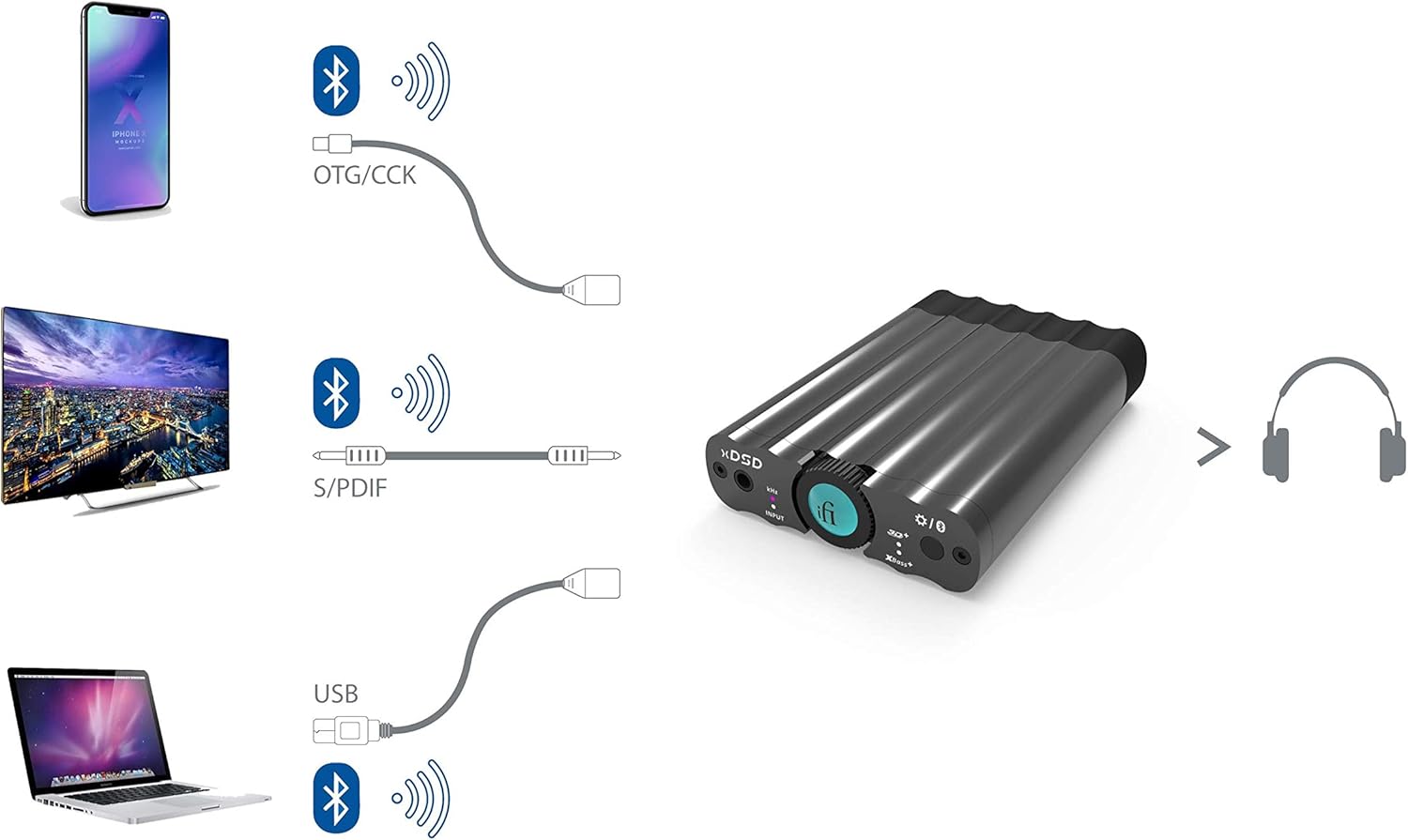
Figure 5.1: xDSD Connectivity Options
5.3 ഹെഡ്ഫോണുകൾ ബന്ധിപ്പിക്കുന്നു
Plug your headphones into the 3.5mm headphone output on the front panel of the xDSD.

Figure 5.2: xDSD connected to a smartphone and headphones.
6. പ്രവർത്തന നിർദ്ദേശങ്ങൾ
6.1 പവർ ഓൺ/ഓഫ്, വോളിയം നിയന്ത്രണം
- പവർ ഓൺ/ഓഫ്: Press and hold the volume knob for approximately 2 seconds. The LED around the volume knob will illuminate.
- വോളിയം ക്രമീകരണം: ശബ്ദം കൂട്ടാൻ വോളിയം നോബ് ഘടികാരദിശയിലും കുറയ്ക്കാൻ എതിർ ഘടികാരദിശയിലും തിരിക്കുക.
- നിശബ്ദമാക്കുക/അൺമ്യൂട്ടുചെയ്യുക: Briefly press the volume knob to mute or unmute the audio output.
6.2 ഇൻപുട്ട് മോഡുകൾ മാറൽ
To switch between USB, S/PDIF, and Bluetooth inputs:
- Power off the xDSD.
- Press and hold the volume knob for approximately 4 seconds. The input LED will cycle through the available modes. Release the button when the desired mode is indicated.
6.3 ബ്ലൂടൂത്ത് ജോടിയാക്കൽ
ബ്ലൂടൂത്ത് മോഡിൽ ആയിരിക്കുമ്പോൾ:
- Press and hold the XBass+ / 3D+ button for 2 seconds to enter pairing mode. The Bluetooth LED will flash.
- On your source device (e.g., smartphone), search for Bluetooth devices and select 'iFi xDSD' to pair.
- Once paired, the Bluetooth LED will remain solid.
6.4 Using 3D+ and XBass+
- 3D+: Press the 3D+ button to activate or deactivate the soundstage enhancement. This feature aims to create a more spacious and immersive listening experience.
- XBass+: Press the XBass+ button to activate or deactivate the bass enhancement. This feature provides a deeper and more impactful bass response without muddying the mid-range.
6.5 Digital Filter Selection
The xDSD features a 'Measure/Listen' switch on the rear panel:
- അളക്കുക: This filter provides a more linear frequency response, ideal for critical listening and audio analysis.
- കേൾക്കുക: This filter offers a slightly warmer and more natural sound signature, often preferred for general music enjoyment.
7. പരിപാലനം
- വൃത്തിയാക്കൽ: Use a soft, dry, lint-free cloth to clean the surface of the xDSD. Avoid using abrasive cleaners or solvents.
- സംഭരണം: ദീർഘനേരം ഉപയോഗിക്കാത്തപ്പോൾ, ഉപകരണം തണുത്തതും വരണ്ടതുമായ സ്ഥലത്ത് സൂക്ഷിക്കുക, നേരിട്ടുള്ള സൂര്യപ്രകാശത്തിൽ നിന്നും കടുത്ത താപനിലയിൽ നിന്നും അകറ്റി നിർത്തുക.
- കൈകാര്യം ചെയ്യൽ: Handle the xDSD with care. Avoid dropping it or subjecting it to strong impacts.
- ബാറ്ററി കെയർ: For optimal battery life, avoid fully discharging the battery frequently. If storing for a long time, charge it to about 50% every few months.
8. പ്രശ്നപരിഹാരം
| പ്രശ്നം | സാധ്യമായ കാരണം | പരിഹാരം |
|---|---|---|
| ഉപകരണം പവർ ഓണാക്കുന്നില്ല. | ബാറ്ററി തീർന്നു. | Connect the xDSD to a USB power source and allow it to charge for at least 30 minutes before attempting to power on. |
| ശബ്ദ ഔട്ട്പുട്ട് ഇല്ല. | തെറ്റായ ഇൻപുട്ട് തിരഞ്ഞെടുത്തു. ശബ്ദം വളരെ കുറവാണ് അല്ലെങ്കിൽ മ്യൂട്ട് ചെയ്തിരിക്കുന്നു. ഹെഡ്ഫോണുകൾ ശരിയായി ബന്ധിപ്പിച്ചിട്ടില്ല. Source device not playing audio or outputting to xDSD. | Verify the correct input mode is selected (USB, Bluetooth, S/PDIF). Increase volume or unmute the device. ഹെഡ്ഫോണുകൾ 3.5mm ജാക്കിൽ പൂർണ്ണമായും പ്ലഗ് ചെയ്തിട്ടുണ്ടെന്ന് ഉറപ്പാക്കുക. Check audio playback on your source device and confirm it's outputting to the xDSD. |
| ബ്ലൂടൂത്ത് ജോടിയാക്കൽ പ്രശ്നങ്ങൾ. | xDSD not in pairing mode. മുൻ ജോടിയാക്കൽ സംഘർഷം. Source device Bluetooth issues. | Ensure xDSD is in Bluetooth mode and press/hold the XBass+/3D+ button for 2 seconds to enter pairing mode. On your source device, 'forget' or 'unpair' the xDSD and attempt to pair again. Restart your source device's Bluetooth function or the device itself. |
| Hissing or static noise. | മറ്റ് ഉപകരണങ്ങളിൽ നിന്നുള്ള ഇടപെടൽ. ഗ്രൗണ്ട് ലൂപ്പ് പ്രശ്നങ്ങൾ. High sensitivity headphones. | Move the xDSD away from other electronic devices. മറ്റൊരു USB പോർട്ട് അല്ലെങ്കിൽ പവർ അഡാപ്റ്റർ പരീക്ഷിക്കുക. Some highly sensitive headphones may exhibit a slight hiss, especially at very low volumes. This is often normal for high-gain ampജീവപര്യന്തം. |
9 സ്പെസിഫിക്കേഷനുകൾ

Figure 9.1: xDSD Technical Specifications
| ഫീച്ചർ | വിശദാംശങ്ങൾ |
|---|---|
| മോഡൽ നമ്പർ | 4336299358 |
| അളവുകൾ (L x W x H) | 3.74 x 2.6 x 0.75 ഇഞ്ച് (95 x 67 x 19 മിമി) |
| ഭാരം | 4.5 ഔൺസ് (127 ഗ്രാം) |
| ഔട്ട്പുട്ട് പവർ | 0.5 Watts (500mW) |
| ചാനലുകളുടെ എണ്ണം | 2 |
| ബാറ്ററി തരം | ലിഥിയം പോളിമർ |
| ബാറ്ററി ലൈഫ് | 10 മണിക്കൂർ വരെ |
| Supported Formats (USB) | PCM 768kHz / DSD512 / DXD / MQA |
| Supported Formats (S/PDIF) | PCM 192kHz / DSD64 (DoP) |
| ബ്ലൂടൂത്ത് കോഡെക്കുകൾ | aptX, AAC |
| മെറ്റീരിയൽ | Magnesium-Aluminum Alloy |
10. വാറൻ്റിയും പിന്തുണയും
10.1 വാറൻ്റി വിവരങ്ങൾ
The iFi Audio xDSD comes with a 12-month limited warranty from the date of purchase. This warranty covers manufacturing defects and workmanship under normal use. It does not cover damage caused by misuse, accidents, unauthorized modifications, or natural disasters.
വാറൻ്റി ക്ലെയിമുകൾക്കായി നിങ്ങളുടെ വാങ്ങിയതിൻ്റെ തെളിവ് സൂക്ഷിക്കുക.
10.2 ഉപഭോക്തൃ പിന്തുണ
For technical assistance, troubleshooting, or warranty inquiries, please visit the official iFi Audio website or contact their customer support team. Contact details can typically be found on the iFi Audio webസൈറ്റ് അല്ലെങ്കിൽ നിങ്ങളുടെ ഉൽപ്പന്നത്തിൽ ഉൾപ്പെടുത്തിയിരിക്കുന്ന വാറന്റി കാർഡിൽ.


