1. ആമുഖം
This manual provides comprehensive instructions for the installation, operation, and maintenance of the LOGiC V5 Camera Interface. This interface is designed to seamlessly integrate aftermarket reverse and front cameras with your existing Mercedes-Benz infotainment system.
Please read this manual thoroughly before installation and operation to ensure proper functionality and to avoid any damage to the product or your vehicle.
2. ഉൽപ്പന്നം കഴിഞ്ഞുview
The LOGiC V5 Camera Interface is a Plug & Play solution for adding rear-view ഒപ്പം ഫ്രണ്ട്-view camera capabilities to compatible Mercedes-Benz vehicles equipped with Comand Online NTG5-205/NTG5.1 or Audio20 NTG5-205/NTG5.1 systems. It allows for automatic switching to the reverse camera when engaging reverse gear and supports manual switching to the front camera.
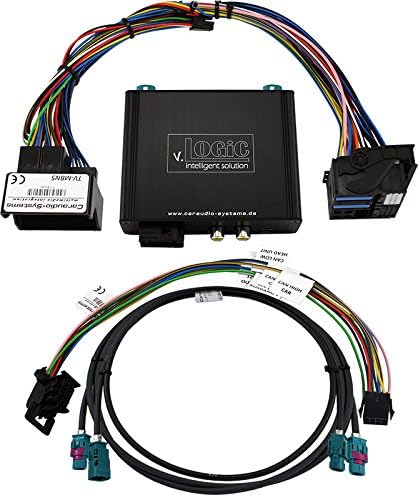
ചിത്രം 1: LOGiC V5 Camera Interface module with included wiring harnesses. The main black module features the "v. LOGiC intelligent solution" branding and RCA connectors. Various multi-pin connectors and a long cable with blue and purple FAKRA connectors are visible, indicating a comprehensive plug-and-play wiring solution for vehicle integration.
3. സവിശേഷതകൾ
- Plug & Play Camera Interface: Designed for easy installation without complex wiring modifications.
- Dynamic Parking Guidelines: Provides active parking lines on the screen for enhanced assistance.
- ഓൺ-സ്ക്രീൻ ഡിസ്പ്ലേ (OSD): Allows for parameter changes directly on the vehicle's display.
- FBAS പിൻഭാഗം-View ക്യാമറ ഇൻപുട്ട്: Dedicated input for a reverse camera.
- FBAS Front-View ക്യാമറ ഇൻപുട്ട്: Dedicated input for a front camera.
- Automatic Reverse Camera Switching: Automatically switches to the reverse camera input when reverse gear is engaged from any operating mode.
- Manual Camera Switching: Option to manually switch to the reverse camera.
- Two Switching Outputs (+12V max. 1A): Separately adjustable switching criteria (CAN, ignition, camera, reverse).
- Compatibility with Original Video Applications: Works alongside existing original video applications (e.g., factory reverse camera, TV tuner).
- USB Update Port: Allows for end-user software updates.
4 അനുയോജ്യത
This interface is compatible with Mercedes-Benz vehicles equipped with the following infotainment systems:
- Comand Online NTG5/NTG5.1
- Audio20 CD NTG5/NTG5.1
- Audio20 USB NTG5/NTG5.1
Important Restriction: This interface is NOT supported for vehicles with a factory-installed TV tuner.
Compatible Mercedes-Benz vehicle models (from specified production dates):
- A-Class (W176) from 09/2015
- B-Class (W246) from 11/2014
- C-Class (W205) up to approx. 06/2018
- C-Class Coupe (C202) from 2015
- CLA Coupe (C117) from 10/2014
- CLA Shooting Brake (X117) from 03/2015
- CLS Coupe (W218) from 08/2014
- CLS Shooting Brake (X218) from approx. 08/2014
- E-Class (S/W212) from 11/2014
- E-Class Coupe (A/C207) from 06/2015 up to 08/2017
- G-Model (G463) from 10/2016
- GL-Class (X166) from 09/2016
- GLA-Class (X156) from 09/2015
- GLC-Class (X253)
- GLE-Class (C292)
- GLS-Class (X166) from 11/2015
- GT AMG (C190)
- ML-Class (W166) from 08/2015
- SL-Class (R231) from approx. 10/2015
- SLC-Class (R172) from 2016
- V-Class (W447) from 2014
5. സജ്ജീകരണവും ഇൻസ്റ്റാളേഷനും
The LOGiC V5 Camera Interface is designed for Plug & Play installation. While specific vehicle disassembly steps are beyond the scope of this general manual, the following outlines the typical installation process:
- തയ്യാറാക്കൽ: ഇൻസ്റ്റാളേഷൻ ആരംഭിക്കുന്നതിന് മുമ്പ് വാഹനത്തിന്റെ ഇഗ്നിഷൻ ഓഫാണെന്നും ബാറ്ററി വിച്ഛേദിക്കപ്പെട്ടിട്ടുണ്ടെന്നും ഉറപ്പാക്കുക.
- ആക്സസ് ഹെഡ് യൂണിറ്റ്: Carefully remove the vehicle's infotainment head unit to access its rear connections. Refer to your vehicle's specific service manual for detailed instructions on head unit removal.
- ഇന്റർഫേസ് ബന്ധിപ്പിക്കുക: The interface harness connects inline with the existing wiring of your Mercedes head unit. Disconnect the original wiring harness from the head unit and connect it to the corresponding input on the LOGiC V5 interface harness. Then, connect the output of the LOGiC V5 interface harness to the head unit.
- ക്യാമറ കണക്ഷൻ: Connect your aftermarket reverse camera to the dedicated FBAS reverse camera input (RCA connector) on the LOGiC V5 module. If installing a front camera, connect it to the FBAS front camera input.
- ശക്തിയും ഗ്രൗണ്ടും: Ensure the interface receives proper power and ground connections as per the wiring diagram (typically integrated into the Plug & Play harness).
- റൂട്ടിംഗ് കേബിളുകൾ: Route all cables neatly and securely, ensuring they do not interfere with moving parts or get pinched.
- ടെസ്റ്റ് പ്രവർത്തനം: Before reassembling the dashboard, reconnect the vehicle battery and test the camera functionality.
- വീണ്ടും കൂട്ടിച്ചേർക്കുക: Once confirmed working, carefully reassemble the head unit and dashboard components.
Note: Professional installation is recommended if you are not familiar with automotive electrical systems or dashboard disassembly.
6. പ്രവർത്തന നിർദ്ദേശങ്ങൾ
Once installed, the LOGiC V5 Camera Interface operates largely automatically:
- Reverse Camera Activation: When you shift your vehicle into reverse gear, the interface will automatically switch the display to the connected reverse camera feed. After disengaging reverse, the display will return to the previous operating mode.
- Front Camera Activation: The front camera can typically be activated manually. Consult the interface's OSD (On-Screen Display) menu for specific activation methods, which may involve a button press or a sequence on the vehicle's controls.
- Dynamic Parking Guidelines: These guidelines will appear on the screen with the reverse camera feed and will dynamically adjust with steering wheel movement (if supported by your vehicle and camera).
- OSD മെനു: Access the On-Screen Display menu to adjust various parameters of the interface, such as camera settings, switching criteria for the 12V outputs, or other configuration options. Refer to the interface's specific OSD instructions for navigation.
7. പരിപാലനം
The LOGiC V5 Camera Interface is designed for long-term, maintenance-free operation. To ensure its longevity and optimal performance, consider the following general guidelines:
- ഉണക്കി സൂക്ഷിക്കുക: Ensure the interface module and its connections remain dry and free from moisture.
- താപനില: Avoid exposing the unit to extreme temperatures, both hot and cold, beyond typical automotive operating conditions.
- ശുചിത്വം: Keep the module free from dust and debris. If cleaning is necessary, use a soft, dry cloth. Do not use liquid cleaners.
- കണക്ഷനുകൾ: Periodically check that all connections remain secure, especially if the vehicle experiences significant vibrations.
- സോഫ്റ്റ്വെയർ അപ്ഡേറ്റുകൾ: Utilize the USB update port for software updates provided by the manufacturer to ensure compatibility and access to new features.
8. പ്രശ്നപരിഹാരം
If you encounter issues with your LOGiC V5 Camera Interface, please refer to the following troubleshooting steps:
| പ്രശ്നം | സാധ്യമായ കാരണം | പരിഹാരം |
|---|---|---|
| No camera image on display. |
|
|
| Image flickering or distorted. |
|
|
| Automatic switching not working. |
|
|
| Dynamic guidelines not appearing. |
|
|
If the problem persists after attempting these solutions, please contact Caraudio-Systems customer support for further assistance.
9 സ്പെസിഫിക്കേഷനുകൾ
| ഫീച്ചർ | സ്പെസിഫിക്കേഷൻ |
|---|---|
| മോഡൽ നമ്പർ | V5-NTG5-PNP |
| ബ്രാൻഡ് | Caraudio-Systems |
| കണക്റ്റിവിറ്റി ടെക്നോളജി | USB (for updates) |
| ചാനലുകളുടെ എണ്ണം | 2 (Camera Inputs) |
| ഓഡിയോ ഇൻപുട്ട് | AUX (Implied for video integration, not direct audio input for interface) |
| ഇനത്തിൻ്റെ ഭാരം | 614 ഗ്രാം |
| മെറ്റീരിയൽ തരം | ലോഹം |
| യു.പി.സി | 784089002239 |
10. വാറൻ്റിയും പിന്തുണയും
Warranty information for the LOGiC V5 Camera Interface is typically provided at the point of purchase or within the product packaging. Please retain your proof of purchase for warranty claims.
For technical support, troubleshooting assistance beyond this manual, or warranty inquiries, please contact the manufacturer:
നിർമ്മാതാവ്: Caraudio-Systems Vertriebs GmbH
Please refer to the official Caraudio-Systems website or your retailer for contact details and the most up-to-date support information.


