ആമുഖം
This manual provides comprehensive instructions for the setup, operation, maintenance, and troubleshooting of your Behringer XENYX X2222USB Premium 22-Input 2/2-Bus Mixer. Please read this manual thoroughly before operating the device to ensure proper use and to maximize its performance and longevity.
The Behringer XENYX X2222USB is a high-performance audio mixer designed for professional audio applications. It features an integrated USB computer audio interface, allowing for seamless blending and shaping of multiple audio signals and distribution to various outputs. Key features include eight top-tier XENYX microphone preamps, British-style EQs, eight user-friendly one-knob compressors, and a built-in 24-bit dual engine effects processor.
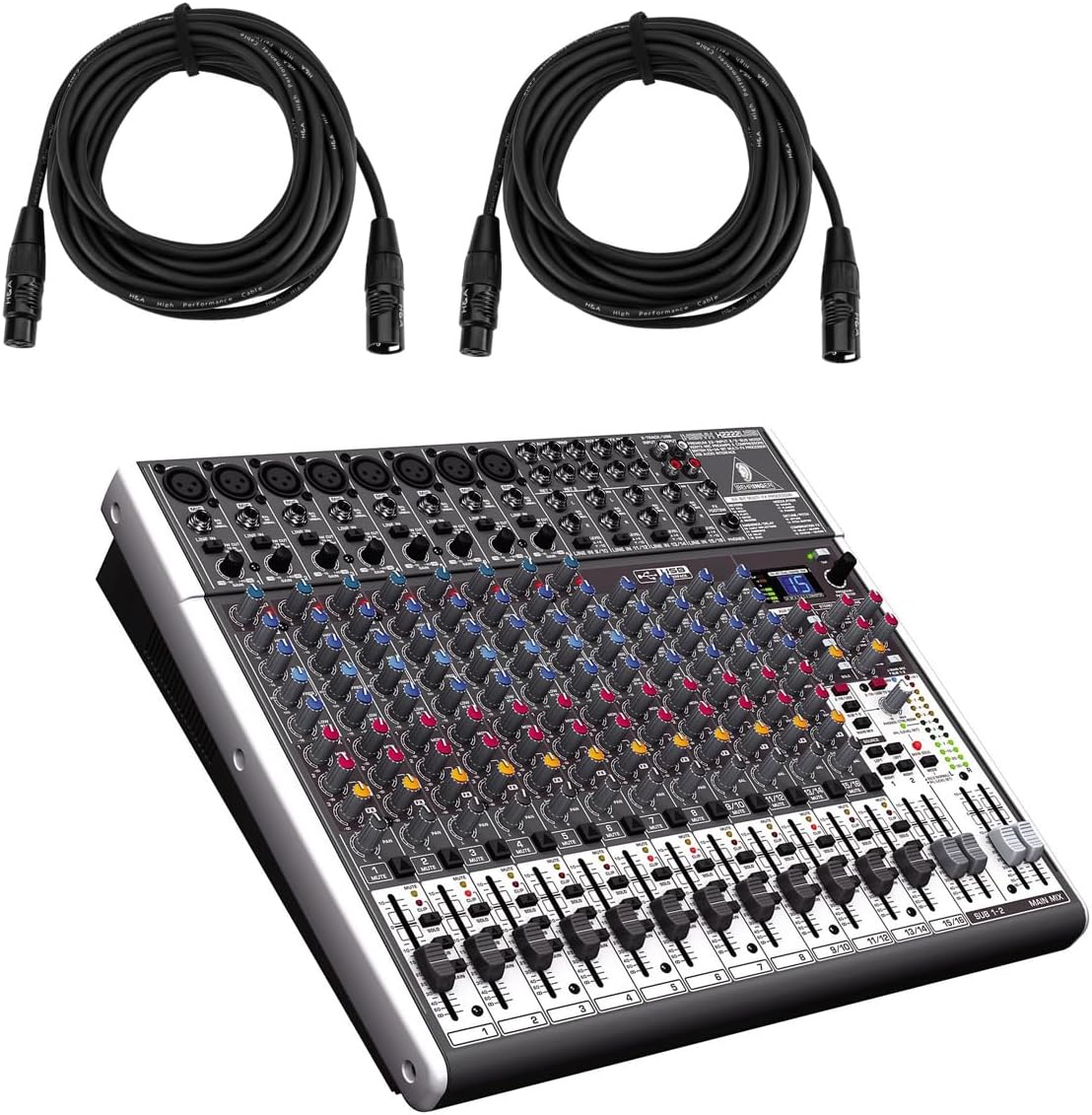
Figure 1: Behringer XENYX X2222USB Mixer with included XLR cables. This image shows the mixer from an angled top-front view, alongside two coiled XLR microphone cables.
പ്രധാനപ്പെട്ട സുരക്ഷാ നിർദ്ദേശങ്ങൾ
- ഈ നിർദ്ദേശങ്ങൾ വായിക്കുക.
- ഈ നിർദ്ദേശങ്ങൾ സൂക്ഷിക്കുക.
- എല്ലാ മുന്നറിയിപ്പുകളും ശ്രദ്ധിക്കുക.
- എല്ലാ നിർദ്ദേശങ്ങളും പാലിക്കുക.
- വെള്ളത്തിനടുത്ത് ഈ ഉപകരണം ഉപയോഗിക്കരുത്.
- ഉണങ്ങിയ തുണി ഉപയോഗിച്ച് മാത്രം വൃത്തിയാക്കുക.
- വെൻ്റിലേഷൻ ഓപ്പണിംഗുകളൊന്നും തടയരുത്. നിർമ്മാതാവിൻ്റെ നിർദ്ദേശങ്ങൾക്കനുസൃതമായി ഇൻസ്റ്റാൾ ചെയ്യുക.
- റേഡിയറുകൾ, ഹീറ്റ് രജിസ്റ്ററുകൾ, സ്റ്റൗകൾ, അല്ലെങ്കിൽ മറ്റ് ഉപകരണങ്ങൾ (ഉൾപ്പെടെ) പോലെയുള്ള താപ സ്രോതസ്സുകൾക്ക് സമീപം ഇൻസ്റ്റാൾ ചെയ്യരുത്. ampലൈഫയറുകൾ) ചൂട് ഉത്പാദിപ്പിക്കുന്നത്.
- പോളറൈസ്ഡ് അല്ലെങ്കിൽ ഗ്രൗണ്ടിംഗ്-ടൈപ്പ് പ്ലഗിൻ്റെ സുരക്ഷാ ഉദ്ദേശ്യത്തെ പരാജയപ്പെടുത്തരുത്. ധ്രുവീകരിക്കപ്പെട്ട പ്ലഗിന് രണ്ട് ബ്ലേഡുകൾ ഉണ്ട്, ഒന്ന് മറ്റൊന്നിനേക്കാൾ വീതിയുള്ളതാണ്. ഒരു ഗ്രൗണ്ടിംഗ് ടൈപ്പ് പ്ലഗിന് രണ്ട് ബ്ലേഡുകളും മൂന്നാമത്തെ ഗ്രൗണ്ടിംഗ് പ്രോംഗും ഉണ്ട്. നിങ്ങളുടെ സുരക്ഷയ്ക്കായി വിശാലമായ ബ്ലേഡ് അല്ലെങ്കിൽ മൂന്നാമത്തെ പ്രോംഗ് നൽകിയിരിക്കുന്നു. നൽകിയിരിക്കുന്ന പ്ലഗ് നിങ്ങളുടെ ഔട്ട്ലെറ്റിലേക്ക് യോജിക്കുന്നില്ലെങ്കിൽ, കാലഹരണപ്പെട്ട ഔട്ട്ലെറ്റ് മാറ്റിസ്ഥാപിക്കുന്നതിന് ഒരു ഇലക്ട്രീഷ്യനെ സമീപിക്കുക.
- പ്രത്യേകിച്ച് പ്ലഗുകൾ, കൺവീനിയൻസ് റിസപ്റ്റക്കിളുകൾ, ഉപകരണത്തിൽ നിന്ന് പുറത്തുകടക്കുന്ന പോയിൻ്റ് എന്നിവയിൽ നടക്കുകയോ പിഞ്ച് ചെയ്യുകയോ ചെയ്യുന്നതിൽ നിന്ന് പവർ കോർഡ് സംരക്ഷിക്കുക.
- നിർമ്മാതാവ് വ്യക്തമാക്കിയ അറ്റാച്ച്മെൻ്റുകൾ/ആക്സസറികൾ മാത്രം ഉപയോഗിക്കുക.
- നിർമ്മാതാവ് വ്യക്തമാക്കിയ കാർട്ട്, സ്റ്റാൻഡ്, ട്രൈപോഡ്, ബ്രാക്കറ്റ് അല്ലെങ്കിൽ ടേബിൾ എന്നിവയ്ക്കൊപ്പം മാത്രം ഉപയോഗിക്കുക, അല്ലെങ്കിൽ ഉപകരണം ഉപയോഗിച്ച് വിൽക്കുക. ഒരു കാർട്ട് ഉപയോഗിക്കുമ്പോൾ, ടിപ്പ്-ഓവറിൽ നിന്നുള്ള പരിക്ക് ഒഴിവാക്കാൻ വണ്ടി/ഉപകരണ കോമ്പിനേഷൻ നീക്കുമ്പോൾ ജാഗ്രത പാലിക്കുക.
- മിന്നൽ കൊടുങ്കാറ്റുകളുടെ സമയത്തോ ദീർഘനേരം ഉപയോഗിക്കാത്ത സമയത്തോ ഈ ഉപകരണം അൺപ്ലഗ് ചെയ്യുക.
- എല്ലാ സേവനങ്ങളും യോഗ്യതയുള്ള സേവന ഉദ്യോഗസ്ഥർക്ക് റഫർ ചെയ്യുക. പവർ സപ്ലൈ കോർഡ് അല്ലെങ്കിൽ പ്ലഗ് കേടാകുക, ദ്രാവകം ഒഴുകുകയോ ഉപകരണങ്ങൾ ഉപകരണത്തിലേക്ക് വീഴുകയോ ചെയ്യുക, ഉപകരണം മഴയോ ഈർപ്പമോ സമ്പർക്കം പുലർത്തുക, സാധാരണയായി പ്രവർത്തിക്കാത്തത് എന്നിങ്ങനെയുള്ള ഏതെങ്കിലും വിധത്തിൽ ഉപകരണത്തിന് കേടുപാടുകൾ സംഭവിക്കുമ്പോൾ സേവനം ആവശ്യമാണ്. , അല്ലെങ്കിൽ ഉപേക്ഷിച്ചു.
പാക്കേജ് ഉള്ളടക്കം
താഴെ ലിസ്റ്റ് ചെയ്തിരിക്കുന്ന എല്ലാ ഇനങ്ങളും നിങ്ങളുടെ പാക്കേജിൽ ഉൾപ്പെടുത്തിയിട്ടുണ്ടെന്ന് ദയവായി പരിശോധിക്കുക:
- Behringer XENYX X2222USB Mixer
- റാക്ക് മ s ണ്ട്സ്
- EnergyXT2.5 Software (download/license information)
- 2 x H&A XLR Cables (15' 8mm)
- പവർ കോർഡ്
- ഉപയോക്തൃ മാനുവൽ (ഈ പ്രമാണം)
സജ്ജമാക്കുക
Follow these steps to set up your Behringer XENYX X2222USB mixer for initial use.
1. പവർ കണക്ഷൻ
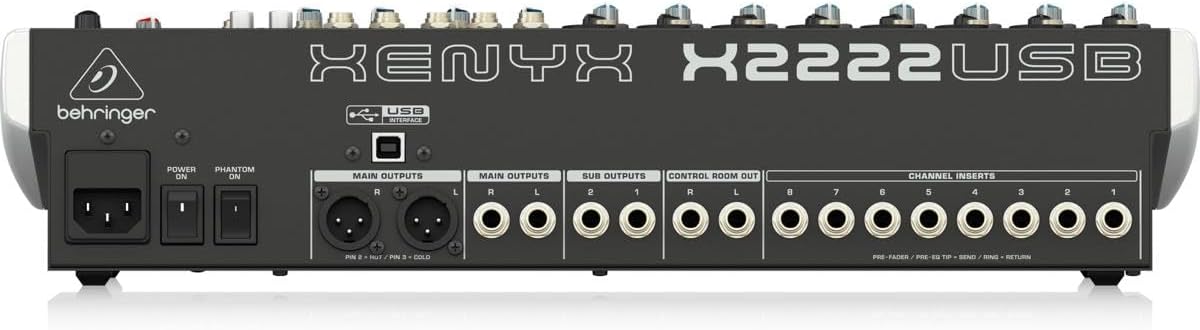
Connect the supplied power cord to the mixer's power input on the rear panel and then to a suitable AC power outlet. Ensure the power switch is in the OFF position before connecting.

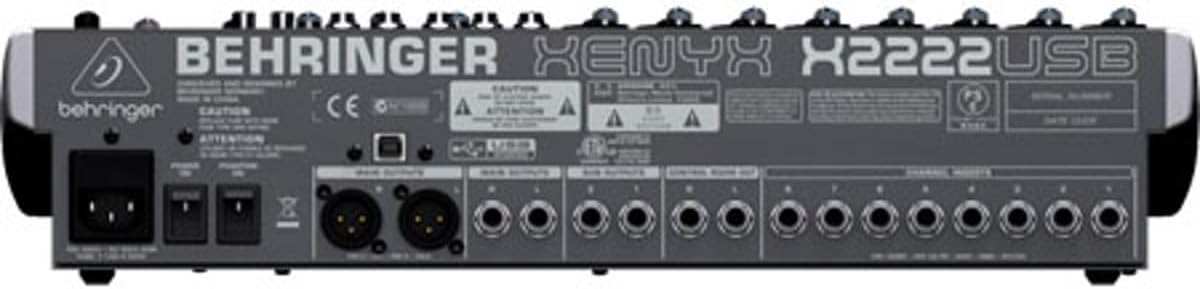
Figure 2: Rear panel of the XENYX X2222USB mixer, highlighting power input, main outputs, sub outputs, control room out, and channel inserts.
2 ഓഡിയോ ഇൻപുട്ട് കണക്ഷനുകൾ
The mixer features 8 XLR mic inputs with XENYX preamps and 12 line inputs (8 mono, 4 stereo). Connect your microphones, instruments, and other audio sources to the appropriate input jacks.
- മൈക്രോഫോണുകൾ: Use XLR cables (like the included H&A cables) to connect microphones to the XLR inputs (1-8).
- ലൈൻ-ലെവൽ ഉപകരണങ്ങൾ: Use 1/4" TRS or TS cables for line-level instruments or devices to the 1/4" line inputs.
ചിത്രം 3: ഉദാamples of XLR male (left) and female (right) connectors, commonly used for microphone connections.
3 ഓഡിയോ ഔട്ട്പുട്ട് കണക്ഷനുകൾ
Connect your main speakers, monitors, or recording devices to the mixer's output jacks.
- പ്രധാന p ട്ട്പുട്ടുകൾ: Use XLR or 1/4" TRS cables for your main stereo speakers.
- കൺട്രോൾ റൂം ഔട്ട്: For connecting studio monitors.
- Sub Outputs: For routing specific groups of channels.
4. USB Connection (for Computer Audio Interface)
Connect the mixer to your computer using a standard USB cable. This enables bi-directional audio transfer for recording and playback.
- Ensure your computer meets the system requirements for the EnergyXT2.5 software.
- Install any necessary drivers (usually automatically detected by modern operating systems, but check Behringer's website if issues arise).
- Install the included EnergyXT2.5 software for advanced recording and production capabilities.
മിക്സർ പ്രവർത്തിപ്പിക്കുന്നു
ഈ വിഭാഗം ഒരു ഓവർ നൽകുന്നുview of the mixer's controls and basic operation.

ചിത്രം 4: ഫ്രണ്ട് പാനൽ കഴിഞ്ഞുview of the XENYX X2222USB mixer, displaying all channels, faders, knobs, and the effects section.
Channel Strips (Mono Channels 1-8)
- നിയന്ത്രണം നേടുക: Adjusts the input sensitivity for microphones and line-level signals. Set this to achieve a healthy signal level without clipping.
- കംപ്രസർ: One-knob compressor for dynamic range control. Turn clockwise to increase compression.
- EQ (സമനില): 3-band British-style EQ with swept mid.
- ഉയർന്നത്: ട്രെബിൾ ഫ്രീക്വൻസികൾ ക്രമീകരിക്കുന്നു.
- മിഡ്: Adjusts mid-range frequencies. The FREQ knob selects the specific mid-frequency to be adjusted.
- കുറവ്: ബാസ് ഫ്രീക്വൻസികൾ ക്രമീകരിക്കുന്നു.
- AUX അയയ്ക്കുന്നു: Three auxiliary sends per channel (FX1, MON1, MON2) for routing signals to external effects processors or stagഇ മോണിറ്ററുകൾ.
- പാൻ: Positions the channel's signal in the stereo field (left to right).
- മ്യൂട്ട്: Mutes the channel's output.
- സോളോ: നിരീക്ഷണത്തിനായി ചാനൽ ഒറ്റപ്പെടുത്തുന്നു.
- ചാനൽ ഫേഡർ: Controls the output level of the individual channel.
Stereo Channels (9/10, 11/12, 13/14, 15/16)
These channels are designed for stereo line-level inputs and feature simplified controls compared to mono channels.
ഇഫക്റ്റ് പ്രോസസർ
The built-in 24-bit dual engine effects processor offers 16 editable presets including reverb, chorus, flanger, delay, and pitch shifter. Use the പ്രോഗ്രാം knob to select an effect and the എഫ് എക്സ് അയയ്ക്കുക controls to apply it to channels.
USB ഓഡിയോ ഇന്റർഫേസ്
The integrated USB interface allows for bi-directional audio streaming with your computer. This enables direct recording of your mix and playback of audio from your computer through the mixer.
- റെക്കോർഡിംഗ്: The main stereo mix can be sent to your computer for recording in a DAW (Digital Audio Workstation) like EnergyXT2.5.
- പ്ലേബാക്ക്: Audio from your computer can be routed back into the mixer for monitoring or integration into your live mix.
പ്രധാന മിക്സ് വിഭാഗം
- പ്രധാന മിക്സ് ഫേഡറുകൾ: Control the overall output level of the stereo main mix.
- ലെവൽ മീറ്ററുകൾ: Provide visual indication of the main mix output level. Aim for levels around 0 dB to avoid clipping.
- ഫാന്റം പവർ (+48V): Activates phantom power for condenser microphones connected to XLR inputs. Ensure microphones requiring phantom power are connected before activating.
മെയിൻ്റനൻസ്
ശരിയായ അറ്റകുറ്റപ്പണി നിങ്ങളുടെ മിക്സറിന്റെ ദീർഘായുസ്സും മികച്ച പ്രകടനവും ഉറപ്പാക്കുന്നു.
- വൃത്തിയാക്കൽ: Use a soft, dry cloth to clean the exterior of the mixer. Avoid using abrasive cleaners, solvents, or waxes. Do not spray liquids directly onto the mixer.
- വെൻ്റിലേഷൻ: വെന്റിലേഷൻ ദ്വാരങ്ങൾ അടഞ്ഞിട്ടില്ലെന്ന് ഉറപ്പാക്കുക. അമിതമായി ചൂടാകുന്നത് തടയാൻ മതിയായ വായുസഞ്ചാരം നിർണായകമാണ്.
- സംഭരണം: When not in use for extended periods, store the mixer in a cool, dry place, away from direct sunlight and extreme temperatures. If possible, use the original packaging or a protective case.
- കേബിൾ മാനേജുമെന്റ്: Regularly check all cables for damage. Replace frayed or damaged cables immediately to prevent signal loss or electrical hazards.
ട്രബിൾഷൂട്ടിംഗ്
നിങ്ങൾ നേരിട്ടേക്കാവുന്ന പൊതുവായ പ്രശ്നങ്ങളെ ഈ വിഭാഗം അഭിസംബോധന ചെയ്യുകയും പരിഹാരങ്ങൾ നൽകുകയും ചെയ്യുന്നു.
| പ്രശ്നം | സാധ്യമായ കാരണം | പരിഹാരം |
|---|---|---|
| മെയിൻ മിക്സിൽ നിന്ന് ശബ്ദ ഔട്ട്പുട്ട് ഇല്ല. |
|
|
| വികലമായ ശബ്ദം. |
|
|
| USB audio not working. |
|
|
സ്പെസിഫിക്കേഷനുകൾ
| ഫീച്ചർ | വിശദാംശങ്ങൾ |
|---|---|
| ബ്രാൻഡ് | ബെഹ്രിംഗർ |
| മോഡൽ | XENYX X2222USB |
| ചാനലുകളുടെ എണ്ണം | 22 (8 മോണോ, 4 സ്റ്റീരിയോ) |
| മൈക്രോഫോൺ പ്രീamps | 8 x XENYX Mic Preamps |
| കംപ്രസ്സറുകൾ | 8 x One-knob Compressors |
| ഇക്വലൈസർ | British-style 3-band EQ with swept mid on mono channels |
| ഇഫക്റ്റ് പ്രോസസർ | 24-bit dual engine with 16 presets |
| കണക്റ്റിവിറ്റി ടെക്നോളജി | USB (bi-directional audio interface) |
| ഔട്ട്പുട്ട് കണക്റ്റർ തരം | എക്സ്എൽആർ, 1/4" ടിആർഎസ് |
| പവർ ഉറവിടം | കോർഡഡ് ഇലക്ട്രിക് |
| ഉൽപ്പന്ന അളവുകൾ | 20.75 x 15.8 x 6 ഇഞ്ച് (52.7 x 40.1 x 15.2 സെ.മീ) |
| ഇനത്തിൻ്റെ ഭാരം | 15.22 പൗണ്ട് (6.9 കി.ഗ്രാം) |
വാറൻ്റി വിവരങ്ങൾ
The Behringer XENYX X2222USB Mixer bundle includes Adorama's 1-year warranty. For specific terms, conditions, and to register your product, please refer to the warranty documentation provided with your purchase or visit the official Behringer or Adorama support webസൈറ്റുകൾ.
വാറൻ്റി ക്ലെയിമുകൾക്കായി നിങ്ങളുടെ വാങ്ങിയതിൻ്റെ തെളിവ് സൂക്ഷിക്കുക.
പിന്തുണ
For further assistance, technical support, or to download the latest drivers and software, please visit the official Behringer webസൈറ്റ്:
You may also refer to the Behringer Store on Amazon for product information and related accessories: ബെഹ്രിംഗർ ആമസോൺ സ്റ്റോർ


