ആമുഖം
The VALETON Dapper Acoustic Mini (MES-4) is a compact, all-in-one multi-effects pedal designed for electric-acoustic guitars and other acoustic instruments. It integrates essential tools for live performance and recording, including a DI output, analog preamp, compressor, reverb, and tuner, all within a durable, mini-sized enclosure.
പ്രധാന സവിശേഷതകൾ
- Acoustic Guitar D.I. (XLR Output) with Multi-Effects, compatible with other acoustic instruments.
- Analog PREAMP with 3-band EQ & Anti-Feedback (Notch Filter) to eliminate unwanted microphonics.
- Classic studio-sounding Analog Compressor for enhanced finger-picking.
- High-quality Reverb module adding depth and ambience.
- Headphones Jack with CAB SIM for direct recording or PA connection.
- Built-in TUNER for accurate instrument tuning.
- 9V Center Negative Regular Pedal Power Supply (adapter included).
സജ്ജമാക്കുക
Follow these steps to set up your Dapper Acoustic Mini pedal:
- Connect the included 9V DC power adapter to the 9V DC input jack on the pedal and to a power outlet.
- Connect your acoustic instrument to the IN jack using a standard 1/4-inch instrument cable.
- Connect the OUT jack to your amplifier or audio interface using a 1/4-inch instrument cable.
- For a balanced signal to a PA system or mixer, use an XLR cable to connect the XLR OUT to your desired destination.
- To practice silently or monitor your sound, connect headphones to the HEADPHONES jack.

This image displays the compact, gold-colored chassis of the Dapper Acoustic Mini pedal, showcasing its three footswitches and various control knobs for reverb, preamp, and compressor modules, along with the tuner display.

The rear panel of the pedal is shown, highlighting the 9V DC power input, 1/4-inch IN and OUT jacks, and the HEADPHONES output, essential for connecting the pedal to power, instruments, and monitoring devices.
പ്രവർത്തന നിർദ്ദേശങ്ങൾ
The Dapper Acoustic Mini features several integrated modules, each with dedicated controls for shaping your sound.
1. പ്രിAMP മൊഡ്യൂൾ
The analog preamp section provides essential tone shaping and anti-feedback capabilities for your acoustic instrument.
- BASS, MID, TREB: These knobs control the 3-band equalizer, allowing you to adjust the low, mid, and high frequencies of your tone.
- നോച്ച്: This is a notch filter designed to eliminate feedback. Rotate the knob to find and suppress problematic frequencies.
- N.FREQ: Adjusts the frequency range of the notch filter.
- വോൾ: Controls the overall output volume of the preamp വിഭാഗം.
- കാൽ സ്വിച്ച്: Activates or bypasses the PREAMP മൊഡ്യൂൾ.

ഈ ചിത്രം വിശദമായ ഒരു വിവരണം നൽകുന്നു view of the control knobs for the Reverb and Preamp sections, including the Bass, Mid, Treble, Notch, N.Freq, and Volume controls for the preamp.
This video demonstrates the sound shaping capabilities of an acoustic guitar preamp, including EQ adjustments and feedback suppression. While featuring a different product (Sonicake A Factory), the principles of acoustic preamp functionality are similar.
2. COMP Module
The compressor module helps to even out your signal, providing sustain and a more consistent attack for finger-picking or strumming.
- COMP: Adjusts the compression ratio and sustain.
- എടികെ: Controls the attack time of the compressor.
- കാൽ സ്വിച്ച്: Activates or bypasses the COMP module.
3. REVERB Module
Add depth and ambience to your acoustic sound with the integrated reverb effect.
- റിവേർബ്: Controls the wet/dry mix of the reverb effect.
- കാൽ സ്വിച്ച്: Activates or bypasses the REVERB module.
4. ട്യൂണർ
The built-in tuner allows for quick and accurate tuning of your instrument.
- സജീവമാക്കൽ: Hold down the REVERB footswitch to engage the tuner. The display will show the note being played.
- ഡിസ്പ്ലേ: LEDs indicate whether the note is flat (red), sharp (red), or in tune (green).
- ബൈപാസ്: Tap the REVERB footswitch again to exit tuner mode and return to normal operation.
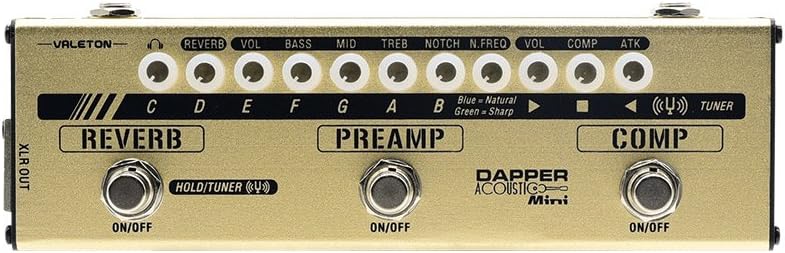
This image shows the top surface of the pedal with the tuner LEDs illuminated, indicating the note being detected and whether it is in tune, flat, or sharp.
5. DI Output (XLR)
The balanced XLR output provides a clean, low-noise signal for direct connection to mixers, PA systems, or recording interfaces.
- Connect an XLR cable from the XLR OUT port to your desired balanced input.
6. Headphones Jack with CAB SIM
The dedicated headphones output includes a cabinet simulator, making it ideal for silent practice, monitoring, or direct recording without an ampജീവൻ.
- Connect your headphones to the HEADPHONES jack.
This official video provides a comprehensive overview of the VALETON Dapper Acoustic Mini (MES-4) pedal, demonstrating its features and sound capabilities for acoustic instruments.
This video showcases the features and sound of the VALETON Dapper Mini (MES-1), a similar multi-effects pedal. While the model differs slightly, it offers insight into the Dapper Mini series' functionality.
മെയിൻ്റനൻസ്
To ensure the longevity and optimal performance of your Dapper Acoustic Mini pedal, follow these maintenance guidelines:
- വൃത്തിയാക്കൽ: Use a soft, dry cloth to wipe down the pedal. Avoid using abrasive cleaners or solvents, as they may damage the finish or internal components.
- സംഭരണം: നേരിട്ടുള്ള സൂര്യപ്രകാശം, തീവ്രമായ താപനില, ഉയർന്ന ഈർപ്പം എന്നിവയിൽ നിന്ന് മാറി തണുത്തതും വരണ്ടതുമായ സ്ഥലത്ത് പെഡൽ സൂക്ഷിക്കുക.
- ശക്തി: Always use the specified 9V DC center-negative power adapter. Using an incorrect power supply can damage the unit and void the warranty.
- കണക്ഷനുകൾ: Periodically check all cables and connections for wear and tear. Replace damaged cables to prevent signal loss or noise.
ട്രബിൾഷൂട്ടിംഗ്
If you encounter issues with your Dapper Acoustic Mini, consult the following troubleshooting tips:
- ശബ്ദമില്ല:
- പവർ അഡാപ്റ്റർ ശരിയായി ബന്ധിപ്പിച്ചിട്ടുണ്ടെന്നും പ്രവർത്തിക്കുന്നുണ്ടെന്നും ഉറപ്പാക്കുക.
- Check all instrument and output cables for secure connections and proper functionality.
- Verify that the volume knobs on the pedal, your instrument, and your amplifier/mixer are turned up.
- If using the tuner, ensure it is disengaged for normal signal pass-through.
- Excessive Noise/Feedback:
- Adjust the NOTCH filter in the PREAMP module to eliminate feedback frequencies.
- എല്ലാ കേബിളുകളും ശരിയായി സംരക്ഷിച്ചിട്ടുണ്ടെന്നും പവർ കേബിളുകൾക്ക് സമാന്തരമായി പോകുന്നില്ലെന്നും ഉറപ്പാക്കുക.
- If the COMP module is engaged, try reducing its settings, as high compression can sometimes introduce noise (as noted in user reviewഎസ്).
- If using the XLR OUT, ensure proper grounding to avoid hum.
- Effects Not Engaging:
- Press the respective footswitch firmly to ensure the module is activated. The indicator LED should light up.
- Check the individual effect level knobs to ensure they are not set to zero.
സ്പെസിഫിക്കേഷനുകൾ
| ഫീച്ചർ | സ്പെസിഫിക്കേഷൻ |
|---|---|
| ഇനത്തിൻ്റെ ഭാരം | 1 പൗണ്ട് (454 ഗ്രാം) |
| ഉൽപ്പന്ന അളവുകൾ | 6.7 x 4.6 x 2.2 ഇഞ്ച് (6.7"L x 4.6"W x 2.2"H) |
| ഇനം മോഡൽ നമ്പർ | എംഇഎസ്-4 |
| ബ്രാൻഡ് | വാലെട്ടൺ |
| പവർ ഉറവിടം | Adapter (9 Volts DC) |
| കണക്റ്റർ തരം | 3.5mm (1/8'') headphone jack, XLR, 1/4-inch Audio |
| സിഗ്നൽ ഫോർമാറ്റ് | അനലോഗ് |
| ശൈലി | Multi-effects, Reverb, Acoustic, Filter, Compressor, Mini, Preamp |
| നിറം | സ്വർണ്ണം, വെള്ളി |
വാറൻ്റിയും പിന്തുണയും
Valeton products typically come with a standard manufacturer's warranty covering defects in materials and workmanship. Please refer to the specific warranty information provided with your purchase for details on coverage duration and terms.
For product support, technical assistance, or warranty claims, please visit the official Valeton store or contact their customer service directly.
Valeton Store: Visit the Valeton Store on Amazon


