1. ആമുഖം
വാങ്ങിയതിന് നന്ദി.asing the Homtime D2qi Bluetooth Speaker with Wireless Charging and Alarm Clock. This device is designed to provide a versatile audio experience with convenient features for your daily life. Please read this manual carefully before use to ensure proper operation and to maximize the product's lifespan.
2 സുരക്ഷാ വിവരങ്ങൾ
- തീവ്രമായ ഊഷ്മാവ്, ഈർപ്പം, നേരിട്ടുള്ള സൂര്യപ്രകാശം എന്നിവയിൽ ഉപകരണം തുറന്നുകാട്ടരുത്.
- വെള്ളത്തിൽ നിന്നും മറ്റ് ദ്രാവകങ്ങളിൽ നിന്നും അകറ്റി നിർത്തുക.
- ഉപകരണം സ്വയം ഡിസ്അസംബ്ലിംഗ് ചെയ്യുകയോ നന്നാക്കാൻ ശ്രമിക്കുകയോ ചെയ്യരുത്. എല്ലാ സേവനങ്ങളും യോഗ്യതയുള്ള ഉദ്യോഗസ്ഥരെ ഏൽപ്പിക്കുക.
- Use only the provided or recommended power adapter.
- ശക്തമായ ആഘാതങ്ങൾക്ക് ഉപകരണം ഇടുകയോ ഇടുകയോ ചെയ്യുന്നത് ഒഴിവാക്കുക.
3. പാക്കേജ് ഉള്ളടക്കം
പാക്കേജിൽ ഇനിപ്പറയുന്ന ഇനങ്ങൾ ഉണ്ടോ എന്ന് പരിശോധിക്കുക:
- Homtime D2qi Bluetooth Speaker
- പവർ അഡാപ്റ്റർ
- ഉപയോക്തൃ മാനുവൽ
4. ഉൽപ്പന്നം കഴിഞ്ഞുview
The Homtime D2qi combines a high-quality Bluetooth speaker with a digital alarm clock and a convenient wireless charging pad. It features intuitive controls for easy operation.

ചിത്രം 4.1: മുൻഭാഗം view of the Homtime D2qi speaker with a smartphone placed on its top surface for wireless charging.

Figure 4.2: The Homtime D2qi speaker positioned on a book, showcasing its compact design and the digital clock display.

Figure 4.3: The Homtime D2qi speaker in a home setting, demonstrating wireless charging functionality.
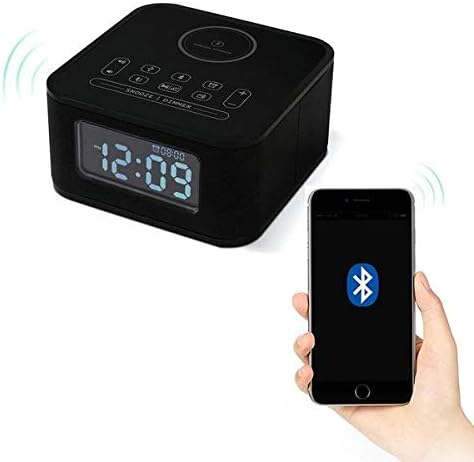
Figure 4.4: The Homtime D2qi speaker connected via Bluetooth to a smartphone.
5. സജ്ജീകരണം
5.1 പവർ കണക്ഷൻ
- Connect the provided power adapter to the DC input port on the back of the Homtime D2qi.
- ഒരു സാധാരണ മതിൽ ഔട്ട്ലെറ്റിലേക്ക് പവർ അഡാപ്റ്റർ പ്ലഗ് ചെയ്യുക.
- ഉപകരണം ഓണാണെന്ന് സൂചിപ്പിക്കുന്ന ഡിസ്പ്ലേ പ്രകാശിക്കും.
5.2 പ്രാരംഭ സമയ ക്രമീകരണം
Upon first power-on or after a power outage, you may need to set the time. Refer to the 'Operating Instructions' section for detailed steps on setting the clock.
6. പ്രവർത്തന നിർദ്ദേശങ്ങൾ
6.1 ബ്ലൂടൂത്ത് കണക്ഷൻ
- അമർത്തുക ബ്ലൂടൂത്ത് ബട്ടൺ on the top panel to enter Bluetooth pairing mode. The Bluetooth indicator will flash.
- നിങ്ങളുടെ സ്മാർട്ട്ഫോണിലോ ഓഡിയോ ഉപകരണത്തിലോ, ബ്ലൂടൂത്ത് പ്രവർത്തനക്ഷമമാക്കി ലഭ്യമായ ഉപകരണങ്ങൾക്കായി തിരയുക.
- Select "Homtime D2qi" from the list.
- കണക്റ്റ് ചെയ്തുകഴിഞ്ഞാൽ, ബ്ലൂടൂത്ത് ഇൻഡിക്കേറ്റർ മിന്നുന്നത് നിർത്തി സ്ഥിരമായി തുടരും. ഇപ്പോൾ നിങ്ങൾക്ക് സ്പീക്കറിലൂടെ ഓഡിയോ പ്ലേ ചെയ്യാൻ കഴിയും.
6.2 വയർലെസ് ചാർജിംഗ്
- Place your Qi-compatible smartphone centrally on the wireless charging pad located on the top surface of the speaker.
- Ensure the phone is properly aligned with the charging coil.
- The charging indicator on your phone will show that charging has begun.
6.3 അലാറം ക്ലോക്ക് പ്രവർത്തനം
- അമർത്തുക അലാറം ബട്ടൺ അലാറം ക്രമീകരണ മോഡിൽ പ്രവേശിക്കാൻ.
- ഉപയോഗിക്കുക +/- ബട്ടണുകൾ മണിക്കൂറും മിനിറ്റും ക്രമീകരിക്കാൻ.
- അമർത്തുക അലാറം ബട്ടൺ ഓരോ ക്രമീകരണവും സ്ഥിരീകരിക്കാൻ വീണ്ടും.
- അലാറം സജീവമാക്കുന്നതിനും നിർജ്ജീവമാക്കുന്നതിനും, അമർത്തുക അലാറം ബട്ടൺ briefly when not in setting mode.
- To snooze, press the സ്നൂസ്/ഡിമ്മർ ബട്ടൺ അലാറം മുഴങ്ങുമ്പോൾ.
6.4 റേഡിയോ പ്രവർത്തനം
- അമർത്തുക മോഡ് ബട്ടൺ FM റേഡിയോ മോഡിലേക്ക് മാറാൻ.
- അമർത്തിപ്പിടിക്കുക പ്ലേ/താൽക്കാലികമായി നിർത്തുക ബട്ടൺ to auto-scan and save available stations.
- ഉപയോഗിക്കുക മുമ്പത്തെ/അടുത്ത ബട്ടണുകൾ to navigate through saved stations.
6.5 Call Answering
ബ്ലൂടൂത്ത് വഴി കണക്റ്റ് ചെയ്യുമ്പോൾ, ഹാൻഡ്സ് ഫ്രീ കോളുകൾക്കായി സ്പീക്കർ ഉപയോഗിക്കാം.
- ഇൻകമിംഗ് കോളിന് മറുപടി നൽകാൻ, അമർത്തുക പ്ലേ/താൽക്കാലികമായി നിർത്തുക ബട്ടൺ.
- ഒരു കോൾ അവസാനിപ്പിക്കാൻ, അമർത്തുക പ്ലേ/താൽക്കാലികമായി നിർത്തുക ബട്ടൺ വീണ്ടും.
7. പരിപാലനം
- മൃദുവായതും ഉണങ്ങിയതുമായ തുണി ഉപയോഗിച്ച് ഉപകരണം വൃത്തിയാക്കുക. അബ്രസീവ് ക്ലീനറുകളോ ലായകങ്ങളോ ഉപയോഗിക്കരുത്.
- Keep the charging pad free of dust and debris to ensure efficient wireless charging.
- ദീർഘനേരം ഉപയോഗിക്കാത്തപ്പോൾ ഉപകരണം തണുത്തതും വരണ്ടതുമായ സ്ഥലത്ത് സൂക്ഷിക്കുക.
8. പ്രശ്നപരിഹാരം
| പ്രശ്നം | സാധ്യമായ കാരണം | പരിഹാരം |
|---|---|---|
| ശക്തിയില്ല | പവർ അഡാപ്റ്റർ ബന്ധിപ്പിച്ചിട്ടില്ല അല്ലെങ്കിൽ ഔട്ട്ലെറ്റ് തകരാറിലാണ്. | Ensure power adapter is securely plugged into the device and a working wall outlet. |
| സ്പീക്കറിൽ നിന്ന് ശബ്ദമില്ല | Bluetooth not connected; volume too low; incorrect mode. | Ensure Bluetooth is paired. Increase volume on both the speaker and your device. Check if the speaker is in the correct mode (Bluetooth/Radio). |
| വയർലെസ് ചാർജിംഗ് പ്രവർത്തിക്കുന്നില്ല | ഫോൺ Qi-യ്ക്ക് അനുയോജ്യമല്ല; ഫോൺ വിന്യസിച്ചിട്ടില്ല; ഫോൺ കേസ് വളരെ കട്ടിയുള്ളതാണ്. | Verify phone supports Qi wireless charging. Realign phone on the charging pad. Remove thick phone cases. |
| Buttons difficult to locate in the dark | Buttons are flush with the surface. | Familiarize yourself with button layout during daylight. Use the dimmer function to adjust display brightness. |
| Bluetooth disconnects automatically | Power saving feature; device out of range. | Reconnect Bluetooth manually. Keep devices within Bluetooth range (approx. 10 meters). |
9 സ്പെസിഫിക്കേഷനുകൾ
| ഫീച്ചർ | വിശദാംശങ്ങൾ |
|---|---|
| ബ്രാൻഡ് | ഹോംടൈം |
| മോഡൽ നമ്പർ | D2qi |
| നിറം | കറുപ്പ് |
| സ്പീക്കർ തരം | ബ്ലൂടൂത്ത് സ്പീക്കറുകൾ |
| കണക്റ്റിവിറ്റി | വയർലെസ് |
| അനുയോജ്യമായ ഉപകരണങ്ങൾ | സ്മാർട്ട്ഫോണുകൾ |
| ഔട്ട്പുട്ട് പവർ | 5 - 10 Watts |
| ഉൽപ്പന്ന ഭാരം | 0.5 കി.ഗ്രാം |
| പാക്കേജ് അളവുകൾ | 19.6 x 18.8 x 14.8 സെ.മീ |
| ഹാർഡ്വെയർ ഇന്റർഫേസ് | Audio/Video Port |
10. വാറൻ്റിയും പിന്തുണയും
Homtime products are manufactured to the highest quality standards. For warranty information and customer support, please refer to the warranty card included in your package or visit the official Homtime webസൈറ്റ്. വാങ്ങിയതിന്റെ തെളിവായി നിങ്ങളുടെ വാങ്ങൽ രസീത് സൂക്ഷിക്കുക.


