ആമുഖം
This manual provides essential information for the safe and proper operation of your VTech Switch & Go Dinos 2-Pack, featuring T-Don the Pteranodon and Tonn the Stegosaurus. Please read these instructions thoroughly before use and retain them for future reference.
The VTech Switch & Go Dinos are 2-in-1 toys that transform between a dinosaur and a vehicle. They feature an LCD screen for customizable animations and play various sounds and phrases.
പാക്കേജ് ഉള്ളടക്കം
- 1 x VTech Switch & Go Dino - T-Don the Pteranodon
- 1 x VTech Switch & Go Dino - Tonn the Stegosaurus
- 4 x AAA ബാറ്ററികൾ (മുൻകൂട്ടി ഇൻസ്റ്റാൾ ചെയ്തത്)

Image: T-Don (red Pteranodon) and Tonn (yellow Stegosaurus) in their dinosaur forms.
സജ്ജമാക്കുക
ബാറ്ററി ഇൻസ്റ്റാളേഷനും മാറ്റിസ്ഥാപിക്കലും
Each Switch & Go Dino requires 2 AAA batteries. Batteries are pre-installed for demonstration purposes. For optimal performance, it is recommended to replace them with new alkaline batteries.
- Locate the battery compartment on the underside of the toy.
- ഒരു സ്ക്രൂഡ്രൈവർ ഉപയോഗിച്ച്, ബാറ്ററി കവറിലെ സ്ക്രൂ അഴിക്കുക.
- Remove the old batteries (if any) and dispose of them properly.
- ശരിയായ പോളാരിറ്റി (+/-) ഉറപ്പാക്കിക്കൊണ്ട് 2 പുതിയ AAA ബാറ്ററികൾ ഇടുക.
- ബാറ്ററി കവർ മാറ്റി സ്ക്രീൻ ശക്തമാക്കുക.
പ്രധാനപ്പെട്ട ബാറ്ററി വിവരങ്ങൾ:
- Use only new AAA alkaline batteries.
- പഴയതും പുതിയതുമായ ബാറ്ററികൾ മിക്സ് ചെയ്യരുത്.
- ആൽക്കലൈൻ, സ്റ്റാൻഡേർഡ് (കാർബൺ-സിങ്ക്), അല്ലെങ്കിൽ റീചാർജ് ചെയ്യാവുന്ന (നിക്കൽ-കാഡ്മിയം) ബാറ്ററികൾ മിക്സ് ചെയ്യരുത്.
- കളിപ്പാട്ടത്തിൽ നിന്ന് തീർന്നുപോയ ബാറ്ററികൾ നീക്കം ചെയ്യുക.
- കളിപ്പാട്ടം ദീർഘകാലത്തേക്ക് ഉപയോഗിക്കുന്നില്ലെങ്കിൽ ബാറ്ററികൾ നീക്കം ചെയ്യുക.
പ്രവർത്തന നിർദ്ദേശങ്ങൾ
പവർ ഓൺ/ഓഫ്
To turn the toy on, locate the On/Off switch, usually on the underside or side of the toy, and slide it to the "On" position. To turn off, slide the switch to "Off".
Transformation: Dinosaur to Vehicle and Vice Versa
Each Switch & Go Dino is designed for easy transformation. Follow these general steps:
- From Dinosaur to Vehicle: Carefully fold and tuck away the dinosaur's limbs, head, and tail. Extend the wheels and vehicle body panels until the vehicle shape is complete.
- From Vehicle to Dinosaur: Extend the dinosaur's limbs, head, and tail from the vehicle body. Fold in the wheels and vehicle panels until the dinosaur shape is complete.
The transformation process is intuitive and designed for repeated use. Refer to the specific toy's molded details for guidance.

Image: Tonn the Stegosaurus (yellow) shown in both dinosaur and vehicle modes, with an arrow indicating transformation.
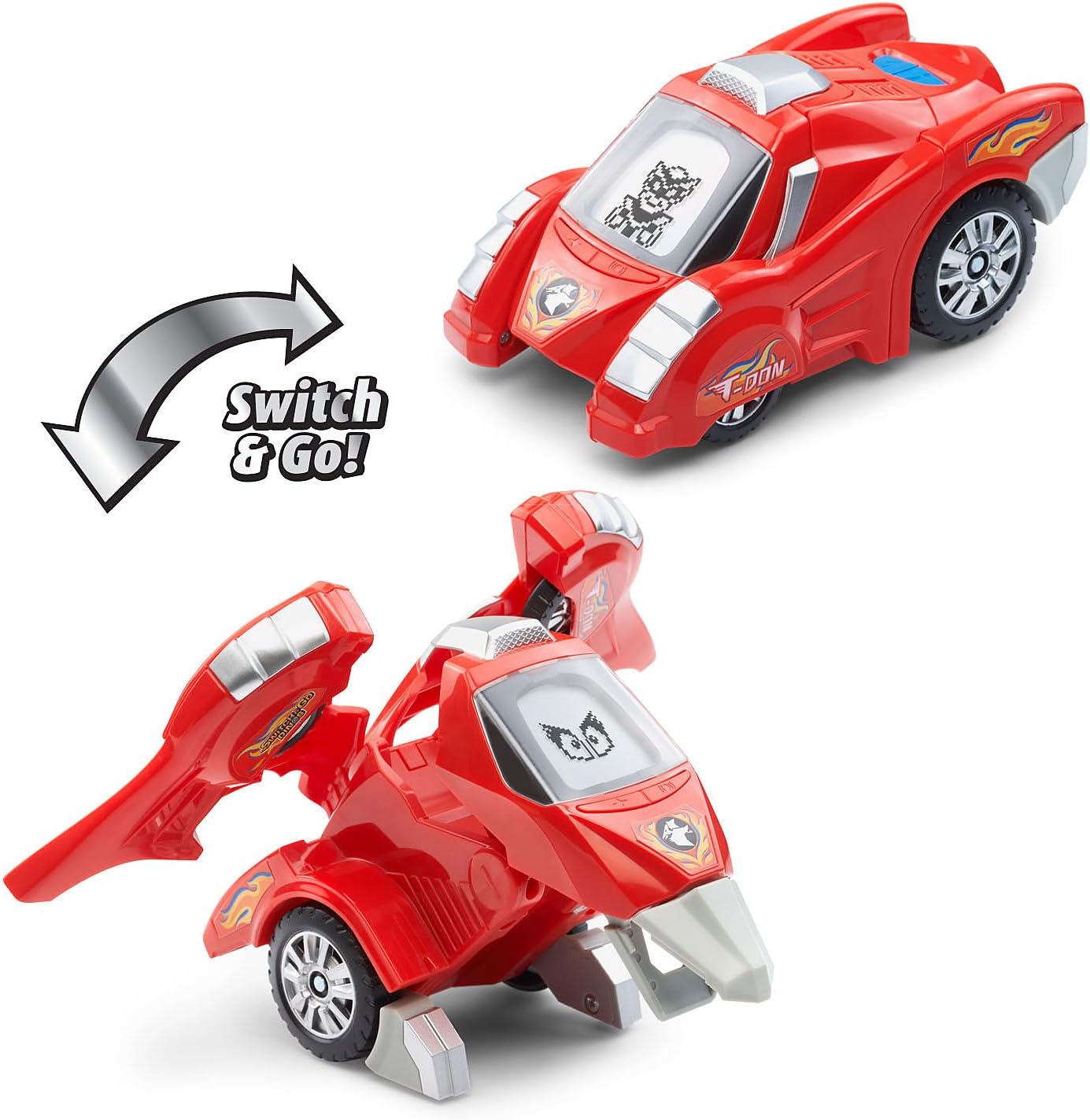
Image: T-Don the Pteranodon (red) shown in both dinosaur and vehicle modes, with an arrow indicating transformation.
എൽസിഡി സ്ക്രീൻ പ്രവർത്തനങ്ങൾ
Each dino features an LCD screen that displays various animations:
- Dinosaur Mode: Displays customizable dinosaur eyes.
- Vehicle Mode: Displays driver animations.
The animations change dynamically with play and button presses.

Image: A finger pressing a button on Tonn the Stegosaurus, demonstrating how the LCD screen displays different eye animations.
ബട്ടൺ പ്രവർത്തനങ്ങൾ
Press the various buttons on the dino to activate different features:
- Dinosaur Facts: Learn interesting facts about each dinosaur.
- ശബ്ദ ഇഫക്റ്റുകൾ: Hear realistic dinosaur roars, vehicle sounds, and other sound effects.
- Phrases: Listen to over 50 unique sounds and phrases.
Experiment with different buttons and modes to discover all the interactive elements.
വോളിയം നിയന്ത്രണം
Some models may include a volume control switch, typically located near the battery compartment or power switch. Adjust to your preferred sound level.
മെയിൻ്റനൻസ്
വൃത്തിയാക്കൽ
കളിപ്പാട്ടം വൃത്തിയാക്കാൻ, അല്പം ഡി-പ്ലാസ്റ്റിക് പേപ്പർ ഉപയോഗിച്ച് തുടയ്ക്കുക.amp cloth. Do not use harsh chemicals or abrasive cleaners. Ensure the toy is completely dry before storage or further use.
ജാഗ്രത:
- Do not immerse the toy in water or any other liquid.
- Keep the toy away from direct sunlight and direct heat sources.
സംഭരണം
When not in use for extended periods, store the toy in a cool, dry place. Remove batteries if storing for several months to prevent leakage.
ട്രബിൾഷൂട്ടിംഗ്
| പ്രശ്നം | സാധ്യമായ കാരണം | പരിഹാരം |
|---|---|---|
| കളിപ്പാട്ടം ഓണാക്കുകയോ പ്രതികരിക്കുകയോ ചെയ്യുന്നില്ല. | ബാറ്ററികൾ കുറവാണ് അല്ലെങ്കിൽ തെറ്റായി ഇൻസ്റ്റാൾ ചെയ്തിരിക്കുന്നു. | Check battery polarity. Replace with new AAA alkaline batteries. Ensure the On/Off switch is in the "On" position. |
| ശബ്ദം വികലമാണ് അല്ലെങ്കിൽ വളരെ കുറവാണ്. | Low batteries or volume setting. | Replace batteries. Adjust the volume switch if available. |
| LCD screen is blank or flickering. | Low batteries or internal malfunction. | Replace batteries. If the issue persists, contact VTech customer support. |
| Difficulty transforming the toy. | Incorrect manipulation. | Refer to the transformation steps in the Operating Instructions. Ensure all parts are aligned correctly. Do not force parts. |
സ്പെസിഫിക്കേഷനുകൾ
| ഫീച്ചർ | വിശദാംശങ്ങൾ |
|---|---|
| ഉൽപ്പന്ന മോഡൽ നമ്പർ | 80-204750 |
| ഉൽപ്പന്ന അളവുകൾ | 7.5 x 7.3 x 3.7 ഇഞ്ച് |
| ഇനത്തിൻ്റെ ഭാരം | 1.13 പൗണ്ട് |
| നിർമ്മാതാവ് ശുപാർശ ചെയ്യുന്ന പ്രായം | 36 മാസം - 8 വർഷം |
| ബാറ്ററികൾ ആവശ്യമാണ് | 4 x AAA batteries (2 per dino, included) |
| നിർമ്മാതാവ് | വിടെക് |
| റിലീസ് തീയതി | മെയ് 2, 2018 |
വാറൻ്റി വിവരങ്ങൾ
VTech products are manufactured with high-quality materials and undergo rigorous testing. For specific warranty details, please refer to the warranty card included with your product or visit the official VTech webസൈറ്റ്. വാങ്ങിയതിന്റെ തെളിവായി നിങ്ങളുടെ വാങ്ങൽ രസീത് സൂക്ഷിക്കുക.
ഉപഭോക്തൃ പിന്തുണ
If you have any questions, require assistance, or encounter issues not covered in this manual, please contact VTech Customer Support. Contact information can typically be found on the VTech official webസൈറ്റ് അല്ലെങ്കിൽ ഉൽപ്പന്ന പാക്കേജിംഗിൽ.
Online resources and FAQs may also be available on the VTech webസൈറ്റ്.


