1. ആമുഖം
The Flashpoint Zoom Li-Ion Mini R2 TTL Flash is a compact and powerful flash unit designed for use with select Sony mirrorless cameras, including models such as A7RIII, a7rII, a7R, a58, a99, ILCE6000L, a77II, RX10, and the a9. This flash features an integrated R2 radio transceiver, enabling wireless triggering and control. It can function as a master unit to command other Flashpoint and Godox R2-compatible slave units, offering versatile lighting solutions for various photographic scenarios.
2. സുരക്ഷാ മുൻകരുതലുകൾ
- Do not disassemble or modify the flash unit. Repairs should only be performed by authorized service personnel.
- ഫ്ലാഷ് യൂണിറ്റ് വരണ്ടതായി സൂക്ഷിക്കുക. മഴ, ഈർപ്പം അല്ലെങ്കിൽ ഉയർന്ന ആർദ്രത എന്നിവയ്ക്ക് വിധേയമാക്കരുത്.
- Do not touch the flash tube after firing, as it can be hot.
- കുട്ടികൾക്ക് ലഭ്യമാകാതെ സൂക്ഷിക്കുക.
- Use only the specified battery and charger. Improper use can lead to fire, explosion, or electric shock.
- Avoid direct eye exposure to the flash, especially at close range, as it can impair vision.
3. ഉൽപ്പന്നം കഴിഞ്ഞുview
3.1 പാക്കേജ് ഉള്ളടക്കം
- Flashpoint Zoom Li-Ion Mini Flash Unit
- മിനി സ്റ്റാൻഡ്
- സംരക്ഷണ കേസ്
- Diffuser (assumed from 'Dif' in product data)
3.2 Flash Components
Familiarize yourself with the main components of your Flashpoint Zoom Li-Ion Mini R2 TTL Flash.

ചിത്രം 3.2.1: ഫ്രണ്ട് view of the Flashpoint Zoom Li-Ion Mini R2 TTL Flash, showing the flash head and main body.
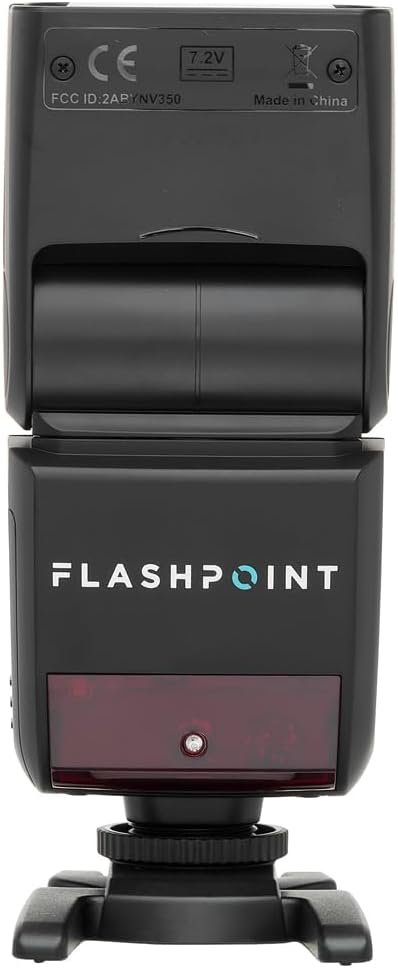
ചിത്രം 3.2.2: പിൻഭാഗം view of the flash, highlighting the LCD display and control buttons for mode, zoom, sync, and power.

ചിത്രം 3.2.3: The flash unit with its built-in wide-angle diffuser panel extended from the flash head.
4. സജ്ജീകരണം
4.1 ബാറ്ററി ഇൻസ്റ്റാളേഷൻ
- ഫ്ലാഷ് യൂണിറ്റിന്റെ വശത്ത് ബാറ്ററി കമ്പാർട്ട്മെന്റ് കണ്ടെത്തുക.
- Slide the battery cover release latch and open the compartment.
- Insert the Li-Ion battery, ensuring correct polarity as indicated inside the compartment.
- ബാറ്ററി കമ്പാർട്ട്മെന്റ് കവർ സുരക്ഷിതമായി സ്ഥലത്ത് ക്ലിക്ക് ചെയ്യുന്നത് വരെ അടയ്ക്കുക.

ചിത്രം 4.1.1: വശം view of the flash unit, indicating the battery compartment with a 'BATT.PUSH' label.
4.2 ക്യാമറയിൽ മൗണ്ടിംഗ്
- Ensure the flash unit is powered off.
- Slide the flash's hot shoe foot into your Sony camera's hot shoe mount.
- Tighten the locking ring on the flash foot to secure it to the camera. Do not overtighten.
4.3 പവർ ഓൺ/ഓഫ്
Press and hold the power button (usually marked with a ⚡ or power symbol) on the rear control panel to turn the flash on or off.
5. പ്രവർത്തന നിർദ്ദേശങ്ങൾ
5.1 അടിസ്ഥാന പ്രവർത്തന രീതികൾ
The Flashpoint Zoom Li-Ion Mini R2 TTL Flash supports various operating modes:
- ടിടിഎൽ ഓട്ടോഫ്ലാഷ് മോഡ്: Automatically sets the flash output for correct exposure.
- മാനുവൽ (എം) മോഡ്: Allows manual adjustment of flash power output.
- Multi (Stroboscopic) Mode: Fires a series of rapid flashes during a single exposure.
- S1/S2 ഒപ്റ്റിക്കൽ സ്ലേവ് മോഡുകൾ: Triggers the flash optically when another flash fires.
ഉപയോഗിക്കുക മോഡ് button on the control panel to cycle through these modes.

ചിത്രം 5.1.1: വിശദമായി view of the flash control panel, showing buttons for MODE, ZOOM, SYNC, SLAVE, GR/CH, and the SET dial.
5.2 R2 Wireless System
The integrated R2 radio transceiver provides wireless control. Set the flash to Master or Slave mode and configure the group (GR) and channel (CH) settings to match your R2-compatible transmitter or other R2 flashes. Refer to your R2 transmitter's manual for detailed wireless setup.
5.3 ഫ്ലാഷ് ഹെഡ് അഡ്ജസ്റ്റ്മെന്റ്
The flash head can be rotated and tilted to bounce light off ceilings or walls for softer illumination.
- തിരശ്ചീന ഭ്രമണം: 0 മുതൽ 270 ഡിഗ്രി വരെ.
- ലംബ ചെരിവ്: -7 മുതൽ 90 ഡിഗ്രി വരെ.

ചിത്രം 5.3.1: Illustration demonstrating the flexible rotation and tilt capabilities of the flash head.
5.4 സൂം പ്രവർത്തനം
The flash features an automatically zooming flashhead from 24-105mm. This adjusts the flash coverage to match the focal length of your lens. In manual mode, you can also adjust the zoom manually using the സൂം ബട്ടൺ.
6. പരിപാലനം
- വൃത്തിയാക്കൽ: Use a soft, dry cloth to clean the flash unit. For stubborn dirt, use a slightly damp cloth with mild detergent, then wipe dry. Do not use organic solvents like thinner or benzene.
- സംഭരണം: When not in use for extended periods, remove the battery and store the flash in a cool, dry place, preferably in its protective case.
- ബാറ്ററി കെയർ: Recharge the Li-Ion battery regularly, even if not in use, to maintain its lifespan. Avoid fully discharging the battery.
7. പ്രശ്നപരിഹാരം
If you encounter issues with your Flashpoint Zoom Li-Ion Mini R2 TTL Flash, refer to the following common problems and solutions:
| പ്രശ്നം | സാധ്യമായ കാരണം / പരിഹാരം |
|---|---|
| ഫ്ലാഷ് കത്തുന്നില്ല. | Check if the flash is powered on. Ensure the battery is charged and correctly installed. Verify the flash is securely mounted on the camera hot shoe. Check camera flash settings. |
| Flash output is inconsistent or incorrect. | Ensure TTL mode is selected for automatic exposure, or adjust manual power settings. Check for obstructions between the flash and subject. Verify flash head zoom matches lens focal length. |
| Wireless triggering fails. | Confirm that the flash and transmitter are set to the same R2 group and channel. Ensure both units are within range and have fresh batteries. Check for radio interference. |
| Difficulty mounting flash on camera hot shoe. | Ensure the locking ring is fully loosened. Some camera hot shoes may have tighter tolerances; apply firm, even pressure. If persistent, verify compatibility with your specific camera model. |
| Unable to update firmware via micro-USB port. | The micro-USB port may be recessed. Try using a micro-USB cable with a very slim connector housing. If issues persist, contact Flashpoint customer support for guidance on compatible cables or alternative update methods. |
8 സ്പെസിഫിക്കേഷനുകൾ
| ഫീച്ചർ | സ്പെസിഫിക്കേഷൻ |
|---|---|
| ഗൈഡ് നമ്പർ | 82ft / 25m (at ISO 100) |
| റീസൈക്കിൾ സമയം | 0.1 മുതൽ 1.7 സെക്കൻഡ് വരെ |
| സൂം ശ്രേണി | 24-105mm (Auto/Manual) |
| Bounce Head Rotation | Horizontal: 0 to 270 degrees |
| Bounce Head Tilt | Vertical: -7 to 90 degrees |
| അളവുകൾ (L x W x H) | 8.4 x 7.2 x 2.8 ഇഞ്ച് |
| ഇനത്തിൻ്റെ ഭാരം | 1.87 പൗണ്ട് |
| അനുയോജ്യമായ മൗണ്ടിംഗുകൾ | സോണി ആൽഫ |
| മോഡൽ നമ്പർ | Zoom-Lion Mini |
| ASIN | B07CV42KFV |
9. വാറൻ്റിയും പിന്തുണയും
9.1 വാറൻ്റി വിവരങ്ങൾ
Flashpoint products typically come with a limited manufacturer's warranty. For specific details regarding the warranty period and terms for your Zoom Li-Ion Mini R2 TTL Flash, please refer to the warranty card included with your product or visit the official Flashpoint webസൈറ്റ്.
9.2 ഉപഭോക്തൃ പിന്തുണ
For technical assistance, troubleshooting beyond this manual, or service inquiries, please contact Flashpoint customer support. Contact information can usually be found on the Flashpoint webസൈറ്റ് അല്ലെങ്കിൽ നിങ്ങളുടെ ഉൽപ്പന്ന ഡോക്യുമെന്റേഷനിൽ.


