1. ആമുഖം
This manual provides instructions for the VINABTY AKB73615337 replacement remote control, designed to operate various LG Plasma TV models. This remote is a direct replacement and typically requires no programming, functioning immediately upon battery installation.

Image 1: VINABTY AKB73615337 Remote Control with compatible LG Plasma TV models.
Compatible LG Plasma TV Models:
- 42PA4900
- 50PA4500, 50PA450C, 50PA4510, 50PA4900, 50PA5500, 50PA550C
- 50PA6500, 50PA6500UA, 50PA6500-UA, 50PA6550
- 60PA5500, 60PA550C
- 60PA6500, 60PA6500UA, 60PA6500-UA, 60PA6550, 60PA6550UA, 60PA6550-UA, 60PA6550UF, 60PA6550-UF
- And other LG Plasma TV models that originally used the AKB73615337 remote.
2. സജ്ജീകരണം
ബാറ്ററി ഇൻസ്റ്റാളേഷൻ
റിമോട്ട് കൺട്രോളിന് പ്രവർത്തിക്കാൻ രണ്ട് (2) AAA ബാറ്ററികൾ (ഉൾപ്പെടുത്തിയിട്ടില്ല) ആവശ്യമാണ്. ബാറ്ററികൾ ഇൻസ്റ്റാൾ ചെയ്യാൻ ഈ ഘട്ടങ്ങൾ പാലിക്കുക:
- റിമോട്ട് കൺട്രോളിൻ്റെ പിൻഭാഗത്ത് ബാറ്ററി കമ്പാർട്ട്മെൻ്റ് കവർ കണ്ടെത്തുക.
- കമ്പാർട്ട്മെന്റ് തുറക്കാൻ ടാബിൽ അമർത്തി കവർ താഴേക്ക് സ്ലൈഡ് ചെയ്യുക.
- രണ്ട് AAA ബാറ്ററികൾ ഇടുക, കമ്പാർട്ടുമെന്റിനുള്ളിലെ ഡയഗ്രമുകളുമായി പോസിറ്റീവ് (+) ഉം നെഗറ്റീവ് (-) ടെർമിനലുകളും പൊരുത്തപ്പെടുന്നുണ്ടെന്ന് ഉറപ്പാക്കുക.
- സുരക്ഷിതമായി ക്ലിക്ക് ചെയ്യുന്നതുവരെ ബാറ്ററി കമ്പാർട്ട്മെന്റ് കവർ തിരികെ സ്ഥലത്തേക്ക് സ്ലൈഡ് ചെയ്യുക.
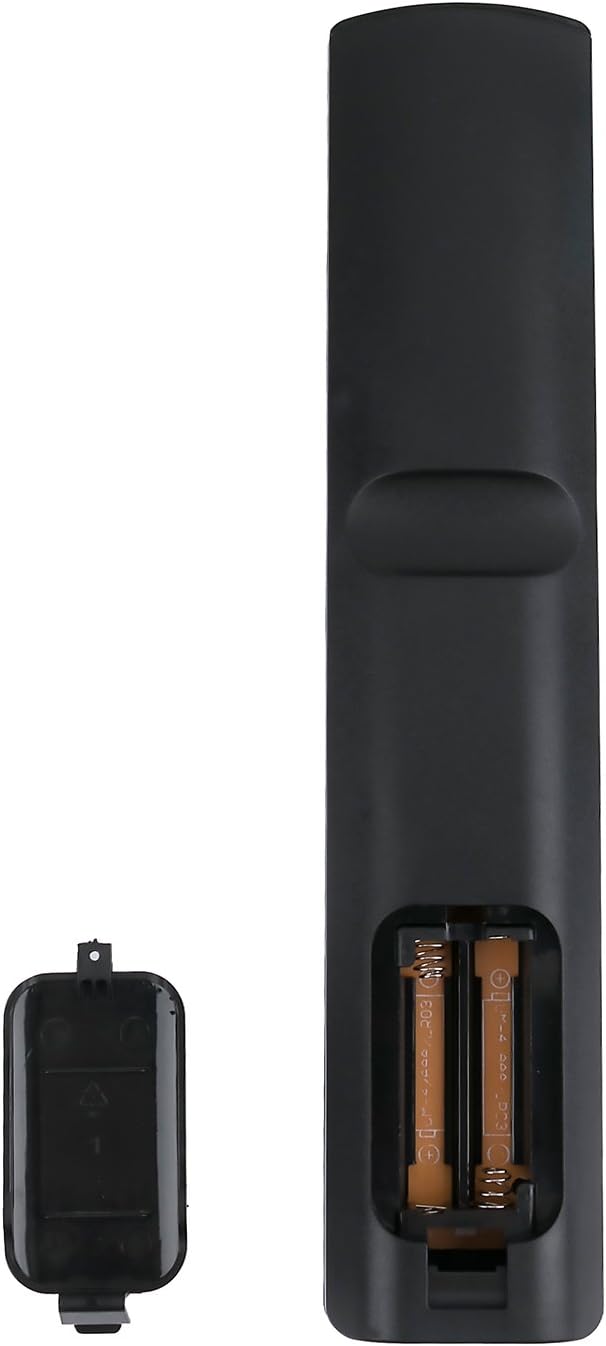
Image 2: Battery compartment with AAA batteries inserted.
കുറിപ്പ്: No programming is required for this replacement remote. It is ready to use once batteries are installed.
3. പ്രവർത്തന നിർദ്ദേശങ്ങൾ
Point the remote control directly at your LG Plasma TV. Ensure there are no obstructions between the remote and the TV's infrared receiver.

ചിത്രം 3: മുൻഭാഗം view ബട്ടൺ ലേഔട്ടുള്ള റിമോട്ട് കൺട്രോളിന്റെ.
കീ ബട്ടൺ പ്രവർത്തനങ്ങൾ:
| ബട്ടൺ | ഫംഗ്ഷൻ |
|---|---|
| പവർ (ചുവപ്പ്) | ടിവി ഓണാക്കുകയോ ഓഫാക്കുകയോ ചെയ്യുന്നു. |
| TV | ടിവി മോഡിലേക്ക് മാറുന്നു. |
| അനുപാതം | സ്ക്രീൻ വീക്ഷണാനുപാതം ക്രമീകരിക്കുന്നു. |
| ഇൻപുട്ട് | Selects input sources (HDMI, AV, Component, etc.). |
| ഊർജ്ജ സംരക്ഷണം | Activates or deactivates energy-saving modes. |
| നമ്പർ ബട്ടണുകൾ (0-9) | നേരിട്ടുള്ള ചാനൽ തിരഞ്ഞെടുക്കൽ. |
| ലിസ്റ്റ് | ചാനൽ ലിസ്റ്റ് പ്രദർശിപ്പിക്കുന്നു. |
| ഫ്ലാഷ്ബികെ | മുമ്പത്തേതിലേക്ക് മടങ്ങുന്നു viewഎഡി ചാനൽ. |
| VOL (+/-) | വോളിയം ലെവൽ ക്രമീകരിക്കുന്നു. |
| CH (മുകളിലേക്ക്/താഴേക്ക്) | ചാനലുകൾ മാറ്റുന്നു. |
| നിശബ്ദമാക്കുക | ടിവി ശബ്ദം മ്യൂട്ട് ചെയ്യുകയോ അൺമ്യൂട്ട് ചെയ്യുകയോ ചെയ്യുന്നു. |
| വിവരം | പ്രോഗ്രാം വിവരങ്ങൾ പ്രദർശിപ്പിക്കുന്നു. |
| ക്രമീകരണങ്ങൾ | Accesses the TV's main settings menu. |
| AV മോഡ് | Selects audio/video modes. |
| Q. മെനു | Accesses the Quick Menu for common settings. |
| നാവിഗേഷൻ (മുകളിലേക്ക്/താഴേക്ക്/ഇടത്/വലത്) | മെനുകളിലൂടെയും ഓപ്ഷനുകളിലൂടെയും നാവിഗേറ്റ് ചെയ്യുന്നു. |
| OK | മെനുകളിലെ തിരഞ്ഞെടുപ്പുകൾ സ്ഥിരീകരിക്കുന്നു. |
| പുറത്ത് | നിലവിലെ മെനുവിൽ നിന്നോ പ്രവർത്തനത്തിൽ നിന്നോ പുറത്തുകടക്കുന്നു. |
| കളർ ബട്ടണുകൾ (ചുവപ്പ്, പച്ച, മഞ്ഞ, നീല) | ടിവി മെനു അല്ലെങ്കിൽ ആപ്ലിക്കേഷൻ അനുസരിച്ച് പ്രവർത്തനങ്ങൾ വ്യത്യാസപ്പെടാം. |
| മീഡിയ നിയന്ത്രണ ബട്ടണുകൾ (പ്ലേ ചെയ്യുക, താൽക്കാലികമായി നിർത്തുക, നിർത്തുക, റിവൈൻഡ് ചെയ്യുക, ഫാസ്റ്റ് ഫോർവേഡ് ചെയ്യുക) | Controls media playback (e.g., USB content). |
4. പരിപാലനം
റിമോട്ട് വൃത്തിയാക്കൽ
To clean the remote control, use a soft, dry cloth. For stubborn dirt, lightly dampen the cloth with water or a mild, non-abrasive cleaner. Avoid using harsh chemicals or solvents, as these can damage the remote's surface or internal components.
ബാറ്ററി കെയർ
- റിമോട്ടിന്റെ പ്രതികരണം മന്ദഗതിയിലാകുകയോ പ്രവർത്തിക്കുന്നത് നിർത്തുകയോ ചെയ്യുമ്പോൾ ബാറ്ററികൾ മാറ്റിസ്ഥാപിക്കുക.
- പഴയതും പുതിയതുമായ ബാറ്ററികൾ, അല്ലെങ്കിൽ വ്യത്യസ്ത തരം ബാറ്ററികൾ (ഉദാ: ആൽക്കലൈൻ, റീചാർജ് ചെയ്യാവുന്നവ) കൂട്ടിക്കലർത്തരുത്.
- Remove batteries if the remote will not be used for an extended period to prevent leakage and damage.
- ഉപയോഗിച്ച ബാറ്ററികൾ പ്രാദേശിക ചട്ടങ്ങൾക്കനുസൃതമായി നീക്കം ചെയ്യുക.
5. പ്രശ്നപരിഹാരം
| പ്രശ്നം | പരിഹാരം |
|---|---|
| റിമോട്ട് പ്രവർത്തിക്കുന്നില്ല. |
|
| റിമോട്ട് ഇടയ്ക്കിടെ പ്രവർത്തിക്കുന്നു. |
|
| ചില ബട്ടണുകൾ പ്രതികരിക്കുന്നില്ല. |
|
6 സ്പെസിഫിക്കേഷനുകൾ
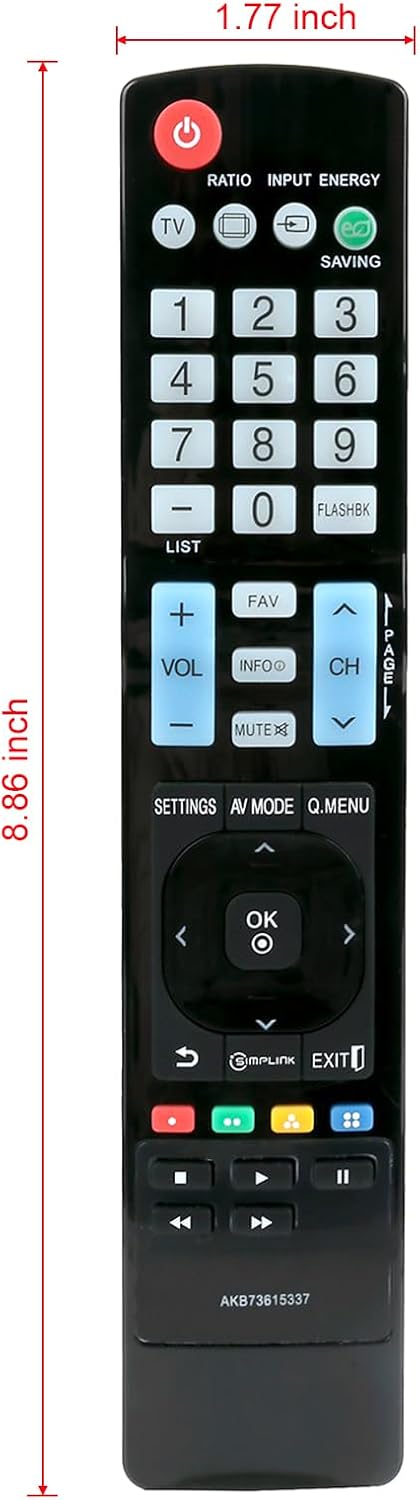
Image 4: Remote control dimensions.
- മോഡൽ നമ്പർ: എകെബി73615337
- ബ്രാൻഡ്: വിനാബ്റ്റി
- അനുയോജ്യമായ ഉപകരണങ്ങൾ: LG Plasma Televisions
- ഊർജ്ജ സ്രോതസ്സ്: 2 x AAA ബാറ്ററികൾ (ഉൾപ്പെടുത്തിയിട്ടില്ല)
- നിറം: കറുപ്പ്
- ഉൽപ്പന്ന അളവുകൾ: ഏകദേശം 7 x 2 x 0.5 ഇഞ്ച് (17.78 x 5.08 x 1.27 സെ.മീ)
- ഇനത്തിൻ്റെ ഭാരം: ഏകദേശം 3 ഔൺസ് (85 ഗ്രാം)
- പ്രത്യേക സവിശേഷത: എർഗണോമിക് ഡിസൈൻ
7. വാറൻ്റിയും പിന്തുണയും
For any questions, concerns, or support regarding your VINABTY AKB73615337 replacement remote control, please refer to the retailer or manufacturer's customer service channels. Keep your purchase receipt for warranty claims, if applicable.
This product is designed to provide a reliable replacement for your original LG Plasma TV remote. Should you encounter any issues not covered in this manual, please contact customer support for further assistance.
