1. ആമുഖം
This manual provides detailed instructions for the setup, operation, maintenance, and troubleshooting of your MAYFLASH Arcade Stick F300 Elite. This arcade stick is designed for a wide range of gaming platforms, offering a premium gaming experience with high-quality components.

ചിത്രം 1: മുൻഭാഗം view of the MAYFLASH Arcade Stick F300 Elite.
പ്രധാന സവിശേഷതകൾ:
- വിശാലമായ അനുയോജ്യത: Supports Switch/Switch 2, PS4, PS3, Xbox Series X/S, Xbox One/S, Xbox 360, PC (Windows, macOS), Steam Deck, and Android.
- പ്രീമിയം ഘടകങ്ങൾ: Equipped with 9 highly responsive Sanwa buttons and a precision 4-way Sanwa joystick for optimal performance.
- ഇൻപുട്ട് മോഡുകൾ: Supports XINPUT and DINPUT for PC use.
- ടർബോ ഫംഗ്ഷൻ: Integrated Turbo feature for enhanced gameplay.
- Modding Capability: Designed for easy customization, allowing joystick and button replacement.
വീഡിയോ 1: ഔദ്യോഗികമായി അവസാനിച്ചുview of the MAYFLASH Arcade Stick F300 Elite by MAYFLASH LIMITED.
2. സജ്ജീകരണ നിർദ്ദേശങ്ങൾ
Follow these steps to connect your F300 Elite Arcade Stick to your desired gaming platform.
2.1 Connecting to Consoles and PC
- Identify the USB Cable: The arcade stick features an integrated USB cable for connection.
- Select Input Mode: Use the switch on the top left of the arcade stick to select the appropriate input mode (XINPUT/NS for PC/Switch, DINPUT/PS3 for PS3/Android).
- Connect to Platform: Plug the USB cable into an available USB port on your console or PC.
- Controller Authentication (for PS4/Xbox): For PS4, Xbox One, Xbox Series X/S, and Xbox 360, you must connect the original wired controller (or a compatible third-party controller) to the USB port on the back of the arcade stick for authentication. This is required for the arcade stick to function correctly on these platforms.
- PS5 അനുയോജ്യത: For PS5 compatibility, the F300 Elite requires a MAYFLASH Magic-S Ultimate Adapter or MagicBoots-S5 Converter (sold separately). Connect the adapter/converter to the arcade stick's USB port, then connect the adapter/converter to your PS5.

Figure 2: Connection diagram illustrating compatibility with various gaming systems.

Figure 3: Close-up of the USB port for controller authentication or adapter connection.
3. പ്രവർത്തന നിർദ്ദേശങ്ങൾ
Familiarize yourself with the controls and special functions of your F300 Elite Arcade Stick.
3.1 നിയന്ത്രണ ലേഔട്ട്
The arcade stick features a standard 8-button layout with a joystick. Additional control buttons are located on the top panel.

ചിത്രം 4: വിശദമായി view of the control panel, including Turbo, Share, and Options buttons.
3.2 ഇൻപുട്ട് മോഡുകൾ
- XINPUT/NS: Use this mode for PC (Windows), Xbox Series X/S, Xbox One/S, Xbox 360, and Nintendo Switch.
- DINPUT/PS3: Use this mode for PC (older games), PS3, and Android devices.
3.3 ടർബോ ഫംഗ്ഷൻ
The Turbo function allows a button to be pressed repeatedly as long as it is held down. To activate or deactivate Turbo for a specific button:
- അമർത്തിപ്പിടിക്കുക ടർബോ ബട്ടൺ.
- പിടിക്കുമ്പോൾ ടർബോ, press the desired action button (e.g., A/X, B/O, X/□, Y/△, RB/R1, LB/L1, RT/R2, LT/L2).
- Release both buttons. The Turbo function is now active for that button. Repeat the process to deactivate.
3.4 Special Button Combinations
- TURBO + SHARE = L3
- TURBO + OPTIONS = R3
4. Maintenance and Customization
The F300 Elite is designed for durability and customization. Regular cleaning and optional component replacement can extend its lifespan and tailor it to your preferences.
4.1 വൃത്തിയാക്കൽ
Wipe the surface of the arcade stick with a soft, dry cloth. Avoid using harsh chemicals or abrasive materials that could damage the finish or components.
4.2 Component Modding
The F300 Elite is built with modding enthusiasts in mind. The internal components are accessible for customization, allowing you to replace the joystick and buttons to suit your playstyle or aesthetic preferences.
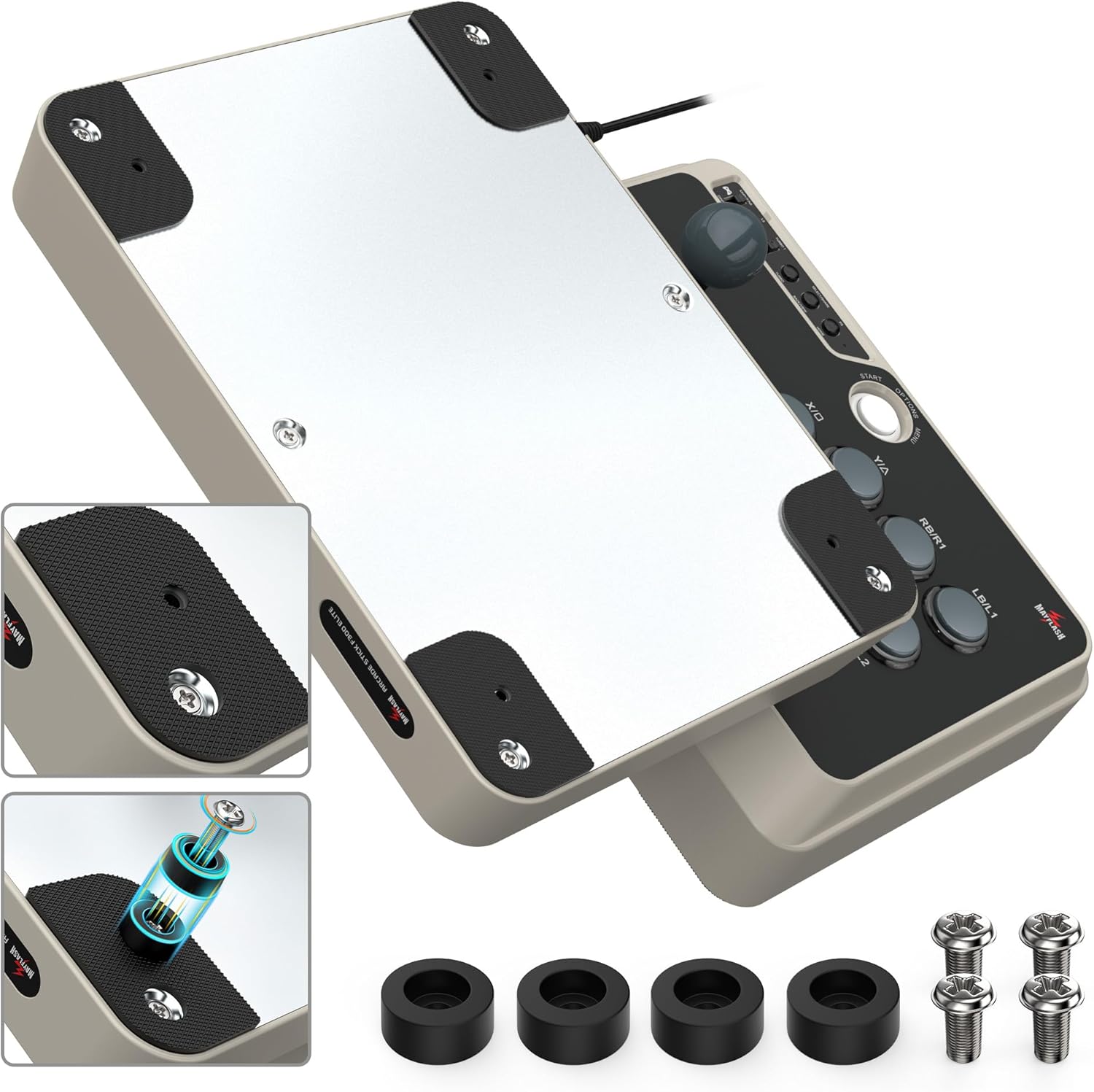
Figure 5: Illustration of the joystick's internal structure, demonstrating ease of replacement.

ചിത്രം 6: ഉദാample of Sanwa buttons, indicating their moddable nature.
To access internal components, carefully remove the screws on the bottom panel of the arcade stick. Exercise caution to avoid damaging internal wiring.

ചിത്രം 7: താഴെ view of the F300 Elite, highlighting screw positions for internal access.
5. പ്രശ്നപരിഹാരം
If you encounter issues with your F300 Elite Arcade Stick, refer to the following common problems and solutions.
5.1 കണക്ഷൻ പ്രശ്നങ്ങൾ
- Not recognized by console/PC: Ensure the correct input mode (XINPUT/NS or DINPUT/PS3) is selected. For PS4/Xbox, verify that an authenticated original controller is connected to the arcade stick's USB port. Try a different USB port on your console/PC.
- PS5 not working: The F300 Elite requires a separate MAYFLASH Magic-S Ultimate Adapter or MagicBoots-S5 Converter for PS5 compatibility. Ensure this adapter is correctly connected and updated if necessary.
5.2 Button/Joystick Malfunction
- Unresponsive buttons/joystick: Check all cable connections. If you have recently modded the device, ensure all internal connections are secure.
- തെറ്റായ ഇൻപുട്ട്: Verify the input mode switch is set correctly for your platform.
5.3 Turbo Function Issues
- Turbo not activating: നിങ്ങൾ അമർത്തിപ്പിടിക്കുന്നുവെന്ന് ഉറപ്പാക്കുക ടർബോ button simultaneously with the desired action button.
- Tournament use: Be aware that the Turbo function may lead to disqualification in competitive tournament settings.
6 സ്പെസിഫിക്കേഷനുകൾ
Detailed technical specifications for the MAYFLASH Arcade Stick F300 Elite.
| ഫീച്ചർ | വിശദാംശങ്ങൾ |
|---|---|
| ബ്രാൻഡ് | മൈഫ്ലാഷ് |
| മോഡൽ നമ്പർ | F300Elite |
| ഹാർഡ്വെയർ പ്ലാറ്റ്ഫോം | Nintendo Switch, PC/Mac, PlayStation 4, Xbox One, Xbox Series X |
| ഓപ്പറേറ്റിംഗ് സിസ്റ്റം അനുയോജ്യത | ആൻഡ്രോയിഡ്, വിൻഡോസ് |
| ഇനത്തിൻ്റെ ഭാരം | 4.4 പൗണ്ട് (ഏകദേശം 2 കിലോഗ്രാം) |
| ഉൽപ്പന്ന അളവുകൾ (LxWxH) | 11.81 x 8.86 x 2.2 ഇഞ്ച് (ഏകദേശം 30 x 22.5 x 5.6 സെ.മീ) |
| കൺട്രോളർ തരം | ജോയിസ്റ്റിക് |
| കണക്റ്റിവിറ്റി ടെക്നോളജി | USB |
| ഘടകങ്ങൾ | Sanwa Buttons, Sanwa Joystick |

Figure 8: Dimensions and key features of the F300 Elite Arcade Stick.
7. വാറൻ്റിയും പിന്തുണയും
MAYFLASH products are thoroughly tested to ensure quality. Your warranty begins from the date of purchase.
7.1 വാറൻ്റി വിവരങ്ങൾ
All MAYFLASH products come with a warranty. Please retain your proof of purchase for warranty claims.
7.2 ഉപഭോക്തൃ പിന്തുണ
If you have any questions, require assistance with setup, operation, or encounter any difficulties with your device, please contact the MAYFLASH service team. They are available to provide support and guidance.


