1. ആമുഖം
Thank you for choosing the SPC 3602N Landline Telephone. This manual provides essential information for setting up, operating, and maintaining your new telephone. Please read it carefully to ensure proper use and to fully utilize all features.

Image 1: The SPC 3602N Landline Telephone, a corded phone with a black finish and large, easy-to-read buttons.
2. പാക്കേജ് ഉള്ളടക്കം
അൺബോക്സിംഗ് ചെയ്യുമ്പോൾ പാക്കേജ് ഉള്ളടക്കങ്ങൾ പരിശോധിക്കുക:
- SPC 3602N Landline Telephone Unit
- ഹാൻഡ്സെറ്റ്
- കോയിൽഡ് ഹാൻഡ്സെറ്റ് കോർഡ്
- ടെലിഫോൺ ലൈൻ കോർഡ് (RJ11)
- ഉപയോക്തൃ മാനുവൽ (ഈ പ്രമാണം)
3. ഉൽപ്പന്നം കഴിഞ്ഞുview ഫീച്ചറുകളും
The SPC 3602N is designed for simplicity and functionality, offering essential features for reliable communication.
പ്രധാന സവിശേഷതകൾ:
- 3 Direct Memory Buttons (M1, M2, M3): For quick dialing of frequently used numbers.
- 10 Indirect Memory Locations: Additional storage for important contacts.
- നിശബ്ദ പ്രവർത്തനം: ഒരു കോൾ സമയത്ത് നിങ്ങളുടെ മൈക്രോഫോൺ താൽക്കാലികമായി നിശബ്ദമാക്കുന്നു.
- "R" Key (Flash Function): Allows access to operator services or call waiting features (network dependent).
- Adjustable Ringer Volume: 3 levels (Low, Medium, High) to suit your environment.
- 3 Ringer Melodies: Choose your preferred ringtone.
- Adjustable Earpiece Volume: 2 levels (High, Low) for comfortable listening.
- Tone Dialing (DTMF): Standard dialing method.
- Line-in-use Indicator: Visual indication when the line is active.
- Mute Indicator: Visual indication when the mute function is active.
- Integrated Directory: For managing stored numbers.
- ബഹുമുഖ പ്ലെയ്സ്മെന്റ്: Designed for both desktop and wall-mounted use.
- RJ11 Telephone Connection: Standard connection for analog telephone lines.

ചിത്രം 2: ഒരു ക്ലോസപ്പ് view of the function buttons on the SPC 3602N, including M1, M2, M3, VOL, MENU, MEM, P, R, and RLL keys.

ചിത്രം 3: വിശദമായ view of the large, clearly labeled numeric keypad on the SPC 3602N telephone.
4. സജ്ജീകരണം
4.1 Connecting the Telephone
- ഹാൻഡ്സെറ്റ് ബന്ധിപ്പിക്കുക: Plug one end of the coiled handset cord into the handset and the other end into the handset jack on the side of the telephone base unit.
- Connect to Telephone Line: Plug one end of the telephone line cord (RJ11) into the LINE jack on the back or side of the telephone base unit. Plug the other end into your wall telephone jack.
- പ്ലേസ്മെൻ്റ്: Place the telephone on a flat, stable surface for desktop use, or use the integrated wall-mount bracket (if applicable) to mount it on a wall. Ensure it is within reach of the telephone line jack.
4.2 പ്രാരംഭ പരിശോധന
After connecting, lift the handset. You should hear a dial tone, indicating the phone is ready for use.
5. പ്രവർത്തന നിർദ്ദേശങ്ങൾ
5.1 ഒരു കോൾ ചെയ്യുന്നു
- ഹാൻഡ്സെറ്റ് ഉയർത്തുക.
- ഡയൽ ടോണിനായി കാത്തിരിക്കുക.
- കീപാഡ് ഉപയോഗിച്ച് ആവശ്യമുള്ള ടെലിഫോൺ നമ്പർ ഡയൽ ചെയ്യുക.
- Once the call is complete, replace the handset to hang up.
5.2 ഒരു കോൾ സ്വീകരിക്കുന്നു
- ഫോൺ റിംഗ് ചെയ്യുമ്പോൾ, കോളിന് മറുപടി നൽകാൻ ഹാൻഡ്സെറ്റ് ഉയർത്തുക.
- Once the call is complete, replace the handset to hang up.
5.3 മെമ്മറി ഫംഗ്ഷനുകൾ ഉപയോഗിക്കൽ
The SPC 3602N offers both direct and indirect memory dialing.
Storing Numbers (Direct Memory M1, M2, M3):
- ഹാൻഡ്സെറ്റ് ഉയർത്തുക.
- അമർത്തുക എം.ഇ.എം ബട്ടൺ.
- Dial the telephone number you wish to store.
- അമർത്തുക എം.ഇ.എം വീണ്ടും ബട്ടൺ.
- Press the desired direct memory button (M1, M2, അല്ലെങ്കിൽ M3) to save the number.
Dialing from Direct Memory:
- ഹാൻഡ്സെറ്റ് ഉയർത്തുക.
- Press the desired direct memory button (M1, M2, അല്ലെങ്കിൽ M3). The stored number will be dialed automatically.
Storing Numbers (Indirect Memory 1-10):
- ഹാൻഡ്സെറ്റ് ഉയർത്തുക.
- അമർത്തുക എം.ഇ.എം ബട്ടൺ.
- Dial the telephone number you wish to store.
- അമർത്തുക എം.ഇ.എം വീണ്ടും ബട്ടൺ.
- Press the numeric key (1-0) corresponding to the desired indirect memory location.
Dialing from Indirect Memory:
- ഹാൻഡ്സെറ്റ് ഉയർത്തുക.
- അമർത്തുക എം.ഇ.എം ബട്ടൺ.
- Press the numeric key (1-0) corresponding to the desired indirect memory location. The stored number will be dialed automatically.
5.4 വോളിയം ക്രമീകരിക്കൽ
- Earpiece Volume: ഒരു കോൾ സമയത്ത്, അമർത്തുക VOL button to cycle between High and Low earpiece volume levels.
- റിംഗർ വോളിയം: Use the switch on the side or back of the phone (if present) or the VOL button in standby mode to adjust the ringer volume (Low, Medium, High).
5.5 നിശബ്ദ പ്രവർത്തനം
- ഒരു കോൾ സമയത്ത്, അമർത്തുക നിശബ്ദമാക്കുക button (often indicated by a microphone icon). The mute indicator light will illuminate. Your voice will not be transmitted to the other party.
- അമർത്തുക നിശബ്ദമാക്കുക button again to resume the conversation. The mute indicator light will turn off.
5.6 Using the "R" Key (Flash)
ദി R key (Flash) is used to access network services such as call waiting or transferring calls. Its functionality depends on your telephone service provider. Consult your provider for specific instructions on using this feature.
6. പരിപാലനം
To ensure the longevity and optimal performance of your SPC 3602N telephone, follow these maintenance guidelines:
- വൃത്തിയാക്കൽ: Wipe the telephone unit and handset with a soft, damp cloth. Do not use abrasive cleaners, solvents, or strong chemicals, as these can damage the surface.
- ദ്രാവകങ്ങൾ ഒഴിവാക്കുക: Keep the telephone away from water and other liquids. If liquid spills on the unit, immediately unplug it from the wall jack and allow it to dry completely before reconnecting.
- താപനിലയും ഈർപ്പവും: Store and operate the telephone in a dry environment, away from extreme temperatures and high humidity.
- കേബിൾ മാനേജുമെന്റ്: Ensure that the telephone line cord and handset cord are not tangled or pinched, which could lead to damage.
7. പ്രശ്നപരിഹാരം
If you encounter issues with your telephone, please refer to the following common problems and solutions:
| പ്രശ്നം | സാധ്യമായ കാരണം | പരിഹാരം |
|---|---|---|
| ഡയൽ ടോൺ ഇല്ല | ടെലിഫോൺ ലൈൻ കോഡ് വിച്ഛേദിക്കപ്പെട്ടിരിക്കുന്നു അല്ലെങ്കിൽ തകരാറിലാണ്. | Ensure the telephone line cord is securely plugged into both the phone and the wall jack. Try a different wall jack or line cord if available. |
| കോളുകൾ വിളിക്കാനോ സ്വീകരിക്കാനോ കഴിയില്ല | Line issue from service provider; phone not connected properly. | Check all connections. If the problem persists, contact your telephone service provider. |
| Ringer does not sound | Ringer volume set to Low or Off. | Adjust the ringer volume to Medium or High using the switch or button. |
| Poor call quality (static, low volume) | Loose connections; interference; earpiece volume too low. | Check handset and line cord connections. Adjust earpiece volume. Move phone away from other electronic devices. |
| Memory dialing not working | Number not stored correctly; incorrect dialing procedure. | Review Section 5.3 for correct storage and dialing procedures. Re-store the number if necessary. |
8 സ്പെസിഫിക്കേഷനുകൾ
Detailed technical specifications for the SPC 3602N telephone:
| ഫീച്ചർ | സ്പെസിഫിക്കേഷൻ |
|---|---|
| മോഡൽ | 3602N |
| ബ്രാൻഡ് | എസ്.പി.സി |
| ടെലിഫോൺ തരം | കോർഡഡ് |
| ഡയലർ തരം | ഒറ്റ കീപാഡ് |
| കണക്ഷൻ തരം | RJ11 Analog Line |
| Direct Memory | 3 locations (M1, M2, M3) |
| Indirect Memory | 10 locations (0-9) |
| Ringer Volume Levels | 3 (താഴ്ന്ന, ഇടത്തരം, ഉയർന്നത്) |
| Earpiece Volume Levels | 2 (ഉയർന്നതും താഴ്ന്നതും) |
| അളവുകൾ (H x D x W) | 81mm (with handset lifted) x 191mm x 137mm |
| ഇനത്തിൻ്റെ ഭാരം | 0.462 കിലോഗ്രാം (462 ഗ്രാം) |
| മെറ്റീരിയൽ | കുൻസ്റ്റ്സ്റ്റോഫ് (പ്ലാസ്റ്റിക്) |
| നിറം | ഷ്വാർസ് (കറുപ്പ്) |
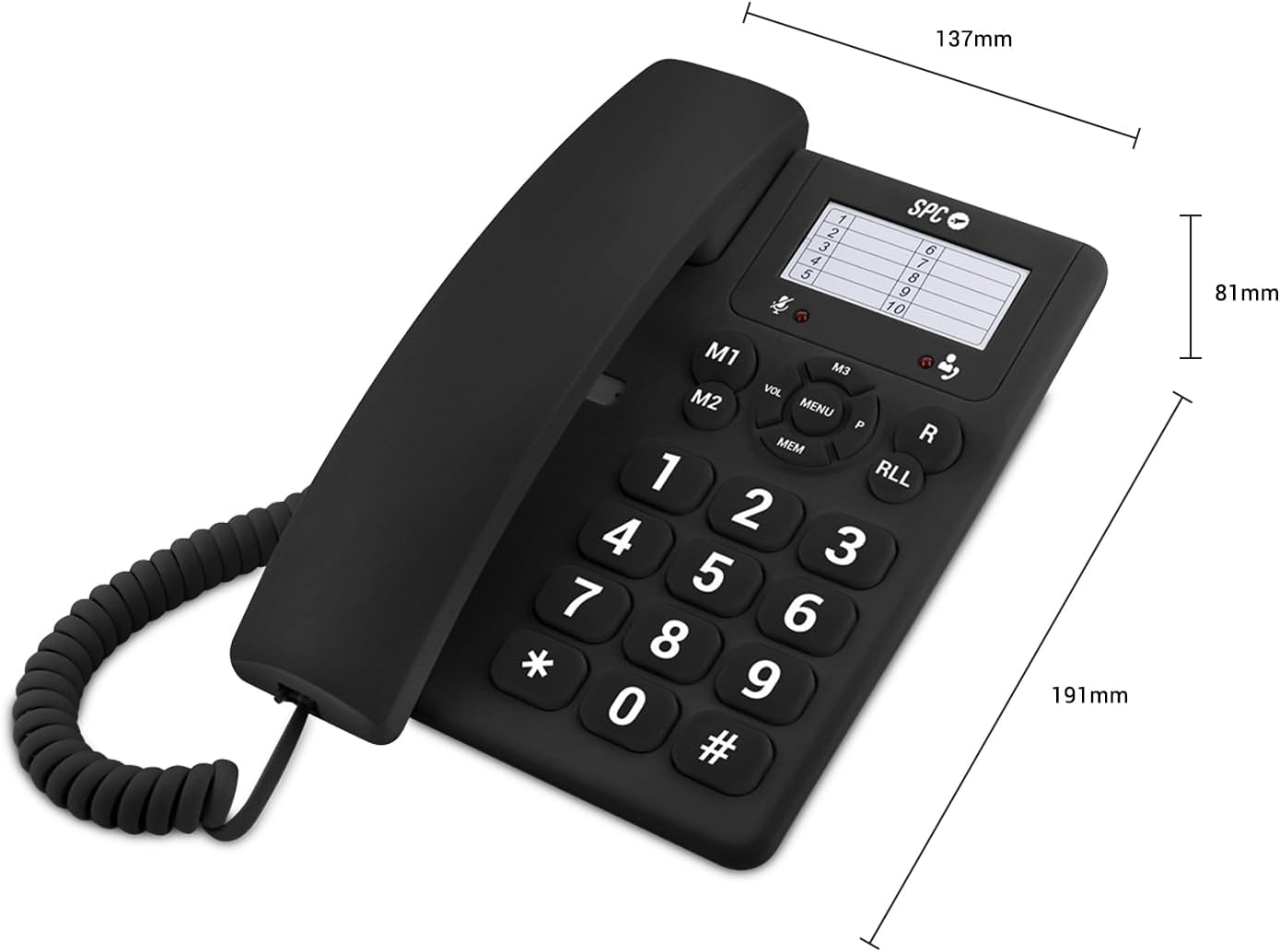
Image 4: The SPC 3602N telephone shown with its key dimensions: 81mm height, 191mm depth, and 137mm width.
9. വാറൻ്റിയും പിന്തുണയും
Your SPC 3602N Landline Telephone comes with a രണ്ട് വർഷത്തെ വാറൻ്റി against factory defects. Please retain your proof of purchase for warranty claims.
For technical support or warranty inquiries, please contact your retailer or the official SPC customer service channels. Refer to the packaging or SPC's official webബന്ധപ്പെടാനുള്ള വിവരങ്ങൾക്കുള്ള സൈറ്റ്.