ആമുഖം
Thank you for choosing the KZ ES4 Dynamic & Balanced Armature Hybrid Technology Driver In-Ear Earphones. This manual provides essential information for the proper setup, operation, and maintenance of your earphones to ensure optimal performance and longevity.
പാക്കേജ് ഉള്ളടക്കം
- 1 x KZ ES4 Earphones
- 2 x Earbud tips (2 pairs, S/L)
- 1 x ഉപയോക്തൃ മാനുവൽ (ഈ പ്രമാണം)
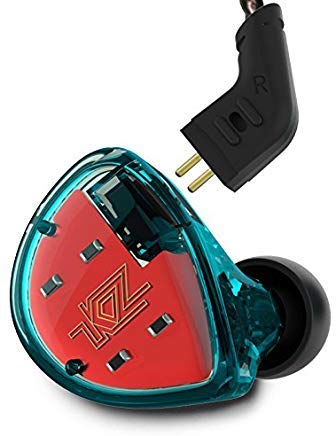
ചിത്രം 1: KZ ES4 In-Ear Earphones with detachable cable and various ear tip sizes.
സജ്ജമാക്കുക
1. കേബിൾ ഘടിപ്പിക്കുന്നു
The KZ ES4 earphones feature a detachable 0.75mm 2-pin cable. Carefully align the pins on the cable with the receptacles on each earphone unit. Push gently until the cable is securely connected. Ensure the left (L) and right (R) indicators on the cable match the respective earphone units.
2. Selecting Earbud Tips
Proper earbud tip selection is crucial for sound quality and comfort. Experiment with the included small (S) and large (L) ear tips to find the size that provides a secure fit and good seal in your ear canal. A good seal enhances bass response and noise isolation.
3. ഇയർഫോണുകൾ ധരിക്കൽ
Insert the earphone units into your ears. The cable is designed to be worn over the ear for a more secure fit and reduced microphonics (cable noise). Adjust the cable behind your ear for comfort.
4. Connecting to an Audio Source
Plug the L-type 3.5mm audio jack of the cable into the headphone port of your audio device (e.g., smartphone, MP3 player, computer).
ഓപ്പറേഷൻ
ഓഡിയോ പ്ലേബാക്ക്
Once connected to an audio source, begin playback from your device. Adjust the volume on your audio source to a comfortable listening level. Avoid listening at excessively high volumes for prolonged periods to prevent hearing damage.
Media Control (If Applicable)
Some versions of the KZ ES4 cable may include an inline remote with media control functions (e.g., play/pause, track skip). Refer to the specific cable's instructions for detailed usage. This particular model (Non-mic, Cyan) does not include a microphone or inline remote.
മെയിൻ്റനൻസ്
വൃത്തിയാക്കൽ
- Earphone Units: Gently wipe the exterior of the earphone units with a soft, dry, lint-free cloth. Do not use harsh chemicals or abrasive materials.
- ചെവി ടിപ്പുകൾ: Remove the ear tips from the earphones. They can be washed with mild soap and water. Ensure they are completely dry before reattaching them to the earphones.
- കേബിൾ: മൃദുവായതും ഉണങ്ങിയതുമായ തുണി ഉപയോഗിച്ച് കേബിൾ തുടയ്ക്കുക. കേബിൾ അമിതമായി വളയ്ക്കുകയോ വളച്ചൊടിക്കുകയോ ചെയ്യുന്നത് ഒഴിവാക്കുക.
സംഭരണം
When not in use, store your KZ ES4 earphones in a clean, dry place, preferably in a protective case, to prevent damage from dust, moisture, and tangling.
ട്രബിൾഷൂട്ടിംഗ്
- ശബ്ദമില്ല:
- Ensure the 3.5mm audio jack is fully inserted into your audio device.
- Check that the detachable 2-pin cable is securely connected to both earphone units.
- Verify that the volume on your audio device is turned up and not muted.
- Test the earphones with a different audio source to rule out device issues.
- Poor Sound Quality (e.g., weak bass, muffled sound):
- Ensure the earbud tips provide a proper seal in your ear canal. Try different sized tips.
- Check for any debris or earwax blocking the earphone nozzles.
- Ensure the cable connections are secure.
- Earphones feel uncomfortable:
- ഏറ്റവും സുഖകരമായ ഫിറ്റ് കണ്ടെത്താൻ വ്യത്യസ്ത ഇയർ ടിപ്പ് വലുപ്പങ്ങൾ ഉപയോഗിച്ച് പരീക്ഷിക്കുക.
- Adjust the cable routing over your ears for better comfort.
സ്പെസിഫിക്കേഷനുകൾ
| ഫീച്ചർ | വിശദാംശങ്ങൾ |
|---|---|
| കണക്റ്റിവിറ്റി | വയർഡ് |
| ഓഡിയോ ജാക്ക് | L-type 3.5mm |
| പിൻ തരം | 0.75mm 2-പിൻ |
| കേബിൾ നീളം | 1.2 മീറ്റർ |
| ഫ്രീക്വൻസി പ്രതികരണം | 20-40000Hz |
| പ്രതിരോധം | 25 ഓം |
| സംവേദനക്ഷമത | 104 dB/mW |
| മൈക്രോഫോൺ | Optional (Not included in this specific model) |
| ഡ്രൈവർ തരം | Dynamic & Balanced Armature Hybrid |
| മെറ്റീരിയൽ | Graphene (for dynamic driver film) |
| ഇനത്തിൻ്റെ ഭാരം | 0.81 ഔൺസ് (ഏകദേശം 23 ഗ്രാം) |
| പാക്കേജ് അളവുകൾ | 4 x 2.9 x 1.1 ഇഞ്ച് (10.16 x 7.37 x 2.79 സെ.മീ) |
വാറൻ്റിയും പിന്തുണയും
For warranty information or technical support, please refer to the documentation provided at the time of purchase or contact KZ customer service directly through their official website or authorized retailers. Specific warranty terms may vary by region and retailer.