ആമുഖം
This manual provides essential information for the proper installation, operation, and maintenance of your Intel Xeon Silver 4116 Twelve-Core Skylake Processor. Please read this guide thoroughly before proceeding with any installation or configuration to ensure optimal performance and system stability.
സുരക്ഷാ വിവരങ്ങൾ
കമ്പ്യൂട്ടർ ഘടകങ്ങൾ കൈകാര്യം ചെയ്യുമ്പോൾ എല്ലായ്പ്പോഴും ഇനിപ്പറയുന്ന സുരക്ഷാ മുൻകരുതലുകൾ പാലിക്കുക:
- Ensure your system is powered off and unplugged from the electrical outlet before installation.
- നിലത്തുകിടക്കുന്ന ഒരു ലോഹ വസ്തുവിൽ സ്പർശിച്ചോ ആന്റി-സ്റ്റാറ്റിക് റിസ്റ്റ് സ്ട്രാപ്പ് ധരിച്ചോ സ്റ്റാറ്റിക് വൈദ്യുതി ഡിസ്ചാർജ് ചെയ്യുക.
- Handle the processor by its edges to avoid touching the gold contacts or the integrated heat spreader (IHS).
- Keep the processor in its protective packaging until ready for installation.
സജ്ജീകരണവും ഇൻസ്റ്റാളേഷനും
1. ഇൻസ്റ്റാളേഷന് മുമ്പുള്ള പരിശോധനകൾ
- Verify that your motherboard supports the Intel Xeon Silver 4116 processor and has an LGA 3647 socket. Consult your motherboard's manual for compatibility.
- Ensure you have a compatible CPU cooler designed for the LGA 3647 socket and appropriate thermal paste.
- Gather necessary tools, such as a Phillips head screwdriver.
2. പ്രോസസ്സർ ഇൻസ്റ്റലേഷൻ
- Carefully open the CPU socket retention mechanism on the motherboard.
- Align the processor with the socket. The processor has specific notches that must align with the socket keys. Do not force the processor into the socket.
- പ്രോസസ്സർ സോക്കറ്റിലേക്ക് പതുക്കെ താഴ്ത്തുക.
- Close the socket retention mechanism to secure the processor.
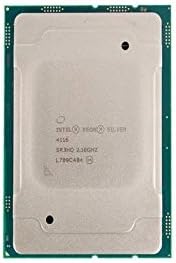
ചിത്രം: മുകളിൽ view of the Intel Xeon Silver 4116 processor, showing the integrated heat spreader and Intel branding.

ചിത്രം: വശങ്ങളിലായി view of the Intel Xeon Silver 4116 processor, displaying both the top (integrated heat spreader) and bottom (LGA 3647 contact array) surfaces.
3. സിപിയു കൂളർ ഇൻസ്റ്റലേഷൻ
- Apply a thin, even layer of thermal paste to the center of the processor's integrated heat spreader (IHS). Refer to the thermal paste manufacturer's instructions for specific application methods.
- നിർമ്മാതാവിന്റെ നിർദ്ദേശങ്ങൾക്കനുസൃതമായി സിപിയു കൂളർ ഘടിപ്പിക്കുക, മർദ്ദ വിതരണം തുല്യമാണെന്ന് ഉറപ്പാക്കുക.
- Connect the CPU cooler's fan cable to the designated CPU fan header on the motherboard.
പ്രവർത്തന നിർദ്ദേശങ്ങൾ
1. Initial System Boot
- After completing hardware installation, connect all necessary peripherals and power cables.
- Power on your system. The system should initiate the boot process.
- Access the BIOS/UEFI setup utility (typically by pressing DEL, F2, അല്ലെങ്കിൽ F10 during startup, depending on your motherboard).
2. ബയോസ്/യുഇഎഫ്ഐ കോൺഫിഗറേഷൻ
- Verify that the BIOS/UEFI recognizes the Intel Xeon Silver 4116 processor correctly.
- Configure memory settings (e.g., XMP profiles) if applicable.
- Adjust fan speed curves for the CPU cooler to maintain optimal temperatures.
- Save changes and exit the BIOS/UEFI.
3. ഡ്രൈവർ ഇൻസ്റ്റാളേഷൻ
- ഓപ്പറേറ്റിംഗ് സിസ്റ്റം ഇൻസ്റ്റാൾ ചെയ്യുക.
- Install the latest chipset drivers for your motherboard, typically available from the motherboard manufacturer's website. These drivers ensure proper communication between the CPU and other system components.
മെയിൻ്റനൻസ്
Regular maintenance helps ensure the longevity and stable operation of your processor and system.
- പൊടി വൃത്തിയാക്കൽ: Periodically clean dust from the CPU cooler heatsink and fan using compressed air. Ensure the system is powered off and unplugged before cleaning.
- തെർമൽ പേസ്റ്റ്: If CPU temperatures become consistently high, consider reapplying thermal paste. This typically involves removing the CPU cooler, cleaning off old thermal paste from both the CPU and cooler base, and applying new thermal paste.
- താപനില നിരീക്ഷണം: Use system monitoring software to keep track of CPU temperatures, especially under load, to prevent overheating.
ട്രബിൾഷൂട്ടിംഗ്
നിങ്ങൾക്ക് പ്രശ്നങ്ങൾ നേരിടുകയാണെങ്കിൽ, ഇനിപ്പറയുന്ന പൊതുവായ ട്രബിൾഷൂട്ടിംഗ് ഘട്ടങ്ങൾ പരിശോധിക്കുക:
- ബൂട്ട് ഇല്ല/ഡിസ്പ്ലേ ഇല്ല:
- മദർബോർഡിലേക്കും സിപിയുവിലേക്കും ഉള്ള എല്ലാ പവർ കണക്ഷനുകളും പരിശോധിക്കുക.
- സിപിയു, റാം, ഗ്രാഫിക്സ് കാർഡ് എന്നിവ വീണ്ടും ഇൻസ്റ്റാൾ ചെയ്യുക.
- Check for bent pins on the CPU or in the socket (handle with extreme care).
- സിസ്റ്റം അസ്ഥിരത/ക്രാഷുകൾ:
- Ensure CPU temperatures are within acceptable limits.
- RAM സമഗ്രത പരിശോധിക്കാൻ മെമ്മറി ഡയഗ്നോസ്റ്റിക് ഉപകരണങ്ങൾ പ്രവർത്തിപ്പിക്കുക.
- മദർബോർഡ് BIOS/UEFI ഏറ്റവും പുതിയ പതിപ്പിലേക്ക് അപ്ഡേറ്റ് ചെയ്യുക.
- അമിത ചൂടാക്കൽ:
- സിപിയു കൂളർ ശരിയായി ഇൻസ്റ്റാൾ ചെയ്തിട്ടുണ്ടെന്നും സിപിയുവുമായി നല്ല സമ്പർക്കം പുലർത്തുന്നുണ്ടെന്നും ഉറപ്പാക്കുക.
- സിപിയു ഫാൻ ശരിയായി കറങ്ങുന്നുണ്ടോ എന്ന് പരിശോധിക്കുക.
- കമ്പ്യൂട്ടർ കെയ്സിനുള്ളിൽ മതിയായ വായുസഞ്ചാരം ഉറപ്പാക്കുക.
For persistent issues, consult your motherboard's manual for specific diagnostic LED codes or beep codes.
സ്പെസിഫിക്കേഷനുകൾ
| ഫീച്ചർ | സ്പെസിഫിക്കേഷൻ |
|---|---|
| ബ്രാൻഡ് | ഇൻ്റൽ |
| മോഡൽ നമ്പർ | SR3HQ |
| സിപിയു നിർമ്മാതാവ് | ഇൻ്റൽ |
| സിപിയു മോഡൽ | Xeon Silver 4116 (Twelve-Core) |
| സിപിയു വേഗത | 2.1 GHz |
| സിപിയു സോക്കറ്റ് | LGA 3647 |
| L3 കാഷെ | 16.5 MB |
| ആദ്യ തീയതി ലഭ്യമാണ് | മെയ് 19, 2018 |
വാറൻ്റി വിവരങ്ങൾ
Intel processors typically come with a limited warranty. For detailed information regarding the warranty period, terms, and conditions for your Intel Xeon Silver 4116 processor, please refer to the official Intel webനിങ്ങളുടെ വാങ്ങലിനൊപ്പം നൽകിയിരിക്കുന്ന ഡോക്യുമെന്റേഷൻ അല്ലെങ്കിൽ സൈറ്റ്. വാറന്റി ക്ലെയിമുകൾക്കായി നിങ്ങളുടെ വാങ്ങലിന്റെ തെളിവ് സൂക്ഷിക്കുക.
പിന്തുണ
For further technical assistance, driver downloads, or additional product information, please visit the official Intel support webസൈറ്റ്:
You may also consult your system integrator or motherboard manufacturer for system-specific support.


