1. ആമുഖം
വാങ്ങിയതിന് നന്ദി.asing the CAIWEI A8AB-NEW Video Projector. This manual provides essential information for the safe and efficient operation of your device. Please read it thoroughly before use and retain it for future reference.
2. സുരക്ഷാ നിർദ്ദേശങ്ങൾ
- l ചെയ്യുമ്പോൾ പ്രൊജക്ടർ ലെൻസിലേക്ക് നേരിട്ട് നോക്കരുത്amp ഓണാണ്.
- അമിതമായി ചൂടാകുന്നത് തടയാൻ പ്രൊജക്ടറിന് ചുറ്റും ശരിയായ വായുസഞ്ചാരം ഉറപ്പാക്കുക.
- പ്രൊജക്ടറിനെ മഴയിലോ ഈർപ്പത്തിലോ തുറന്നുവിടരുത്.
- പ്രൊജക്ടറിനൊപ്പം നൽകിയിരിക്കുന്ന പവർ അഡാപ്റ്റർ മാത്രം ഉപയോഗിക്കുക.
- Keep the projector away from flammable materials.
- ഇടിമിന്നൽ ഉണ്ടാകുമ്പോഴോ ദീർഘനേരം ഉപയോഗിക്കാതിരിക്കുമ്പോഴോ പ്രൊജക്ടർ പ്ലഗ് ഊരിവയ്ക്കുക.
- പ്രൊജക്ടർ സ്വയം നന്നാക്കാൻ ശ്രമിക്കരുത്. എല്ലാ സർവീസിംഗും യോഗ്യതയുള്ള ഉദ്യോഗസ്ഥർക്ക് റഫർ ചെയ്യുക.
3. പാക്കേജ് ഉള്ളടക്കം
അൺപാക്ക് ചെയ്യുമ്പോൾ എല്ലാ ഇനങ്ങളും അവിടെയുണ്ടെന്ന് ദയവായി പരിശോധിക്കുക:
- CAIWEI A8AB-NEW Video Projector
- പവർ കേബിൾ
- റിമോട്ട് കൺട്രോൾ
- HDMI കേബിൾ
- വിജിഎ കേബിൾ
- എവി കേബിൾ
- ഉപയോക്തൃ മാനുവൽ
4. ഉൽപ്പന്നം കഴിഞ്ഞുview
Familiarize yourself with the projector's components:
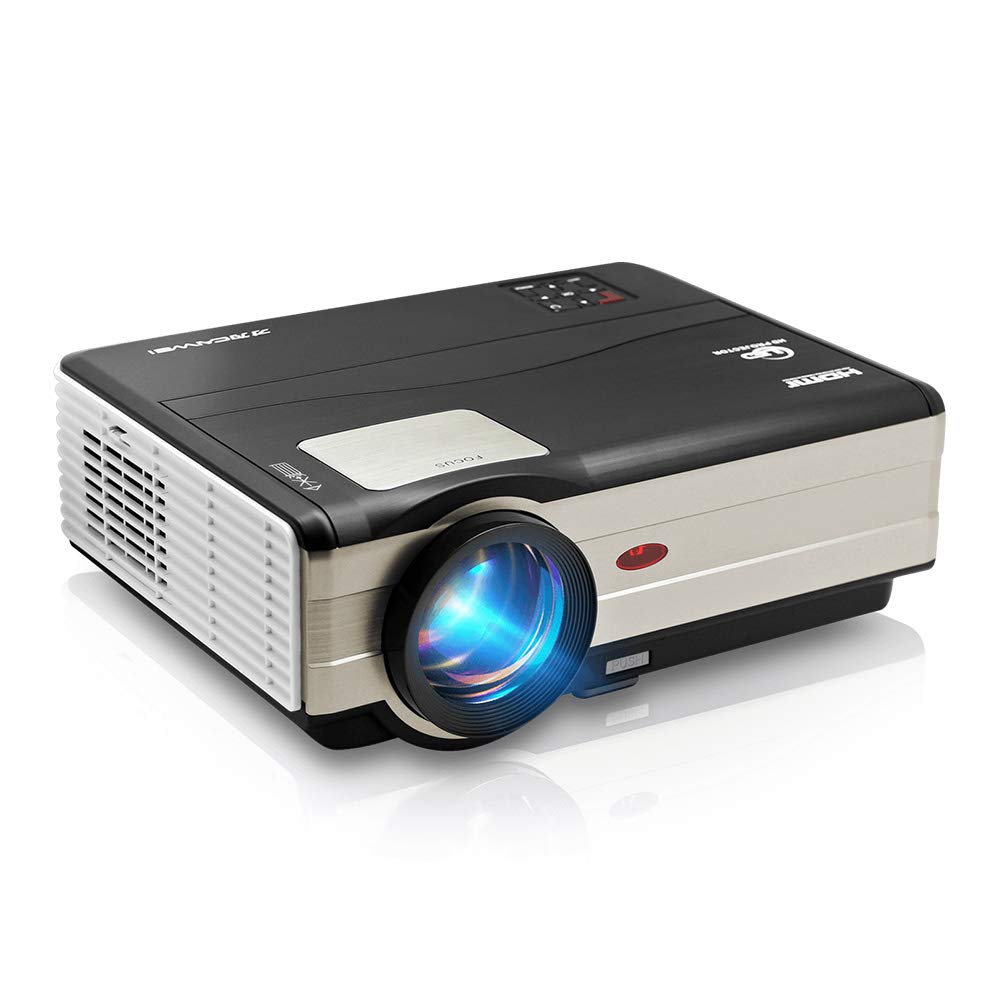
ചിത്രം 1: ഫ്രണ്ട് view of the CAIWEI A8AB-NEW Video Projector, showing the lens and ventilation.
ഫ്രണ്ട് പാനൽ
- പ്രൊജക്ഷൻ ലെൻസ്: ചിത്രം പുറപ്പെടുവിക്കുന്നു.
- ഫോക്കസ് റിംഗ്: ചിത്രത്തിന്റെ വ്യക്തത ക്രമീകരിക്കുന്നു.
- കീസ്റ്റോൺ തിരുത്തൽ: ട്രപസോയിഡൽ ഇമേജ് വികലത ശരിയാക്കുന്നു.
പിൻ പാനൽ
- പവർ പോർട്ട്: പവർ കേബിളുമായി ബന്ധിപ്പിക്കുന്നു.
- HDMI പോർട്ടുകൾ (x2): Connects to HDMI-enabled devices (e.g., Blu-ray player, game console).
- യുഎസ്ബി പോർട്ടുകൾ (x2): Connects to USB storage devices or other USB peripherals.
- VGA പോർട്ട്: Connects to computers or laptops with VGA output.
- എവി പോർട്ട്: Connects to older devices using composite video and stereo audio.
- ഓഡിയോ ഔട്ട്പുട്ട് (3.5 മിമി): ബാഹ്യ സ്പീക്കറുകളിലേക്കോ ഹെഡ്ഫോണുകളിലേക്കോ കണക്റ്റുചെയ്യുന്നു.
5. സജ്ജീകരണം
5.1 പ്ലേസ്മെൻ്റ്
Place the projector on a stable, flat surface or mount it to a ceiling. Ensure the projector is perpendicular to the projection screen or wall. The optimal projection distance varies, but generally, a larger distance yields a larger image.
5.2 പവർ കണക്ഷൻ
- Connect the power cable to the projector's power port.
- പവർ കേബിളിൻ്റെ മറ്റേ അറ്റം പവർ ഔട്ട്ലെറ്റിലേക്ക് പ്ലഗ് ചെയ്യുക.
- പവർ ഇൻഡിക്കേറ്റർ ലൈറ്റ് പ്രകാശിക്കും.
5.3 ഇൻപുട്ട് ഉപകരണങ്ങൾ ബന്ധിപ്പിക്കൽ
പ്രൊജക്ടർ വിവിധ ഇൻപുട്ട് സ്രോതസ്സുകളെ പിന്തുണയ്ക്കുന്നു:
- എച്ച്ഡിഎംഐ: Connect an HDMI cable from your device (e.g., laptop, game console, streaming stick) to one of the projector's HDMI ports.
- USB: Insert a USB flash drive into a USB port to play media fileനേരിട്ട്.
- വി.ജി.എ: Connect a VGA cable from your computer to the projector's VGA port.
- ഓഫ്: Use the provided AV cable to connect to devices with composite video output.
- Wireless (WiFi): For screen mirroring from smartphones or tablets, navigate to the 'Wireless Display' or 'Screen Mirroring' option in the projector's menu and follow the on-screen instructions. Ensure your device and the projector are on the same Wi-Fi network.
- ബ്ലൂടൂത്ത്: To connect external Bluetooth speakers, go to the Bluetooth settings in the projector's menu, enable Bluetooth, and pair with your desired audio device.
5.4 ഫോക്കസും കീസ്റ്റോൺ ക്രമീകരണവും
- പ്രൊജക്ടർ ഓണാക്കി ഒരു ചിത്രം പ്രദർശിപ്പിക്കുക.
- തിരിക്കുക ഫോക്കസ് റിംഗ് on the lens until the image appears sharp and clear.
- If the image is trapezoidal (wider at the top or bottom), adjust the കീസ്റ്റോൺ തിരുത്തൽ dial or setting until the image is rectangular.
6. പ്രവർത്തന നിർദ്ദേശങ്ങൾ
6.1 പവർ ഓൺ/ഓഫ്
- പവർ ഓൺ: പ്രൊജക്ടറിലോ റിമോട്ട് കൺട്രോളിലോ ഉള്ള പവർ ബട്ടൺ അമർത്തുക.
- പവർ ഓഫ്: പവർ ബട്ടൺ വീണ്ടും അമർത്തുക. ആവശ്യപ്പെടുകയാണെങ്കിൽ ഷട്ട്ഡൗൺ സ്ഥിരീകരിക്കുക.
6.2 മെനു നാവിഗേഷൻ
Use the navigation buttons (Up, Down, Left, Right, OK) on the projector or remote control to browse the on-screen menu. The 'Menu' button typically opens the main settings, and 'Exit' or 'Back' closes sub-menus.
6.3 ഇൻപുട്ട് ഉറവിട തിരഞ്ഞെടുപ്പ്
Press the 'Source' or 'Input' button on the remote control or projector. A list of available input sources (HDMI1, HDMI2, USB1, USB2, VGA, AV, Wireless Display) will appear. Select the desired source using the navigation buttons and press 'OK'.
6.4 ഓഡിയോ ക്രമീകരണങ്ങൾ
Access the audio settings through the main menu to adjust volume, select audio output (internal speaker, external via 3.5mm jack, or Bluetooth), and modify sound modes.
6.5 Wireless/Bluetooth Connection
Refer to section 5.3 for detailed instructions on connecting via Wi-Fi for screen mirroring or Bluetooth for audio output.
7. പരിപാലനം
7.1 ലെൻസ് വൃത്തിയാക്കൽ
Use a soft, lint-free cloth specifically designed for optical lenses. Gently wipe the lens surface. Avoid using abrasive cleaners or excessive force, which can scratch the lens.
7.2 Cleaning the Air Filter/Vents
Regularly check the air intake and exhaust vents for dust accumulation. Use a soft brush or a can of compressed air to gently clean the vents. This helps maintain proper airflow and prevents overheating.
7.3 സംഭരണം
When not in use, store the projector in a cool, dry, and dust-free environment. Use the original packaging or a protective case to prevent damage.
8. പ്രശ്നപരിഹാരം
| പ്രശ്നം | സാധ്യമായ കാരണം | പരിഹാരം |
|---|---|---|
| സ്ക്രീനിൽ ചിത്രമൊന്നുമില്ല | Power not connected; Incorrect input source; Device not powered on. | Check power cable; Select correct input source; Ensure connected device is on. |
| ചിത്രം മങ്ങിയതാണ് | Focus not adjusted; Projector too far/close. | Adjust the focus ring; Reposition the projector. |
| ചിത്രം ട്രപസോയിഡൽ ആണ് | കീസ്റ്റോൺ ക്രമീകരിച്ചിട്ടില്ല. | കീസ്റ്റോൺ തിരുത്തൽ ക്രമീകരിക്കുക. |
| ശബ്ദമില്ല | Volume too low; Muted; Incorrect audio output; Cable issue. | Increase volume; Unmute; Check audio settings; Verify cable connections. |
| റിമോട്ട് കൺട്രോൾ പ്രവർത്തിക്കുന്നില്ല | Batteries dead; Obstruction; Out of range. | Replace batteries; Remove obstructions; Ensure line of sight to IR receiver. |
| അമിത ചൂടാക്കൽ മുന്നറിയിപ്പ് | Blocked vents; Poor ventilation. | Clear vents; Ensure adequate space around projector. |
9 സ്പെസിഫിക്കേഷനുകൾ
- മോഡൽ: A8AB-NEW
- ബ്രാൻഡ്: CAIWEI
- ഡിസ്പ്ലേ റെസല്യൂഷൻ: 1280 x 800
- കണക്റ്റിവിറ്റി ടെക്നോളജി: Bluetooth, HDMI, USB, VGA, Wireless
- പ്രത്യേക സവിശേഷതകൾ: Built-In Wi-Fi, Portable, Wireless
- ശുപാർശ ചെയ്യുന്ന ഉപയോഗങ്ങൾ: Gaming, Home Theater
- ഇനത്തിൻ്റെ ഭാരം: 6.1 പൗണ്ട്
- ഉൽപ്പന്ന അളവുകൾ: 11.2 x 14.7 x 5 ഇഞ്ച്
10. വാറൻ്റിയും പിന്തുണയും
CAIWEI products are designed for reliability and performance. For specific warranty details, please refer to the warranty card included with your purchase or contact CAIWEI customer support. If you encounter any issues not covered in this manual, please reach out to our support team for assistance.
ഉപഭോക്തൃ പിന്തുണ: Please visit the official CAIWEI website or contact your retailer for support information.


