1. ആമുഖം
Thank you for choosing the Docooler LiitoKala Lii-500 Smart Battery Charger. This advanced charger is designed to provide efficient and safe charging for various rechargeable batteries, including Li-ion, Ni-MH, and Ni-CD types. It features an intuitive LCD display, four independent charging slots, and multiple charging current options, along with a USB output function.
Please read this manual carefully before use to ensure proper operation and to maximize the lifespan of your batteries and charger.
2. സുരക്ഷാ നിർദ്ദേശങ്ങൾ
To prevent injury, property damage, or damage to the charger and batteries, observe the following safety precautions:
- Use only the supplied AC adapter. Using an incompatible adapter may cause damage or fire.
- Do not charge non-rechargeable batteries. This can lead to explosion, rupture, or leakage.
- Ensure correct battery polarity (+/-) when inserting batteries into the charger slots.
- Do not disassemble, modify, or attempt to repair the charger. Contact customer support for assistance.
- Keep the charger away from water, moisture, direct sunlight, and high temperatures.
- Do not operate the charger if it appears damaged or has been dropped.
- കുട്ടികൾക്ക് ലഭ്യമാകാതെ സൂക്ഷിക്കുക.
- ചാർജ് ചെയ്യുമ്പോൾ ആവശ്യത്തിന് വായുസഞ്ചാരം ഉറപ്പാക്കുക. ചാർജർ മൂടരുത്.
3. ഉൽപ്പന്നം കഴിഞ്ഞുview
3.1. ഘടകങ്ങൾ
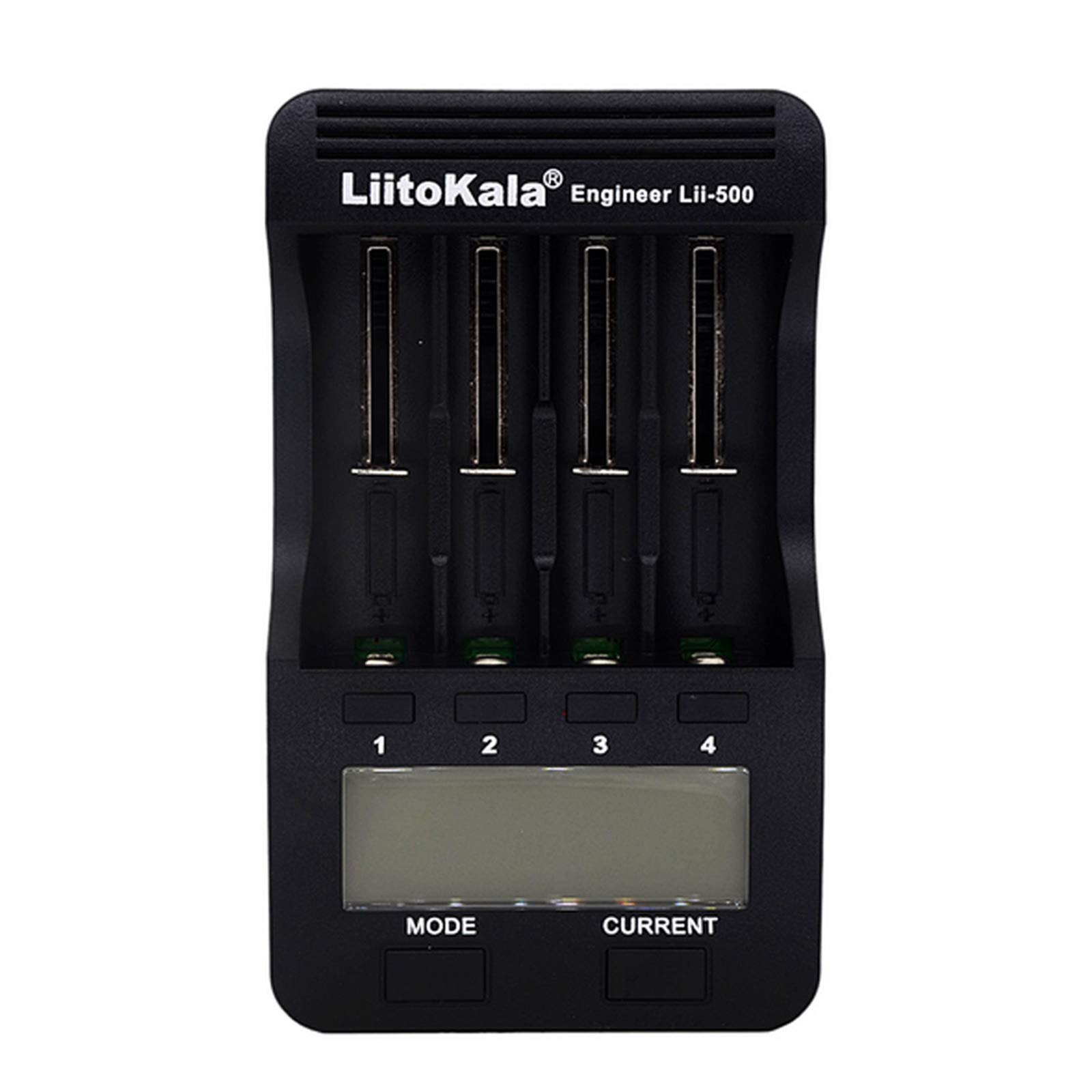
ചിത്രം 1: മുകളിൽ view of the Lii-500 charger, displaying the four independent battery slots and the LCD screen.

ചിത്രം 2: Lii-500 charger with four batteries inserted, illustrating how batteries fit into the slots and the visibility of the LCD display.
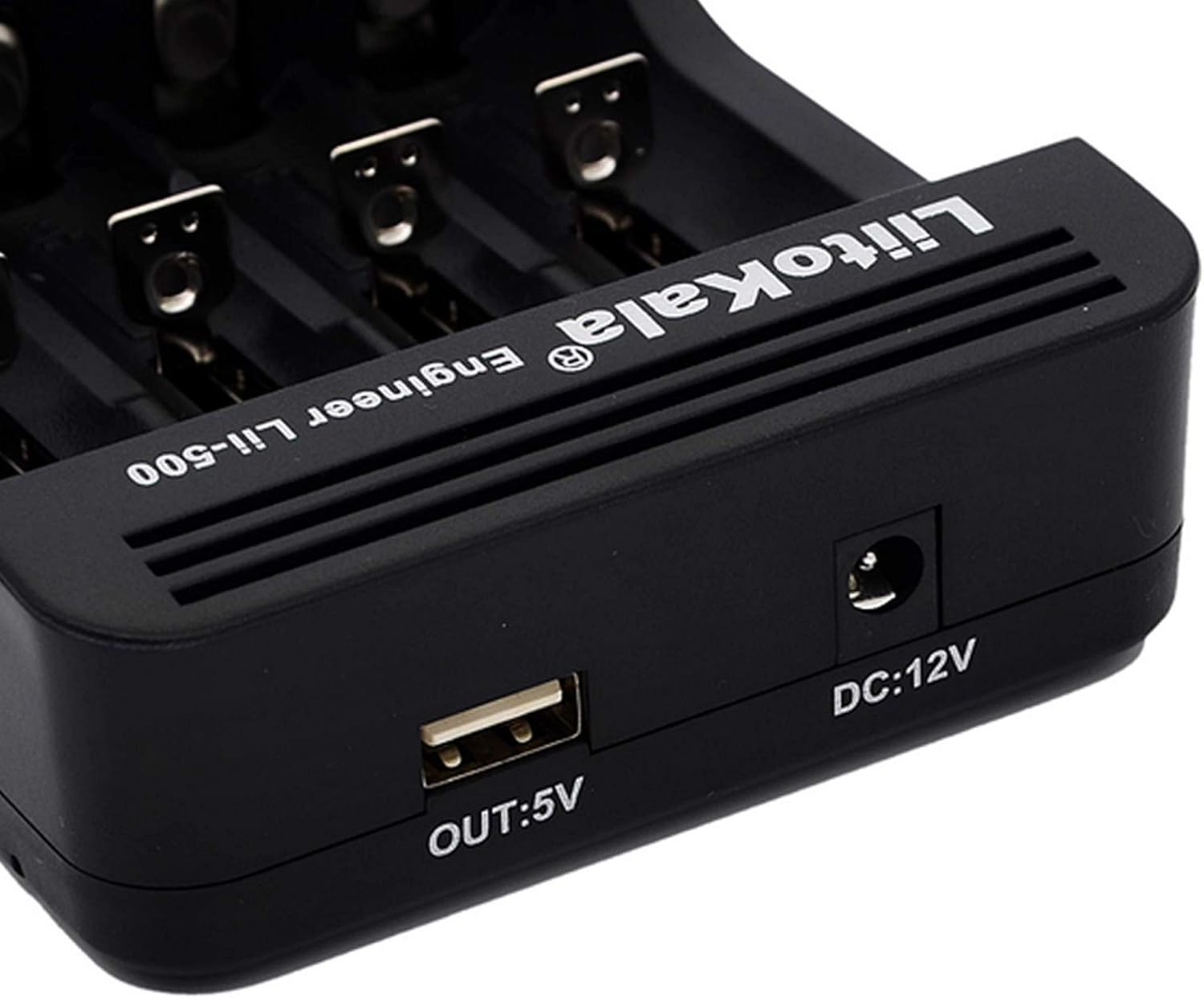
ചിത്രം 3: വശം view of the Lii-500 charger, highlighting the DC 12V power input and the 5V USB output port.

ചിത്രം 4: Dimensions of the Lii-500 charger, indicating its compact size.
3.2. എൽസിഡി ഡിസ്പ്ലേ
The LCD screen provides real-time information for each battery slot, including:
- വാല്യംtagഇ (വി): നിലവിലെ ബാറ്ററി വോള്യംtage.
- നിലവിലെ (mA): Selected charging/discharging current.
- Time (h): Elapsed charging/discharging time.
- ശേഷി (mAh): Accumulated capacity during charging/discharging.
- Internal Resistance (mR): Battery's internal resistance (displayed during test modes).
4 സ്പെസിഫിക്കേഷനുകൾ
| ഫീച്ചർ | സ്പെസിഫിക്കേഷൻ |
|---|---|
| ഇൻപുട്ട് വോളിയംtage | ഡിസി 12 വി / 2 എ |
| Charging Current (Li-ion) | 300mA / 500mA / 700mA / 1000mA x 4 |
| Charging Current (Ni-MH/Ni-CD) | 300mA / 500mA / 700mA / 1000mA x 4 |
| ഡിസ്ചാർജ് കറൻ്റ് | 250mA / 500mA x 4 |
| USB ഔട്ട്പുട്ട് | 5V / 1000mA (requires 1-4 Li-ion batteries) |
| അനുയോജ്യമായ ബാറ്ററികൾ | Li-ion (3.7V): 26650, 22650, 26500, 18650, 18490, 17670, 17500, 17355, 16340, 14500, 10440 Ni-MH/Ni-CD (1.2V): AA, AAA, C, SC |
| അളവുകൾ | 15.9cm x 9.3cm x 3.7cm (ഏകദേശം) |
| ഭാരം | 210 ഗ്രാം (ഏകദേശം) |
5. സജ്ജീകരണം
- പവർ ബന്ധിപ്പിക്കുക: Plug the provided AC adapter into a power outlet and connect the DC 12V end to the charger's input port. The LCD screen will illuminate.
- ബാറ്ററികൾ ചേർക്കുക: Carefully insert one or more rechargeable batteries into the charging slots, observing the correct polarity (+/-). The charger will automatically detect the battery type (Li-ion or Ni-MH/Ni-CD) and display its current voltage.
6. പ്രവർത്തന നിർദ്ദേശങ്ങൾ
The Lii-500 charger offers three main operating modes: ചാർജ് ചെയ്യുക, ഫാസ്റ്റ് ടെസ്റ്റ്, ഒപ്പം Normal Test.
6.1. മോഡ് തിരഞ്ഞെടുക്കൽ
After inserting a battery, press the മോഡ് ലഭ്യമായ മോഡുകളിലൂടെ സൈക്കിൾ ചെയ്യാൻ ബട്ടൺ:
- ചാർജ് മോഡ്: Standard charging of batteries.
- Fast Test Mode: Quickly determines battery capacity by discharging and then fully charging.
- Normal Test Mode: Provides a more accurate capacity measurement by fully charging, then discharging, and finally recharging the battery.
If no mode is selected within 8 seconds, the charger will default to ചാർജ് മോഡ് 500mA-ൽ.
6.2. Current Selection
In ചാർജ് മോഡ്, after selecting the mode, press the നിലവിലെ button to choose the desired charging current (300mA, 500mA, 700mA, or 1000mA). The selected current will apply to all active slots. For optimal battery life, it is generally recommended to use lower charging currents unless faster charging is required.
6.3. Independent Slot Operation
Each of the four slots operates independently. You can set different modes and currents for each battery by pressing the corresponding slot number button (1, 2, 3, or 4) after inserting a battery, then using the മോഡ് ഒപ്പം നിലവിലെ ബട്ടണുകൾ.
6.4. യുഎസ്ബി ഔട്ട്പുട്ട് ഫംഗ്ഷൻ
The Lii-500 features a 5V/1000mA USB output port, allowing it to function as a power bank. This function is active only when 1 to 4 fully charged Li-ion batteries are inserted into the charger. Ni-MH/Ni-CD batteries do not support the USB output function.

ചിത്രം 5: Illustration of the Lii-500 charger providing power via its USB output port to charge a mobile device.
7. പരിപാലനം
- വൃത്തിയാക്കൽ: Disconnect the charger from power before cleaning. Use a soft, dry cloth to wipe the surface. Do not use abrasive cleaners or solvents.
- സംഭരണം: ഉപയോഗിക്കാത്തപ്പോൾ നേരിട്ടുള്ള സൂര്യപ്രകാശത്തിൽ നിന്നും കടുത്ത താപനിലയിൽ നിന്നും മാറി തണുത്തതും വരണ്ടതുമായ സ്ഥലത്ത് ചാർജർ സൂക്ഷിക്കുക.
- ബാറ്ററി കെയർ: For optimal battery life, avoid fully discharging Li-ion batteries frequently. Store batteries at approximately 50% charge if not used for extended periods.
8. പ്രശ്നപരിഹാരം
| പ്രശ്നം | സാധ്യമായ കാരണം | പരിഹാരം |
|---|---|---|
| ചാർജർ ഓണാകുന്നില്ല. | പവർ അഡാപ്റ്റർ ബന്ധിപ്പിച്ചിട്ടില്ല അല്ലെങ്കിൽ തകരാറുണ്ട്. | Ensure the AC adapter is securely plugged into both the wall outlet and the charger. Try a different outlet. |
| ബാറ്ററി ചാർജ് ചെയ്യുന്നില്ല. | Incorrect battery insertion; battery is non-rechargeable; battery is severely over-discharged (0V activation needed). | Check battery polarity. Ensure it's a rechargeable battery. The charger has 0V activation; if it doesn't start, the battery might be beyond recovery. |
| USB output not working. | Only Li-ion batteries support USB output; batteries are not sufficiently charged. | Ensure 1-4 Li-ion batteries are inserted and fully charged. Ni-MH/Ni-CD batteries do not provide USB output. |
| പ്രവർത്തന സമയത്ത് ചാർജർ ചൂടാകുന്നു. | Normal operation, especially during high-current charging or discharge cycles. | Ensure adequate ventilation around the charger. If it becomes excessively hot to touch, reduce the charging current or discontinue use and contact support. |
9. വാറൻ്റിയും പിന്തുണയും
Docooler products are designed for reliability and performance. For warranty information or technical support, please refer to the documentation included with your purchase or contact your retailer. Keep your purchase receipt as proof of purchase.
For further assistance, you may visit the official Docooler webസൈറ്റ് അല്ലെങ്കിൽ അവരുടെ ഉപഭോക്തൃ സേവന വിഭാഗവുമായി ബന്ധപ്പെടുക.


