1. ആമുഖം
Thank you for choosing the Uten Digital Kitchen Scale. This ultra-slim, multifunction scale is designed for precise food weighing in your kitchen. Featuring a durable stainless steel platform, a clear back-lit LCD display, and multiple measurement modes, it simplifies your cooking and baking tasks. Please read this manual thoroughly before use to ensure proper operation and maintenance.
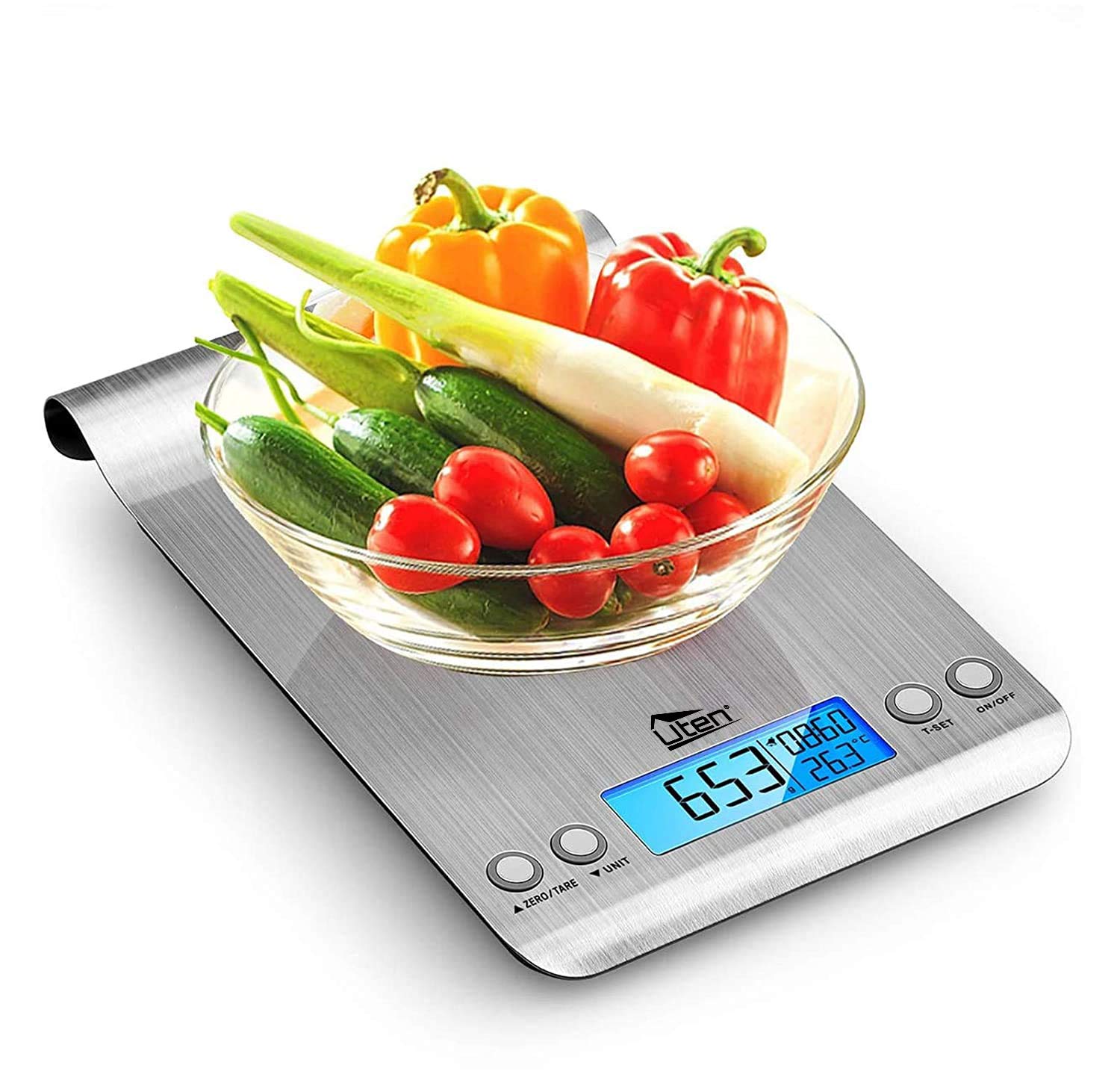
Figure 1: Uten Digital Kitchen Scale with a bowl of fresh vegetables, demonstrating its use for weighing ingredients.
2. ബോക്സിൽ എന്താണുള്ളത്?
- 1 x Uten Electronic Kitchen Scale
- 2 x 1.5V AAA Batteries (Panasonic)
- 1 x ഉപയോക്തൃ നിർദ്ദേശ മാനുവൽ
3. ഉൽപ്പന്ന സവിശേഷതകൾ
- ഉയർന്ന നിലവാരമുള്ള നിർമ്മാണം: SUS401 high-quality stainless steel platform and ABS plastic frame for durability and easy cleaning.
- Slim Design with Hook: Lightweight, compact, and features a hook for convenient hanging storage when not in use.
- ബാക്ക്-ലിറ്റ് എൽസിഡി ഡിസ്പ്ലേ: Large 2.87 x 1.02 inch high-contrast display with blue back-light for easy readability.
- ഹൈ പ്രിസിഷൻ സെൻസർ: Built with a high precision strain gauge sensor, weighing up to 11lb/5kg with a graduation of 1g/0.1oz.
- ഒന്നിലധികം അളവെടുപ്പ് മോഡുകൾ: Supports 4 measurement modes including kilograms (kg), grams (g), ounces (oz), and pounds (lb:oz).
- Volume Indication: Measures water and milk volume in milliliters (ml) and fluid ounces (fl'oz).
- Zero & Tare Function: Allows for weighing different loads consecutively without removing the previous load.
- Alarm Timer & Real-Time Clock: Integrated timer and clock display for added kitchen convenience.
- താപനില സെൻസർ: ആംബിയന്റ് താപനില പ്രദർശിപ്പിക്കുന്നു.
- മുന്നറിയിപ്പ് സൂചകങ്ങൾ: Includes low battery and overload indications.

Figure 2: The scale's large platform and slim design, ideal for various kitchen tasks and easy storage.
4. സജ്ജീകരണം
4.1. ബാറ്ററി ഇൻസ്റ്റാളേഷൻ
- സ്കെയിലിൻ്റെ അടിഭാഗത്ത് ബാറ്ററി കമ്പാർട്ട്മെൻ്റ് കണ്ടെത്തുക.
- ബാറ്ററി കമ്പാർട്ട്മെൻ്റ് കവർ തുറക്കുക.
- രണ്ട് 1.5V AAA ബാറ്ററികൾ ഇടുക, ശരിയായ പോളാരിറ്റി ഉറപ്പാക്കുക (+/-).
- ബാറ്ററി കമ്പാർട്ട്മെൻ്റ് കവർ സുരക്ഷിതമായി അടയ്ക്കുക.
4.2. പ്ലേസ്മെന്റ്
For accurate readings, always place the scale on a flat, hard, and stable surface. Avoid soft surfaces like carpets or uneven countertops.
5. പ്രവർത്തന നിർദ്ദേശങ്ങൾ
5.1. പവർ ഓൺ/ഓഫ്
അമർത്തുക ഓൺ/ഓഫ് button to turn the scale on. The back-lit LCD display will illuminate, and the scale will enter weighing mode, typically displaying "0.0". To turn off the scale, press and hold the ഓൺ/ഓഫ് കുറച്ച് നിമിഷങ്ങൾക്കുള്ള ബട്ടൺ.
5.2. യൂണിറ്റ് പരിവർത്തനം
സ്കെയിൽ ഓണായിരിക്കുമ്പോൾ, അമർത്തുക യൂണിറ്റ് button to cycle through the available measurement units: grams (g), kilograms (kg), pounds (lb:oz), milliliters (ml), and fluid ounces (fl'oz). A long press on the യൂണിറ്റ് button can switch between metric and imperial systems for temperature display.

Figure 3: Visual representation of the four unit conversion options available on the scale's display.
5.3. സീറോ/ടാരെ ഫംഗ്ഷൻ
ദി ZERO/TARE button allows you to reset the display to zero, effectively subtracting the weight of a container or previous ingredients. This is useful for weighing multiple ingredients in the same bowl.
- സ്കെയിലിൽ ഒരു ഒഴിഞ്ഞ പാത്രം വയ്ക്കുക. ഡിസ്പ്ലേ അതിന്റെ ഭാരം കാണിക്കും.
- അമർത്തുക ZERO/TARE ബട്ടൺ. ഡിസ്പ്ലേ "0.0" ആയി പുനഃസജ്ജമാക്കും.
- Add your ingredient to the container. The display will show only the weight of the added ingredient.

Figure 4: Step-by-step guide illustrating how to use the Zero/Tare function for accurate ingredient measurement.
5.4. Alarm Timer and Clock
ദി ടി-സെറ്റ് button functions as both a timer and a clock. In idle standing mode, the scale displays time and temperature. To set the timer, simply click ടി-സെറ്റ്; the clock display in the upper right-hand corner will begin to flicker. Adjust the desired stop time using the ZERO/TARE (മുകളിലേക്ക്) അല്ലെങ്കിൽ യൂണിറ്റ് (down) buttons. The timer will count down and sound an alarm when finished.

Figure 5: The scale's alarm timer feature, useful for cooking and other timed kitchen activities.
5.5. Video Demonstration: Key Features
Video 1: An official demonstration of the Uten Digital Kitchen Scale, highlighting its features such as power on/off, unit conversion, and the zero/tare function. This video provides a visual guide to operating the scale's main controls.
6. പരിചരണവും പരിപാലനവും
- വൃത്തിയാക്കൽ: The stainless steel platform is fingerprint resistant and easy to clean. Use a slightly damp cloth to remove residue or fingerprints. Do not use abrasive cleaners.
- നിമജ്ജനം ഒഴിവാക്കുക: സ്കെയിൽ വെള്ളത്തിലോ മറ്റേതെങ്കിലും ദ്രാവകത്തിലോ മുക്കരുത്.
- ഉണക്കി സൂക്ഷിക്കുക: Ensure the scale is dry after cleaning to prevent damage to electronic components.
- ശ്രദ്ധയോടെ കൈകാര്യം ചെയ്യുക: Do not strike or drop the scale, as this can affect its accuracy and functionality.
- സംഭരണം: Utilize the integrated hook for convenient hanging storage, keeping the scale safe and accessible.

Figure 6: Demonstrating the ease of cleaning the scale's fingerprint-resistant stainless steel surface.
7. പ്രശ്നപരിഹാരം
- "Lo" or "Err" Display: This indicates low battery. Replace the two 1.5V AAA batteries.
- "O-Ld" Display: This indicates an overload. The maximum weight capacity is 11lb (5kg). Remove items immediately to prevent damage.
- കൃത്യമല്ലാത്ത വായനകൾ: Ensure the scale is placed on a flat, stable surface. Avoid placing it near strong electromagnetic fields or extreme temperature changes. Recalibrate if necessary by turning it off and on.
- ഡിസ്പ്ലേ ഓണാക്കുന്നില്ല: ബാറ്ററി ഇൻസ്റ്റാളേഷൻ പരിശോധിച്ച് ബാറ്ററികൾ തീർന്നിട്ടില്ലെന്ന് ഉറപ്പാക്കുക.
8 സ്പെസിഫിക്കേഷനുകൾ
| സ്പെസിഫിക്കേഷൻ | വിശദാംശങ്ങൾ |
|---|---|
| ഉൽപ്പന്ന അളവുകൾ | 9.25 x 1.06 x 6.5 ഇഞ്ച് |
| ഇനത്തിൻ്റെ ഭാരം | 1.29 പൗണ്ട് |
| ഇനം മോഡൽ നമ്പർ | US-U-HKW014-X01 |
| നിർമ്മാതാവ് | Uten |
| നിറം | വെള്ളി |
| ശുപാർശ ചെയ്യുന്ന ഉപയോഗങ്ങൾ | Food Weighing |
| പ്രത്യേക സവിശേഷതകൾ | Alarm Timer, Temperature Sensor, Water/Milk Volume Indicator, Auto Shut Off, Tare Function |
| ഡിസ്പ്ലേ തരം | LCD (Back-Lit) |
| പരമാവധി ശേഷി | 11lb / 5kg |
| ബിരുദം | 1g / 0.1oz |
| താപനില പരിധി | 0-40°C or 0°F to 104°F |
9. വാറൻ്റിയും പിന്തുണയും
The Uten Digital Kitchen Scale comes with an extended 12-month warranty. For any product inquiries, technical support, or warranty claims, please contact Uten customer service through the retailer's platform or the official Uten website. Please retain your purchase receipt as proof of purchase for warranty purposes.


