1. ആമുഖം
The LiteBee Flysky FS-GR3E is a compact and reliable 3-channel 2.4Ghz AFHDS receiver designed for use with various Flysky transmitters in RC car and boat applications. This manual provides essential information for proper setup, operation, and maintenance of your receiver.
2 സുരക്ഷാ വിവരങ്ങൾ
- Always ensure correct polarity when connecting power to avoid damage to the receiver or other components.
- Operate your RC model in open areas, away from people, vehicles, and obstacles to prevent accidents.
- Regularly check all connections for security and proper seating before each operation.
- Keep the receiver away from moisture, water, and extreme temperatures to ensure optimal performance and longevity.
- Do not attempt to modify the receiver. Unauthorized modifications may void the warranty and lead to malfunction or damage.
3. പാക്കേജ് ഉള്ളടക്കം
- 1 x LiteBee Flysky FS-GR3E 2.4Ghz 3CH Receiver
4 സ്പെസിഫിക്കേഷനുകൾ
| ചാനലുകൾ | 3 |
| മോഡൽ തരം | RC Car / RC Boat |
| RF റിസീവർ സെൻസിറ്റിവിറ്റി | -105dBm |
| മോഡുലേഷൻ | ജി.എഫ്.എസ്.കെ |
| സിസ്റ്റം തരം | AFHDS (Automatic Frequency Hopping Digital System) |
| സംവേദനക്ഷമത | 1024 |
| പരാജയം സുരക്ഷിതം | Yes (on Channel 2) |
| Binding Port | Yes (on Channel 3) |
| പവർ പോർട്ട് | Yes (VCC) |
| പവർ ഇൻപുട്ട് | 4-11 വി ഡിസി |
| ഭാരം | 5g |
| ആൻ്റിന നീളം | 26 മി.മീ |
| അളവുകൾ | 37.6mm x 22.3mm x 13mm |
| നിറം | കറുപ്പ് |
| അനുയോജ്യമായ ട്രാൻസ്മിറ്ററുകൾ | Flysky FS-GT2, FS-GT2B, FS-GT3B, FS-GT3C |

Figure 1: Dimensions of the FS-GR3E receiver.
5. സജ്ജീകരണം
5.1. ഭൗതിക ബന്ധം
This section details the physical connection of the FS-GR3E receiver to your RC model's components.
- Connect the steering servo to ചാനൽ 1 റിസീവറിൽ.
- Connect the Electronic Speed Controller (ESC) or throttle servo to ചാനൽ 2 റിസീവറിൽ.
- Connect any auxiliary functions (e.g., lights, additional servos) to ചാനൽ 3. This port is also used for binding.
- Ensure the power input (4-11V DC) is supplied to the receiver, typically through the ESC or a dedicated battery connected to the VCC port.

Figure 2: LiteBee Flysky FS-GR3E 3CH RC Receiver with labeled ports for connection.
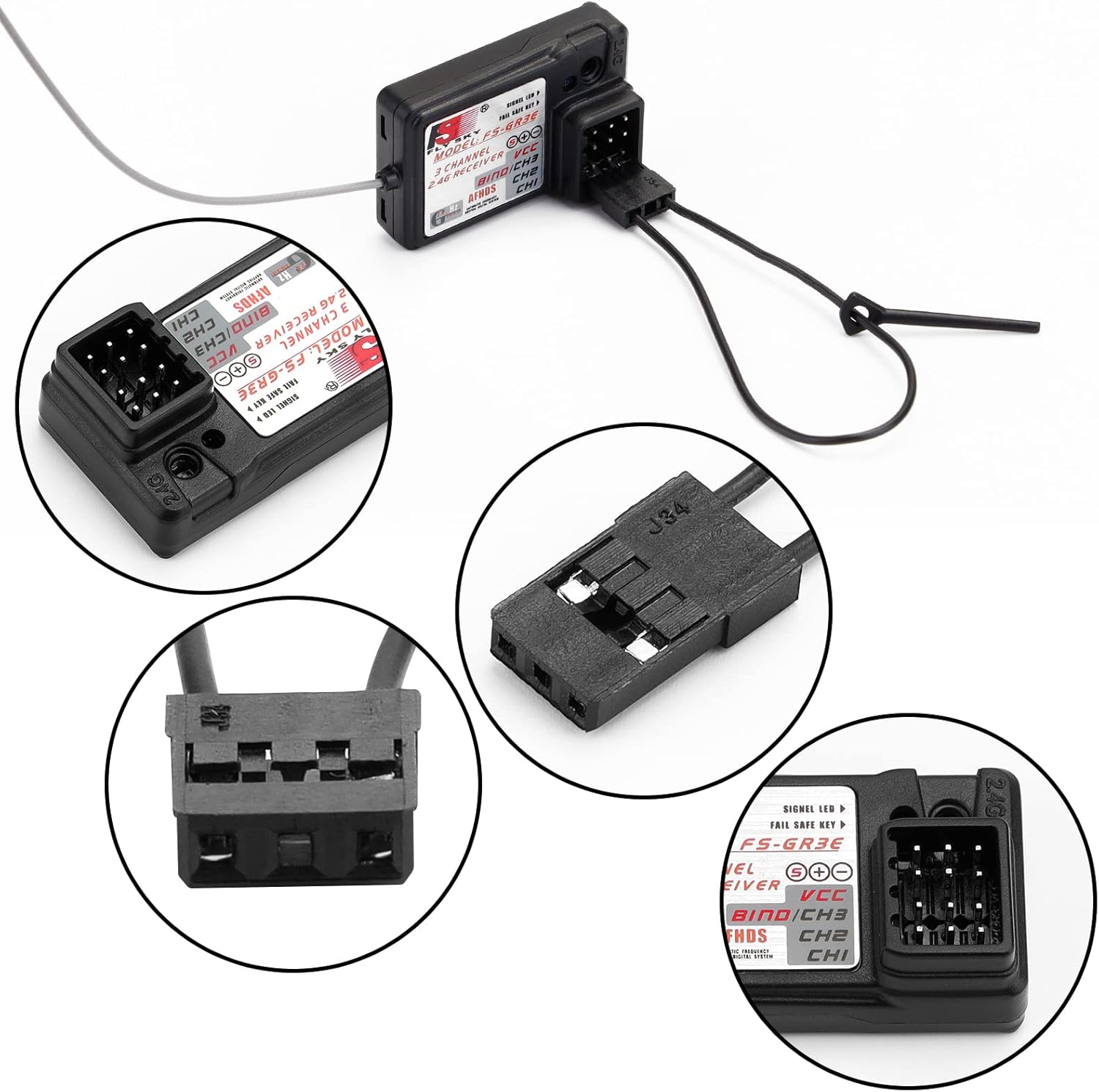
ചിത്രം 3: വിശദമായി view of the receiver's connection ports, including the BIND/CH3 port.

ചിത്രം 4: ഉദാample of the FS-GR3E receiver connected within an RC car setup.
5.2. Binding Process
The binding process links your FS-GR3E receiver to your Flysky transmitter, establishing a unique communication link. This process ensures that your receiver only responds to commands from your specific transmitter.
- Ensure your Flysky transmitter is powered off.
- Insert the binding plug (a small jumper wire or dedicated plug, often included with your transmitter or receiver) into the BIND/CH3 port on the FS-GR3E receiver.
- Power on the receiver. The receiver's LED should flash rapidly, indicating it is in binding mode.
- പിടിക്കുമ്പോൾ ബന്ധിക്കുക button on your Flysky transmitter (if available, or follow your transmitter's specific binding procedure), power on the transmitter.
- The receiver's LED should stop flashing and remain solid, indicating a successful bind.
- Release the BIND button on the transmitter.
- Power off both the receiver and the transmitter.
- Remove the binding plug from the receiver.
- Power on the transmitter first, then the receiver. The receiver's LED should illuminate solid, confirming the connection.
- Test all channels (steering, throttle, etc.) to ensure proper operation before using the model.
വീഡിയോ 1: ഉദാample of a Flysky receiver binding process. While the video shows an FS-IA6B receiver, the binding steps are generally similar for Flysky AFHDS receivers like the FS-GR3E.
5.3 അനുയോജ്യത
The FS-GR3E receiver is compatible with Flysky transmitters utilizing the AFHDS protocol. Refer to the compatibility chart below for specific models.

Figure 5: Flysky receiver compatibility chart, indicating which transmitters work with various receivers, including the GR3E.
6. പ്രവർത്തന നിർദ്ദേശങ്ങൾ
- പവർ ഓൺ സീക്വൻസ്: Always power on your transmitter first, then power on your RC model (receiver). This ensures the transmitter is broadcasting a signal before the receiver attempts to connect.
- പവർ ഓഫ് ക്രമം: Always power off your RC model (receiver) first, then power off your transmitter. This prevents unintended movements due to loss of signal while the model is still powered.
- സുരക്ഷിതമല്ലാത്ത പ്രവർത്തനം: The FS-GR3E features a failsafe on Channel 2 (throttle). In case of signal loss or low battery, the failsafe will automatically set the throttle to a pre-programmed position (usually neutral or brake) to prevent the model from running away. Refer to your transmitter's manual for instructions on setting failsafe values.
- After powering on, observe the receiver's LED. A solid LED indicates a successful connection to the transmitter.
7. പരിപാലനം
- വൃത്തിയാക്കൽ: റിസീവർ വൃത്തിയായും പൊടി, അഴുക്ക്, ഈർപ്പം എന്നിവയിൽ നിന്ന് മുക്തമായും സൂക്ഷിക്കുക. വൃത്തിയാക്കാൻ മൃദുവായതും ഉണങ്ങിയതുമായ തുണി ഉപയോഗിക്കുക. ലായകങ്ങളോ കഠിനമായ രാസവസ്തുക്കളോ ഉപയോഗിക്കുന്നത് ഒഴിവാക്കുക.
- കണക്ഷനുകൾ: Periodically check all wiring and connections for wear, damage, or looseness. Secure any loose connections.
- ആൻ്റിന: Ensure the antenna is properly positioned and not damaged. Avoid bending, coiling, or cutting the antenna wire, as this can significantly reduce range and signal quality.
- സംഭരണം: Store the receiver in a dry, cool place when not in use. Protect it from physical impact and static electricity.
8. പ്രശ്നപരിഹാരം
- No Power to Receiver:
- ബാറ്ററി കണക്ഷനുകൾ പരിശോധിച്ച് ബാറ്ററി ചാർജ്ജ് ചെയ്തിട്ടുണ്ടെന്ന് ഉറപ്പാക്കുക.
- Verify correct polarity of power connections to the receiver.
- Ensure the Electronic Speed Controller (ESC) or external power source is functioning correctly.
- Receiver Not Binding:
- Confirm the binding plug is correctly inserted into the BIND/CH3 port.
- Ensure the transmitter is in binding mode according to its manual.
- Verify that the transmitter and receiver are compatible (both use the Flysky AFHDS system).
- Try binding in a location away from other 2.4GHz devices that might cause interference.
- Intermittent Signal / Short Range:
- Check for physical obstructions between the transmitter and receiver.
- Ensure the receiver antenna is not damaged, coiled, or shielded by carbon fiber or metal parts within the model.
- Avoid operating near strong electromagnetic interference sources (e.g., power lines, large metal structures).
- Check the transmitter battery level.
- Servos/ESC Not Responding:
- Verify that the receiver is successfully bound to the transmitter (solid LED).
- Check servo/ESC connections to the correct receiver channels.
- Ensure servos/ESC are powered and functioning independently.
9. വാറൻ്റിയും പിന്തുണയും
For warranty claims or technical support regarding your LiteBee Flysky FS-GR3E receiver, please contact your original retailer or the manufacturer directly. It is recommended to retain your proof of purchase for warranty validation.


