ആമുഖം
The Razer Nommo Pro is a THX Certified 2.1 gaming speaker system designed to deliver high-fidelity audio. It features Dolby Virtual Surround Sound, a dedicated downward-firing subwoofer, and customizable Razer Chroma lighting. This manual provides essential information for setting up, operating, maintaining, and troubleshooting your speaker system.
ബോക്സിൽ എന്താണുള്ളത്
- രണ്ട് സാറ്റലൈറ്റ് സ്പീക്കറുകൾ
- One Downward-Firing Subwoofer
- LED Illuminated Control Pod
- പവർ അഡാപ്റ്റർ
- USB കേബിൾ
- 3.5 എംഎം ഓഡിയോ കേബിൾ
- ഒപ്റ്റിക്കൽ കേബിൾ
ഉൽപ്പന്നം കഴിഞ്ഞുview
The Razer Nommo Pro system includes two satellite speakers, a powerful subwoofer, and an intuitive control pod, all designed for an enhanced audio experience.
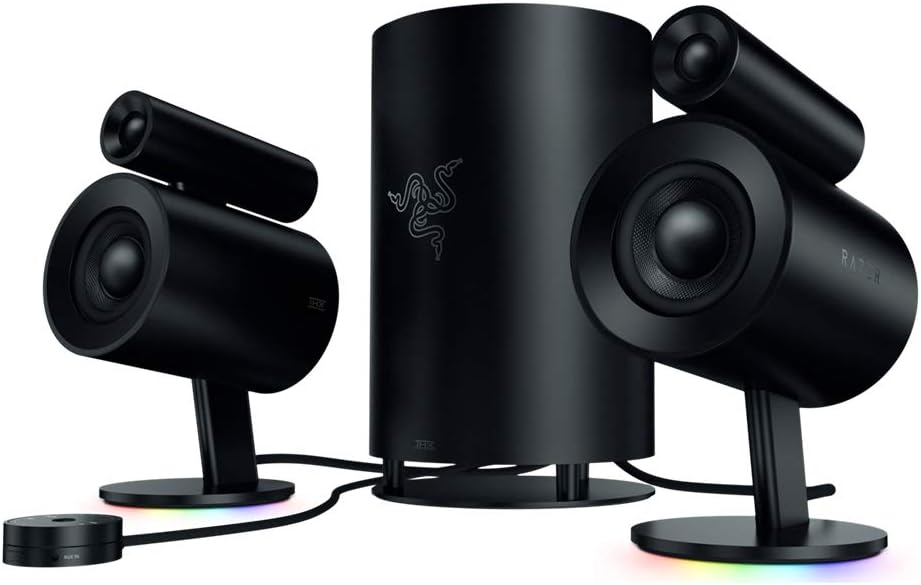
The complete Razer Nommo Pro 2.1 speaker system, featuring two satellite speakers, a central subwoofer, and a circular control pod.
THX Certified Premium Audio
The speakers are THX Certified, ensuring a high standard of audio fidelity and clarity. This certification guarantees that the sound output is precise and powerful, delivering an immersive listening experience.

A single Razer Nommo Pro satellite speaker, highlighting its THX Certified Premium Audio capabilities for clear and powerful sound.
Dolby Virtual Surround Sound Technology
Experience powerful cinematic immersion with Dolby Virtual Surround Sound. This technology enhances spatial audio, making games and movies more engaging by creating a wider soundstage.

Two Razer Nommo Pro satellite speakers, illustrating the Dolby Virtual Surround Sound Technology for immersive audio.
Downward Firing Subwoofer
The dedicated downward-firing subwoofer provides deep, powerful, and unrestricted bass, adding significant impact to your audio. It's designed to deliver desk-shaking, room-thumping low-end sound.

The Razer Nommo Pro downward-firing subwoofer, engineered for powerful and deep bass performance.
LED Illuminated Control Pod
The LED illuminated control pod offers convenient access to volume, mute, and input selection. Its intuitive design allows for quick and easy adjustments.

The LED illuminated control pod for the Razer Nommo Pro, providing easy access to audio controls and input selection.
ബഹുമുഖ കണക്റ്റിവിറ്റി
Connect your Razer Nommo Pro speakers via multiple options including USB, Bluetooth 4.2, optical, or a 3.5 mm audio jack, ensuring compatibility with various devices.

Illustration of the Razer Nommo Pro's versatile connectivity, showing connections to a laptop and tablet via USB, Bluetooth, Optical, and 3.5mm jack.
റേസർ ക്രോമ നൽകുന്നത്
Customize your audio setup with 16.8 million color options, thanks to Razer Chroma integration. The lighting can be synchronized with your games and other Chroma-enabled devices.

The base of a Razer Nommo Pro speaker displaying its customizable Razer Chroma RGB lighting.
സജ്ജമാക്കുക
- പ്ലേസ്മെൻ്റ്: Position the two satellite speakers on either side of your monitor or listening area. Place the subwoofer on the floor, ideally near your desk, for optimal bass delivery.
- സാറ്റലൈറ്റ് സ്പീക്കറുകൾ ബന്ധിപ്പിക്കുക: Connect the satellite speakers to the subwoofer using the provided cables. Ensure the left speaker connects to the 'L' input and the right speaker to the 'R' input on the subwoofer.
- Connect Control Pod: Plug the control pod cable into the designated port on the subwoofer.
- പവർ കണക്ഷൻ: Connect the power adapter to the subwoofer and then plug it into a power outlet.
- ഉപകരണത്തിലേക്ക് കണക്റ്റുചെയ്യുക: Choose your preferred connection method (USB, Bluetooth, Optical, or 3.5mm audio jack) and connect the subwoofer to your audio source (PC, console, mobile device).
പ്രവർത്തന നിർദ്ദേശങ്ങൾ
Control Pod Functions
- വോളിയം നിയന്ത്രണം: Rotate the outer ring of the control pod to adjust the master volume.
- നിശബ്ദമാക്കുക/അൺമ്യൂട്ടുചെയ്യുക: Press the center button of the control pod to mute or unmute the audio.
- ഇൻപുട്ട് തിരഞ്ഞെടുക്കൽ: Press the input buttons (USB, Bluetooth, Optical, Analog) on the control pod to switch between audio sources.
- ഹെഡ്ഫോൺ ജാക്ക്: A 3.5mm headphone jack is available on the control pod for private listening. Plugging in headphones will automatically mute the speakers.
Razer Synapse Software
For advanced customization of audio settings and Razer Chroma lighting, download and install the Razer Synapse software on your PC. This software allows you to:
- Adjust equalizer settings and create custom audio profiles.
- Control subwoofer level independently.
- RGB ലൈറ്റിംഗ് ഇഫക്റ്റുകളും നിറങ്ങളും ഇഷ്ടാനുസൃതമാക്കുക.
- Set up game-specific audio and lighting profiles.
മെയിൻ്റനൻസ്
- വൃത്തിയാക്കൽ: Use a soft, dry cloth to clean the surfaces of the speakers, subwoofer, and control pod. Avoid using abrasive cleaners or solvents.
- കേബിൾ മാനേജുമെന്റ്: Ensure all cables are neatly organized and not tangled to prevent damage or interference.
- പരിസ്ഥിതി: Keep the speakers in a dry environment, away from extreme temperatures and direct sunlight.
ട്രബിൾഷൂട്ടിംഗ്
- ശബ്ദമില്ല:
- Check all cable connections (power, speakers to subwoofer, audio source).
- Ensure the correct input source is selected on the control pod.
- വോളിയം മ്യൂട്ട് ചെയ്തിട്ടില്ല അല്ലെങ്കിൽ വളരെ കുറച്ച് സജ്ജീകരിച്ചിട്ടില്ലെന്ന് ഉറപ്പാക്കുക.
- Confirm that your audio source device's volume is up and not muted.
- വികലമായ ഓഡിയോ:
- Lower the volume on both the speakers and your audio source.
- അയഞ്ഞ കേബിൾ കണക്ഷനുകൾ പരിശോധിക്കുക.
- മറ്റൊരു ഓഡിയോ ഉറവിടമോ കേബിളോ ഉപയോഗിച്ച് പരീക്ഷിക്കുക.
- RGB ലൈറ്റിംഗ് പ്രവർത്തിക്കുന്നില്ല:
- Ensure Razer Synapse software is installed and updated.
- റേസർ സിനാപ്സിനുള്ളിലെ ലൈറ്റിംഗ് ക്രമീകരണങ്ങൾ പരിശോധിക്കുക.
- Verify USB connection to your PC.
- ബ്ലൂടൂത്ത് ജോടിയാക്കൽ പ്രശ്നങ്ങൾ:
- Ensure the speakers are in Bluetooth pairing mode (indicated by a blinking light on the control pod).
- Remove the speakers from your device's Bluetooth list and attempt to re-pair.
- Ensure no other devices are actively connected to the speakers via Bluetooth.
ഔദ്യോഗിക ഉൽപ്പന്ന വീഡിയോ
ഔദ്യോഗിക വീഡിയോ പ്രദർശനംasing the Razer Nommo Pro THX Certified speakers, highlighting their features and design.
സ്പെസിഫിക്കേഷനുകൾ
| ഫീച്ചർ | വിശദാംശങ്ങൾ |
|---|---|
| ബ്രാൻഡ് | റേസർ |
| മോഡലിൻ്റെ പേര് | RZ0502470100R3U1 |
| സ്പീക്കർ തരം | സബ് വൂഫർ |
| മൗണ്ടിംഗ് തരം | ടേബിൾടോപ്പ് മൗണ്ട് |
| പ്രത്യേക ഫീച്ചർ | ബ്ലൂടൂത്ത് |
| ഉൽപ്പന്നത്തിനുള്ള ശുപാർശിത ഉപയോഗങ്ങൾ | കമ്പ്യൂട്ടറുകൾക്കായി |
| അനുയോജ്യമായ ഉപകരണങ്ങൾ | പേഴ്സണൽ കമ്പ്യൂട്ടർ |
| സബ് വൂഫർ വ്യാസം | 3 ഇഞ്ച് |
| യൂണിറ്റ് എണ്ണം | 1.0 എണ്ണം |
| സറൗണ്ട് സൗണ്ട് ചാനൽ കോൺഫിഗറേഷൻ | 2.1 |
| നിറം | കറുപ്പ് |
| ഉൽപ്പന്ന അളവുകൾ | 10.63"D x 10.63"W x 15.35"H |
| ഇനത്തിൻ്റെ ഭാരം | 12500 ഗ്രാം (27.6 പൗണ്ട്) |
| പരമാവധി പരിധി | 10 മീറ്റർ |
| നിയന്ത്രണ രീതി | സ്പർശിക്കുക |
| വയർലെസ് കമ്മ്യൂണിക്കേഷൻ ടെക്നോളജി | ബ്ലൂടൂത്ത് |
| സ്പീക്കർ വലിപ്പം | 3 ഇഞ്ച് |
| പവർ ഉറവിടം | കോർഡഡ് ഇലക്ട്രിക് |
| വൂഫർ വ്യാസം | 7 ഇഞ്ച് |
| ട്വീറ്റർ വ്യാസം | 20 മില്ലിമീറ്റർ |
| ഓഡിയോ ഡ്രൈവർ തരം | ഡൈനാമിക് ഡ്രൈവർ |
| ബ്ലൂടൂത്ത് ശ്രേണി | 10 മീറ്റർ |
| സബ്വൂഫർ കണക്റ്റിവിറ്റി സാങ്കേതികവിദ്യ | വയർഡ് |
| സ്പീക്കർ പരമാവധി ഔട്ട്പുട്ട് പവർ | 25 വാട്ട്സ് |
| ഫ്രീക്വൻസി പ്രതികരണം | 20 KHz |
| കണക്റ്റിവിറ്റി ടെക്നോളജി | ബ്ലൂടൂത്ത്, യുഎസ്ബി |
| ഓഡിയോ put ട്ട്പുട്ട് മോഡ് | ചുറ്റുക |
വാറൻ്റിയും പിന്തുണയും
The Razer Nommo Pro comes with a Limited Warranty. For assistance, troubleshooting, or to view the full warranty details, please visit the Raദ്യോഗിക റേസർ പിന്തുണ webസൈറ്റ്.


