1. ആമുഖം
This user manual provides essential information for the safe and efficient operation of your Spigen Wireless Charger (Model: F308W). Please read this manual thoroughly before use and retain it for future reference.
ഉൽപ്പന്നം കഴിഞ്ഞുview
The Spigen Wireless Charger is a Qi-certified 10W leather charging pad designed for fast wireless charging of compatible devices. Its ergonomic design features a black leather surface and an aluminum-rimmed finish. The charger includes a 4.9ft (1.5m) extra-long cable for flexible placement and a Control Light Technology LED indicator that dims after 60 seconds to avoid disturbing sleep.

ചിത്രം: മുകളിൽ നിന്ന് താഴേക്ക് view of the Spigen Wireless Charger, showcasing its black leather surface and aluminum rim.
പാക്കേജ് ഉള്ളടക്കം
പാക്കേജിൽ എല്ലാ ഇനങ്ങളും ഉണ്ടെന്ന് ഉറപ്പാക്കുക:
- Spigen SteadiBoost 10W Leather Wireless Charger
- USB-A to Micro Charging Cable (1.5m)
- Welcome Guide (User Manual)
Note: A power adapter is NOT included and must be purchased separately. For optimal performance, a Quick Charge 2.0/3.0 compatible adapter is recommended.

Image: The contents of the product box, including the wireless charging pad, USB-A to Micro charging cable, and user manual.
2. സജ്ജീകരണ നിർദ്ദേശങ്ങൾ
- കേബിൾ ബന്ധിപ്പിക്കുക: Insert the Micro USB end of the provided charging cable into the Micro USB port on the Spigen Wireless Charger.
- പവറിലേക്ക് ബന്ധിപ്പിക്കുക: Plug the USB-A end of the cable into a compatible USB power adapter (not included). For fast charging, use a Quick Charge 2.0/3.0 or Power Delivery compatible adapter.
- പ്ലേസ്മെൻ്റ്: Place the wireless charger on a flat, stable surface, such as a desk or nightstand. Ensure there are no metal objects or foreign materials between the charger and the device to be charged.

Image: The Spigen Wireless Charger connected to a power source via its 1.5m extra-long Micro USB cable, demonstrating its extended reach.
3. പ്രവർത്തന നിർദ്ദേശങ്ങൾ
നിങ്ങളുടെ ഉപകരണം ചാർജ് ചെയ്യുന്നു
- Place Device: Carefully place your Qi-compatible smartphone or other device (e.g., AirPods, Galaxy Buds) onto the center of the Spigen Wireless Charger pad.
- ചാർജിംഗ് സ്ഥിരീകരണം: A faint blue LED indicator on the charger will illuminate briefly to confirm that charging has begun. Your device's screen will also typically show a charging icon or notification. The LED indicator will turn off after approximately 60 seconds to prevent light disturbance, especially during nighttime use.
- കേസ് അനുയോജ്യത: The charger is designed to work through most protective cases up to 4mm thick. Cases containing credit cards, magnetic attachments, or metal components may interfere with charging and should be removed.
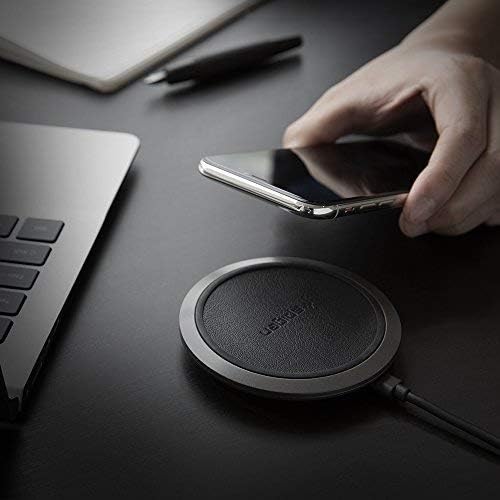
Image: A hand placing a smartphone onto the Spigen Wireless Charger, illustrating the ease of use.

Image: An illustration demonstrating the Control Light Technology, where the LED indicator on the charger turns off after 60 seconds to avoid disturbing sleep.
ചാർജിംഗ് വേഗത
- 10W ഔട്ട്പുട്ട്: For compatible Galaxy devices.
- 7.5W ഔട്ട്പുട്ട്: For compatible iPhone devices.
- 5W ഔട്ട്പുട്ട്: For other Qi-compatible devices such as AirPods/AirPods Pro/Galaxy Buds.

Image: A graphic comparing the charging speed of the Spigen charger (170 minutes) versus other chargers (182-190 minutes) for an iPhone 8/X from 0-100%.
സുരക്ഷാ സവിശേഷതകൾ
The Spigen Wireless Charger incorporates several safety features to protect your device and the charger:
- ControlHeat Technology: Manages temperature to prevent overheating during charging.
- Intelligent Power Technology (iP™): Optimizes power delivery for efficient and safe charging.
- Smart IC Chip Protection: Provides safeguards against overcharge, overcurrent, and short-circuiting.

Image: A graphic illustrating the internal components and safety features of the Spigen Wireless Charger, including ControlHeat Technology, Intelligent Power Technology, and Smart IC Chip Protection.

Image: A bar chart comparing the charging temperatures of the Spigen charger versus other chargers for various phone models (iPhone X, iPhone 8, iPhone 8 Plus, Galaxy S9, Galaxy S8/S8+), showing Spigen's lower temperatures.
ഉൽപ്പന്ന വീഡിയോ
Video: An official product video from Spigen demonstrating the unboxing and basic operation of the Spigen Wireless Charger F308W, highlighting its features like Qi certification, fast charging, and safety technologies.
4. പരിപാലനം
To ensure the longevity and optimal performance of your Spigen Wireless Charger, follow these maintenance guidelines:
- വൃത്തിയാക്കൽ: Disconnect the charger from the power source before cleaning. Use a soft, dry cloth to wipe the surface of the charging pad. Do not use harsh chemicals, abrasive cleaners, or excessive moisture.
- സംഭരണം: ചാർജർ ദീർഘനേരം ഉപയോഗിക്കാത്തപ്പോൾ, നേരിട്ടുള്ള സൂര്യപ്രകാശത്തിൽ നിന്നും കടുത്ത താപനിലയിൽ നിന്നും മാറി തണുത്തതും വരണ്ടതുമായ സ്ഥലത്ത് സൂക്ഷിക്കുക.
- കൈകാര്യം ചെയ്യൽ: ചാർജർ താഴെയിടുകയോ ശക്തമായ ആഘാതങ്ങൾക്ക് വിധേയമാക്കുകയോ ചെയ്യുന്നത് ഒഴിവാക്കുക, കാരണം ഇത് ആന്തരിക ഘടകങ്ങൾക്ക് കേടുവരുത്തിയേക്കാം.
5. പ്രശ്നപരിഹാരം
If you encounter issues with your Spigen Wireless Charger, refer to the following common problems and solutions:
| പ്രശ്നം | സാധ്യമായ കാരണം | പരിഹാരം |
|---|---|---|
| Device not charging or charging intermittently. |
|
|
| വേഗത കുറഞ്ഞ ചാർജിംഗ് വേഗത. |
|
|
| LED ഇൻഡിക്കേറ്റർ പ്രകാശിക്കുന്നില്ല. |
|
|
6. ഉൽപ്പന്ന സവിശേഷതകൾ
| ഫീച്ചർ | വിശദാംശങ്ങൾ |
|---|---|
| മോഡൽ നമ്പർ | F308W |
| ഉൽപ്പന്ന അളവുകൾ | 3.54 x 3.54 x 0.59 ഇഞ്ച് |
| ഇനത്തിൻ്റെ ഭാരം | 3.52 ഔൺസ് |
| നിറം | കറുപ്പ് |
| കണക്റ്റിവിറ്റി ടെക്നോളജി | Wireless (Qi Certified) |
| കണക്റ്റർ തരം | വയർലെസ് |
| ഇൻപുട്ട് | 5V/2A, 9V/1.67A (Requires QC 2.0/3.0 adapter for fast charge) |
| ഔട്ട്പുട്ട് | 10W (Max) / 7.5W / 5W |
| കേബിൾ നീളം | 1.5m (4.9ft) Micro USB |
| കേസ് അനുയോജ്യത | Up to 4mm thick (excluding cases with credit cards/magnetic/metal attachment) |
| നിർമ്മാതാവ് | സ്പൈജൻ |
| ആദ്യം ലഭ്യമായ തീയതി | ഓഗസ്റ്റ് 16, 2018 |
Compatible Devices (Partial List)
- ആപ്പിൾ ഐഫോൺ: 13 / 13 Pro / 13 Pro Max / 13 Mini / 12 / 12 Pro / 12 Pro Max / 12 Mini / 11 / 11 Pro / 11 Pro Max / X / XS / XR / XS Max / SE 2020 / 8 / 8 Plus
- സാംസങ് ഗാലക്സി: S22 / S22 Ultra / S22 Plus / S21 FE / S21 / S21 Ultra / S21 Plus / S20 / S20 Ultra / S20 Plus / S20 FE / Note 20 / Note 10 / S10 / S9 / S8 / Z Fold 3 / Z Flip 3 / Z Fold 2 / Z Flip 5G / Z Flip / Fold 5G / Fold
- ഗൂഗിൾ പിക്സൽ: 6 Pro / 6 / 5a / 5 / 4xl / 4
- മറ്റുള്ളവ: AirPods / AirPods Pro / Galaxy Buds / Buds 2 / Buds Live / Buds Pro
7. വാറൻ്റിയും പിന്തുണയും
വാറൻ്റി വിവരങ്ങൾ
The Spigen Wireless Charger (Model: F308W) comes with a 24-മാസ വാറൻ്റി വാങ്ങിയ തീയതി മുതൽ. ഈ വാറന്റി നിർമ്മാണ വൈകല്യങ്ങളും സാധാരണ ഉപയോഗത്തിൽ നിന്ന് ഉണ്ടാകുന്ന പ്രശ്നങ്ങളും ഉൾക്കൊള്ളുന്നു. ദുരുപയോഗം, അപകടങ്ങൾ, അനധികൃത പരിഷ്കാരങ്ങൾ അല്ലെങ്കിൽ പ്രകൃതി ദുരന്തങ്ങൾ എന്നിവ മൂലമുണ്ടാകുന്ന നാശനഷ്ടങ്ങൾക്ക് ഇത് പരിരക്ഷ നൽകുന്നില്ല.
വാറൻ്റി ക്ലെയിമുകൾക്കായി നിങ്ങളുടെ വാങ്ങിയതിൻ്റെ തെളിവ് സൂക്ഷിക്കുക.
കസ്റ്റമർ സർവീസ്
For any questions, technical support, or warranty inquiries, please contact Spigen Customer Service. Refer to the contact information provided in your Welcome Guide or visit the official Spigen webഏറ്റവും കാലികമായ പിന്തുണാ വിശദാംശങ്ങൾക്കായി സൈറ്റ്.
You can also find a digital version of the user manual ഇവിടെ.


