ആമുഖം
The Promate Divemate is a versatile wireless in-ear headset designed for active lifestyles. Featuring an IPX8 waterproof rating, it is suitable for various activities including swimming. With 8GB of internal storage, you can enjoy music directly from the headset without needing a connected smartphone. It also includes Bluetooth 4.2 connectivity and a built-in microphone for hands-free calls.
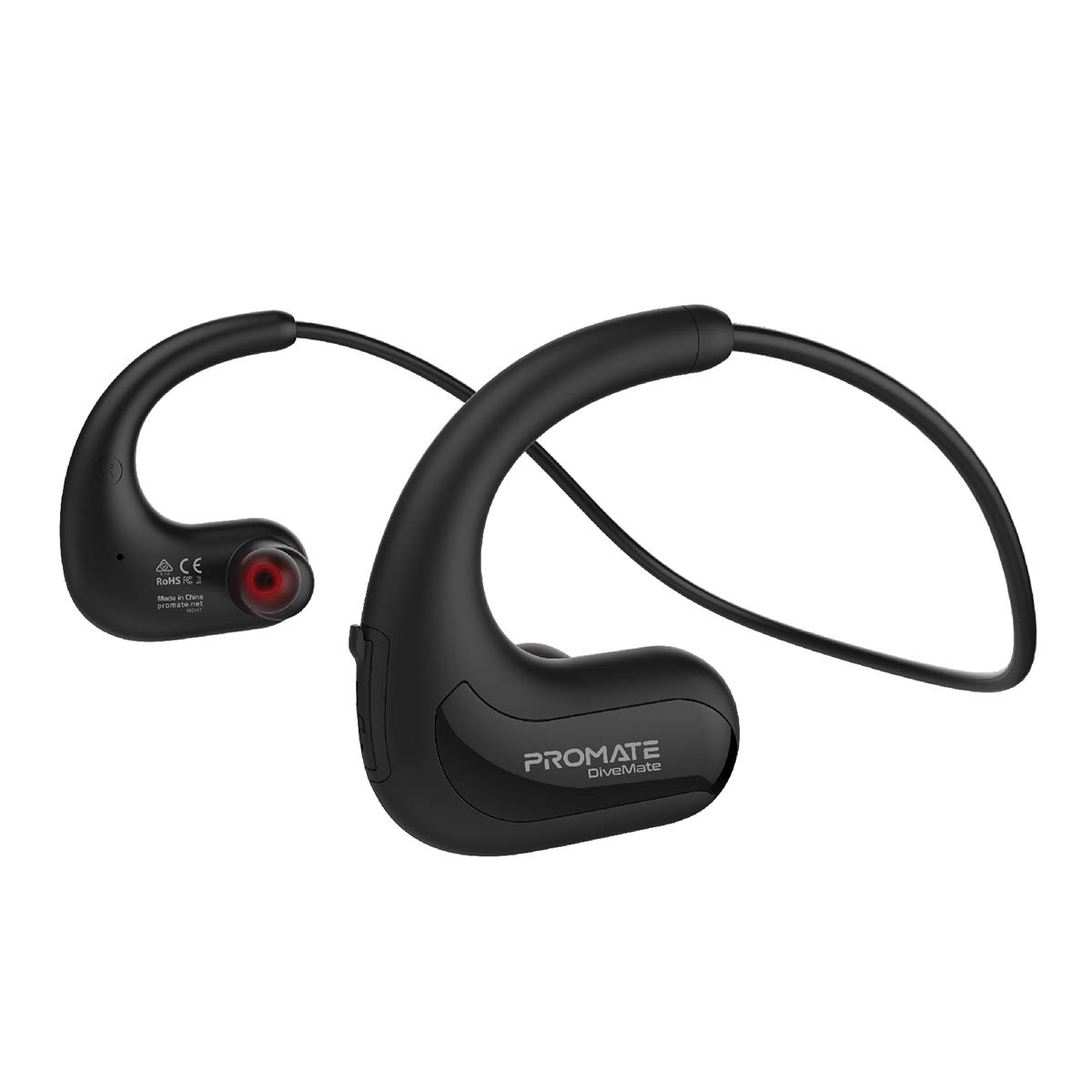
Image: Promate Divemate Wireless In-Ear MP3 Headphones, showcasinജി നെക്ക്ബാൻഡ് ഡിസൈനും ഇയർബഡുകളും.
പ്രധാന സവിശേഷതകൾ:
- MP3 Bluetooth Play Mode: Built-in 8GB memory for music storage, allowing playback without a connected device.
- IPX8 വാട്ടർപ്രൂഫ്: Designed to withstand immersion in water, ideal for swimming and water sports.
- Easy 'Drag & Drop' Audio File മാനേജ്മെൻ്റ്: Simple transfer of music files to the internal 8GB storage.
- പ്രീമിയം ശബ്ദം: Echo-elimination technology and noise isolation for clear audio.
- ബിൽറ്റ്-ഇൻ മൈക്രോഫോൺ: For hands-free calls, even in wet environments.
- Intuitive Playback Controls: Easy access to power, volume, and music playback functions.
- Flexible Neckband: Lightweight and comfortable design for extended wear.
- ദൈർഘ്യമേറിയ കളി സമയം: ഒറ്റ ചാർജിൽ 8 മണിക്കൂർ വരെ ഉപയോഗിക്കാം.
- സാർവത്രിക അനുയോജ്യത: Connects with most Bluetooth-enabled devices.
സജ്ജമാക്കുക
1 ഉപകരണം ചാർജ് ചെയ്യുന്നു
Before first use, fully charge your Divemate headphones. Connect the charging cable to the charging port on the device and to a standard USB power source. A full charge takes approximately 1.5 hours. The LED indicator will show charging status (e.g., red for charging, blue for fully charged).
- ചാർജിംഗ് സമയം: ഏകദേശം 1.5 മണിക്കൂർ
- ഉപയോഗ സമയം: 8 മണിക്കൂർ വരെ
- സ്റ്റാൻഡ്ബൈ സമയം: 120 മണിക്കൂർ വരെ
2. സംഗീതം കൈമാറുന്നു Files (MP3 Mode)
The Divemate features 8GB of internal storage for MP3 playback. To transfer music:
- Connect the Divemate to your computer using the provided USB cable.
- The device will appear as a removable storage drive on your computer.
- നിങ്ങൾക്ക് ആവശ്യമുള്ള ഓഡിയോ വലിച്ചിടുക files (MP3 and other supported formats) into the Divemate's storage folder.
- Safely eject the device from your computer once the transfer is complete.
This allows you to listen to music without needing a Bluetooth connection, which is ideal for activities like swimming.
3. ബ്ലൂടൂത്ത് ജോടിയാക്കൽ
To connect your Divemate to a Bluetooth-enabled device (e.g., smartphone, tablet):
- Ensure the Divemate is charged and powered off.
- ജോടിയാക്കൽ മോഡ് സൂചിപ്പിക്കുന്ന LED ഇൻഡിക്കേറ്റർ നീലയും ചുവപ്പും നിറങ്ങളിൽ മിന്നുന്നതുവരെ പവർ ബട്ടൺ അമർത്തിപ്പിടിക്കുക.
- നിങ്ങളുടെ ഉപകരണത്തിൽ, ബ്ലൂടൂത്ത് ക്രമീകരണത്തിലേക്ക് പോയി ലഭ്യമായ ഉപകരണങ്ങൾക്കായി തിരയുക.
- Select "Divemate" from the list.
- Once paired, the LED indicator will flash blue periodically.
The operating distance for Bluetooth is approximately 10 meters (33 feet).
പ്രവർത്തന നിർദ്ദേശങ്ങൾ
പവർ ഓൺ/ഓഫ്
- പവർ ഓണാക്കാൻ: LED ഇൻഡിക്കേറ്റർ പ്രകാശിക്കുന്നത് വരെ പവർ ബട്ടൺ അമർത്തിപ്പിടിക്കുക.
- പവർ ഓഫ് ചെയ്യാൻ: LED ഇൻഡിക്കേറ്റർ ഓഫ് ആകുന്നത് വരെ പവർ ബട്ടൺ അമർത്തിപ്പിടിക്കുക.
സംഗീത പ്ലേബാക്ക്
- പ്ലേ/താൽക്കാലികമായി നിർത്തുക: മൾട്ടി-ഫംഗ്ഷൻ ബട്ടൺ ഒരിക്കൽ അമർത്തുക.
- അടുത്ത ട്രാക്ക്: വോളിയം അപ്പ് ബട്ടൺ അമർത്തിപ്പിടിക്കുക.
- മുമ്പത്തെ ട്രാക്ക്: വോളിയം ഡൗൺ ബട്ടൺ അമർത്തിപ്പിടിക്കുക.
- വോളിയം കൂട്ടുക: വോളിയം അപ്പ് ബട്ടൺ അൽപ്പനേരം അമർത്തുക.
- വോളിയം താഴേക്ക്: വോളിയം ഡൗൺ ബട്ടൺ അൽപ്പനേരം അമർത്തുക.
To switch between MP3 mode (internal storage) and Bluetooth mode, refer to the device's specific button combination, usually a long press on a dedicated mode button or the multi-function button.
കോളുകൾ ചെയ്യലും സ്വീകരിക്കലും
When connected via Bluetooth to a smartphone:
- മറുപടി കോൾ: മൾട്ടി-ഫംഗ്ഷൻ ബട്ടൺ ഒരിക്കൽ അമർത്തുക.
- കോൾ അവസാനിപ്പിക്കുക: ഒരു കോൾ സമയത്ത് മൾട്ടി-ഫംഗ്ഷൻ ബട്ടൺ ഒരിക്കൽ അമർത്തുക.
- കോൾ നിരസിക്കുക: മൾട്ടി-ഫംഗ്ഷൻ ബട്ടൺ 2 സെക്കൻഡ് അമർത്തിപ്പിടിക്കുക.
- അവസാന നമ്പർ വീണ്ടും ഡയൽ ചെയ്യുക: മൾട്ടി-ഫംഗ്ഷൻ ബട്ടൺ രണ്ടുതവണ അമർത്തുക.
The waterproof microphone ensures clear communication even in wet conditions.
മെയിൻ്റനൻസ്
Proper maintenance ensures the longevity and performance of your Promate Divemate headphones.
- വൃത്തിയാക്കൽ: After use, especially in chlorinated or saltwater, rinse the headphones with fresh water. Wipe them dry with a soft, clean cloth. Do not use abrasive cleaners or solvents.
- സംഭരണം: നേരിട്ടുള്ള സൂര്യപ്രകാശത്തിൽ നിന്നും കടുത്ത താപനിലയിൽ നിന്നും മാറി തണുത്തതും വരണ്ടതുമായ സ്ഥലത്ത് ഹെഡ്ഫോണുകൾ സൂക്ഷിക്കുക.
- ജല പ്രതിരോധം: While IPX8 rated, avoid intentionally submerging the device for extended periods beyond its intended use. Ensure the charging port cover is securely closed before exposing to water.
- ചാർജിംഗ്: Only use the provided charging cable and a compatible USB power adapter.
ട്രബിൾഷൂട്ടിംഗ്
If you encounter issues with your Divemate headphones, refer to the following common solutions:
| പ്രശ്നം | സാധ്യമായ പരിഹാരം |
|---|---|
| ഉപകരണം പവർ ഓണാക്കുന്നില്ല. | Ensure the battery is charged. Connect to a power source and charge for at least 1.5 hours. |
| ബ്ലൂടൂത്ത് വഴി ജോടിയാക്കാൻ കഴിയില്ല. |
|
| ശബ്ദമില്ല അല്ലെങ്കിൽ കുറഞ്ഞ ശബ്ദമില്ല. |
|
| മൈക്രോഫോൺ പ്രവർത്തിക്കുന്നില്ല. |
|
| Water damage despite IPX8 rating. | Ensure all port covers were securely closed before water exposure. IPX8 rating specifies conditions (depth and duration); exceeding these limits or improper sealing can lead to damage. |
സ്പെസിഫിക്കേഷനുകൾ
| ഫീച്ചർ | വിശദാംശങ്ങൾ |
|---|---|
| മോഡലിൻ്റെ പേര് | Divemate |
| ബ്രാൻഡ് | പ്രോത്സാഹിപ്പിക്കുക |
| ബ്ലൂടൂത്ത് പതിപ്പ് | v4.2 |
| ബ്ലൂടൂത്ത് ചിപ്സെറ്റ് | ആക്ഷൻ ATS2825 |
| ബ്ലൂടൂത്ത് പ്രോfile | HSP, HFP, A2DP |
| ബ്ലൂടൂത്ത് ഫ്രീക്വൻസി | 2.4-2.48GHz |
| പ്രവർത്തന ദൂരം | 10മീ |
| വാട്ടർപ്രൂഫ് റേറ്റിംഗ് | IPX8 |
| ആന്തരിക സംഭരണം | 8 ജിബി |
| പ്രതിരോധം | 32Ω |
| ഇൻപുട്ട് വോളിയംtage | 5.1V |
| ബാറ്ററി ശേഷി | 160mAh |
| ബാറ്ററി തരം | ലി-പോളിമർ |
| ചാർജിംഗ് സമയം | ~1.5 മണിക്കൂർ |
| ഉപയോഗ സമയം | 8 മണിക്കൂർ |
| സ്റ്റാൻഡ്ബൈ സമയം | 120 മണിക്കൂർ |
| ഉൽപ്പന്ന അളവുകൾ | 3.5 x 13 x 23 സെ.മീ |
| ഉൽപ്പന്ന ഭാരം | 200 ഗ്രാം |
വാറൻ്റിയും പിന്തുണയും
Information regarding product warranty and customer support is not available in the provided product data. Please refer to the product packaging or the manufacturer's official webവാറന്റി കവറേജിനെക്കുറിച്ചും ഉപഭോക്തൃ പിന്തുണയുമായി എങ്ങനെ ബന്ധപ്പെടാം എന്നതിനെക്കുറിച്ചും വിശദാംശങ്ങൾക്ക് സൈറ്റ് സന്ദർശിക്കുക.


