1. ആമുഖം
Thank you for choosing the Amica AMGF23E1GB Microwave Oven. This manual provides essential information for the safe and efficient operation, maintenance, and troubleshooting of your new appliance. Please read this manual thoroughly before using the microwave oven and keep it for future reference.
The Amica AMGF23E1GB is a versatile 23-liter microwave oven with a 900W microwave power output and a 1000W quartz grill. It features electronic control, an electronic display, and 8 automatic programs, designed for convenient and effective cooking.
2 സുരക്ഷാ വിവരങ്ങൾ
തീപിടുത്തം, വൈദ്യുതാഘാതം, വ്യക്തികൾക്ക് പരിക്കേൽക്കൽ, അല്ലെങ്കിൽ അമിതമായ മൈക്രോവേവ് ഊർജ്ജത്തിന് വിധേയമാകൽ എന്നിവ കുറയ്ക്കുന്നതിന് വൈദ്യുത ഉപകരണങ്ങൾ ഉപയോഗിക്കുമ്പോൾ എല്ലായ്പ്പോഴും അടിസ്ഥാന സുരക്ഷാ മുൻകരുതലുകൾ പാലിക്കുക.
- എല്ലാ നിർദ്ദേശങ്ങളും വായിക്കുക ഉപകരണം ഉപയോഗിക്കുന്നതിന് മുമ്പ്.
- പ്രവർത്തിക്കരുത് the oven if it has a damaged cord or plug, if it is not working properly, or if it has been damaged or dropped.
- Do not heat liquids or other foods പൊട്ടിത്തെറിക്കാൻ സാധ്യതയുള്ളതിനാൽ അടച്ച പാത്രങ്ങളിൽ.
- Do not use corrosive chemicals or vapors ഈ ഉപകരണത്തിൽ.
- Supervise children when they are using the microwave oven.
- Only use utensils that are suitable for use in microwave ovens.
- Clean the oven regularly and remove any food deposits.
- Do not attempt to service this appliance yourself. Contact qualified service personnel.
- ശരിയായ വെൻ്റിലേഷൻ ഉറപ്പാക്കുക ഉപകരണത്തിന് ചുറ്റും.
3. ഉൽപ്പന്നം കഴിഞ്ഞുview
Familiarize yourself with the components and controls of your Amica microwave oven.

ചിത്രം 3.1: മുൻഭാഗം View of the Microwave Oven (Door Closed)
This image displays the sleek black design of the Amica AMGF23E1GB microwave oven. The electronic display is visible on the left side of the control panel, with various function icons on the right. The door features a black mirror finish, and the Amica logo is centered at the bottom.
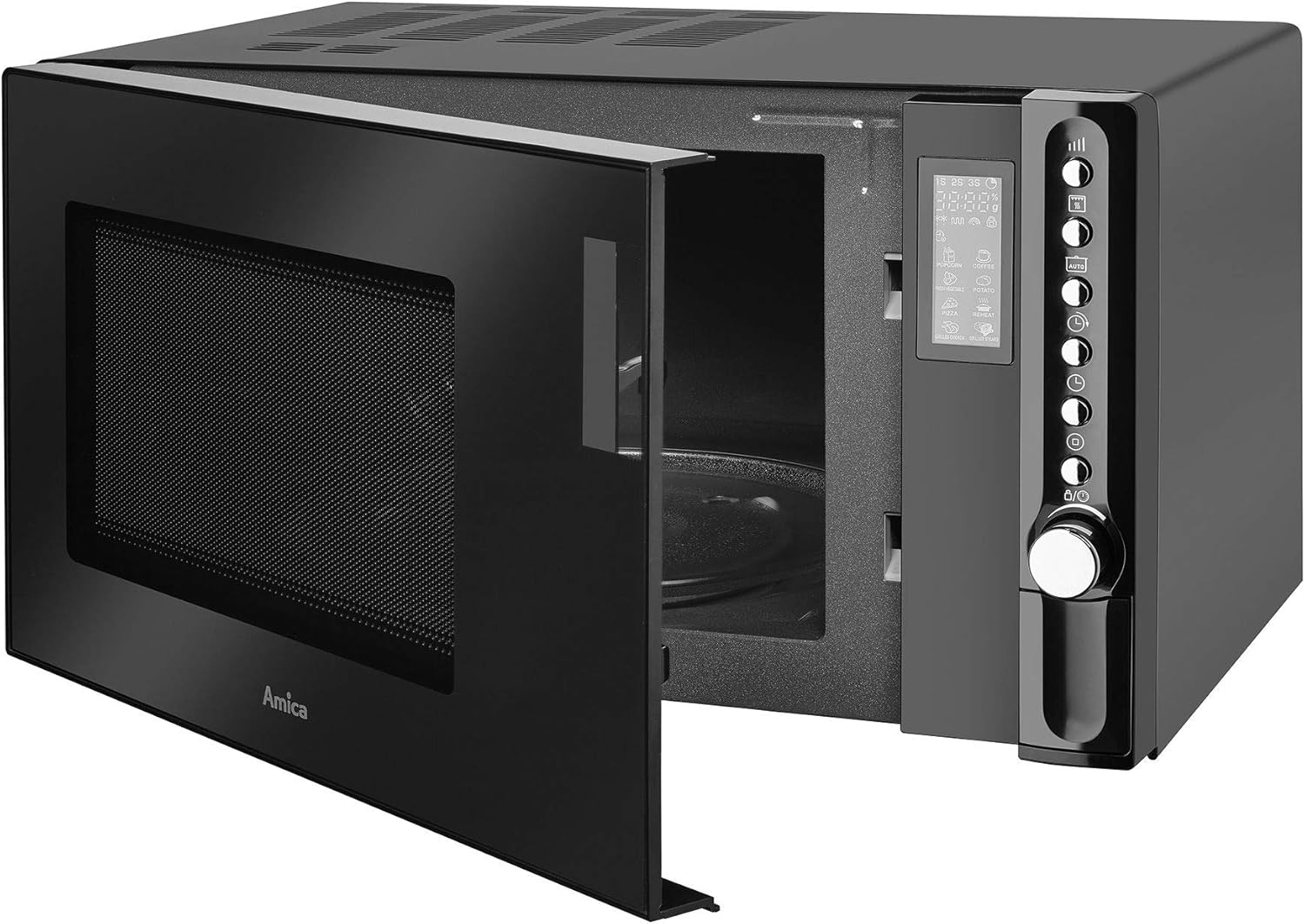
ചിത്രം 3.2: മുൻഭാഗം View of the Microwave Oven (Door Open)
This image shows the Amica AMGF23E1GB microwave oven with its door open, providing a clear view of the interior cooking cavity and the glass turntable. The control panel on the right side is fully visible, highlighting the electronic display and the rotary knob for settings adjustment.
നിയന്ത്രണ പാനൽ സവിശേഷതകൾ:
- ഇലക്ട്രോണിക് ഡിസ്പ്ലേ: Shows time, power level, cooking status, and program indicators.
- ഇലക്ട്രോണിക് നിയന്ത്രണം: Buttons and a rotary knob for setting time, power, and selecting programs.
- ഡോർ റിലീസ് ബട്ടൺ: Located on the control panel for opening the oven door.
4. സജ്ജീകരണം
- അൺപാക്ക് ചെയ്യുന്നു: മൈക്രോവേവ് ഓവനും എല്ലാ പാക്കിംഗ് വസ്തുക്കളും ശ്രദ്ധാപൂർവ്വം നീക്കം ചെയ്യുക. എന്തെങ്കിലും കേടുപാടുകൾ സംഭവിച്ചിട്ടുണ്ടോയെന്ന് പരിശോധിക്കുക. കേടുപാടുകൾ സംഭവിച്ചിട്ടുണ്ടെങ്കിൽ പ്രവർത്തിപ്പിക്കരുത്.
- പ്ലേസ്മെൻ്റ്: Place the oven on a flat, stable surface. Ensure there is adequate ventilation space (at least 10 cm at the back, 20 cm at the top, and 5 cm on each side) for proper airflow. Do not block ventilation openings.
- പവർ കണക്ഷൻ: പവർ കോർഡ് ഒരു ഗ്രൗണ്ടഡ് ഇലക്ട്രിക്കൽ ഔട്ട്ലെറ്റിലേക്ക് പ്ലഗ് ചെയ്യുക. വോള്യം ഉറപ്പാക്കുകtage ഓവനിലെ റേറ്റിംഗ് ലേബലുമായി പൊരുത്തപ്പെടുന്നു.
- ടേൺടേബിൾ അസംബ്ലി: Place the turntable ring inside the oven cavity, then place the glass turntable plate on top of the ring, ensuring it sits securely on the center hub.
- പ്രാരംഭ ക്ലീനിംഗ്: ആദ്യ ഉപയോഗത്തിന് മുമ്പ്, ഓവന്റെ ഉൾഭാഗവും പുറംഭാഗവും പരസ്യം ഉപയോഗിച്ച് തുടയ്ക്കുക.amp തുണി.
5. പ്രവർത്തന നിർദ്ദേശങ്ങൾ
Your Amica microwave oven offers various cooking functions. Below are instructions for common operations.
5.1 ക്ലോക്ക് ക്രമീകരിക്കുക
- Press the "Clock" button (if available, or refer to specific button on your model).
- Use the rotary knob or number pads to set the current time.
- സ്ഥിരീകരിക്കാൻ "ക്ലോക്ക്" ബട്ടൺ വീണ്ടും അമർത്തുക.
5.2 മൈക്രോവേവ് പാചകം
- ഗ്ലാസ് ടർടേബിളിൽ മൈക്രോവേവ്-സേഫ് കണ്ടെയ്നറിൽ ഭക്ഷണം വയ്ക്കുക.
- അടുപ്പിൻ്റെ വാതിൽ സുരക്ഷിതമായി അടയ്ക്കുക.
- "മൈക്രോവേവ്" ബട്ടൺ അമർത്തുക അല്ലെങ്കിൽ ആവശ്യമുള്ള പവർ ലെവൽ തിരഞ്ഞെടുക്കുക (ലഭ്യമായ 6 ലെവലുകൾ).
- Use the rotary knob to set the cooking time (up to 95 minutes).
- പാചകം ആരംഭിക്കാൻ "ആരംഭിക്കുക" അമർത്തുക.
5.3 ഗ്രിൽ പാചകം
The 1000W quartz grill is ideal for browning and crisping food.
- ഭക്ഷണം ഗ്രിൽ റാക്കിൽ (നൽകിയിട്ടുണ്ടെങ്കിൽ) അല്ലെങ്കിൽ ചൂട് പ്രതിരോധശേഷിയുള്ള ഒരു പാത്രത്തിൽ വയ്ക്കുക.
- "ഗ്രിൽ" ബട്ടൺ അമർത്തുക.
- Set the desired grilling time using the rotary knob.
- "ആരംഭിക്കുക" അമർത്തുക.
5.4 കോമ്പി ഗ്രിൽ (മൈക്രോവേവ് + ഗ്രിൽ)
This function combines microwave cooking with grilling for faster and more even results.
- അനുയോജ്യമായ പാത്രത്തിൽ ഭക്ഷണം വയ്ക്കുക.
- Press the "Combi" button (or corresponding button for combination cooking).
- Select the desired combination mode (e.g., C-1, C-2, if applicable).
- പാചക സമയം സജ്ജമാക്കുക.
- "ആരംഭിക്കുക" അമർത്തുക.
5.5 Automatic Programs (8 Programs)
The oven comes with 8 pre-set automatic programs for various food types.
- Press the "Auto Menu" or "Program" button.
- Use the rotary knob to select the desired program number (P1-P8).
- Confirm the food weight if prompted.
- "ആരംഭിക്കുക" അമർത്തുക.
5.6 ഡിഫ്രോസ്റ്റിംഗ്
The oven offers defrosting by time and by weight.
സമയം അനുസരിച്ച് ഡിഫ്രോസ്റ്റ്:
- "ഡിഫ്രോസ്റ്റ്" ബട്ടൺ അമർത്തുക.
- Set the defrosting time using the rotary knob.
- "ആരംഭിക്കുക" അമർത്തുക.
ഭാരം അനുസരിച്ച് മങ്ങൽ:
- Press the "Weight Defrost" button.
- Use the rotary knob to select the food weight.
- "ആരംഭിക്കുക" അമർത്തുക.
5.7 ദ്രുത ആരംഭം
പൂർണ്ണ ശക്തിയിൽ വേഗത്തിൽ ചൂടാക്കുന്നതിന്.
- Press the "Quick Start" button repeatedly to add cooking time (e.g., 30 seconds per press).
- The oven will start automatically after a few seconds.
5.8 ചൈൽഡ് ലോക്ക്
പ്രത്യേകിച്ച് കുട്ടികളിൽ ആകസ്മികമായ പ്രവർത്തനം തടയുന്നതിന്.
- To activate: Press and hold the "Stop/Cancel" button for 3 seconds until a lock indicator appears on the display.
- To deactivate: Press and hold the "Stop/Cancel" button again for 3 seconds until the lock indicator disappears.
6. പരിപാലനം
പതിവായി വൃത്തിയാക്കലും ശരിയായ പരിചരണവും നിങ്ങളുടെ മൈക്രോവേവ് ഓവന്റെ ദീർഘായുസ്സും മികച്ച പ്രകടനവും ഉറപ്പാക്കും.
- ഇന്റീരിയർ വൃത്തിയാക്കൽ: ഓരോ ഉപയോഗത്തിനു ശേഷവും, പരസ്യം ഉപയോഗിച്ച് ഉൾഭാഗം തുടയ്ക്കുക.amp ഭക്ഷണപ്പൊടികൾ നീക്കം ചെയ്യാൻ തുണി ഉപയോഗിക്കുക. കഠിനമായ കറകൾക്ക്, നേരിയ ഡിറ്റർജന്റ് ഉപയോഗിക്കുക. അബ്രാസീവ് ക്ലീനറുകളോ സ്കോറിംഗ് പാഡുകളോ ഉപയോഗിക്കരുത്.
- പുറം വൃത്തിയാക്കൽ: ഒരു മൃദുവായ, ഡി ഉപയോഗിച്ച് ബാഹ്യ പ്രതലങ്ങൾ തുടയ്ക്കുകamp തുണി. വെന്റിലേഷൻ ദ്വാരങ്ങളിലേക്ക് വെള്ളം കയറുന്നത് ഒഴിവാക്കുക.
- ടേൺടേബിളും റിംഗും: ഗ്ലാസ് ടർടേബിളും ടർടേബിൾ റിംഗും ചെറുചൂടുള്ള സോപ്പ് വെള്ളത്തിലോ ഡിഷ്വാഷറിലോ കഴുകാം. അവ വീണ്ടും അടുപ്പിൽ വയ്ക്കുന്നതിന് മുമ്പ് പൂർണ്ണമായും ഉണങ്ങിയെന്ന് ഉറപ്പാക്കുക.
- ദുർഗന്ധം നീക്കംചെയ്യൽ: To remove odors, combine a cup of water with a few slices of lemon or a tablespoon of vinegar in a microwave-safe bowl. Microwave on high for 2-3 minutes, then let it sit for 5 minutes before wiping the interior.
- ലൈറ്റ് ബൾബ് മാറ്റിസ്ഥാപിക്കൽ: If the interior light bulb needs replacement, contact qualified service personnel. Do not attempt to replace it yourself.
7. പ്രശ്നപരിഹാരം
If you encounter issues with your microwave oven, refer to the following table for common problems and solutions.
| പ്രശ്നം | സാധ്യമായ കാരണം | പരിഹാരം |
|---|---|---|
| ഓവൻ ആരംഭിക്കുന്നില്ല | പവർ കോർഡ് പ്ലഗ് ഇൻ ചെയ്തിട്ടില്ല; വാതിൽ ശരിയായി അടച്ചിട്ടില്ല; ഫ്യൂസ് പൊട്ടിത്തെറിച്ചു അല്ലെങ്കിൽ സർക്യൂട്ട് ബ്രേക്കർ ട്രിപ്പുചെയ്തു; ചൈൽഡ് ലോക്ക് സജീവമാക്കി. | പ്ലഗ് ഔട്ട്ലെറ്റിൽ സുരക്ഷിതമായി ഉറപ്പിച്ചിട്ടുണ്ടെന്ന് ഉറപ്പാക്കുക; വാതിൽ കർശനമായി അടയ്ക്കുക; വീട്ടിലെ ഫ്യൂസ്/സർക്യൂട്ട് ബ്രേക്കർ പരിശോധിക്കുക; ചൈൽഡ് ലോക്ക് നിർജ്ജീവമാക്കുക. |
| ഭക്ഷണം തുല്യമായി വേവിക്കാത്തത് | Food not stirred or turned; Incorrect power level/cooking time; Turntable not rotating. | Stir or turn food during cooking; Adjust power/time; Check if turntable and ring are correctly placed and clean. |
| അടുപ്പിനുള്ളിൽ അമിതമായ നീരാവി | ഭക്ഷണത്തിൽ ഉയർന്ന ഈർപ്പം. | This is normal for high-moisture foods. Wipe interior after use. |
| ഓവൻ ലൈറ്റ് പ്രവർത്തിക്കുന്നില്ല | Light bulb burnt out. | മാറ്റിസ്ഥാപിക്കുന്നതിന് യോഗ്യതയുള്ള സേവന ഉദ്യോഗസ്ഥരെ ബന്ധപ്പെടുക. |
| ഡിസ്പ്ലേ പിശക് കോഡ് കാണിക്കുന്നു | ആന്തരിക തകരാറ്. | Unplug the oven for a few minutes, then plug it back in. If the error persists, contact service. |
If the problem persists after trying these solutions, please contact Amica customer support.
8 സ്പെസിഫിക്കേഷനുകൾ
| ബ്രാൻഡ് | അമിക്ക |
| മോഡൽ നമ്പർ | AMGF23E1GB (1103102) |
| ശേഷി | 23 ലിറ്റർ |
| മൈക്രോവേവ് പവർ ഔട്ട്പുട്ട് | 900 വാട്ട്സ് |
| ഗ്രിൽ പവർ ഔട്ട്പുട്ട് | 1000 Watts (Quartz Grill) |
| അളവുകൾ (L x W x H) | 48.3 x 37.2 x 28.1 സെ.മീ |
| ഭാരം | 18 കിലോഗ്രാം |
| നിറം | Black (Black Mirror Front) |
| മെറ്റീരിയൽ | സ്റ്റെയിൻലെസ്സ് സ്റ്റീൽ |
| നിയന്ത്രണ തരം | ഇലക്ട്രോണിക് നിയന്ത്രണം |
| ടേൺ ചെയ്യാവുന്ന വ്യാസം | 27 സെ.മീ |
| പ്രത്യേക സവിശേഷതകൾ | 8 Automatic Programs, Multiwaves System, Child Lock, Quick Start, Electronic Display, Acoustic Signal, Interior Lighting. |
9. വാറൻ്റിയും പിന്തുണയും
Amica products are manufactured to high-quality standards and are warranted against manufacturing defects. Please refer to the warranty card included with your purchase for specific terms and conditions, including the warranty period and coverage details.
For technical assistance, service, or to inquire about spare parts, please contact Amica customer support. Have your model number (AMGF23E1GB) and serial number ready when contacting support.
Amica Customer Service:
Visit Amica's Official Website for Contact Information


