1. ആമുഖം
This manual provides comprehensive instructions for the installation, operation, maintenance, and troubleshooting of your Seagate Barracuda 2TB 3.5-inch SATA III Internal Hard Drive (Model ST2000DM008). Designed for desktop computers, this drive offers reliable storage for your data, applications, games, and media files.

ചിത്രം 1.1: മുൻഭാഗം view of the Seagate Barracuda 2TB Internal Hard Drive, showcasing its sleek design and the Barracuda branding.
2. സജ്ജീകരണവും ഇൻസ്റ്റാളേഷനും
The Seagate Barracuda ST2000DM008 is an internal hard drive designed for desktop computer systems. Proper installation is crucial for optimal performance and data integrity.
2.1. സിസ്റ്റം ആവശ്യകതകൾ
- Available 3.5-inch drive bay in your desktop computer.
- Available SATA data port on your motherboard.
- Available SATA power connector from your power supply unit (PSU).
- Compatible operating system (e.g., Windows, macOS, Linux).
2.2. ഫിസിക്കൽ ഇൻസ്റ്റലേഷൻ
- പവർ ഓഫാക്കി വിച്ഛേദിക്കുക: നിങ്ങളുടെ കമ്പ്യൂട്ടർ പൂർണ്ണമായും ഓഫ് ചെയ്തിട്ടുണ്ടെന്നും പവർ ഔട്ട്ലെറ്റിൽ നിന്ന് അൺപ്ലഗ് ചെയ്തിട്ടുണ്ടെന്നും ഉറപ്പാക്കുക.
- കമ്പ്യൂട്ടർ കേസ് തുറക്കുക: ആന്തരിക ഘടകങ്ങൾ ആക്സസ് ചെയ്യുന്നതിന് നിങ്ങളുടെ കമ്പ്യൂട്ടർ കേസിന്റെ സൈഡ് പാനൽ നീക്കം ചെയ്യുക.
- ഡ്രൈവ് ബേ കണ്ടെത്തുക: Identify an available 3.5-inch drive bay. Some cases may require a drive caddy.
- Mount the Drive: Carefully slide the hard drive into the drive bay. Secure it with screws or the case's tool-less mechanism.
- കേബിളുകൾ ബന്ധിപ്പിക്കുക:
- Connect one end of the SATA data cable to the hard drive and the other end to an available SATA port on your motherboard.
- Connect a SATA power cable from your PSU to the hard drive's power connector.
- കെയ്സ് അടച്ച് പവർ ഓണാക്കുക: Replace the computer case panel and reconnect the power cable. Power on your computer.
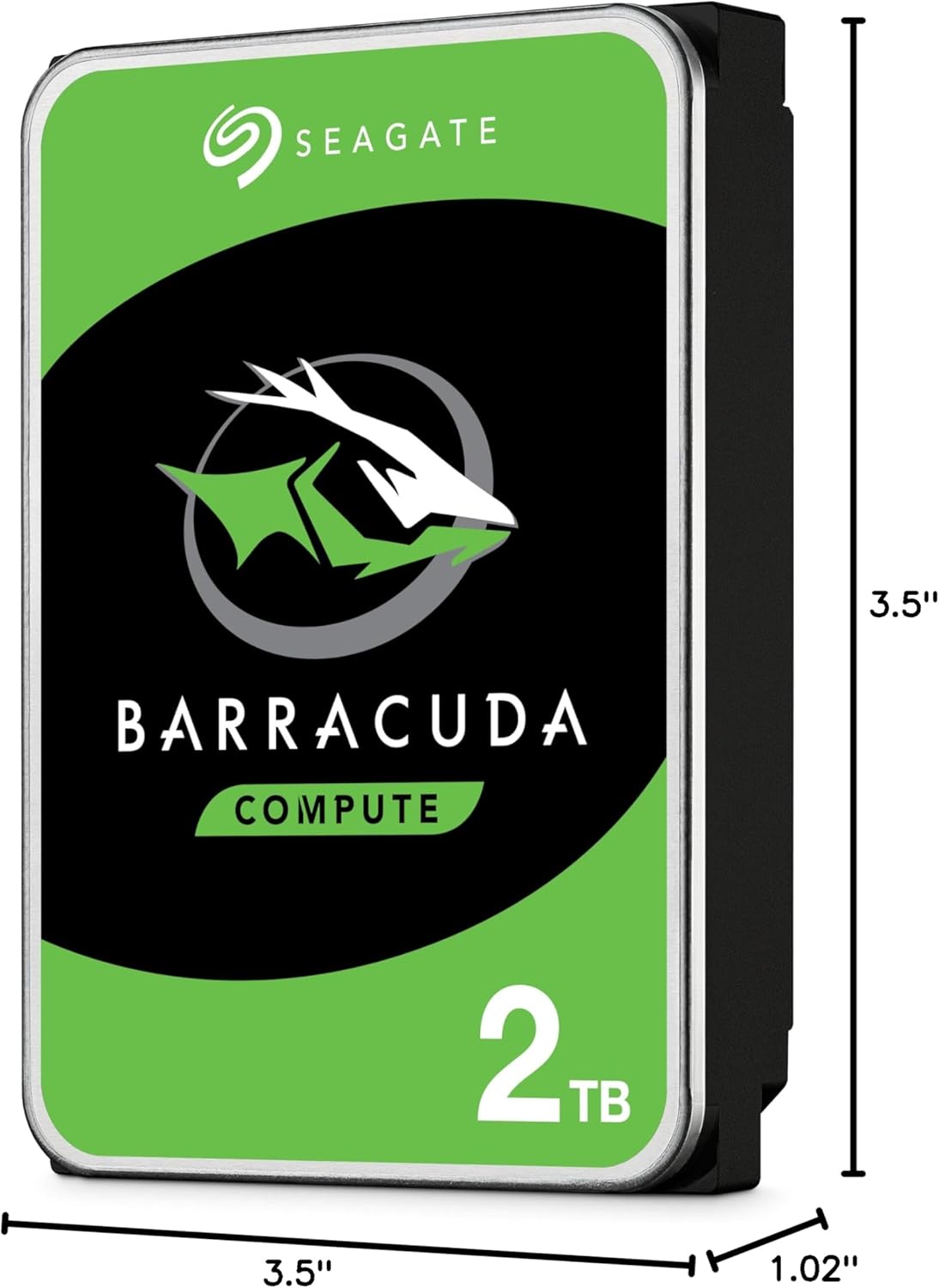
Image 2.1: Dimensions of the Seagate Barracuda 2TB Hard Drive, illustrating its 3.5-inch form factor and physical measurements for compatibility with desktop drive bays.
2.3. Software Setup (Initial Use)
After physical installation, the drive needs to be initialized, partitioned, and formatted by your operating system before it can be used for storage.
- ഡിസ്ക് മാനേജ്മെന്റ് ആക്സസ് ചെയ്യുക:
- വിൻഡോസ്: Right-click on 'This PC' or 'My Computer', select 'Manage', then 'Disk Management'.
- മാകോസ്: Go to 'Applications' > 'Utilities' > 'Disk Utility'.
- Linux: Use a disk utility like GParted or the 'fdisk'/'parted' command-line tools.
- ഡിസ്ക് ആരംഭിക്കുക: The new drive should appear as 'Unallocated Space'. You may be prompted to initialize it (e.g., MBR or GPT partition style). GPT is recommended for drives larger than 2TB.
- Create Partition(s): Create one or more partitions on the initialized disk.
- Format Partition(s): Format the partition(s) with a suitable file system (e.g., NTFS for Windows, HFS+ or APFS for macOS, Ext4 for Linux).
- Assign Drive Letter/Mount Point: Assign a drive letter (Windows) or mount point (Linux) to the new partition(s).
3. ഹാർഡ് ഡ്രൈവ് പ്രവർത്തിപ്പിക്കൽ
Once installed and formatted, your Seagate Barracuda hard drive functions as a standard storage device within your computer system. It is designed for continuous operation in a desktop environment.
3.1. Data Storage and Access
- File മാനേജ്മെൻ്റ്: നിങ്ങളുടെ ഓപ്പറേറ്റിംഗ് സിസ്റ്റത്തിന്റെ file explorer (e.g., Windows Explorer, macOS Finder) to save, copy, move, and delete fileഡ്രൈവിൽ എസ്.
- ആപ്ലിക്കേഷൻ ഇൻസ്റ്റാളേഷൻ: Install software applications directly onto the drive.
- മീഡിയ സ്റ്റോറേജ്: Store large media files such as videos, photos, and music.
- ഗെയിമിംഗ്: Install and run games from the drive to utilize its capacity.
3.2. പ്രകടനം
The drive utilizes a SATA 6Gb/s interface, providing high-speed data transfer rates for typical desktop usage. Actual performance may vary based on system configuration, file sizes, and workload.

Image 3.1: Illustrates the 'Store More' capability of the Seagate Barracuda drive, highlighting its suitability for storing a large volume of games, movies, and music files.
4. പരിപാലനവും പരിചരണവും
Proper maintenance helps ensure the longevity and reliability of your hard drive.
- പതിവ് ബാക്കപ്പുകൾ: Periodically back up important data to another storage device or cloud service. This is the most critical maintenance step to prevent data loss.
- ഡീഫ്രാഗ്മെന്റേഷൻ (HDD-കൾക്ക്): For Windows users, regularly defragmenting the drive can help optimize performance. macOS and Linux typically handle this automatically.
- ഡ്രൈവ് ആരോഗ്യം പരിശോധിക്കുക: Use disk utility tools provided by your operating system or third-party software to monitor the drive's S.M.A.R.T. status and overall health.
- സിസ്റ്റം തണുപ്പിക്കുക: Ensure adequate airflow within your computer case to prevent the drive from overheating.
- ശാരീരിക ആഘാതങ്ങൾ ഒഴിവാക്കുക: Hard drives are sensitive to physical impact. Avoid moving or bumping your computer while it is operating.
- സോഫ്റ്റ്വെയർ അപ്ഡേറ്റുകൾ: Keep your operating system and drivers updated to ensure compatibility and optimal performance.

Image 4.1: Depicts the 'Get Protected' feature, emphasizing Seagate Secure data protection, which contributes to the overall reliability of the drive.
5. പ്രശ്നപരിഹാരം
If you encounter issues with your Seagate Barracuda hard drive, try the following common troubleshooting steps.
5.1. ഡ്രൈവ് കണ്ടെത്തിയില്ല
- കേബിളുകൾ പരിശോധിക്കുക: SATA ഡാറ്റയും പവർ കേബിളുകളും ഡ്രൈവിലേക്കും മദർബോർഡിലേക്കും/പിഎസ്യുവിലേക്കും സുരക്ഷിതമായി ബന്ധിപ്പിച്ചിട്ടുണ്ടെന്ന് ഉറപ്പാക്കുക.
- Check BIOS/UEFI: നിങ്ങളുടെ കമ്പ്യൂട്ടറിന്റെ BIOS/UEFI ക്രമീകരണങ്ങളിൽ ഡ്രൈവ് ബന്ധിപ്പിച്ചിരിക്കുന്ന SATA പോർട്ട് പ്രവർത്തനക്ഷമമാക്കിയിട്ടുണ്ടെന്ന് ഉറപ്പാക്കുക.
- വ്യത്യസ്ത പോർട്ട്/കേബിൾ പരീക്ഷിക്കുക: വ്യത്യസ്തമായ ഒരു SATA ഡാറ്റ കേബിൾ, പവർ കേബിൾ, അല്ലെങ്കിൽ മദർബോർഡ് SATA പോർട്ട് എന്നിവ ഉപയോഗിച്ച് ഡ്രൈവ് പരിശോധിക്കുക.
- പവർ സപ്ലൈ പരിശോധിക്കുക: Ensure your PSU has sufficient wattage, ലഭ്യമായ കണക്ടറുകൾ.
- ഡിസ്ക് മാനേജ്മെൻ്റ്: ഡ്രൈവ് കണ്ടെത്തിയെങ്കിലും ഇനിഷ്യലൈസ് ചെയ്തിട്ടില്ലേ അതോ ഫോർമാറ്റ് ചെയ്തിട്ടില്ലേ എന്നറിയാൻ ഡിസ്ക് മാനേജ്മെന്റ് (വിൻഡോസ്) അല്ലെങ്കിൽ ഡിസ്ക് യൂട്ടിലിറ്റി (മാകോസ്) പരിശോധിക്കുക.
5.2. മന്ദഗതിയിലുള്ള പ്രകടനം
- Check Disk Usage: Ensure the drive is not nearly full. Performance can degrade significantly when a drive is almost at capacity.
- Defragmentation: Perform a disk defragmentation (Windows) if the drive is heavily fragmented.
- സ്മാർട്ട് സ്റ്റാറ്റസ്: Check the drive's S.M.A.R.T. status for any warnings indicating potential failure.
- പശ്ചാത്തല പ്രക്രിയകൾ: Close any unnecessary background applications that might be accessing the drive.
- ഡ്രൈവർ അപ്ഡേറ്റുകൾ: നിങ്ങളുടെ മദർബോർഡിന്റെ SATA ഡ്രൈവറുകൾ കാലികമാണെന്ന് ഉറപ്പാക്കുക.
5.3. അസാധാരണമായ ശബ്ദങ്ങൾ
- ക്ലിക്ക് ചെയ്യൽ/പൊടിക്കൽ: Unusual clicking, grinding, or scraping noises often indicate a mechanical failure. Immediately back up any accessible data and consider replacing the drive.
- വൈബ്രേഷൻ: Ensure the drive is securely mounted in its bay to prevent vibrations.
If these steps do not resolve the issue, please refer to the support section or contact Seagate customer support.
6 സ്പെസിഫിക്കേഷനുകൾ
Key technical specifications for the Seagate Barracuda 2TB Internal Hard Drive (Model ST2000DM008).
| ഫീച്ചർ | വിവരണം |
|---|---|
| മോഡൽ നമ്പർ | ST2000DM008 |
| ഡിജിറ്റൽ സ്റ്റോറേജ് കപ്പാസിറ്റി | 2000 ജിബി (2 ടിബി) |
| ഹാർഡ് ഡിസ്ക് ഇന്റർഫേസ് | SATA 6 GB/s |
| ഫോം ഫാക്ടർ | 3.5 ഇഞ്ച് |
| ഹാർഡ് ഡിസ്ക് വിവരണം | Mechanical Hard Disk (HDD) |
| അനുയോജ്യമായ ഉപകരണങ്ങൾ | ഡെസ്ക്ടോപ്പ് കമ്പ്യൂട്ടറുകൾ |
| ഇൻസ്റ്റലേഷൻ തരം | ആന്തരിക ഹാർഡ് ഡ്രൈവ് |
| ഇനത്തിൻ്റെ ഭാരം | 7 ഔൺസ് (ഏകദേശം 198 ഗ്രാം) |
| ഉൽപ്പന്ന അളവുകൾ (LxWxH) | 5.78 x 4.01 x 0.8 ഇഞ്ച് (ഏകദേശം 14.68 x 10.19 x 2.03 സെ.മീ) |
7. വാറൻ്റി വിവരങ്ങൾ
The Seagate Barracuda ST2000DM008 Internal Hard Drive typically comes with a 2 വർഷത്തെ പരിമിത വാറൻ്റി വാങ്ങിയ തീയതി മുതൽ. സാധാരണ ഉപയോഗത്തിലുള്ള മെറ്റീരിയലുകളിലെയും വർക്ക്മാൻഷിപ്പുകളിലെയും വൈകല്യങ്ങൾ ഈ വാറന്റി ഉൾക്കൊള്ളുന്നു.
For complete details regarding warranty terms, conditions, and limitations, please refer to the official Seagate warranty statement available on their website or contact Seagate customer support. Keep your proof of purchase for warranty claims.

Image 7.1: Highlights the 'Trusted Durability' of the Seagate Barracuda drive, backed by a 2-year limited warranty, ensuring peace of mind for users.
8. ഉപഭോക്തൃ പിന്തുണ
For further assistance, technical support, or to register your product, please visit the official Seagate support resources:
- Seagate Official Webസൈറ്റ്: www.seagate.com/support/
- Seagate Brand Store on Amazon: Visit Seagate Store
You may also find helpful resources, FAQs, and driver downloads on their support pages.


