1. ആമുഖം
This manual provides essential information for the safe and effective operation of your DJI Air 3S Fly More Combo with RC 2 remote controller. The DJI Air 3S is an advanced drone featuring dual 4K/60fps HDR video cameras, omnidirectional obstacle avoidance, and extended flight capabilities. Please read this manual thoroughly before operating the device.
2. സജ്ജീകരണം
2.1 അൺബോക്സിംഗും പ്രാരംഭ തയ്യാറെടുപ്പും
The DJI Air 3S Fly More Combo (RC 2) includes the following components:
- DJI Air 3S Aircraft x1
- DJI RC 2 Remote Controller x1
- DJI Air 3S Intelligent Flight Battery x3
- DJI Shoulder Bag x1
- DJI Air 3S ND Filter Set (ND8/32/128) x1
- DJI Air 3 Series Battery Charging Hub x1
- DJI Air 3 Series Spare Low-Noise Propellers (Pair) x3
- DJI Air 3S Gimbal Protector x1
- Type-C to Type-C PD Cable x1
കുറിപ്പ്: A battery charger is sold separately. The DJI 65W Portable Charger is recommended.

Figure 1: Included components in the DJI Air 3S Fly More Combo (RC 2) package, showing the drone, RC 2 controller, three batteries, charging hub, ND filters, shoulder bag, and other accessories.
2.2 Initial Activation and Firmware Update
Before your first flight, ensure the drone and remote controller are activated and updated to the latest firmware. This process requires an internet connection.
- Operator Registration: Complete any necessary operator registration as required by local regulations.
- അക്കൗണ്ട് സൃഷ്ടിക്കൽ/ലോഗിൻ: Create or log in to your DJI account via the DJI Fly app.
- ഫേംവെയർ അപ്ഡേറ്റ്: Connect the aircraft to the remote controller. The DJI Fly app will prompt you for any available firmware updates for the aircraft, remote controller, batteries, and other devices. Follow the on-screen instructions. Ensure sufficient battery charge (at least 20%) before starting updates.

Figure 2: Visual guide illustrating the three simple steps to prepare the DJI Air 3S for flight, including operator registration, labeling, and online training/app setup.
2.3 Unfolding the Aircraft
Carefully unfold the front and rear arms of the DJI Air 3S aircraft before each flight. Ensure all propellers are securely attached and free from damage.
വീഡിയോ 1: ഒരു അൺബോക്സിംഗ് കൂടിview of the DJI Air 3S, demonstrating how to unfold the drone and prepare it for flight, along with a look at the RC 2 controller and accessories.
3. പ്രവർത്തന നിർദ്ദേശങ്ങൾ
3.1 DJI RC 2 Remote Controller
The DJI RC 2 remote controller features a built-in screen, eliminating the need for a separate mobile device. It offers enhanced signal strength and faster boot-up times compared to previous models.

Figure 3: A user operating the DJI Air 3S drone with the RC 2 remote controller, showcasing the integrated screen for real-time flight view.
3.2 Flight Modes and Controls
Familiarize yourself with the various flight modes and controls available through the DJI Fly app and the RC 2 controller. These include standard flight, intelligent flight modes, and emergency procedures.
3.3 QuickTransfer
The DJI Air 3S supports QuickTransfer, allowing you to send files directly to your smartphone even when the drone is off. Files can also be transferred to a computer via a compatible USB-C cable while the drone is powered off.
4. ക്യാമറ സവിശേഷതകൾ
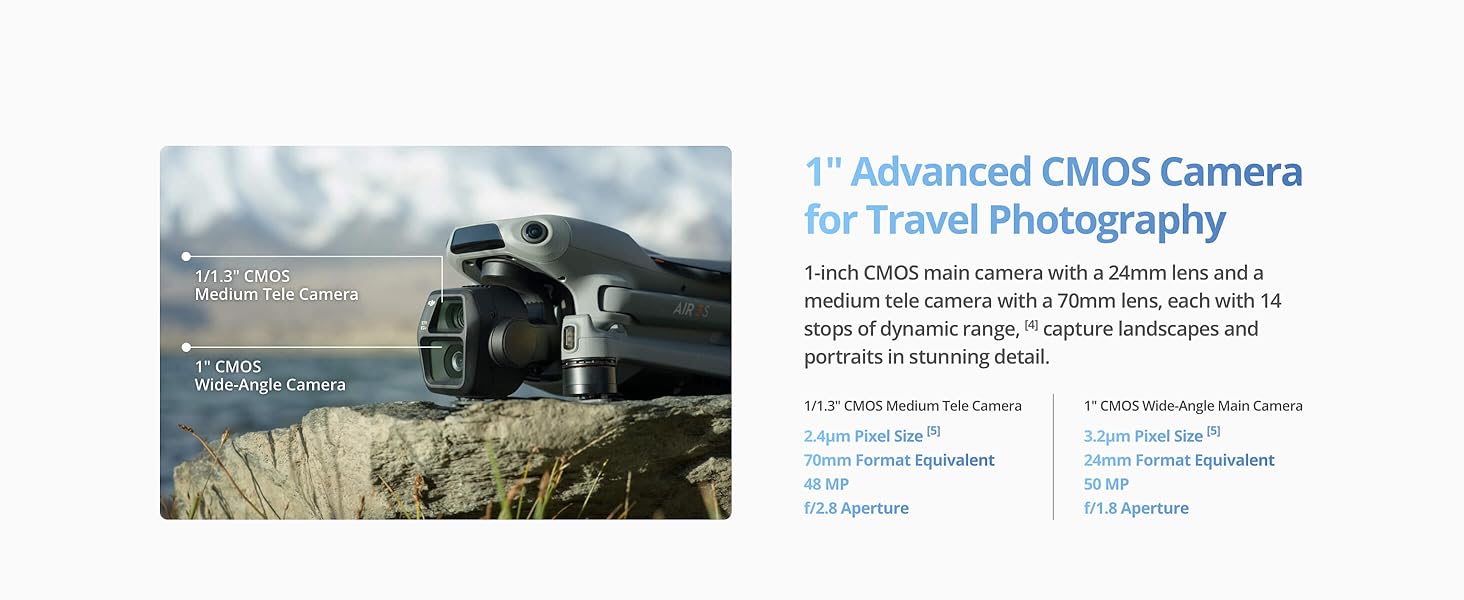
The DJI Air 3S is equipped with an advanced dual-camera system for versatile imaging.
- 1" CMOS Wide-Angle Camera: Captures 50MP effective still resolution and 4K/60fps HDR video with up to 14 stops of dynamic range.
- 1/1.3" CMOS Medium Tele Camera: Offers a 70mm equivalent lens for detailed shots and 48MP effective still resolution.

ചിത്രം 4: വിശദമായി view of the DJI Air 3S's dual camera system, highlighting the 1-inch CMOS wide-angle camera and the 1/1.3-inch CMOS medium tele camera, along with example shots.
4.1 Panorama Mode
Utilize the Free Panorama Mode to create seamless panoramic shots. Both wide-angle and medium tele cameras support this feature, offering diverse perspectives.

Figure 5: Comparison of panoramic images captured using the DJI Air 3S, demonstrating the seamless stitching and detailed output of the Free Panorama Mode.
5. Flight Safety & Features
5.1 Omnidirectional Obstacle Sensing
The DJI Air 3S features omnidirectional obstacle sensing, including forward-facing LiDAR and additional sensors. This system actively identifies and avoids obstacles in all directions, enhancing flight safety, especially during nighttime operations and return paths.
5.2 Smart Return-To-Home (RTH)
Equipped with next-gen Smart RTH algorithms, the drone can intelligently select the optimal return route and quickly fly back to the Home Point, even in areas with weak GPS signals. It can also memorize flight paths in well-lit conditions for safe returns.

Figure 6: Illustration of the DJI Air 3S's advanced safety features, including omnidirectional obstacle sensing for nighttime flying and the intelligent pathfinding of Smart Return-to-Home.
5.3 Extended Flight Time & Transmission
Enjoy a maximum flight time of 45 minutes and a video transmission range of up to 20km, providing ample time for capturing footage and responsive control.
ചിത്രം 7: ഓവർview of DJI Air 3S high performance features, including 45-minute flight time, 20km video transmission, 42GB built-in storage, and Off-State QuickTransfer capability.
6. പരിപാലനം
6.1 പ്രൊപ്പല്ലർ കെയർ
Regularly inspect propellers for any signs of damage (cracks, bends, chips). Replace damaged propellers immediately using the provided spare low-noise propellers. Ensure propellers are correctly installed before each flight.
6.2 Gimbal Protection
Always attach the DJI Air 3S Gimbal Protector when the drone is not in use or during transport to prevent damage to the camera and gimbal system.
6.3 Battery Charging and Storage
Use the DJI Air 3 Series Battery Charging Hub to charge your intelligent flight batteries. The hub supports PD fast charging and features power accumulation, transferring power from multiple low-power batteries to a high-power battery. Do not connect the charger, external devices, or insert/remove batteries during power accumulation.
7. പ്രശ്നപരിഹാരം
7.1 Firmware Update Issues
If you encounter issues with firmware updates, ensure you have a stable internet connection and sufficient battery charge. You can also update via the DJI Assistant 2 (Consumer Drones Series) software, available on the official DJI webസൈറ്റ്.
7.2 Loss of GPS Signal
In environments with weak GNSS signals, fly the aircraft in well-lit conditions. The Smart RTH function can still guide the drone home even with weak GPS, but ensure adequate lighting and clear flight paths.
7.3 Obstacle Avoidance Malfunctions
Obstacle avoidance may not work correctly near reflective surfaces (water, snow) or in dim environments. Avoid flying near magnetic or radio interference sources (Wi-Fi hotspots, routers, Bluetooth devices, high-voltage lines, etc.). Exercise caution in complex environments.
7.4 Account Unbinding for Returns
ഗുരുതരമായ അറിയിപ്പ്: Before returning your DJI drone, you must unbind your account. Go to DJI Fly > Profile > Device Management > Remove Device From Account. Then log out of your account from DJI Fly. Failure to unbind may result in unauthorized access to your account or potential remote locking of the device.
8 സ്പെസിഫിക്കേഷനുകൾ
| ഫീച്ചർ | വിശദാംശങ്ങൾ |
|---|---|
| ബ്രാൻഡ് | ഡിജെഐ |
| മോഡലിൻ്റെ പേര് | DJIAIR3SRC2 |
| പ്രത്യേക സവിശേഷതകൾ | 10-Bit D-Log M and HLG Color Modes, Day and Night Omnidirectional Avoidance, Forward-Facing LiDAR Sensor, Multiple Pre-Programmed Flight Modes, Up to 45 Minutes of Flight Time |
| നിറം | ചാരനിറം |
| വീഡിയോ ക്യാപ്ചർ റെസല്യൂഷൻ | 4K |
| ഫലപ്രദമായ സ്റ്റിൽ റെസല്യൂഷൻ | 48 എം.പി |
| കണക്റ്റിവിറ്റി ടെക്നോളജി | ബ്ലൂടൂത്ത്, വൈഫൈ |
| നൈപുണ്യ നില | എല്ലാം |
| ഇനത്തിൻ്റെ ഭാരം | 724 ഗ്രാം (1.6 പൗണ്ട്) |
| പരമാവധി പരിധി | 20 കിലോമീറ്റർ |
| ബാറ്ററി സെൽ കോമ്പോസിഷൻ | ലിഥിയം പോളിമർ |
| ഉൽപ്പന്ന അളവുകൾ | 10.48"L x 12.81"W x 4.17"H |
| യു.പി.സി | 190021115033 |
9. വാറൻ്റിയും പിന്തുണയും
For technical support, warranty information, and the latest firmware updates, please visit the official DJI website. Ensure you register your product for warranty coverage.
Always check and strictly abide by local laws and regulations before flying your drone.


