ആമുഖം
The 2GIG DW30 Wireless Outdoor Contact Sensor is designed to provide reliable security monitoring for outdoor applications such as gates, sheds, and other entry points. This weatherproof sensor communicates wirelessly with compatible 2GIG security systems, alerting you to open or closed states. Its robust design ensures durability in various outdoor environments.

Image: The 2GIG DW30 Wireless Outdoor Contact Sensor, showing both the main sensor unit and the accompanying magnet.
പാക്കേജ് ഉള്ളടക്കം
- 1 x 2GIG DW30 Wireless Outdoor Contact Sensor (Transmitter Unit)
- 1 x Rare Earth Magnet
- മൗണ്ടിംഗ് സ്ക്രൂകൾ
- 2 x AA Lithium Batteries
സ്പെസിഫിക്കേഷനുകൾ
| ഫീച്ചർ | വിശദാംശങ്ങൾ |
|---|---|
| മോഡൽ നമ്പർ | DW30 |
| നിറം | കറുപ്പ് |
| പവർ ഉറവിടം | 2 x AA Lithium Batteries |
| ബാറ്ററി ലൈഫ് | 5 വർഷം വരെ |
| പരമാവധി വയർലെസ് റേഞ്ച് | 100 അടി (ഏകദേശം 30 മീറ്റർ) |
| ആവൃത്തി | 345 MHz |
| മൗണ്ടിംഗ് തരം | Wall or Surface Mount |
| ഉൽപ്പന്ന അളവുകൾ | 1 x 1 x 1 inches (approximate, compact design) |
| ഇനത്തിൻ്റെ ഭാരം | 9.2 ഔൺസ് |
| അനുയോജ്യമായ ഉപകരണങ്ങൾ | 2GIG security devices and systems |
| ശുപാർശ ചെയ്യുന്ന ഉപയോഗങ്ങൾ | Garden gates, terraces, garages, driveways, sheds, fences |
സജ്ജീകരണവും ഇൻസ്റ്റാളേഷനും
Proper installation is crucial for optimal performance and reliable operation of your outdoor contact sensor.
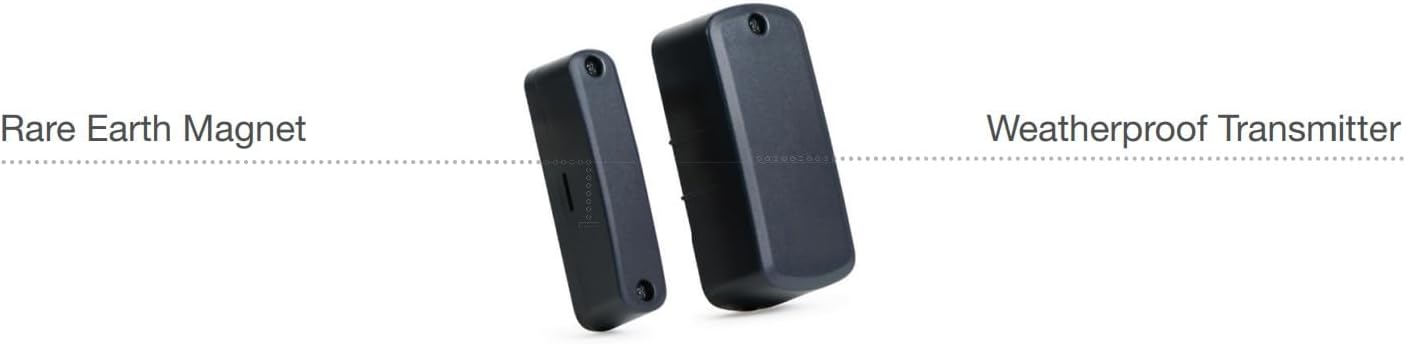
Image: The sensor unit labeled 'Weatherproof Transmitter' and the magnet labeled 'Rare Earth Magnet', illustrating their distinct components.
ഇൻസ്റ്റലേഷൻ ഘട്ടങ്ങൾ:
- ബാറ്ററി ഇൻസ്റ്റാളേഷൻ: Open the sensor unit's casing. Insert the two provided AA lithium batteries, ensuring correct polarity. Close the casinഗ്രാം സുരക്ഷിതമായി.
- മൗണ്ടിംഗ് ലൊക്കേഷൻ: Choose a flat, stable surface for mounting the sensor and magnet. Ensure the location is clean and dry. The sensor is weatherproof, but direct exposure to extreme conditions should be considered.
- Mounting the Sensor Unit: Position the main sensor unit on the stationary part of the door, gate, or window frame. Use the provided screws to securely fasten the unit. The sensor housing includes a tamper switch; ensure the cover is properly seated to prevent false tampഎർ അലാറങ്ങൾ.
- Mounting the Magnet: Position the rare earth magnet on the moving part of the door, gate, or window, directly adjacent to the sensor unit. The optimal gap between the sensor and the magnet is approximately 1/4 inch (0.6 cm). However, the sensor can tolerate a gap of up to two inches (5 cm) on wooden surfaces, and it can also function effectively when mounted on metal posts. Use the provided screws to secure the magnet.
- Programming to 2GIG Panel: Refer to your 2GIG control panel's user manual for specific instructions on how to enroll new wireless sensors. The DW30 sensor is designed for easy integration with 2GIG systems. Follow the panel's prompts to add the sensor to your security system.

ചിത്രം: ഒരു മുൻ കാമുകൻample installation of the 2GIG DW30 sensor on an outdoor security gate, demonstrating its application in a typical environment.
പ്രവർത്തന നിർദ്ദേശങ്ങൾ
Once installed and programmed, the 2GIG DW30 sensor operates by detecting the presence or absence of its magnet. When the magnet is in close proximity to the sensor, the contact is considered closed. When the magnet moves away from the sensor (e.g., a gate opens), the contact opens, and the sensor transmits a signal to your 2GIG control panel.
- സാധാരണ പ്രവർത്തനം: The sensor will silently monitor the open/closed status of the protected entry point.
- അലാറം ട്രിഗർ: If the system is armed and the sensor detects an open state, it will trigger an alarm according to your panel's programming.
- Tampകണ്ടെത്തൽ: The sensor includes a tamper switch. If the sensor's cover is removed or tampered with while the system is armed, it will trigger a tampഎർ അലാറം.
മെയിൻ്റനൻസ്
Regular maintenance ensures the longevity and reliability of your sensor.
- ബാറ്ററി മാറ്റിസ്ഥാപിക്കൽ: The sensor is designed for long battery life (up to 5 years). Your 2GIG control panel will typically indicate a low battery condition for the sensor. When this occurs, replace both AA lithium batteries promptly. Use only high-quality lithium or alkaline AA batteries.
- വൃത്തിയാക്കൽ: Periodically clean the exterior of the sensor and magnet with a soft, damp cloth. Avoid using abrasive cleaners or solvents, as these can damage the housing.
- പരിശോധന: Regularly inspect the sensor and magnet for any signs of physical damage, loose mounting, or obstruction. Ensure the gap between the sensor and magnet remains consistent.
ട്രബിൾഷൂട്ടിംഗ്
If you encounter issues with your 2GIG DW30 sensor, consider the following:
- Sensor Not Reporting:
- ബാറ്ററി ലെവലുകൾ പരിശോധിക്കുക. കുറവാണെങ്കിൽ ബാറ്ററികൾ മാറ്റി വയ്ക്കുക.
- Ensure the sensor and magnet are properly aligned and within the recommended gap.
- Verify the sensor is correctly enrolled in your 2GIG control panel. Refer to your panel's manual for re-enrollment steps if necessary.
- Check for any physical obstructions or interference between the sensor and the control panel.
- തെറ്റായ ടിamper Alarms:
- Ensure the sensor's cover is securely closed and latched.
- Check for any movement or vibration of the mounting surface that might cause the cover to shift.
- പരിമിത ശ്രേണി:
- While the sensor has a good range, large metal objects, thick walls, or other wireless devices can cause interference. Try repositioning the sensor or the control panel if possible.
- Ensure there are no other strong radio frequency sources nearby.
For persistent issues, consult your 2GIG control panel's manual or contact 2GIG technical support.
വാറൻ്റി വിവരങ്ങൾ
For detailed warranty information regarding your 2GIG DW30 Wireless Outdoor Contact Sensor, please refer to the official 2GIG website or the warranty documentation included with your purchase. Warranty terms typically cover defects in materials and workmanship under normal use.
പിന്തുണ
If you require further assistance with installation, operation, or troubleshooting, please contact 2GIG customer support or your authorized security system installer. Support contact details can usually be found on the official 2GIG website or within your security system's documentation.


