ആമുഖം
This manual provides comprehensive instructions for the setup, operation, maintenance, and troubleshooting of your Listen Technologies LR-5200-IR-P1 Advanced Intelligent DSP IR Receiver Package 1. Please read this manual thoroughly before using the device to ensure proper functionality and to maximize its performance.
The LR-5200-IR-P1 package is designed to expand or establish an IR assistive listening system, offering high-performance signal reception and clarity. It includes the LR-5200-IR receiver, an integrated neck loop/lanyard, and a universal ear speaker.
പാക്കേജ് ഉള്ളടക്കം
The LR-5200-IR-P1 package includes the following components:
- (1) LR-5200-IR Advanced Intelligent DSP IR Receiver
- (1) LA-430 Intelligent Ear Phone/Neck Loop Lanyard
- (1) LA-401 Universal Ear Speaker
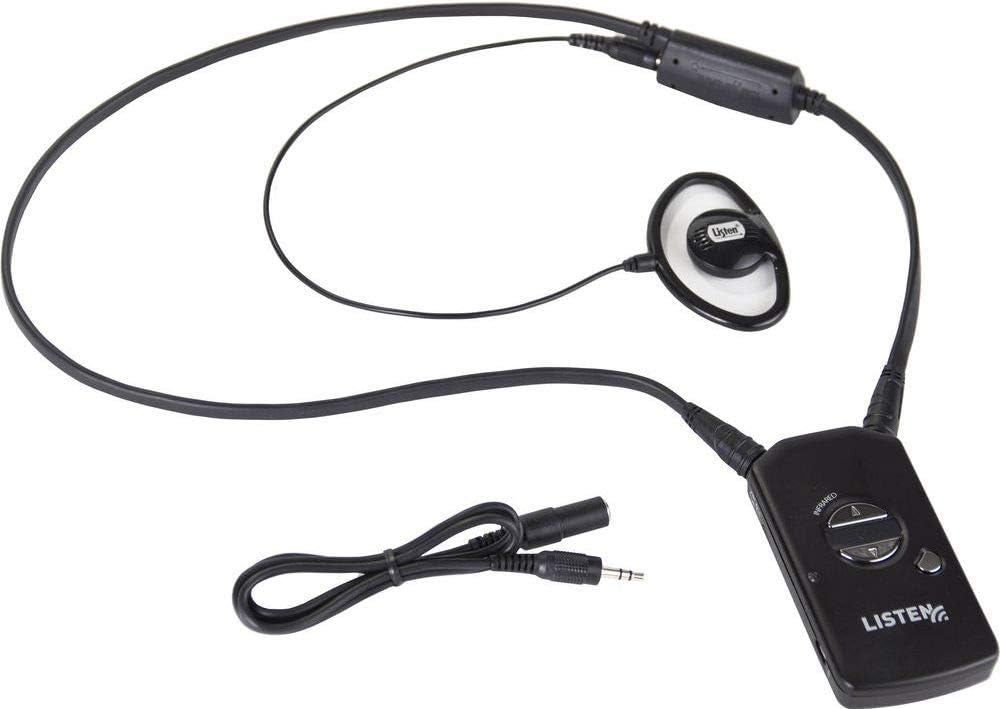
ചിത്രം 1: Components of the LR-5200-IR-P1 package. Shown are the LR-5200-IR receiver, the LA-430 neck loop/lanyard, and the LA-401 universal ear speaker, all connected and ready for use.
സജ്ജമാക്കുക
1. റിസീവർ ചാർജ് ചെയ്യുന്നു
The LR-5200-IR receiver uses advanced green battery technology. Before first use, ensure the receiver is fully charged.
- Connect the receiver to a compatible Listen Technologies charging station (sold separately) or a USB power source using the appropriate cable.
- The charging indicator light on the receiver will illuminate to show charging status.
- പൂർണ്ണമായി ചാർജ് ചെയ്യാൻ മതിയായ സമയം അനുവദിക്കുക, സാധാരണയായി നിരവധി മണിക്കൂർ.
2. ആക്സസറികൾ ബന്ധിപ്പിക്കുന്നു
The package includes an integrated neck loop/lanyard and a universal ear speaker.
- Ear Speaker: Plug the 3.5mm jack of the LA-401 Universal Ear Speaker into the audio output port on the LR-5200-IR receiver.
- Neck Loop/Lanyard: The LA-430 Intelligent Ear Phone/Neck Loop Lanyard connects to the receiver via its integrated connector. This accessory is designed for users with T-coil enabled hearing aids.
3. Wearing the Receiver
The LR-5200-IR receiver is designed for discreet and comfortable wear.
- Neck Loop/Lanyard: Place the lanyard around your neck. The receiver will hang comfortably at chest level.
- ബെൽറ്റ് ക്ലിപ്പ്: Alternatively, the receiver can be attached to a belt or waistband using its integrated belt clip for a more discreet option.
പ്രവർത്തന നിർദ്ദേശങ്ങൾ
1. പവർ ഓൺ/ഓഫ്
To power on the LR-5200-IR receiver, press and hold the power button located on the front of the device until the indicator light illuminates. To power off, press and hold the power button again until the light turns off.
2 ചാനൽ തിരഞ്ഞെടുക്കൽ
The LR-5200-IR receiver supports multi-channel applications, allowing users to select their desired channel.
- Use the channel up/down buttons (typically marked with arrows) on the receiver to cycle through available IR channels.
- The current channel number may be displayed on a small screen or indicated by LED patterns, depending on the receiver's design.
- Ensure the selected channel matches the broadcast channel of the IR transmitter in your listening environment.
3. വോളിയം അഡ്ജസ്റ്റ്മെൻ്റ്
Adjust the listening volume to a comfortable level using the volume up/down buttons on the receiver.
4. Using with T-Coil Hearing Aids
If you are using a T-coil enabled hearing aid, ensure your hearing aid is set to the "T" or "Telecoil" program. The LA-430 neck loop/lanyard will transmit the audio signal directly to your hearing aid's T-coil, providing a clear listening experience.
മെയിൻ്റനൻസ്
1. വൃത്തിയാക്കൽ
- Wipe the receiver and accessories with a soft, dry, lint-free cloth.
- Do not use abrasive cleaners, solvents, or strong chemicals, as these can damage the device.
- For ear speakers, use a mild disinfectant wipe if necessary, ensuring no liquid enters the speaker grille.
2. ബാറ്ററി പരിചരണം
- Regularly charge the receiver to maintain battery health.
- ബാറ്ററി ഇടയ്ക്കിടെ പൂർണ്ണമായും കളയുന്നത് ഒഴിവാക്കുക.
- Store the receiver in a cool, dry place when not in use for extended periods.
3. സംഭരണം
When not in use, store the LR-5200-IR receiver and its accessories in a protective case or a clean, dry environment to prevent damage from dust, moisture, or physical impact.
ട്രബിൾഷൂട്ടിംഗ്
| പ്രശ്നം | സാധ്യമായ കാരണം | പരിഹാരം |
|---|---|---|
| No audio from receiver | Receiver not powered on; Low battery; Incorrect channel selected; Ear speaker/neck loop not connected; Out of range of IR transmitter; Obstruction blocking IR signal. | Ensure receiver is powered on; Charge the battery; Verify correct channel selection; Check ear speaker/neck loop connection; Move closer to the IR transmitter; Remove any obstructions between receiver and transmitter. |
| Distorted or unclear audio | Weak IR signal; Interference; Volume too high; Damaged ear speaker/neck loop. | Move closer to the IR transmitter; Check for sources of interference; Adjust volume to a lower level; Test with a different ear speaker/neck loop if available. |
| റിസീവർ ചാർജ് ചെയ്യുന്നില്ല | Charging cable/station not connected properly; Faulty charging cable/station; Battery issue. | Ensure secure connection; Try a different charging cable or station; Contact support if battery issues persist. |
സ്പെസിഫിക്കേഷനുകൾ
- മോഡൽ: LR-5200-IR-P1
- നിർമ്മാതാവ്: ലിസൻ ടെക്നോളജീസ്
- കണക്റ്റിവിറ്റി ടെക്നോളജി: Wired (for accessories)
- കൺട്രോളർ തരം: കൈ നിയന്ത്രണം
- പ്രത്യേക സവിശേഷത: കോംപാക്റ്റ് ഡിസൈൻ
- അനുയോജ്യമായ ഉപകരണങ്ങൾ: സ്പീക്കർ
- കണക്റ്റർ തരം: 3.5 എംഎം ജാക്ക്
- ഓഡിയോ putട്ട്പുട്ട് മോഡ്: മോണോ
- ചാനലുകളുടെ എണ്ണം: 5
- ഇനത്തിൻ്റെ ഭാരം: 3.8 ഔൺസ്
- ബാറ്ററികൾ: 1 Lithium Ion battery required (integrated)
- ആദ്യം ലഭ്യമായ തീയതി: ഓഗസ്റ്റ് 18, 2018
വാറൻ്റിയും പിന്തുണയും
For warranty information and technical support, please refer to the official Listen Technologies webസൈറ്റിൽ ബന്ധപ്പെടുകയോ അവരുടെ ഉപഭോക്തൃ സേവനവുമായി നേരിട്ട് ബന്ധപ്പെടുകയോ ചെയ്യുക. വാറന്റി ക്ലെയിമുകൾക്കുള്ള വാങ്ങലിന്റെ തെളിവായി നിങ്ങളുടെ വാങ്ങൽ രസീത് സൂക്ഷിക്കുക.
Listen Technologies Contact Information:
- Webസൈറ്റ്: www.listentech.com
- കസ്റ്റമർ സർവീസ്: റഫർ ചെയ്യുക webകോൺടാക്റ്റ് നമ്പറുകൾക്കോ പിന്തുണ ഫോമുകൾക്കോ ഉള്ള സൈറ്റ്.


