1. ആമുഖം
Thank you for choosing the Meross Smart Wi-Fi Plug. This device allows you to control your home appliances remotely, monitor energy consumption, and set schedules, all through your smartphone or voice commands. This manual provides detailed instructions for setting up, operating, and maintaining your smart plug to ensure optimal performance and safety.

Image: The Meross Smart Wi-Fi Plug, an Italian Type L plug, featuring a power button and a three-pin socket.
2 പ്രധാനപ്പെട്ട സുരക്ഷാ വിവരങ്ങൾ
- ഉപകരണം ഡിസ്അസംബ്ലിംഗ് ചെയ്യുകയോ പരിഷ്കരിക്കുകയോ ചെയ്യരുത്.
- ഉപകരണം വെള്ളത്തിലോ ഉയർന്ന ആർദ്രതയിലോ തുറന്നുകാട്ടരുത്.
- Do not use the device in environments with high temperatures or near flammable materials.
- Ensure the connected appliance's power rating does not exceed the smart plug's maximum load (16A, 3840W).
- ഇൻഡോർ ഉപയോഗത്തിന് മാത്രം.
- കുട്ടികൾക്ക് ലഭ്യമാകാതെ സൂക്ഷിക്കുക.
3. പാക്കേജ് ഉള്ളടക്കം
- 1 x Meross Smart Wi-Fi Plug (Model: MSS310R)
- 1 x ഉപയോക്തൃ മാനുവൽ
4. ഉൽപ്പന്നം കഴിഞ്ഞുview
The Meross Smart Wi-Fi Plug (MSS310R) is designed for Italian Type L sockets. It features a compact design with a power button and an LED indicator. The plug allows for remote control, voice control, and energy monitoring of connected devices.
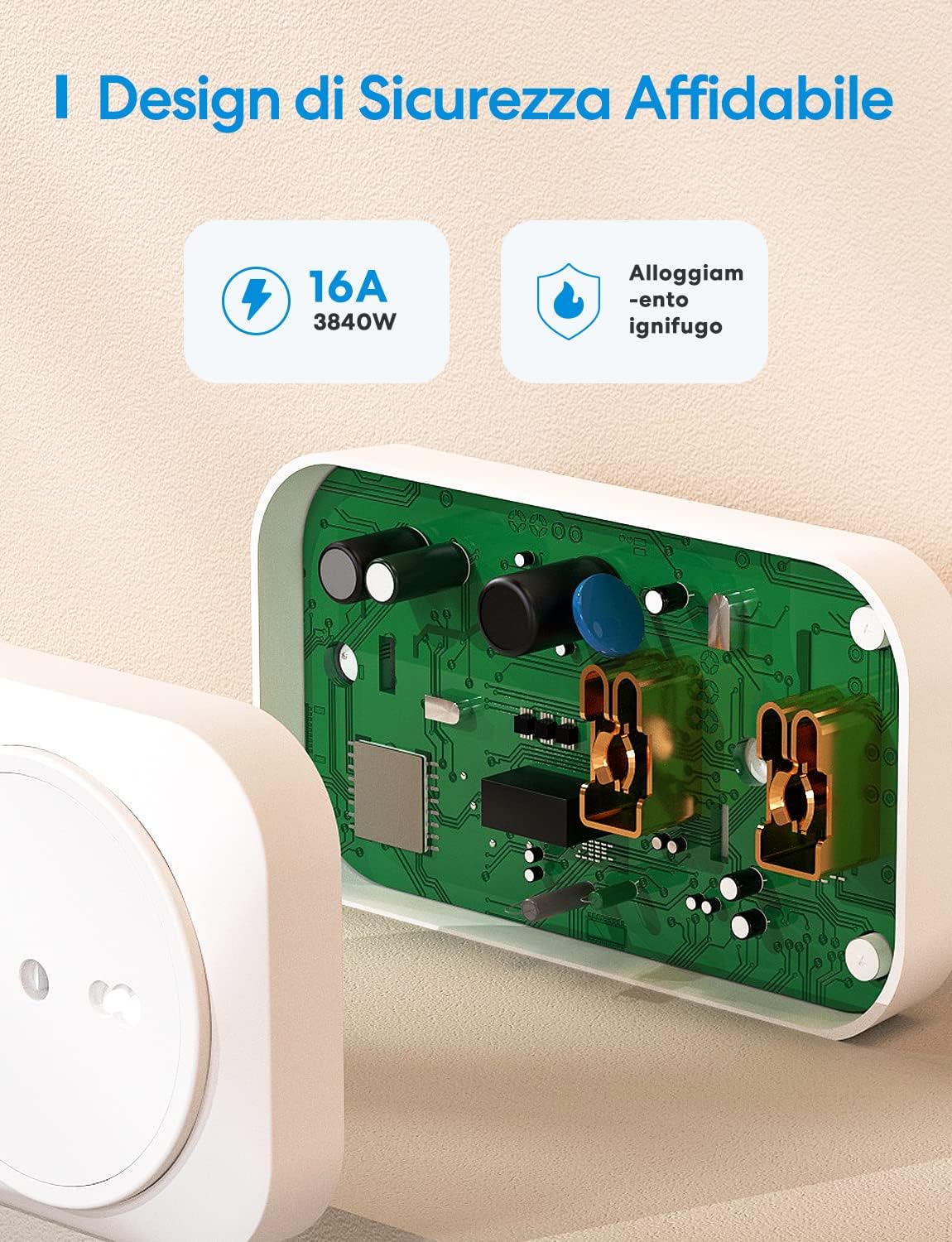
ചിത്രം: ഒരു ആന്തരികം view of the Meross Smart Plug, highlighting its robust and fire-retardant housing, designed for safety and durability.
5. സജ്ജീകരണ ഗൈഡ്
Follow these steps to set up your Meross Smart Wi-Fi Plug:
- മെറോസ് ആപ്പ് ഡൗൺലോഡ് ചെയ്യുക: ഇതിനായി തിരയുക "Meross" in the Apple App Store or Google Play Store and download the app.
- രജിസ്റ്റർ ചെയ്യുക/ലോഗിൻ ചെയ്യുക: Open the Meross app and register for a new account or log in with your existing credentials.
- ഉപകരണം പ്ലഗ് ഇൻ ചെയ്യുക: Insert the Meross Smart Plug into an Italian Type L wall socket. The LED indicator on the plug should start blinking.
- ആപ്പിൽ ഉപകരണം ചേർക്കുക: In the Meross app, tap the "+" icon in the top right corner to add a new device. Select "Smart Plug" from the list.
- വൈഫൈയിലേക്ക് കണക്റ്റുചെയ്യുക: Follow the in-app instructions to connect the smart plug to your 2.4GHz Wi-Fi network. Note: The Meross Smart Plug only supports 2.4GHz Wi-Fi.
- നിങ്ങളുടെ ഉപകരണത്തിന് പേര് നൽകുക: കണക്റ്റ് ചെയ്തുകഴിഞ്ഞാൽ, നിങ്ങളുടെ സ്മാർട്ട് പ്ലഗിന് ഒരു പേര് നൽകാം (ഉദാ. "ലിവിംഗ് റൂം എൽamp").
Your Meross Smart Plug is now ready for use!
6. പ്രവർത്തന നിർദ്ദേശങ്ങൾ
6.1 വിദൂര നിയന്ത്രണം
Control your appliances from anywhere using the Meross app. Simply open the app, select your smart plug, and toggle its power on or off. This feature allows you to manage devices even when you are away from home, provided you have an internet connection.

Image: A man using the Meross app on his smartphone to remotely control devices connected to the smart plug, demonstrating the convenience of remote operation.
6.2 ശബ്ദ നിയന്ത്രണം
The Meross Smart Plug is compatible with Amazon Alexa and Google Assistant. Link your Meross account to your voice assistant app to enable voice commands.
- ആമസോൺ അലക്സയ്ക്കായി: "അലക്സാ, ലിവിംഗ് റൂം ഓണാക്കൂ lamp."
- Google അസിസ്റ്റന്റിനായി: "ഹേ ഗൂഗിൾ, ഫാൻ ഓഫ് ചെയ്യൂ."

Image: Two smart speakers (Amazon Echo Dot and Google Home Mini) positioned near a television, illustrating how voice commands can be used to control the Meross Smart Plug.
6.3 Timer and Schedule Function
Set schedules and timers for your appliances to automate their operation. This can help save energy and provide convenience.
- ഷെഡ്യൂളിംഗ്: Program devices to turn on or off at specific times, such as turning on a coffee maker every morning.
- Sunrise/Sunset Routines: Configure the plug to activate or deactivate based on local sunrise or sunset times, ideal for lighting.
- കൗണ്ട്ഡൗൺ ടൈമർ: Set a countdown for a device to turn off after a certain period.

Image: A smartphone screen displaying the Meross app's scheduling interface, with options for sunrise, sunset, and custom routines, next to a smart plug controlling a bedside lamp.
6.4 ഊർജ്ജ നിരീക്ഷണം
The Meross Smart Plug provides real-time energy consumption data and historical records for connected devices. This feature helps you track and manage your energy usage, potentially leading to energy savings.
- View current power (W) and total consumption (kWh).
- Access daily, weekly, monthly, and yearly energy reports.

Image: A smartphone screen showing the Meross app's energy monitoring interface, displaying real-time power consumption and historical data, with a smart plug connected to a fireplace heater in the background.
6.5 ഓഫ്ലൈൻ നിയന്ത്രണം
Even if your internet connection is down, you can still control your Meross Smart Plug locally via your home Wi-Fi network, provided your smartphone and the smart plug are on the same network.

Image: A diagram showing a house with a Wi-Fi router, illustrating that devices can still be controlled via the Meross app locally even if the internet connection is unavailable.
7. പരിപാലനം
- Keep the device clean and dry. Use a soft, dry cloth to wipe the surface.
- കഠിനമായ രാസവസ്തുക്കളോ ഉരച്ചിലുകളുള്ള ക്ലീനറുകളോ ഉപയോഗിക്കുന്നത് ഒഴിവാക്കുക.
- Ensure the plug is disconnected from the power outlet before cleaning.
8. പ്രശ്നപരിഹാരം
| പ്രശ്നം | സാധ്യമായ പരിഹാരം |
|---|---|
| Device cannot connect to Wi-Fi. |
|
| ആപ്പിൽ ഉപകരണം ഓഫ്ലൈനാണ്. |
|
| Voice control is not working. |
|
| Energy monitoring data is incorrect or missing. |
|
9 സ്പെസിഫിക്കേഷനുകൾ
| ഫീച്ചർ | വിശദാംശങ്ങൾ |
|---|---|
| മോഡൽ നമ്പർ | MSS310R |
| നിർമ്മാതാവ് | മെറോസ് |
| ഉൽപ്പന്ന അളവുകൾ (L x W x H) | 11 x 6 x 3.2 സെ.മീ |
| ഭാരം | 118 ഗ്രാം |
| നിറം | വെള്ള |
| ശൈലി | Italian Smart Plug (Type L) |
| വാല്യംtage | 240 വോൾട്ട് |
| ശക്തി | 16 വാട്ട്സ് |
| പരമാവധി ലോഡ് | 16A / 3840W |
| കണക്റ്റിവിറ്റി | വൈഫൈ (2.4GHz മാത്രം) |
| അനുയോജ്യത | Amazon Alexa, Google Assistant, SmartThings |
| ഹബ് ആവശ്യമാണ് | ഇല്ല |
10. വാറൻ്റിയും പിന്തുണയും
Meross provides a standard warranty for its products. For detailed warranty information, please refer to the warranty card included with your product or visit the official Meross webസൈറ്റ്.
If you encounter any issues or have questions regarding your Meross Smart Wi-Fi Plug, please contact Meross Customer Support:
- ഉദ്യോഗസ്ഥൻ Webസൈറ്റ്: www.meross.com
- ഇമെയിൽ പിന്തുണ: Refer to the Meross app or official webഏറ്റവും പുതിയ പിന്തുണാ ഇമെയിൽ വിലാസത്തിനായുള്ള സൈറ്റ്.
- ഇൻ-ആപ്പ് പിന്തുണ: Many common issues can be resolved through the help section within the Meross app.
If you have any problems with the product, please contact the seller directly. We will respond with a satisfactory solution.


