ആമുഖം
This user manual provides detailed instructions for the Qisan GATERON Brown Switch Mechanical Numeric Keypad. Please read this manual thoroughly before using the product to ensure proper operation and maintenance. This keypad is designed to enhance productivity for users requiring a dedicated numeric input, especially those using laptops or compact keyboards without a numeric section.
ഉൽപ്പന്ന സവിശേഷതകൾ
- Enhanced 21-Key Layout: Beyond the standard 17 numeric keys, this keypad includes additional keys such as ഇഎസ്സി, ടാബ്, ← (Backspace), ഒപ്പം Fn വിപുലീകൃത പ്രവർത്തനത്തിനായി.
- GATERON Brown Mechanical Switches: Equipped with GATERON Brown switches, offering a tactile typing experience with a moderate actuation force, suitable for both typing and gaming.
- ക്രമീകരിക്കാവുന്ന ബാക്ക്ലൈറ്റിംഗ്: Features 3 backlight modes and 6 brightness levels, allowing customization for various lighting conditions.
- ഡ്യൂറബിൾ കീക്യാപ്പുകൾ: Two-color injection molded transparent keycaps ensure durability and clear visibility of characters, especially with backlighting.
- എർഗണോമിക് ഡിസൈൻ: Keys are ergonomically angled for comfortable and easy typing. The transparent polycarbonate casing provides a clear, crystalline texture.
- ആൻ്റി-സ്ലിപ്പ് ബേസ്: Four silicone pads on the bottom prevent the keypad from sliding during use.
- പോർട്ടബിൾ ഡിസൈൻ: The keypad and its USB cable are detachable, making it easy to transport and store.

ചിത്രം: മുകളിൽ നിന്ന് താഴേക്ക് view of the Qisan mechanical numeric keypad, showcasing its 21-key layout and white backlighting.
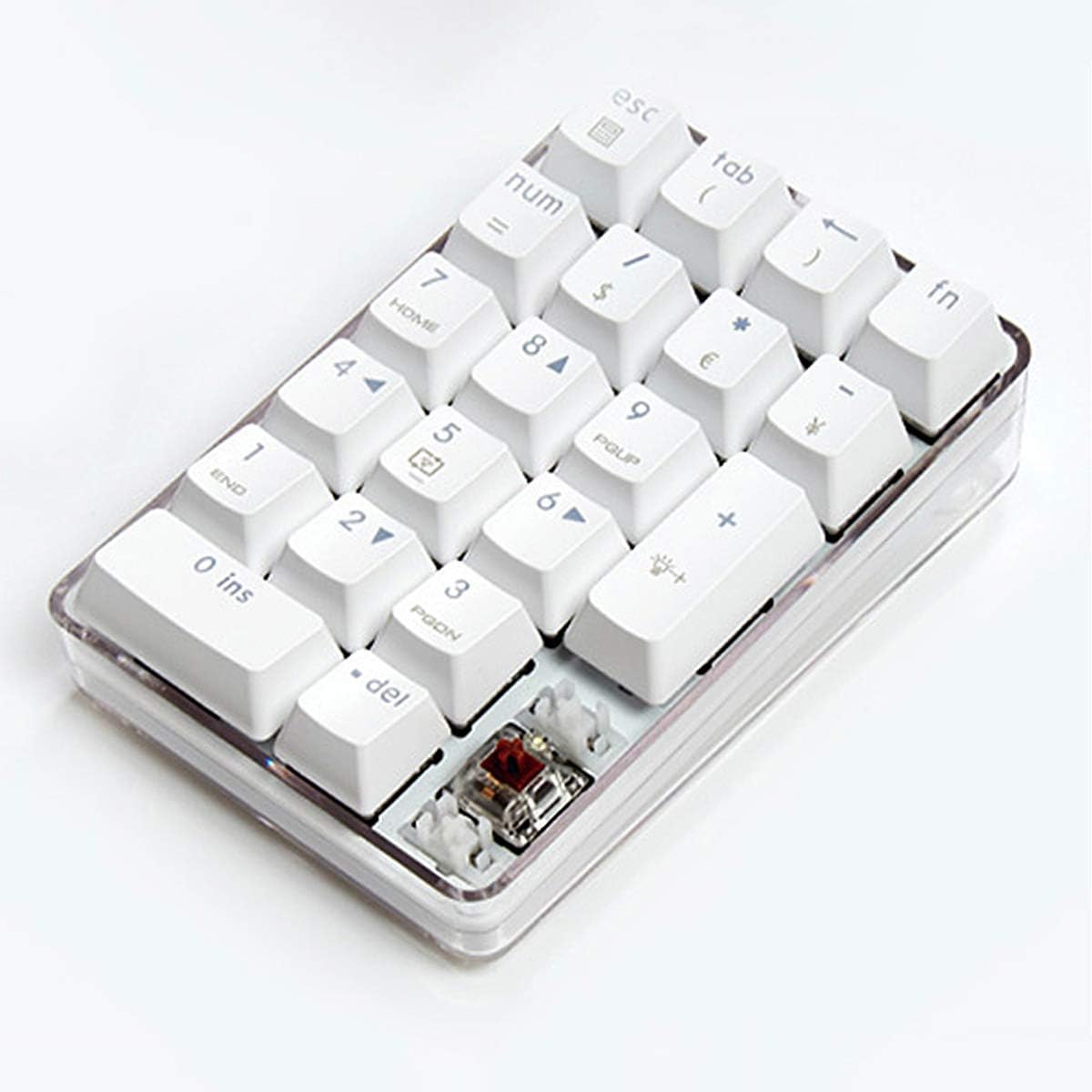
ചിത്രം: ആംഗിൾഡ് view of the keypad, highlighting the transparent casing and a visible GATERON Brown mechanical switch.
സജ്ജമാക്കുക
- Unpack the Keypad: Carefully remove the numeric keypad and its USB cable from the packaging.
- കേബിൾ ബന്ധിപ്പിക്കുക: Insert the smaller end of the provided USB cable into the USB-C port on the keypad.
- കമ്പ്യൂട്ടറുമായി ബന്ധിപ്പിക്കുക: Plug the standard USB-A end of the cable into an available USB port on your computer or laptop.
- ഡ്രൈവർ ഇൻസ്റ്റാളേഷൻ: The keypad is plug-and-play and typically does not require additional driver installation. Your operating system should automatically recognize the device.

Image: The keypad with its detachable USB-C cable, illustrating the connection point.
പ്രവർത്തന നിർദ്ദേശങ്ങൾ
Num Lock Functionality
The Num Lock function on this keypad operates independently of any other connected keyboard. This means you can toggle the numeric input on or off for the keypad without affecting the Num Lock status of your main keyboard.
ബാക്ക്ലൈറ്റ് നിയന്ത്രണം
- ബാക്ക്ലൈറ്റ് മോഡ് മാറ്റുക: അമർത്തുക FN + 5 to cycle through the 3 available backlight modes:
- തുടർച്ചയായ വെളിച്ചം
- Reactive (lights up on key press)
- ശ്വസന പ്രഭാവം
- ബാക്ക്ലൈറ്റ് ഓഫ്
- തെളിച്ചം വർദ്ധിപ്പിക്കുക: അമർത്തുക FN ++ to increase the backlight brightness. There are 6 levels of brightness.
- തെളിച്ചം കുറയ്ക്കുക: അമർത്തുക FN + എന്റർ ചെയ്യുക to decrease the backlight brightness.
കുറുക്കുവഴി കീകൾ
ദി Fn key allows access to additional functions printed on certain keys. Press and hold Fn, then press the desired key:
- FN + ESC: Activates the calculator function.
- FN + TAB: Activates the left parenthesis (.
- FN + ബാക്ക്സ്പെയ്സ്: Activates the right parenthesis ).
- FN + NUM: Toggles the Num Lock function.
- FN + /: Activates the dollar sign $.
- FN + *: Activates the Euro sign €.
- FN + -: Activates the exclamation mark ¡.

Image: A user operating the Qisan numeric keypad alongside a laptop, demonstrating its practical use.
മെയിൻ്റനൻസ്
- വൃത്തിയാക്കൽ: Use a soft, dry cloth to wipe the surface of the keypad. For deeper cleaning, use compressed air to remove dust and debris from between the keys. Avoid using liquid cleaners directly on the keypad.
- സംഭരണം: When not in use, store the keypad in a clean, dry environment away from direct sunlight and extreme temperatures.
- കേബിൾ കെയർ: കേടുപാടുകൾ ഒഴിവാക്കാൻ USB കേബിൾ അമിതമായി വളയ്ക്കുകയോ വളച്ചൊടിക്കുകയോ ചെയ്യുന്നത് ഒഴിവാക്കുക.
ട്രബിൾഷൂട്ടിംഗ്
- കീപാഡ് പ്രതികരിക്കുന്നില്ല:
- യുഎസ്ബി കേബിൾ കീപാഡിലേക്കും കമ്പ്യൂട്ടറിലേക്കും സുരക്ഷിതമായി ബന്ധിപ്പിച്ചിട്ടുണ്ടെന്ന് ഉറപ്പാക്കുക.
- Try plugging the keypad into a different USB port on your computer.
- നിങ്ങളുടെ കമ്പ്യൂട്ടർ പുനരാരംഭിക്കുക.
- Check if the Num Lock indicator light is on. If not, press the സംഖ്യ കീ അല്ലെങ്കിൽ FN + NUM അത് സജീവമാക്കാൻ.
- ബാക്ക്ലൈറ്റ് പ്രവർത്തിക്കുന്നില്ല:
- Ensure the keypad is properly connected and receiving power.
- അമർത്തുക FN + 5 to cycle through backlight modes, ensuring it's not set to "Backlight off".
- ഉപയോഗിച്ച് തെളിച്ചം ക്രമീകരിക്കുക FN ++ or FN + എന്റർ ചെയ്യുക.
- തെറ്റായ പ്രതീക ഔട്ട്പുട്ട്:
- Verify that Num Lock is enabled if you are trying to input numbers.
- If using shortcut keys, ensure you are pressing Fn simultaneously with the correct key.
സ്പെസിഫിക്കേഷനുകൾ
| ഫീച്ചർ | വിശദാംശങ്ങൾ |
|---|---|
| മോഡൽ നമ്പർ | 100674 |
| സ്വിച്ച് തരം | GATERON Brown |
| കീകളുടെ എണ്ണം | 21 |
| നിറം | വെള്ള |
| കണക്റ്റിവിറ്റി ടെക്നോളജി | യുഎസ്ബി-സി (വയേർഡ്) |
| മെറ്റീരിയൽ | പോളികാർബണേറ്റ് |
| ഉൽപ്പന്ന അളവുകൾ | 14.5 x 10 x 5.5 സെ.മീ (ഏകദേശം 5.7 x 3.9 x 2.2 ഇഞ്ച്) |
| ഉൽപ്പന്ന ഭാരം | 330 ഗ്രാം (ഏകദേശം 0.73 പൗണ്ട്) |
| അനുയോജ്യമായ ഉപകരണങ്ങൾ | ലാപ്ടോപ്പ്, ഡെസ്ക്ടോപ്പ് കമ്പ്യൂട്ടറുകൾ |

Image: Diagram illustrating the dimensions of the Qisan numeric keypad.
വാറൻ്റിയും പിന്തുണയും
For warranty information and technical support, please refer to the product packaging or contact the manufacturer directly. Keep your purchase receipt as proof of purchase for any warranty claims.
Manufacturer: Qisan

