1. ആമുഖം
The Denver MRD-51 is a versatile multi-function music system designed to play various audio formats. It integrates a record player, DAB+ and FM/AM radio tuner, CD player, and cassette deck into a single unit. Additionally, it features a USB port for digitizing audio from CDs, records, or cassettes, and an AUX input for connecting external devices. The system includes two integrated stereo speakers for a complete audio experience.
2. സുരക്ഷാ നിർദ്ദേശങ്ങൾ
- ഉപകരണം പ്രവർത്തിപ്പിക്കുന്നതിന് മുമ്പ് എല്ലാ നിർദ്ദേശങ്ങളും ശ്രദ്ധാപൂർവ്വം വായിക്കുക.
- ഭാവി റഫറൻസിനായി ഈ മാനുവൽ സൂക്ഷിക്കുക.
- തീയോ വൈദ്യുതാഘാതമോ തടയാൻ യൂണിറ്റ് മഴയിലോ ഈർപ്പത്തിലോ തുറന്നുകാട്ടരുത്.
- ശരിയായ വായുസഞ്ചാരം ഉറപ്പാക്കുക; ഏതെങ്കിലും വായുസഞ്ചാര ദ്വാരങ്ങൾ തടയരുത്.
- സുസ്ഥിരവും പരന്നതുമായ പ്രതലത്തിൽ യൂണിറ്റ് സ്ഥാപിക്കുക.
- Disconnect the power plug from the wall outlet if the unit is not in use for a long period.
- യൂണിറ്റ് സ്വയം സർവീസ് ചെയ്യാൻ ശ്രമിക്കരുത്. എല്ലാ സർവീസിംഗും യോഗ്യതയുള്ള സർവീസ് ഉദ്യോഗസ്ഥരെ ഏൽപ്പിക്കുക.
3. പാക്കേജ് ഉള്ളടക്കം
പായ്ക്ക് അൺപാക്ക് ചെയ്യുമ്പോൾ എല്ലാ ഇനങ്ങളും ഉണ്ടെന്ന് ഉറപ്പാക്കുക:
- Denver MRD-51 Multi-Function Music System
- പവർ കേബിൾ
- റിമോട്ട് കൺട്രോൾ
- ഉപയോക്തൃ മാനുവൽ
4. ഉൽപ്പന്നം കഴിഞ്ഞുview

ചിത്രം 4.1: Denver MRD-51 Multi-Function Music System with turntable open. This image displays the Denver MRD-51 music system from a front-top perspective, with the turntable lid open and a vinyl record placed on the platter. The control panel, including the LCD display, knobs, and buttons, is visible below the turntable.

ചിത്രം 4.2: Denver MRD-51 Multi-Function Music System, front view. A front view of the Denver MRD-51 music system with the turntable lid closed. This image highlights the integrated stereo speakers on the sides and the central control panel, emphasizing its classic design.
4.1 ഫ്രണ്ട് പാനൽ നിയന്ത്രണങ്ങൾ
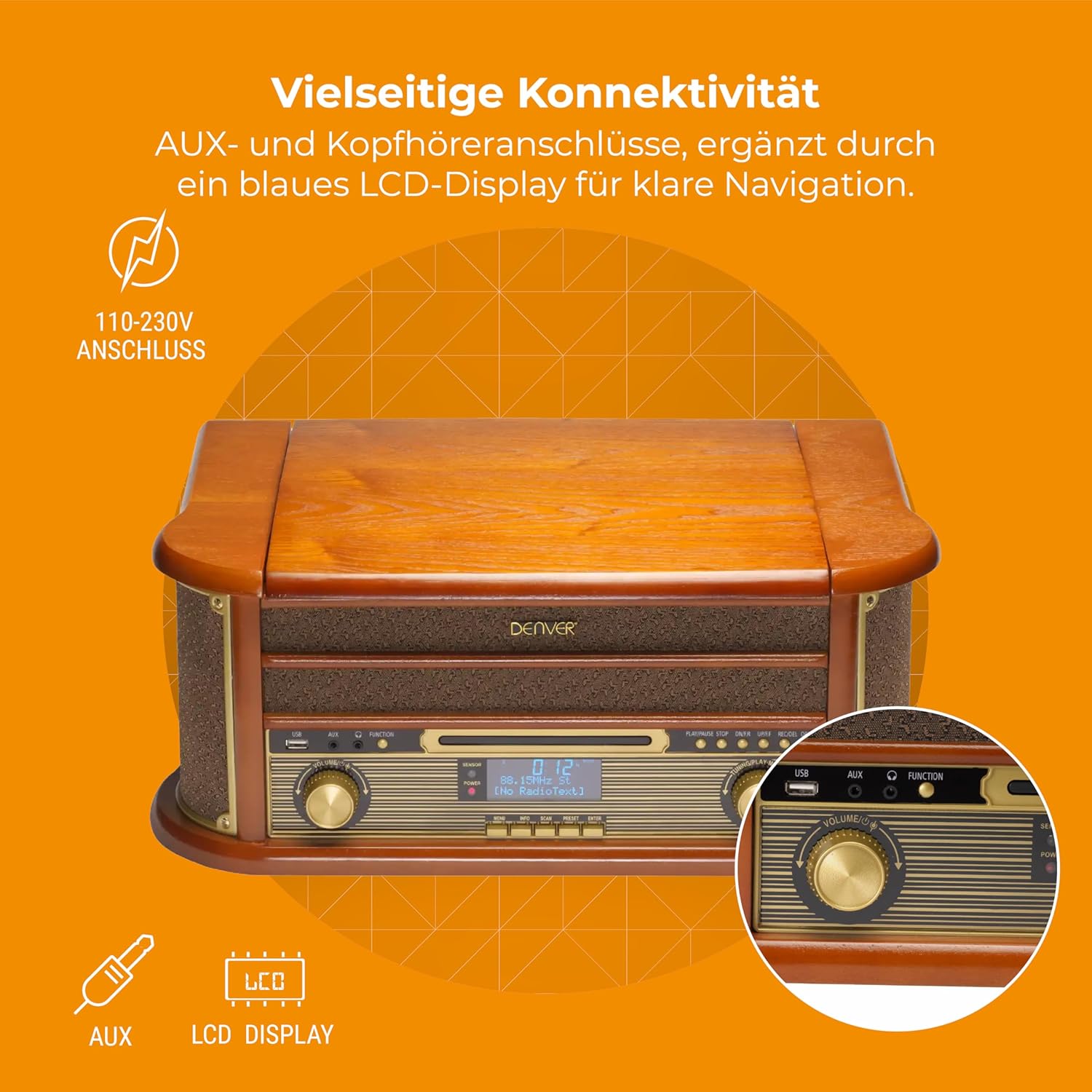
ചിത്രം 4.3: Denver MRD-51 front panel with USB, AUX, and LCD display. A close-up of the Denver MRD-51's front control panel, showcasing the USB port, AUX input, and the blue LCD display for clear navigation. This view details the various connectivity options available.
- പവർ ബട്ടൺ: യൂണിറ്റ് ഓണാക്കുകയോ ഓഫാക്കുകയോ ചെയ്യുന്നു.
- ഫംഗ്ഷൻ ബട്ടൺ: Selects between Turntable, CD, Cassette, DAB+, FM, AM, AUX, and USB modes.
- USB പോർട്ട്: For connecting USB storage devices for playback or recording.
- AUX ഇൻപുട്ട്: ബാഹ്യ ഓഡിയോ സ്രോതസ്സുകളെ ബന്ധിപ്പിക്കുന്നതിനുള്ള 3.5mm ജാക്ക്.
- LCD ഡിസ്പ്ലേ: Shows current mode, track information, radio frequency, and other system status.
- പ്ലേ/പോസ് ബട്ടൺ: Starts or pauses playback for CD, Cassette, or USB.
- സ്റ്റോപ്പ് ബട്ടൺ: പ്ലേബാക്ക് നിർത്തുന്നു.
- SKIP Buttons (◀◀ / ▶▶): ട്രാക്കുകൾ ഒഴിവാക്കുകയോ വേഗത്തിൽ മുന്നോട്ട്/റിവൈൻഡ് ചെയ്യുകയോ ചെയ്യുന്നു.
- റെക്കോർഡ് ബട്ടൺ: Initiates recording to USB.
- വോളിയം നോബ്: മൊത്തത്തിലുള്ള ഔട്ട്പുട്ട് വോളിയം ക്രമീകരിക്കുന്നു.
- ട്യൂണിംഗ് നോബ്: Adjusts radio frequency in FM/AM mode or navigates menus in DAB+ mode.
4.2 Turntable and Cassette Deck

ചിത്രം 4.4: Denver MRD-51 showing open turntable and cassette deck. This image illustrates the versatility of the Denver MRD-51, featuring the open turntable with a record and an arrow pointing to the cassette deck slot on the side, indicating its multi-format playback capabilities.
- ടേൺടേബിൾ പ്ലാറ്റർ: For playing vinyl records.
- Tone Arm with Stylus: Reads the grooves of vinyl records.
- സ്പീഡ് സെലക്ടർ: Allows selection of 33, 45, or 78 RPM.
- Cassette Deck Slot: For inserting audio cassettes.
4.3 സിഡി പ്ലെയർ

ചിത്രം 4.5: Denver MRD-51 with CD tray open and remote control. This image shows the Denver MRD-51 with its CD tray open, ready for disc insertion. A remote control is also pictured, indicating convenient operation of the system's functions.
- സിഡി ട്രേ: For inserting compact discs.
- തുറക്കുക/അടയ്ക്കുക ബട്ടൺ: Opens and closes the CD tray.
5. സജ്ജീകരണം
5.1 അൺപാക്കിംഗും പ്ലേസ്മെന്റും
- യൂണിറ്റ് അതിന്റെ പാക്കേജിംഗിൽ നിന്ന് ശ്രദ്ധാപൂർവ്വം നീക്കം ചെയ്യുക.
- Place the unit on a flat, stable surface away from direct sunlight, heat sources, and excessive dust or moisture.
- യൂണിറ്റിന് ചുറ്റും വായുസഞ്ചാരത്തിന് മതിയായ ഇടമുണ്ടെന്ന് ഉറപ്പാക്കുക.
5.2 പവർ കണക്ഷൻ
- Connect the power cable to the AC IN socket on the rear of the unit.
- Plug the other end of the power cable into a standard wall outlet (110-230V).
5.3 ആന്റിന കണക്ഷൻ
For optimal radio reception, extend the telescopic antenna fully for FM/DAB+ or adjust its position for AM.
6. പ്രവർത്തന നിർദ്ദേശങ്ങൾ
6.1 പൊതു പ്രവർത്തനം
- അമർത്തുക പവർ യൂണിറ്റ് ഓണാക്കാനുള്ള ബട്ടൺ.
- അമർത്തുക ഫങ്ഷൻ button repeatedly to cycle through available modes: Turntable, CD, Cassette, DAB+, FM, AM, AUX, USB.
- ക്രമീകരിക്കുക വോളിയം നിങ്ങൾക്ക് ആവശ്യമുള്ള ശ്രവണ നിലയിലേക്ക് നോബ് ചെയ്യുക.
6.2 ടേൺടേബിൾ പ്രവർത്തനം
- Select the 'Turntable' function.
- ടേൺടേബിൾ മൂടി തുറക്കുക.
- ഒരു വിനൈൽ റെക്കോർഡ് പ്ലേറ്ററിൽ വയ്ക്കുക.
- Set the speed selector to match the record's speed (33, 45, or 78 RPM). For 45 RPM records, use the included adapter if necessary.
- Gently lift the tone arm and position the stylus over the desired track on the record.
- Lower the tone arm slowly onto the record. Playback will begin.
- At the end of the record, the tone arm may automatically return to its rest, or you may need to manually lift and return it.
6.3 സിഡി പ്ലെയർ പ്രവർത്തനം
- 'CD' ഫംഗ്ഷൻ തിരഞ്ഞെടുക്കുക.
- അമർത്തുക തുറക്കുക/അടയ്ക്കുക സിഡി ട്രേ തുറക്കാൻ ബട്ടൺ.
- Place a CD (CD/CD-R/CD-RW compatible) with the label side facing up into the tray.
- അമർത്തുക തുറക്കുക/അടയ്ക്കുക ട്രേ അടയ്ക്കാൻ വീണ്ടും ബട്ടൺ അമർത്തുക. യൂണിറ്റ് ഡിസ്ക് വായിക്കും.
- അമർത്തുക പ്ലേ/താൽക്കാലികമായി നിർത്തുക പ്ലേബാക്ക് ആരംഭിക്കാൻ.
- ഉപയോഗിക്കുക ഒഴിവാക്കുക buttons (◀◀ / ▶▶) to navigate between tracks.
- അമർത്തുക നിർത്തുക പ്ലേബാക്ക് അവസാനിപ്പിക്കാൻ.
6.4 കാസറ്റ് പ്ലെയർ പ്രവർത്തനം
- Select the 'Cassette' function.
- Insert an audio cassette into the cassette deck slot until it clicks into place.
- അമർത്തുക കളിക്കുക button (often integrated with the cassette mechanism) to start playback.
- ഉപയോഗിക്കുക നിർത്തുക button to end playback. Fast forward and rewind functions are typically available via dedicated buttons on the cassette deck.
6.5 Radio Operation (DAB+/FM/AM)
- Select the desired radio function (DAB+, FM, or AM).
- For DAB+ Radio: The unit will typically perform an automatic scan for available stations upon first use. Use the ട്യൂണിംഗ് നോബ് അല്ലെങ്കിൽ ഒഴിവാക്കുക buttons to navigate through the list of stations.
- For FM/AM Radio: ഉപയോഗിക്കുക ട്യൂണിംഗ് knob to manually tune to a station. The frequency will be displayed on the LCD.
6.6 USB റെക്കോർഡിംഗ്
The MRD-51 allows you to digitize audio from your records, CDs, or cassettes directly to a USB storage device.
- ഇതിലേക്ക് ഒരു USB ഫ്ലാഷ് ഡ്രൈവ് ചേർക്കുക USB പോർട്ട്.
- Select the source function you wish to record from (Turntable, CD, or Cassette).
- Start playback of the audio source (e.g., play a record, CD, or cassette).
- അമർത്തുക രേഖപ്പെടുത്തുക button. The recording indicator on the display will illuminate, and recording will begin.
- അമർത്തുക രേഖപ്പെടുത്തുക ബട്ടൺ വീണ്ടും അല്ലെങ്കിൽ നിർത്തുക button to end the recording. The recorded file USB ഡ്രൈവിൽ സേവ് ചെയ്യും.
6.7 AUX ഇൻപുട്ട്
- ഒരു ബാഹ്യ ഓഡിയോ ഉപകരണം (ഉദാ: സ്മാർട്ട്ഫോൺ, MP3 പ്ലെയർ) ഇതിലേക്ക് ബന്ധിപ്പിക്കുക AUX ഇൻപുട്ട് ഒരു 3.5mm ഓഡിയോ കേബിൾ ഉപയോഗിക്കുന്നു.
- Select the 'AUX' function.
- Start playback on your external device. The audio will be played through the MRD-51's speakers.
7. പരിപാലനം
7.1 യൂണിറ്റ് വൃത്തിയാക്കൽ
- വൃത്തിയാക്കുന്നതിന് മുമ്പ് എല്ലായ്പ്പോഴും പവർ ഔട്ട്ലെറ്റിൽ നിന്ന് യൂണിറ്റ് അൺപ്ലഗ് ചെയ്യുക.
- പുറംഭാഗങ്ങൾ തുടയ്ക്കാൻ മൃദുവായതും ഉണങ്ങിയതുമായ തുണി ഉപയോഗിക്കുക.
- അബ്രാസീവ് ക്ലീനറുകൾ, മെഴുക്, ലായകങ്ങൾ എന്നിവ ഉപയോഗിക്കരുത്.
7.2 Turntable Stylus Care
- Gently clean the stylus regularly with a soft brush, brushing from back to front.
- നിങ്ങളുടെ വിരലുകൾ കൊണ്ട് സ്റ്റൈലസിൽ തൊടുന്നത് ഒഴിവാക്കുക.
- ശബ്ദ നിലവാരം മോശമാകുമ്പോഴോ അല്ലെങ്കിൽ ദൃശ്യമായി കേടുപാടുകൾ സംഭവിച്ചാലോ സ്റ്റൈലസ് മാറ്റിസ്ഥാപിക്കുക.
7.3 CD/Cassette Player Care
- Handle CDs and cassettes by their edges to avoid fingerprints and scratches.
- Keep the CD tray and cassette deck free of dust and debris.
8. പ്രശ്നപരിഹാരം
| പ്രശ്നം | സാധ്യമായ കാരണം | പരിഹാരം |
|---|---|---|
| ശക്തിയില്ല | Power cable not connected; Wall outlet not active | Ensure power cable is securely connected; Try a different outlet |
| ശബ്ദമില്ല | Volume too low; Incorrect function selected; External device not playing | Increase volume; Select correct function; Ensure external device is playing and connected properly |
| ടേൺടേബിൾ കറങ്ങുന്നില്ല അല്ലെങ്കിൽ മോശം ശബ്ദം | Speed setting incorrect; Stylus dirty or damaged; Record dirty | Adjust speed selector; Clean or replace stylus; Clean record |
| സിഡി പ്ലേ ചെയ്യുന്നില്ല | CD inserted incorrectly; CD scratched or dirty; CD format not supported | Reinsert CD correctly; Clean or replace CD; Ensure CD is CD/CD-R/CD-RW format |
| മോശം റേഡിയോ സ്വീകരണം | Antenna not extended/positioned correctly; Weak signal | Extend and adjust antenna; Try repositioning the unit |
| USB റെക്കോർഡിംഗ് പ്രവർത്തിക്കുന്നില്ല | USB drive full or incompatible; Source not playing | Use a different USB drive or clear space; Ensure audio source is playing during recording |
9 സ്പെസിഫിക്കേഷനുകൾ
| ഫീച്ചർ | സ്പെസിഫിക്കേഷൻ |
|---|---|
| ഉൽപ്പന്ന അളവുകൾ | 20.08 x 13.39 x 8.46 ഇഞ്ച് |
| ഇനത്തിൻ്റെ ഭാരം | 15.18 പൗണ്ട് (6.9 കിലോഗ്രാം) |
| മോഡൽ നമ്പർ | MRD-51 (Internal: 111201210000) |
| ബ്രാൻഡ് | ഡെൻവർ |
| പരമാവധി റൊട്ടേഷണൽ സ്പീഡ് | 78 ആർപിഎം (33, 45, 78 ആർപിഎം പിന്തുണയ്ക്കുന്നു) |
| ഉൾപ്പെടുത്തിയ ഘടകങ്ങൾ | MRD-51 unit |
| പ്രത്യേക സവിശേഷതകൾ | Adjustable Speed, Digital Recorder, Integrated Speakers |
| മെറ്റീരിയൽ | Aluminum (internal components), Wood (housing) |
| നിറം | മരം |
| അനുയോജ്യമായ ഉപകരണങ്ങൾ | Personal Computer (for USB transfer) |
| റേഡിയോ ട്യൂണർ | DAB+, FM, AM |
| സിഡി പ്ലെയർ | Supports CD/CD-R/CD-RW |
| ഓഡിയോ ഔട്ട്പുട്ട് | 2 x 2.5W സ്റ്റീരിയോ സ്പീക്കറുകൾ |
10. വാറൻ്റിയും പിന്തുണയും
For warranty information and technical support, please refer to the documentation provided with your purchase or contact Denver customer service through their official webസൈറ്റ്. ഏതെങ്കിലും വാറന്റി ക്ലെയിമുകൾക്ക് നിങ്ങളുടെ വാങ്ങലിന്റെ തെളിവ് സൂക്ഷിക്കുക.


