ആമുഖം
This manual provides detailed instructions for the installation, operation, and maintenance of your YESKAMO Wireless CCTV Camera System. Please read this manual thoroughly before using the product to ensure proper setup and functionality.
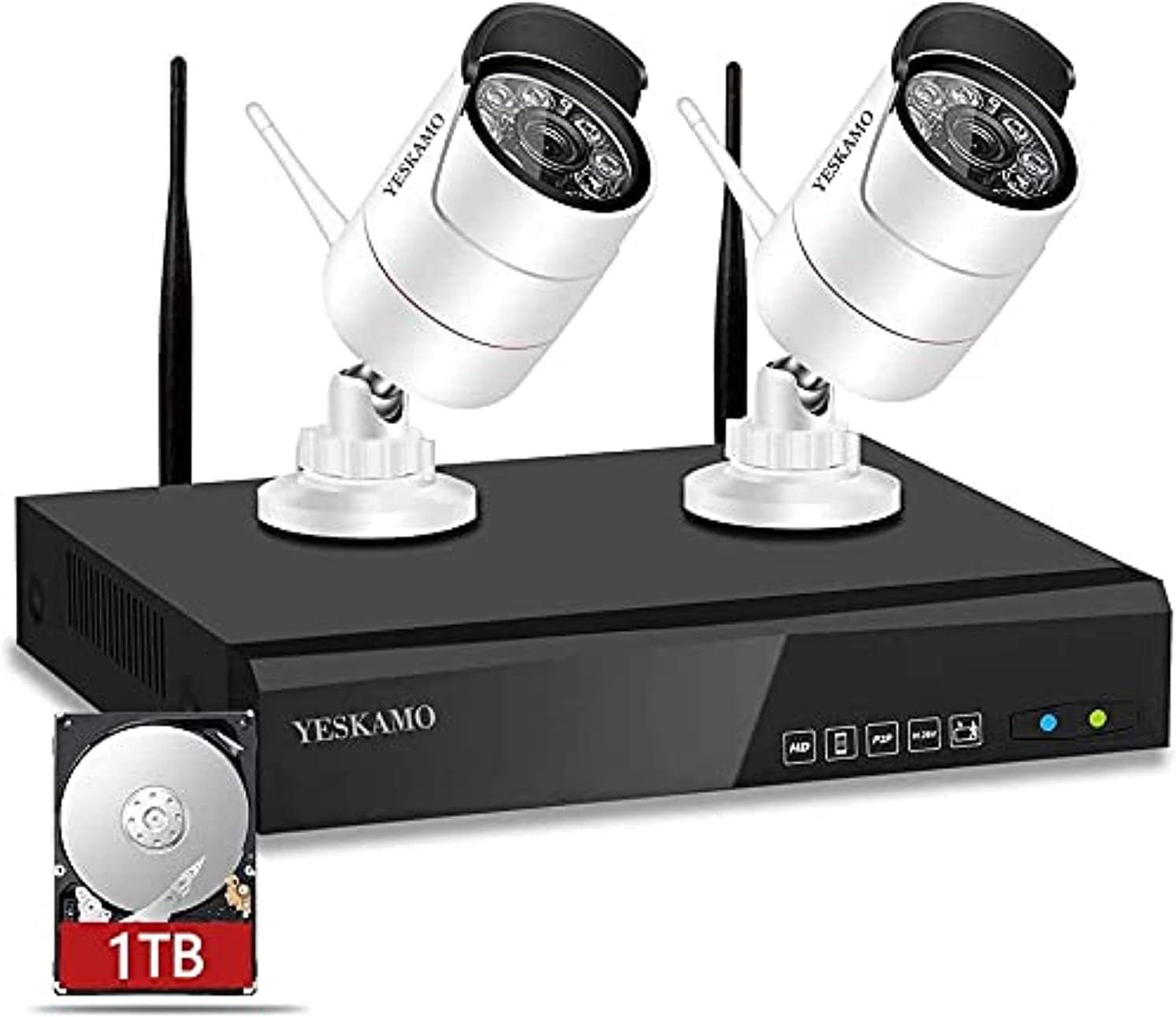
Figure 1: YESKAMO Wireless CCTV Camera System overview, showing the NVR unit, two wireless cameras, and a 1TB hard drive icon.
പാക്കേജ് ഉള്ളടക്കം
താഴെ ലിസ്റ്റ് ചെയ്തിരിക്കുന്ന എല്ലാ ഇനങ്ങളും നിങ്ങളുടെ പാക്കേജിൽ ഉൾപ്പെടുത്തിയിട്ടുണ്ടെന്ന് ഉറപ്പാക്കുക:
- 1x 4-Channel 1080P Network Video Recorder (NVR) with pre-installed 1TB surveillance hard drive
- 2x 1080P HD WiFi IP Cameras (with 2x 3dBi antennas)
- 3x 12V UK power adapters
- 1x യുഎസ്ബി മൗസ്
- 1x 7dBi 3M/10ft WiFi Extension Antenna
- 1x 1M/3ft Ethernet Cable
- 1x User Manual Instruction

Figure 2: All components included in the YESKAMO Wireless CCTV Camera System package, including the NVR, two cameras, power adapters, mouse, antennas, and cables.
സജ്ജീകരണ നിർദ്ദേശങ്ങൾ
- പവർ കണക്ഷൻ: Connect the NVR and each camera to a power outlet using the supplied 12V power adapters. The system is designed for plug-and-play operation.
- യാന്ത്രിക ജോടിയാക്കൽ: The cameras will automatically connect to the NVR upon power-up. No manual pairing is typically required.
- മോണിറ്റർ കണക്ഷൻ: Connect the NVR to a monitor via VGA or HDMI cable (not included) to view the live feed locally.
- Internet Connection (Optional for Remote Access): റിമോട്ടിന് viewing via a mobile app or PC software, connect the NVR to your home router using the provided Ethernet cable. This step is not necessary for local viewing.
- ക്യാമറ പ്ലെയ്സ്മെന്റ്: Position the cameras in desired surveillance areas. Ensure they are within range of the NVR's wireless signal. The IP66 weatherproof rating allows for both indoor and outdoor installation.
കുറിപ്പ്: "Wireless" refers to the connection between the cameras and the NVR. All components still require a power connection via the supplied adapters.

Figure 3: Illustration of the wireless connection between the cameras and the NVR, highlighting the simplicity of setup without complex wiring.
പ്രവർത്തന നിർദ്ദേശങ്ങൾ
Camera Features Overview
Each YESKAMO camera offers 3MP resolution for clear video, motion detection capabilities, and automatic day/night vision. They are designed for remote access, are IP66 weatherproof, and can send app alarms and email alerts.

ചിത്രം 4: ഓവർview of key features for a single YESKAMO 3MP Wireless IP Camera, including resolution, motion detection, day/night vision, remote access, IP66 rating, and alert functions.
പ്രാദേശിക Viewഇംഗും പ്ലേബാക്കും
Once the system is powered on and connected to a monitor, you can view live feeds directly. Use the included USB mouse to navigate the NVR's interface for settings, recording playback, and system management.
Remote Access and Alerts
To access your camera system remotely:
- Ensure the NVR is connected to your internet router via Ethernet cable.
- Download the YESKAMO mobile application (for iPhone/Android) or PC CMS software.
- Follow the in-app instructions to add your NVR device.
ആപ്പ് വഴി, നിങ്ങൾക്ക് കഴിയും view live video, capture snapshots, record footage, and playback recorded events from anywhere with WiFi or 3G/4G network access.

Figure 5: Depiction of local and remote playback capabilities, illustrating how recorded footagഇ ആകാം viewed on a monitor, tablet, or smartphone.
മോഷൻ ഡിറ്റക്ഷനും അലേർട്ടുകളും
The system features intelligent motion detection. When motion is detected, you can receive instant email alerts or push notifications to your mobile application, often accompanied by a picture snapshot of the event.

ചിത്രം 6: ഉദാample of smart motion detection triggering app and email alerts on a smartphone, showing a detected event.
നൈറ്റ് വിഷൻ
The cameras are equipped with Infrared (IR) LED arrays and an IR-CUT function, enabling automatic switching between color day vision and black-and-white night vision. This provides clear surveillance up to 100ft (30m) in low-light conditions.

Figure 7: Visual comparison demonstrating the automatic IR-CUT switch, showing a scene in color during the day and in black and white at night.
മെയിൻ്റനൻസ്
Hard Drive Management
The pre-installed 1TB hard drive supports 24/7 continuous recording. When the storage space is full, the system will automatically overwrite the oldest footage, ensuring continuous loop recording. The advanced H.265 compression format optimizes storage, saving at least 50% more space compared to H.264.
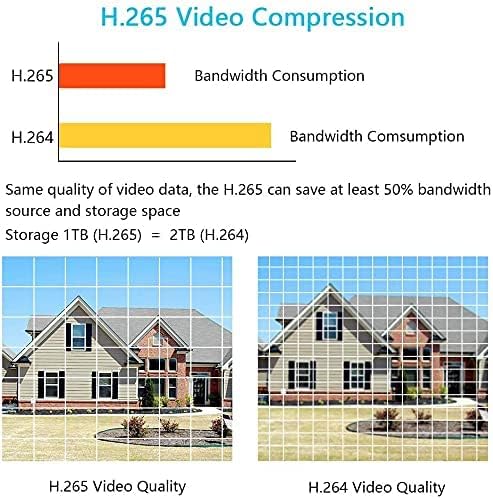
Figure 8: Chart illustrating the bandwidth and storage savings achieved with H.265 video compression compared to H.264, along with a visual quality comparison.
Environmental Durability
The cameras feature an IP66 metal waterproof housing, designed to withstand extreme weather conditions ranging from -20℃ (-4℉) to 60℃ (140℉). Regular cleaning of the camera lenses with a soft, dry cloth is recommended to maintain optimal image clarity.
ട്രബിൾഷൂട്ടിംഗ്
- മോണിറ്ററിൽ ചിത്രമില്ല:
- Ensure the NVR and monitor are powered on and connected correctly.
- Verify the video input source on your monitor is set to the correct HDMI or VGA port.
- പ്രദർശിപ്പിക്കാത്ത ക്യാമറകൾ:
- Check if cameras are powered on.
- Ensure cameras are within wireless range of the NVR.
- If a camera loses connection, try restarting both the camera and the NVR.
- റിമോട്ട് ആക്സസ് ഇല്ല:
- Confirm the NVR is connected to your internet router via Ethernet cable and has an active internet connection.
- Check your router's internet status.
- Ensure the mobile app or PC software is updated to the latest version.
- മോഷൻ ഡിറ്റക്ഷൻ ട്രിഗർ ചെയ്യുന്നില്ല:
- Verify motion detection settings are enabled in the NVR's menu or mobile app.
- Adjust sensitivity settings if necessary.
സ്പെസിഫിക്കേഷനുകൾ
| ഫീച്ചർ | വിശദാംശങ്ങൾ |
|---|---|
| മോഡൽ നമ്പർ | NK02-10802-1TB |
| എൻവിആർ ചാനലുകൾ | 8-Channel (4-Channel 1080P NVR included, expandable) |
| ക്യാമറ റെസല്യൂഷൻ | 3 എംപി (1920 x 1080) |
| ലെൻസ് | 3.6mm (90-degree wide viewഇംഗ് ആംഗിൾ) |
| രാത്രി കാഴ്ച ദൂരം | 100 അടി (30 മീറ്റർ) വരെ |
| കാലാവസ്ഥാ പ്രൂഫ് റേറ്റിംഗ് | IP66 |
| വീഡിയോ കംപ്രഷൻ | H.265 |
| ഹാർഡ് ഡ്രൈവ് | 1TB Pre-installed (expandable up to 6TB) |
| കണക്റ്റിവിറ്റി | Wireless (camera to NVR), Wired (NVR to router) |
| പ്രവർത്തന താപനില | -20 ℃ മുതൽ 60 ℃ വരെ (-4 ℉ മുതൽ 140 ℉ വരെ) |
| പവർ ഉറവിടം | Corded Electric (12V adapters) |
| ഇനത്തിൻ്റെ ഭാരം | 1.64 കിലോഗ്രാം |
| ഉൽപ്പന്ന അളവുകൾ | 42 x 18.5 x 33 സെ.മീ |
വാറൻ്റിയും പിന്തുണയും
YESKAMO provides lifetime free technical support for this product. Our professional after-sale team is available to answer your questions within 24 hours. For assistance, please refer to the contact information provided in your product packaging or on the official YESKAMO webസൈറ്റ്.


