1. ആമുഖം
The LogiLink EO0009 is an adjustable under-desk PC mount designed to securely hold your computer tower, freeing up valuable desk space. This mount utilizes a robust steel frame and adjustable fabric straps to accommodate various PC sizes, ensuring stability and protection from dust and accidental impacts.
2 സുരക്ഷാ വിവരങ്ങൾ
- Ensure the mounting surface (desk underside) is sturdy enough to support the weight of the PC mount and your computer.
- പരമാവധി ലോഡ് കപ്പാസിറ്റി 10 കി.ഗ്രാം (22 പൗണ്ട്) കവിയരുത്.
- Tighten all screws and straps securely during installation to prevent the PC from falling.
- ഇൻസ്റ്റലേഷൻ ഏരിയയിൽ നിന്ന് കുട്ടികളെയും വളർത്തുമൃഗങ്ങളെയും അകറ്റി നിർത്തുക.
- Periodically check the tightness of the straps and mounting screws.
3. പാക്കേജ് ഉള്ളടക്കം
ഇൻസ്റ്റാളേഷൻ ആരംഭിക്കുന്നതിന് മുമ്പ് എല്ലാ ഘടകങ്ങളും ഉണ്ടെന്ന് ഉറപ്പാക്കുക.
- 1 x LogiLink Under-Desk PC Mount
- 1 x മൗണ്ടിംഗ് സ്ക്രൂകളുടെ സെറ്റ്
- 1 x ഉപയോക്തൃ മാനുവൽ

Image 3.1: Packaging of the LogiLink EO0009 PC mount, illustrating the product and its key features.
4. സജ്ജീകരണവും ഇൻസ്റ്റാളേഷനും
Follow these steps to install the LogiLink EO0009 PC mount under your desk.
- മൗണ്ട് തയ്യാറാക്കുക: The mount consists of a steel frame and two adjustable fabric straps. Ensure the foam pads are correctly positioned on the frame to prevent scratching your PC.
- മൗണ്ട് സ്ഥാപിക്കുക: Determine the desired location under your desk. Ensure there is enough clearance for your PC and for airflow. The mount is adjustable in width/depth from approximately 340mm to 540mm.
- Secure the Mount to the Desk: Use the provided mounting screws to attach the steel frame securely to the underside of your desk. Ensure the screws are tightened firmly.
- Insert Your PC: Carefully place your computer tower into the mounted frame.
- Adjust and Secure Straps: Wrap the fabric straps around your PC. Thread the straps through the buckles and pull them tight to secure the computer firmly within the mount. It may be helpful to hold the PC in place while adjusting and tightening the straps to ensure a snug fit. The straps are designed to prevent the PC from falling and keep it stable.
- അന്തിമ പരിശോധന: Gently test the stability of the mounted PC. Ensure all connections are secure and the PC does not wobble.

Image 4.1: The LogiLink EO0009 PC mount, disassembled to show the metal frame and fabric straps.

Image 4.2: The PC mount installed under a desk, holding a computer tower.

Image 4.3: A computer tower fully secured within the LogiLink EO0009 mount.
5. ഓപ്പറേഷൻ
Once installed, the LogiLink EO0009 PC mount operates passively by holding your computer tower in a suspended position under your desk. No further operational steps are required beyond ensuring the PC is securely strapped in.
6. പരിപാലനം
- വൃത്തിയാക്കൽ: മെറ്റൽ ഫ്രെയിം ഒരു സോഫ്റ്റ്, ഡി ക്ലീനർ ഉപയോഗിച്ച് തുടയ്ക്കുക.amp തുണി. ഉരച്ചിലുകൾ ഉള്ള ക്ലീനറുകൾ ഒഴിവാക്കുക.
- പരിശോധന: Periodically inspect the mounting screws and fabric straps for any signs of wear, damage, or loosening. Re-tighten screws and adjust straps as necessary.
- ലോഡ് കപ്പാസിറ്റി: Do not place additional items on or in the mounted PC that would exceed the 10 kg load limit.
7. പ്രശ്നപരിഹാരം
- PC not held firmly: Ensure the fabric straps are pulled as tight as possible. It can be challenging to achieve maximum tension; try holding the PC in its desired position while simultaneously pulling and securing the straps.
- മൗണ്ട് അസ്ഥിരമായി തോന്നുന്നു: Check that all mounting screws attaching the frame to the desk are fully tightened. Ensure the desk material is solid and provides adequate support.
- Scratches on PC: Verify that the foam pads are correctly positioned between the PC and the metal frame.
8 സ്പെസിഫിക്കേഷനുകൾ
| മോഡൽ നമ്പർ | എഒക്സനുമ്ക്സ |
| മെറ്റീരിയൽ | Alloy Steel, Fabric |
| നിറം | കറുപ്പ് |
| ലോഡ് കപ്പാസിറ്റി | പരമാവധി. 10 കി.ഗ്രാം (22 പൗണ്ട്) |
| Adjustable Width/Depth | Approx. 340mm - 540mm |
| ഉൽപ്പന്ന അളവുകൾ | 34 x 54 x 54 cm (approximate, depending on adjustment) |
| നിർമ്മാതാവ് | 2 ഡയറക്ട് ജിഎംബിഎച്ച് |
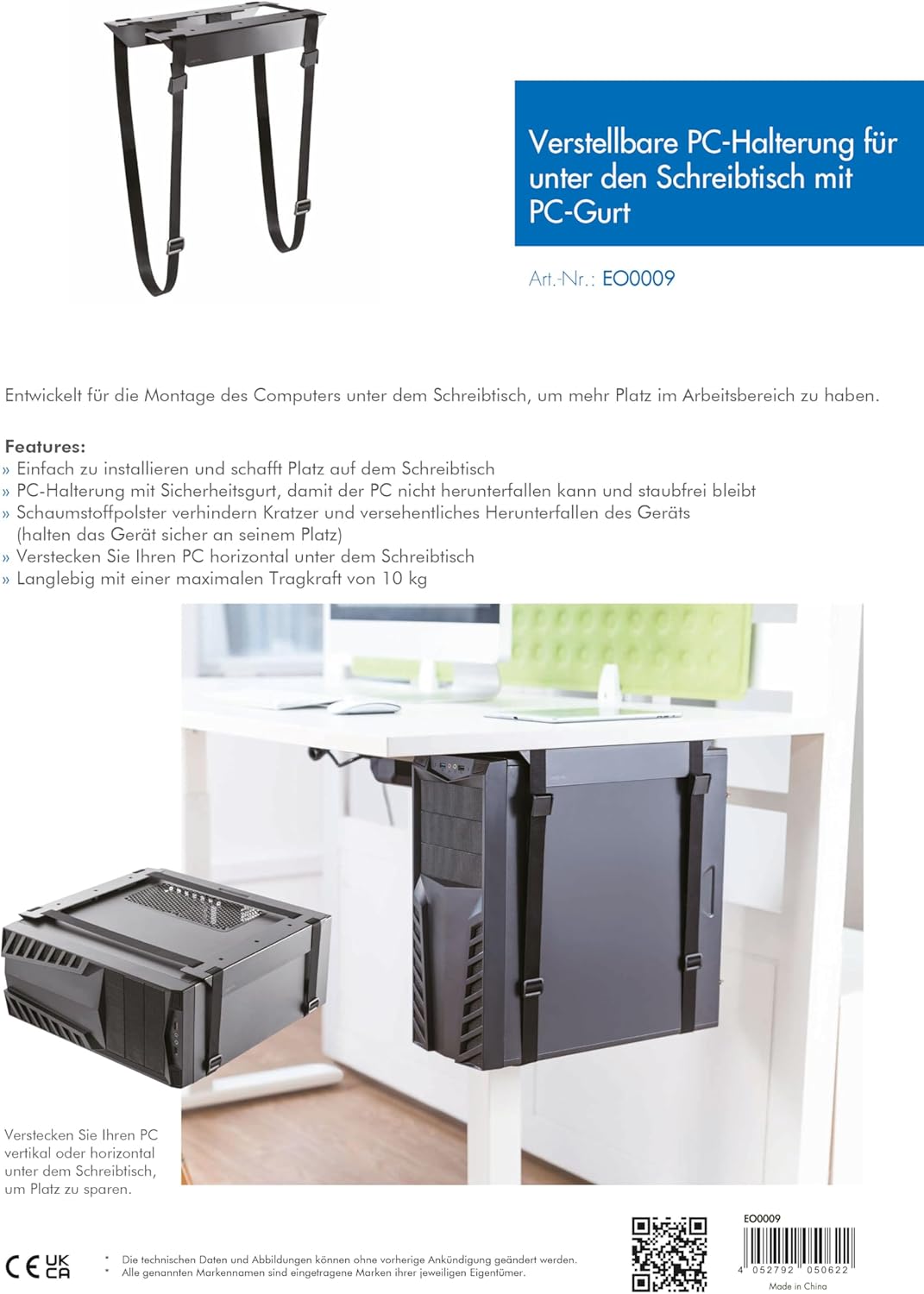
Image 8.1: Technical diagram illustrating the adjustable dimensions and features of the PC mount.
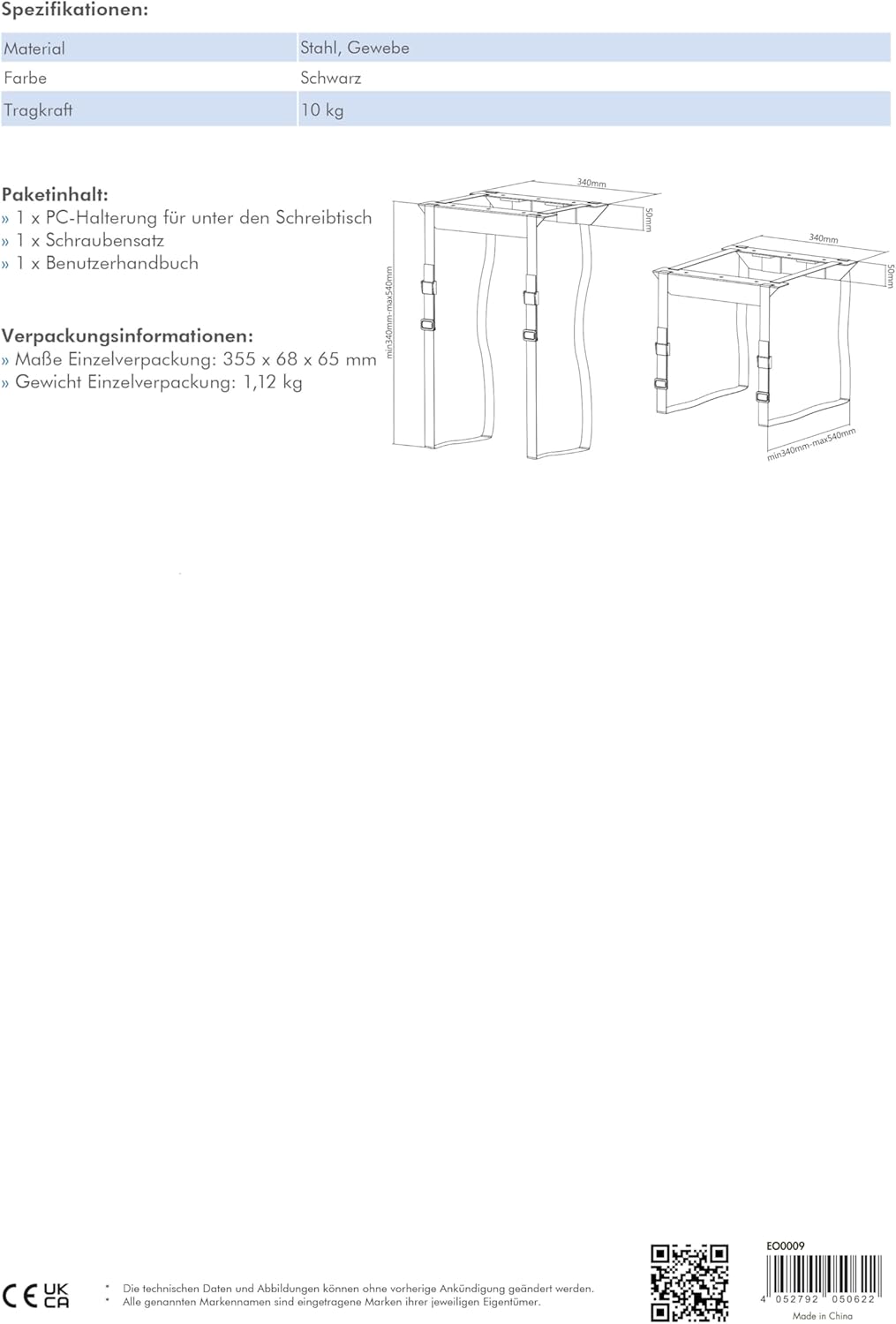
Image 8.2: Detailed diagram showing the minimum and maximum adjustable dimensions of the PC mount.
9. വാറൻ്റിയും പിന്തുണയും
For warranty information or technical support, please contact your retailer or visit the manufacturer's website. You can find more product details and support resources at www.2direct.de.


