1. ആമുഖം
The Leitz IQ Office Pro P5+ Shredder is designed for secure and efficient document destruction in office environments. Featuring advanced micro-cut technology, it ensures a high level of security for your confidential information. This manual provides essential information for the safe and effective operation, maintenance, and troubleshooting of your shredder.

ചിത്രം: മുൻഭാഗം view of the Leitz IQ Office Pro P5+ Shredder, showing its sleek design and the waste bin filled with shredded paper.
2 സുരക്ഷാ വിവരങ്ങൾ
പൊതു സുരക്ഷാ മുൻകരുതലുകൾ
- ഉപയോഗിക്കുന്നതിന് മുമ്പ് എല്ലാ നിർദ്ദേശങ്ങളും വായിക്കുക.
- Keep hands, hair, loose clothing, and ties away from the paper entry slot.
- കുട്ടികളെയും വളർത്തുമൃഗങ്ങളെയും ഷ്രെഡറിൽ നിന്ന് അകറ്റി നിർത്തുക.
- Do not insert more sheets than specified (7-8 sheets A4, 70-80 gsm).
- Do not shred metal objects, plastic cards, or adhesive labels unless explicitly stated as compatible. This shredder is designed for paper, staples, and paper clips.
- മാലിന്യക്കൂമ്പാരം ഉണ്ടാകാതിരിക്കാൻ പതിവായി വേസ്റ്റ് ബിൻ കാലിയാക്കുക.
ഇലക്ട്രിക്കൽ സുരക്ഷ
- പവർ ഔട്ട്ലെറ്റ് വോള്യവുമായി പൊരുത്തപ്പെടുന്നുണ്ടെന്ന് ഉറപ്പാക്കുകtage requirements of the shredder.
- പവർ കോർഡിന് കേടുപാടുകൾ സംഭവിച്ചാൽ ഷ്രെഡർ ഉപയോഗിക്കരുത്.
- Unplug the shredder before moving, cleaning, or performing maintenance.
- Avoid placing the shredder near water or in damp പരിസരങ്ങൾ.
3. ഉൽപ്പന്നം കഴിഞ്ഞുview
പ്രധാന സവിശേഷതകൾ
- Micro Cut Security (DIN P5+): Shreds documents into tiny 2x5mm particles for enhanced security.
- ഉയർന്ന ശേഷി: Shreds up to 7-8 sheets of A4 paper (70-80 gsm) per pass.
- Large Waste Bin: 30-liter removable bin holds up to 350 shredded sheets.
- Anti-Jam Technology: Automatically reverses if too much paper is inserted, preventing jams.
- ശാന്തമായ പ്രവർത്തനം: Designed for a calm working environment.
- വിപുലീകരിച്ച പ്രവർത്തന സമയം: Operates continuously for up to 4 hours (240 minutes).
- അവബോധജന്യമായ ടച്ച് നിയന്ത്രണങ്ങൾ: Easy-to-use interface for simple operation.

ചിത്രം: ക്ലോസ്-അപ്പ് view of the shredder's control panel with touch buttons and the fine micro-cut shredded paper in the bin.
4. സജ്ജീകരണം
അൺപാക്ക് ചെയ്യുന്നു
- ഷ്രെഡർ അതിന്റെ പാക്കേജിംഗിൽ നിന്ന് ശ്രദ്ധാപൂർവ്വം നീക്കം ചെയ്യുക.
- Remove any protective materials or plastic bags.
- Ensure all components are present, including the shredder unit and waste bin.

Image: The Leitz IQ Office Pro P5+ Shredder next to its instruction manual, indicating the contents of the package.
പ്ലേസ്മെൻ്റ്
- ഷ്രെഡർ ഒരു പരന്നതും സ്ഥിരതയുള്ളതുമായ പ്രതലത്തിൽ വയ്ക്കുക.
- Ensure there is adequate space around the shredder for ventilation and easy access to the waste bin.
- Position the shredder near a power outlet.
പവർ കണക്ഷൻ
- Insert the waste bin securely into the shredder unit.
- ഗ്രൗണ്ടഡ് ഇലക്ട്രിക്കൽ ഔട്ട്ലെറ്റിലേക്ക് പവർ കോർഡ് പ്ലഗ് ചെയ്യുക.
- The shredder is now ready for operation.
5. പ്രവർത്തന നിർദ്ദേശങ്ങൾ
കീറിമുറിക്കുന്ന രേഖകൾ
- ഷ്രെഡർ പ്ലഗ് ഇൻ ചെയ്തിട്ടുണ്ടെന്നും വേസ്റ്റ് ബിൻ ശരിയായി ചേർത്തിട്ടുണ്ടെന്നും ഉറപ്പാക്കുക.
- Turn on the shredder using the power button on the control panel.
- Insert up to 7-8 sheets of A4 paper (70-80 gsm) into the paper entry slot. The shredder will automatically start shredding.
- The shredder can also handle small staples and paper clips.
- For optimal performance and quiet operation, consider using Leitz pre-lubricated paper.

Image: The shredder with visual indicators for its 7-sheet capacity and 30-liter waste bin, highlighting its efficiency.
ആന്റി ജാം ടെക്നോളജി
The Leitz IQ Office Pro P5+ Shredder features advanced anti-jam technology. If too much paper is inserted, the shredder will automatically reverse to clear the jam. Remove the excess paper and re-insert a smaller quantity.

Image: Graphic illustrating the Anti-Jam feature and the 2+1 year guarantee offered with the shredder.
വേസ്റ്റ് ബിൻ ശൂന്യമാക്കുന്നു
- When the waste bin is full, the shredder will stop operating.
- Pull out the removable waste bin from the front of the shredder.
- Dispose of the shredded paper.
- Reinsert the waste bin firmly until it clicks into place. The shredder will then be ready for use again.
6. പരിപാലനം
വൃത്തിയാക്കൽ
- വൃത്തിയാക്കുന്നതിന് മുമ്പ് എപ്പോഴും ഷ്രെഡർ അൺപ്ലഗ് ചെയ്യുക.
- മൃദുവായതും ഉണങ്ങിയതുമായ തുണി ഉപയോഗിച്ച് ഷ്രെഡറിന്റെ പുറംഭാഗം തുടയ്ക്കുക. അബ്രാസീവ് ക്ലീനറുകളോ ലായകങ്ങളോ ഉപയോഗിക്കരുത്.
- പേപ്പർ പൊടിയോ അവശിഷ്ടങ്ങളോ നീക്കം ചെയ്യുന്നതിനായി പേപ്പർ എൻട്രി ഏരിയ ഇടയ്ക്കിടെ വൃത്തിയാക്കുക.
ലൂബ്രിക്കേഷൻ
To maintain optimal performance and extend the life of your shredder, it is recommended to lubricate the cutting blades regularly. Use shredder oil or lubrication sheets specifically designed for paper shredders. Follow the instructions provided with the lubrication product.
7. പ്രശ്നപരിഹാരം
| പ്രശ്നം | സാധ്യമായ കാരണം | പരിഹാരം |
|---|---|---|
| ഷ്രെഡർ ഓണാകുന്നില്ല. | Not plugged in; Waste bin not fully inserted; Overheat protection activated. | Check power connection; Ensure bin is correctly seated; Allow shredder to cool down for 30-60 minutes. |
| പേപ്പർ ജാം. | വളരെയധികം പേപ്പർ തിരുകി; പേപ്പർ നേരെ തിരുകിയില്ല. | Use the reverse function to clear the jam; Remove excess paper; Insert fewer sheets straight into the slot. |
| പ്രവർത്തന സമയത്ത് ഷ്രെഡർ നിർത്തുന്നു. | Waste bin is full; Overheat protection activated. | Empty the waste bin; Allow shredder to cool down. |
| ഷ്രെഡർ ശബ്ദമുണ്ടാക്കുന്നു. | ലൂബ്രിക്കേഷൻ ആവശ്യമാണ്. | Lubricate the cutting blades with shredder oil. |
8 സ്പെസിഫിക്കേഷനുകൾ
| ഫീച്ചർ | വിശദാംശങ്ങൾ |
|---|---|
| മോഡൽ നമ്പർ | 80040000 |
| ബ്രാൻഡ് | ലെയ്റ്റ്സ് |
| കട്ട് തരം | മൈക്രോ കട്ട് |
| സുരക്ഷാ നില | DIN P5+ |
| കീറിമുറിക്കൽ വലിപ്പം | 2x5 മി.മീ |
| ഷീറ്റ് ശേഷി | 7-8 sheets (A4, 70-80 gsm) |
| വേസ്റ്റ് ബിൻ കപ്പാസിറ്റി | 30 ലിറ്റർ |
| തുടർച്ചയായ പ്രവർത്തന സമയം | 240 മിനിറ്റ് (4 മണിക്കൂർ) |
| അനുയോജ്യമായ മെറ്റീരിയലുകൾ | Paper documents, staples, paper clips |
| അളവുകൾ (HxLxP) | 58.9 x 40.6 x 32 സെ.മീ |
| ഭാരം | 22 കി.ഗ്രാം |
| മെറ്റീരിയൽ | പ്ലാസ്റ്റിക് |
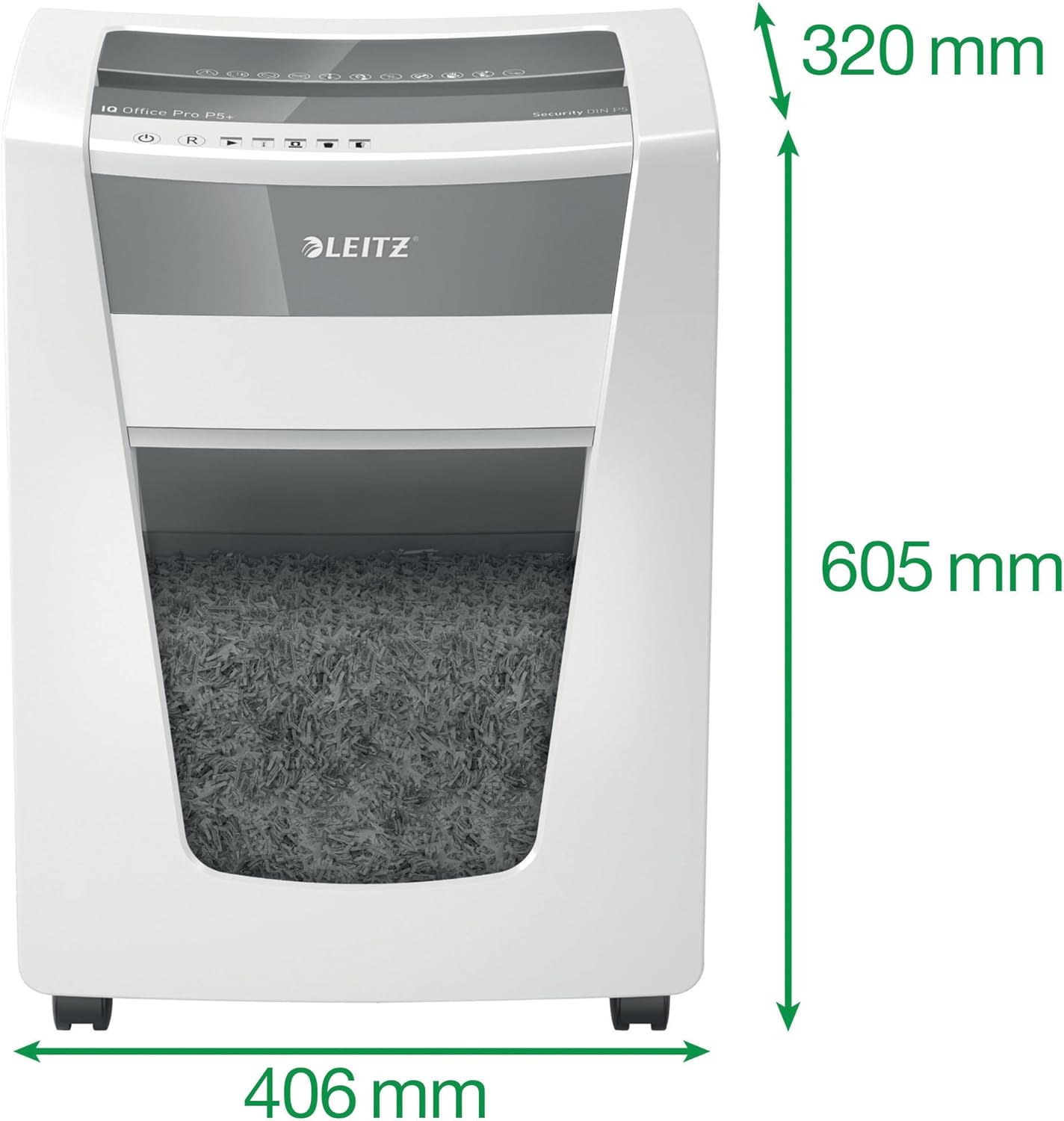
Image: The shredder with its key dimensions (height, width, depth) clearly marked.
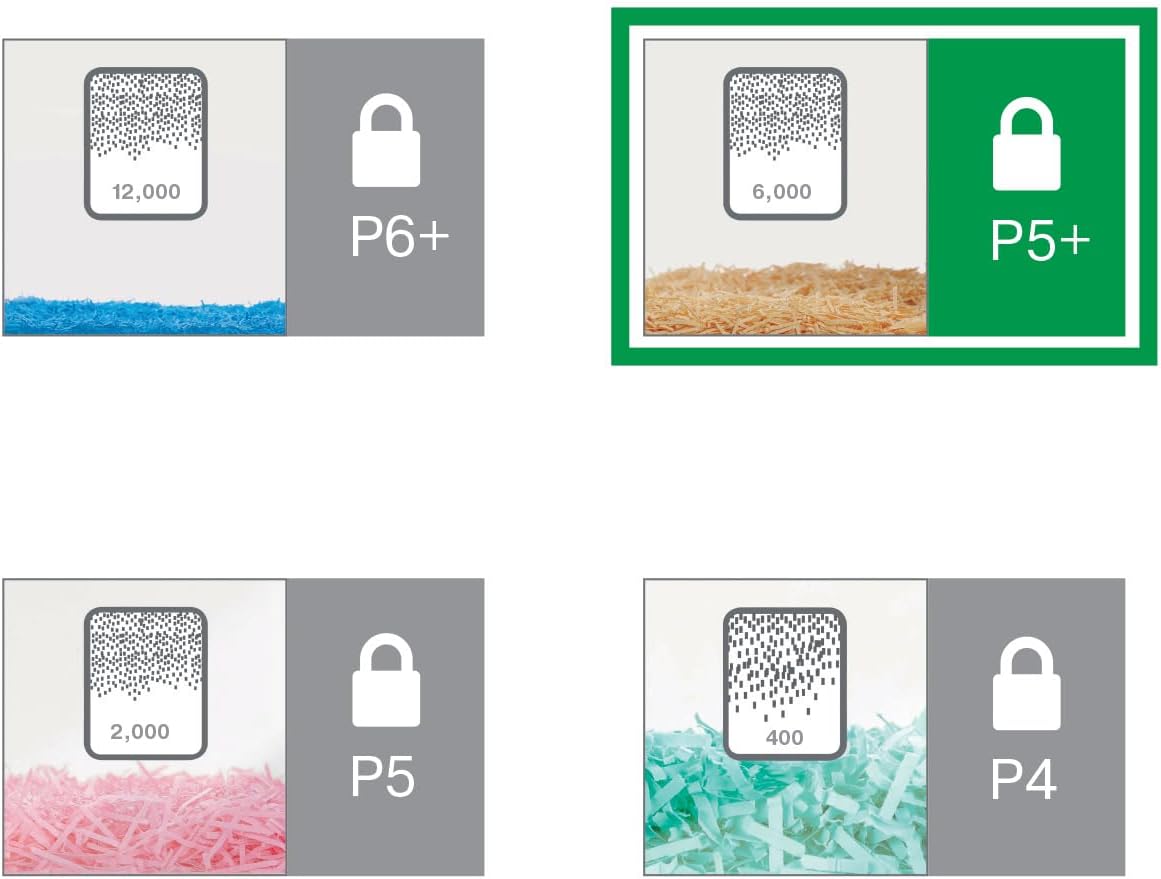
Image: A visual comparison of different DIN security levels (P4, P5, P5+, P6+), illustrating the decreasing particle size for higher security.
9. വാറൻ്റിയും പിന്തുണയും
വാറൻ്റി വിവരങ്ങൾ
This Leitz IQ Office Pro P5+ Shredder comes with a 2-year warranty. An additional 1-year warranty (total 3 years) can be obtained upon product registration. Please refer to the warranty card included with your product for detailed terms and conditions, or visit the official Leitz webരജിസ്ട്രേഷനുള്ള സൈറ്റ്.
ഉപഭോക്തൃ പിന്തുണ
For technical assistance, spare parts, or any inquiries regarding your Leitz shredder, please contact Leitz customer support. Contact information can typically be found on the official Leitz webസൈറ്റ് അല്ലെങ്കിൽ ഉൽപ്പന്ന പാക്കേജിംഗിൽ.
നിങ്ങൾക്ക് സന്ദർശിക്കാനും കഴിയും Leitz official webസൈറ്റ് കൂടുതൽ വിവരങ്ങൾക്കും പിന്തുണാ ഉറവിടങ്ങൾക്കും.


