ആമുഖം
This manual provides essential information for the safe and efficient operation of your Leitz IQ Home Office P4 Paper Shredder. Designed for personal and small office use, this compact cross-cut shredder offers DIN P4 security for your sensitive documents. Please read these instructions carefully before use and retain them for future reference.

The Leitz IQ Home Office P4 Paper Shredder integrated into a modern office environment, showcasing its compact and stylish design suitable for both home and office use.
1. സജ്ജീകരണം
- അൺപാക്ക് ചെയ്യുന്നു: Carefully remove the shredder from its packaging. Ensure all packing materials are removed from the shredder head and waste bin.
- പ്ലേസ്മെൻ്റ്: Place the shredder on a flat, stable surface. Ensure there is adequate space around the unit for ventilation and easy access to the power outlet.
- വേസ്റ്റ് ബിൻ ഇൻസ്റ്റാളേഷൻ: Ensure the waste bin is correctly inserted into the shredder unit. The shredder will not operate if the bin is not properly seated.
- പവർ കണക്ഷൻ: ഒരു സാധാരണ ഇലക്ട്രിക്കൽ ഔട്ട്ലെറ്റിലേക്ക് പവർ കോർഡ് പ്ലഗ് ചെയ്യുക.
- സുരക്ഷാ ലോക്ക്: Locate the safety lock feature. This mechanism prevents unsupervised use. Ensure it is disengaged before operation and engaged when not in use, especially around children or pets.

This image displays the Leitz IQ Home Office P4 Paper Shredder with its top unit lifted, showing the internal waste bin filled with cross-cut shredded paper. This illustrates the shredder's design and how to access the waste bin for emptying.
2. പ്രവർത്തന നിർദ്ദേശങ്ങൾ
- പവർ ഓൺ: Turn on the shredder using the main power switch, usually located on the back or side of the unit. The shredder is ready when the indicator light is on.
- Feeding Paper: Insert up to 10 sheets of A4 paper into the paper entry slot. The shredder will automatically detect the paper and begin shredding.
- തുടർച്ചയായ പ്രവർത്തനം: The shredder can operate continuously for up to 6 minutes. An LED indicator will illuminate if the shredder needs to cool down after extended use. Allow the unit to cool before resuming operation.
- Shredding Other Items: This shredder is designed to handle paper clips and staples. However, for optimal performance and longevity, it is recommended to remove them when possible. Do not attempt to shred CDs, credit cards, or other non-paper items.
- വേസ്റ്റ് ബിൻ കപ്പാസിറ്റി: The 23-liter waste bin can hold approximately 225 shredded sheets before requiring emptying. Monitor the bin level through the viewഇൻ വിൻഡോ.

This image visually confirms the shredder's capacity, showing it can shred up to 10 sheets of A4 paper at once and has a 23-liter waste bin, which can hold approximately 225 shredded sheets.
3. പരിപാലനം
- വേസ്റ്റ് ബിൻ ശൂന്യമാക്കൽ: Regularly empty the waste bin to prevent jams and ensure efficient operation. Always turn off and unplug the shredder before emptying.
- ഷ്രെഡറിൽ എണ്ണ പുരട്ടൽ: For optimal performance and to prolong the life of the cutting blades, oil the shredder regularly, especially after emptying the bin several times or after heavy use. Use Leitz oil sheets or a recommended shredder oil.
- വൃത്തിയാക്കൽ: Wipe the exterior of the shredder with a soft, dry cloth. Do not use abrasive cleaners or solvents. Ensure the paper entry slot is free of dust and paper debris.
4. പ്രശ്നപരിഹാരം
| പ്രശ്നം | സാധ്യമായ കാരണം | പരിഹാരം |
|---|---|---|
| ഷ്രെഡർ ഓണാകുന്നില്ല. | Not plugged in, waste bin not properly seated, safety lock engaged. | Check power connection, ensure bin is correctly inserted, disengage safety lock. |
| പേപ്പർ ജാം. | Too many sheets inserted, paper folded or crumpled. | Use the reverse function to clear the jam. Reduce the number of sheets. The shredder features a jam-proof mechanism to help prevent this. |
| പ്രവർത്തന സമയത്ത് ഷ്രെഡർ നിർത്തുന്നു. | Overheating due to continuous use, waste bin full. | Allow the shredder to cool down (LED indicator will show). Empty the waste bin. |
| Shredder is unusually noisy. | ബ്ലേഡുകൾക്ക് എണ്ണ തേയ്ക്കേണ്ടതുണ്ട്. | Oil the shredder blades using recommended shredder oil or oil sheets. |
5 സ്പെസിഫിക്കേഷനുകൾ
- ബ്രാൻഡ്: ലെയ്റ്റ്സ്
- മോഡൽ നമ്പർ: 80090000
- കട്ട് തരം: ക്രോസ്-കട്ട്
- സുരക്ഷാ നില: DIN P4
- ഷീറ്റ് ശേഷി: 10 A4 sheets (80 gsm)
- വേസ്റ്റ് ബിൻ കപ്പാസിറ്റി: 23 Liters (approx. 225 shredded sheets)
- തുടർച്ചയായ പ്രവർത്തന സമയം: 6 മിനിറ്റ്
- തണുത്ത സമയം: Indicated by LED
- ഉൽപ്പന്ന അളവുകൾ (H x W x D): 42.3 x 35.6 x 23.8 സെ.മീ
- ഇനത്തിൻ്റെ ഭാരം: 6.5 കിലോഗ്രാം
- ഊർജ്ജ സ്രോതസ്സ്: കോർഡഡ് ഇലക്ട്രിക്
- പ്രത്യേക സവിശേഷതകൾ: Automatic stop, Jam proof, Anti-clog, Quiet operation, Safety lock
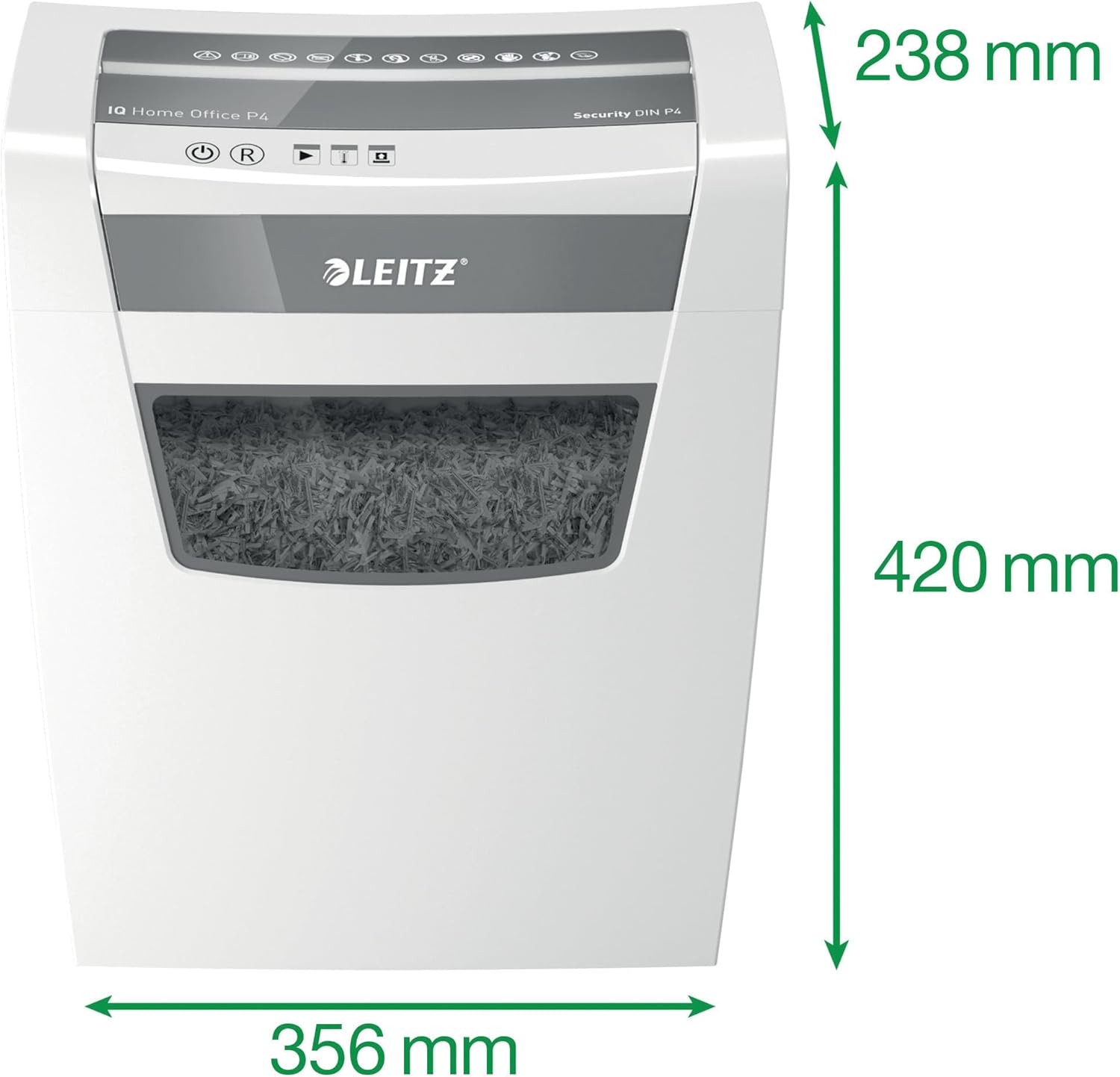
This image provides the physical dimensions of the Leitz IQ Home Office P4 Paper Shredder, indicating a height of 420 mm, a width of 356 mm, and a depth of 238 mm. These measurements are useful for planning placement.

This graphic illustrates different DIN security levels for paper shredders. The Leitz IQ Home Office P4 model provides P4 security, meaning it shreds documents into small cross-cut particles (approximately 400 particles per A4 sheet), offering a good balance of security for home and office use.
6. വാറൻ്റി വിവരങ്ങൾ
Your Leitz IQ Home Office P4 Paper Shredder is covered by a manufacturer's warranty. Please refer to the warranty card included with your product for specific terms, conditions, and duration. Keep your proof of purchase for any warranty claims.
7. ഉപഭോക്തൃ പിന്തുണ
For technical assistance, troubleshooting not covered in this manual, or spare parts, please contact Leitz customer support. Contact details can typically be found on the Leitz official webസൈറ്റ് അല്ലെങ്കിൽ ഉൽപ്പന്ന പാക്കേജിംഗിൽ.


