1. ആമുഖം
Thank you for choosing the BLAUPUNKT CLRD 30 DAB+ FM Clock Radio. This device combines a digital radio with an alarm clock and a convenient USB charging function. This manual will guide you through the setup, operation, and maintenance of your new clock radio to ensure optimal performance and longevity.
2 സുരക്ഷാ വിവരങ്ങൾ
- Read all instructions carefully before use and retain them for future reference.
- മഴ, ഈർപ്പം, അല്ലെങ്കിൽ തീവ്രമായ താപനില എന്നിവയിൽ ഉപകരണം തുറന്നുകാട്ടരുത്.
- ശരിയായ വായുസഞ്ചാരം ഉറപ്പാക്കുക; ഏതെങ്കിലും വായുസഞ്ചാര ദ്വാരങ്ങൾ തടയരുത്.
- നൽകിയിരിക്കുന്ന പവർ അഡാപ്റ്റർ മാത്രം ഉപയോഗിക്കുക.
- യൂണിറ്റ് ഡിസ്അസംബ്ലിംഗ് ചെയ്യാനോ പരിഷ്ക്കരിക്കാനോ ശ്രമിക്കരുത്. എല്ലാ സേവനങ്ങളും യോഗ്യതയുള്ള ഉദ്യോഗസ്ഥർക്ക് റഫർ ചെയ്യുക.
- ശക്തമായ കാന്തിക മണ്ഡലങ്ങളിൽ നിന്ന് ഉപകരണം അകറ്റി നിർത്തുക.
3. പാക്കേജ് ഉള്ളടക്കം
പാക്കേജിൽ എല്ലാ ഇനങ്ങളും ഉണ്ടോ എന്ന് ദയവായി പരിശോധിക്കുക:
- BLAUPUNKT CLRD 30 DAB+ FM Clock Radio
- പവർ അഡാപ്റ്റർ
- ഉപയോക്തൃ മാനുവൽ
- വാറൻ്റി കാർഡ്

Image: Power adapter for the BLAUPUNKT CLRD 30 clock radio.
4. ഉൽപ്പന്ന സവിശേഷതകൾ
- DAB+ and FM Radio: Enjoy a wide range of digital and analog radio stations with clear reception.
- യുഎസ്ബി ചാർജിംഗ് പോർട്ട്: Conveniently charge your smartphone or other USB-powered devices (5V, 2A output).
- ഇരട്ട അലാറം: Set two independent alarm times with options to wake to radio or buzzer.
- സ്നൂസ് പ്രവർത്തനം: Temporarily pause the alarm for a few extra minutes of sleep.
- സ്ലീപ്പ് ടൈമർ: Program the radio to turn off automatically after a set duration (up to 90 minutes).
- Dimmable LCD Display: Large display shows time, date, and radio information with adjustable brightness.
- 6W RMS Audio Output: Delivers clear and balanced sound.
5. നിയന്ത്രണങ്ങളും പ്രദർശനവും
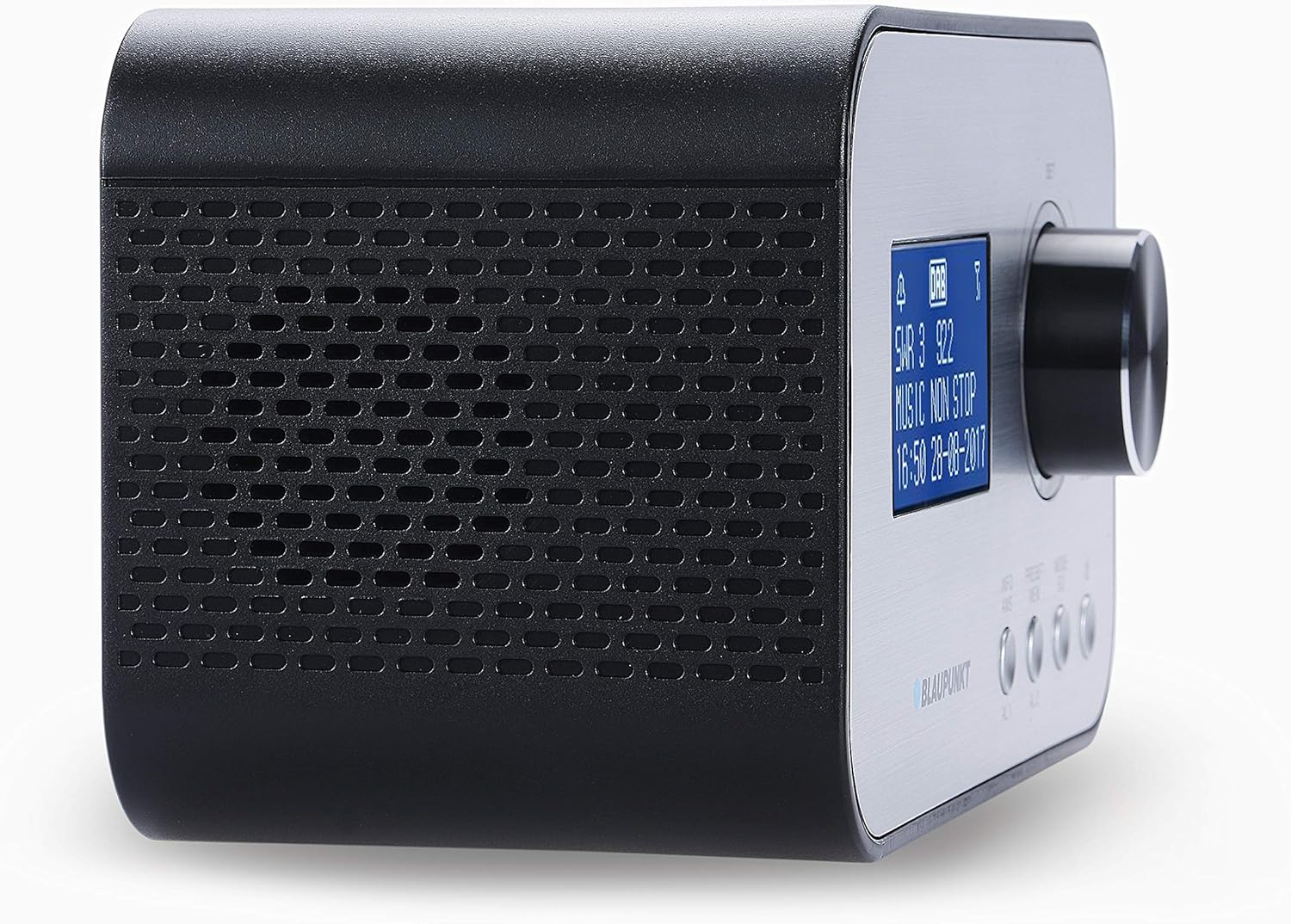
ചിത്രം: മുൻവശവും വശവും view of the BLAUPUNKT CLRD 30 clock radio, highlighting the display and main control knob.

Image: Top and side view of the BLAUPUNKT CLRD 30 clock radio, showing the 'SNOOZE / SLEEP / DIMMER' button and other front panel controls.
ഫ്രണ്ട് പാനൽ നിയന്ത്രണങ്ങൾ:
- ഡിസ്പ്ലേ: Shows time, date, radio station information, and menu options.
- Control Knob (SET/SELECT/VOLUME): Rotate to navigate menus or adjust volume. Press to confirm selections.
- PRESET/MENU Button: Access preset stations or the main menu.
- MODE/INFO Button: Switch between DAB+, FM, and other modes; display additional information.
- AL1/AL2 ബട്ടണുകൾ: Set and activate Alarm 1 and Alarm 2.
മുകളിലെ പാനൽ നിയന്ത്രണങ്ങൾ:
- SNOOZE / SLEEP / DIMMER Button: Press to activate snooze, set sleep timer, or adjust display brightness.
പിൻ പാനൽ കണക്ഷനുകൾ:

ചിത്രം: പിൻഭാഗം view of the BLAUPUNKT CLRD 30 clock radio, showing the DC 5V power input and the USB charging port.
- DC 5V ഇൻപുട്ട്: നൽകിയിരിക്കുന്ന പവർ അഡാപ്റ്റർ ബന്ധിപ്പിക്കുക.
- USB Output (CHARGING ONLY): Connect your mobile device for charging.
- ടെലിസ്കോപ്പിക് ആന്റിന: ഒപ്റ്റിമൽ റേഡിയോ സ്വീകരണത്തിനായി നീട്ടുക.
6. സജ്ജീകരണം
6.1 പവർ കണക്ഷൻ
- Insert the DC plug of the provided power adapter into the DC 5V input jack on the rear of the clock radio.
- ഒരു സാധാരണ മതിൽ ഔട്ട്ലെറ്റിലേക്ക് പവർ അഡാപ്റ്റർ പ്ലഗ് ചെയ്യുക.
- യൂണിറ്റ് ഓണാകും, ഡിസ്പ്ലേ പ്രകാശിക്കും.
6.2 ആൻ്റിന
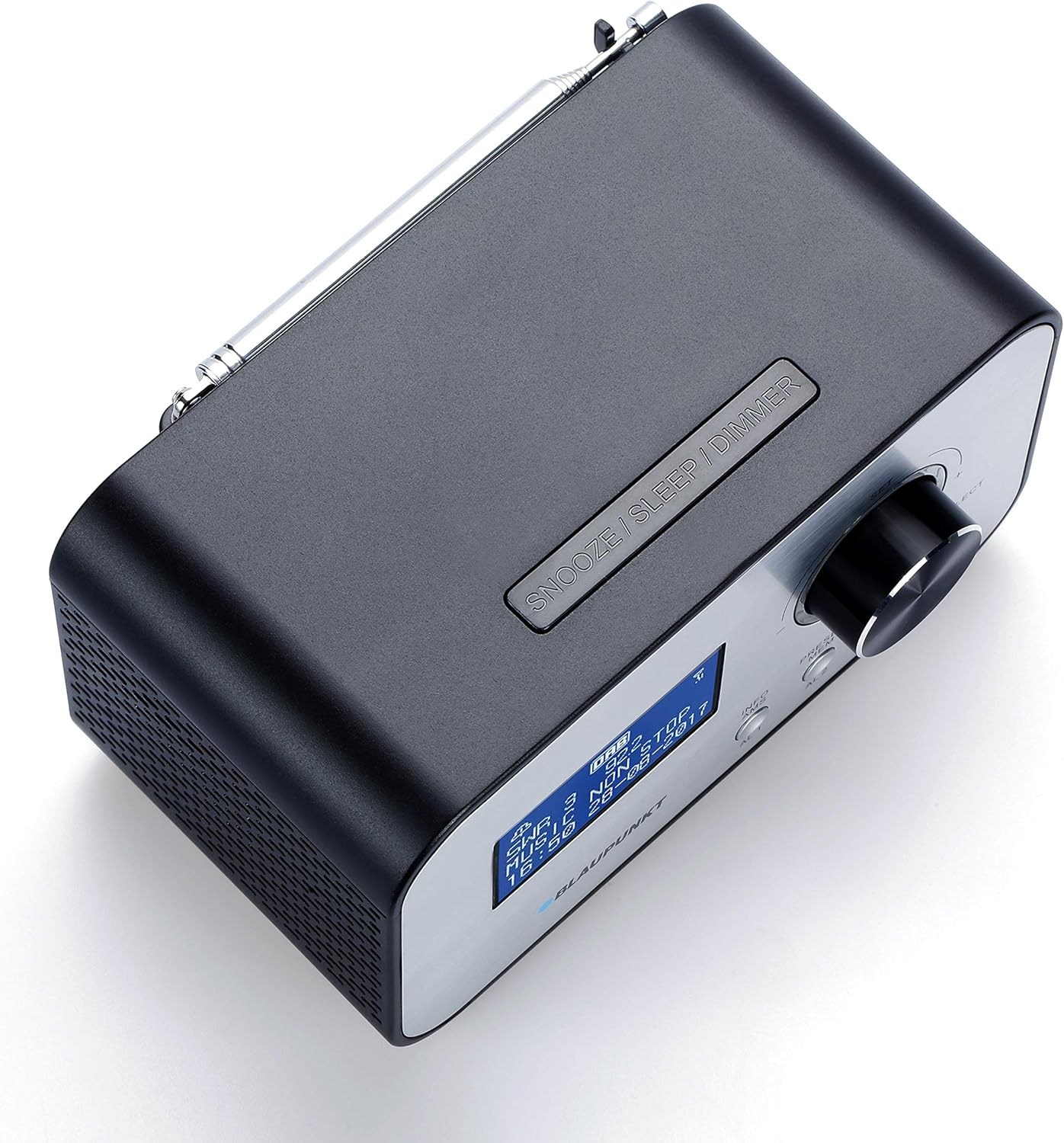
ചിത്രം: മുകളിൽ view of the BLAUPUNKT CLRD 30 clock radio with its telescopic antenna fully extended for improved reception.
For optimal DAB+ and FM radio reception, fully extend the telescopic antenna located on the rear of the unit. Adjust its position for the best signal quality.
6.3 Initial Setup (Time, Date, Language)
Upon first power-on, the unit may automatically scan for DAB+ stations and set the time/date. If not, or if you wish to adjust settings:
- അമർത്തുക PRESET/MENU പ്രധാന മെനുവിൽ പ്രവേശിക്കുന്നതിനുള്ള ബട്ടൺ.
- തിരിക്കുക നോബ് നിയന്ത്രിക്കുക to navigate to 'System Settings' or 'Time/Date' and press the knob to select.
- Follow the on-screen prompts to set the time, date, and preferred language.
- For language, select English to ensure all menu options are understandable.
7. പ്രവർത്തന നിർദ്ദേശങ്ങൾ
7.1 റേഡിയോ ഓപ്പറേഷൻ (DAB+/FM)
- അമർത്തുക MODE/INFO button to switch between DAB+ and FM radio modes.
- DAB+ റേഡിയോ: The radio will automatically scan for available DAB+ stations. Rotate the നോബ് നിയന്ത്രിക്കുക to browse stations and press to select.
- എഫ്എം റേഡിയോ: തിരിക്കുക നോബ് നിയന്ത്രിക്കുക to manually tune to FM frequencies. Press and hold the knob for an automatic scan to the next available station.
- തിരിക്കുന്നതിലൂടെ വോളിയം ക്രമീകരിക്കുക നോബ് നിയന്ത്രിക്കുക പ്ലേബാക്ക് സമയത്ത്.
7.2 Setting Alarms (AL1/AL2)
- ഒന്നുകിൽ അമർത്തുക AL1 or AL2 button to enter alarm setup for the respective alarm.
- തിരിക്കുക നോബ് നിയന്ത്രിക്കുക to adjust the hour and minute, pressing the knob to confirm each setting.
- Select the alarm source (Buzzer or Radio). If Radio, select the desired station.
- Set the alarm volume. Note that the minimum volume setting might be louder than expected for some users.
- Choose the alarm frequency (Daily, Weekdays, Weekends, Once).
- Confirm settings to activate the alarm. An alarm icon will appear on the display.
7.3 സ്നൂസ് ഫംഗ്ഷൻ
അലാറം മുഴങ്ങുമ്പോൾ, അമർത്തുക സ്നൂസ് / സ്ലീപ്പ് / ഡിമ്മർ button to temporarily silence the alarm. The alarm will sound again after a short interval (typically 9 minutes).
7.4 സ്ലീപ്പ് ടൈമർ
- റേഡിയോ പ്ലേ ചെയ്യുമ്പോൾ, അമർത്തുക സ്നൂസ് / സ്ലീപ്പ് / ഡിമ്മർ button repeatedly to cycle through sleep timer options (e.g., 15, 30, 45, 60, 90 minutes, OFF).
- തിരഞ്ഞെടുത്ത കാലയളവിനുശേഷം റേഡിയോ സ്വയമേവ ഓഫാകും.
7.5 യുഎസ്ബി ചാർജിംഗ്
Connect your smartphone or other USB-powered device to the USB output port on the rear of the clock radio using a compatible USB cable. The port provides 5V/2A output for charging.
7.6 ഡിസ്പ്ലേ ഡിമ്മർ
അമർത്തുക സ്നൂസ് / സ്ലീപ്പ് / ഡിമ്മർ button (when no alarm is active) to adjust the brightness of the LCD display. Cycle through available brightness levels to find your preferred setting. If the display appears too bright or too dim, adjust it using this button.
8. പരിപാലനം
- വൃത്തിയാക്കുന്നതിന് മുമ്പ് പവർ അഡാപ്റ്റർ വിച്ഛേദിക്കുക.
- മൃദുവായതും ഉണങ്ങിയതുമായ തുണി ഉപയോഗിച്ച് യൂണിറ്റ് തുടയ്ക്കുക. അബ്രാസീവ് ക്ലീനറുകളോ ലായകങ്ങളോ ഉപയോഗിക്കരുത്.
- Keep the ventilation openings clear of dust.
9. പ്രശ്നപരിഹാരം
- ശക്തിയില്ല: പവർ അഡാപ്റ്റർ യൂണിറ്റിലേക്കും വർക്കിംഗ് വാൾ ഔട്ട്ലെറ്റിലേക്കും സുരക്ഷിതമായി ബന്ധിപ്പിച്ചിട്ടുണ്ടെന്ന് ഉറപ്പാക്കുക.
- മോശം റേഡിയോ സ്വീകരണം: Fully extend and adjust the telescopic antenna. Try repositioning the unit to improve signal.
- അലാറം മുഴങ്ങുന്നില്ല: Check that the alarm is activated (alarm icon on display) and the alarm volume is set appropriately. Ensure the time and alarm time are correct.
- ഡിസ്പ്ലേ വളരെ തെളിച്ചമുള്ളത്/മങ്ങിയത്: ഉപയോഗിക്കുക സ്നൂസ് / സ്ലീപ്പ് / ഡിമ്മർ തെളിച്ച നിലകളിലൂടെ സഞ്ചരിക്കാൻ ബട്ടൺ അമർത്തുക.
- USB Charging Not Working: Ensure the device is properly connected and the USB cable is functional. The USB port is for charging only, not data transfer.
- Difficulty with Menu Navigation: The menu system is primarily controlled by the നോബ് നിയന്ത്രിക്കുക (rotate to navigate, press to select) and the PRESET/MENU button to access. If the language is incorrect, navigate to 'System Settings' to change it to English.
10 സ്പെസിഫിക്കേഷനുകൾ
| ബ്രാൻഡ്: | BLAUPUNKT |
| മോഡൽ നമ്പർ: | CLRD 30 BK |
| അളവുകൾ (L x W x H): | 17 x 11.5 x 10.2 സെ.മീ |
| ഭാരം: | 550 ഗ്രാം |
| മെറ്റീരിയൽ: | പ്ലാസ്റ്റിക് |
| കണക്റ്റിവിറ്റി ടെക്നോളജി: | USB |
| ട്യൂണർ സാങ്കേതികവിദ്യ: | DAB+ |
| ഊർജ്ജ സ്രോതസ്സ്: | AC (Adapter included) |
| പിന്തുണയ്ക്കുന്ന റേഡിയോ ബാൻഡുകൾ: | DAB+/FM |
| USB ഔട്ട്പുട്ട്: | 5V, 2A (Charging Only) |
11. വാറൻ്റിയും പിന്തുണയും
This product comes with a warranty. Please refer to the included warranty card for details regarding coverage and duration. For technical support or service inquiries, you may contact:
- സേവന ഹോട്ട്ലൈൻ: 00 800 1300 1400 (Free call)
- ഇമെയിൽ: blaupunkt@gt-support.de
Please have your model number (CLRD 30 BK) and purchase information ready when contacting support.


