1. ആമുഖം
The Korg CM-300 Contact Microphone is designed to enhance and expand the sound of your musical instrument. Utilizing a piezo element, it directly transmits vibrations from your instrument to a tuner, facilitating high-precision tuning even in environments with high ambient sound. This microphone is versatile and can be applied to various instruments including trumpets, trombones, saxophones, violins, guitars, and ukuleles.
2. സവിശേഷതകൾ
- Sound Transmission: Specifically designed for tuning instruments in loud ensembles by directly capturing instrument vibrations.
- സ്ഥിരതയുള്ള അറ്റാച്ച്മെൻ്റ്: Features an internal rubber grip within the clip for secure attachment to various instruments.
- മെച്ചപ്പെടുത്തിയ ഈട്: The cable design includes updated strain-relief slits where it joins the clip, reducing wire stress for increased longevity.
- വിശാലമായ അനുയോജ്യത: Suitable for a wide range of instruments including trumpet, trombone, saxophone, violin, guitar, and ukulele.
- Clip Mechanism: The clip opens to a maximum of 1.2 inches (30mm) and connects via a 1/4-inch TS Plug to a tuner.
3. പാക്കേജ് ഉള്ളടക്കം
- Korg CM-300 Contact Microphone (Black)
4. സജ്ജീകരണം
To set up your Korg CM-300 Contact Microphone, follow these steps:
- Identify Attachment Point: Choose a suitable location on your instrument for the clip. Recommended points include the bell of a brass instrument, the bridge of a violin, or the headstock of a guitar or ukulele.
- ക്ലിപ്പ് അറ്റാച്ചുചെയ്യുക: Gently open the clip (it can open up to 1.2 inches or 30mm) and securely attach it to the chosen part of your instrument. Ensure the internal rubber material makes firm contact to prevent slippage and optimize vibration transmission.
- Connect to Tuner: Insert the 1/4-inch TS plug of the microphone cable into the input jack of your compatible electronic tuner.
- Position Cable: Route the cable in a way that does not interfere with your playing or instrument movement, and avoids excessive strain on the cable or connector.

Image: Korg CM-300 Contact Microphone attached to a clarinet. The clip securely holds the microphone to the instrument, ready for tuning.
5. പ്രവർത്തന നിർദ്ദേശങ്ങൾ
Once the Korg CM-300 is properly set up and connected to your tuner, operating it is straightforward:
- Power On Tuner: Turn on your electronic tuner.
- Play Instrument: Play a note on your instrument as you normally would. The CM-300's piezo element will detect the vibrations directly from the instrument's body.
- Observe Tuner Display: The vibrations are converted into an electrical signal and sent to the tuner, which will then display the detected pitch.
- Tune Instrument: Adjust your instrument's tuning based on the feedback provided by your tuner. The direct vibration transmission ensures accurate tuning even in noisy environments.
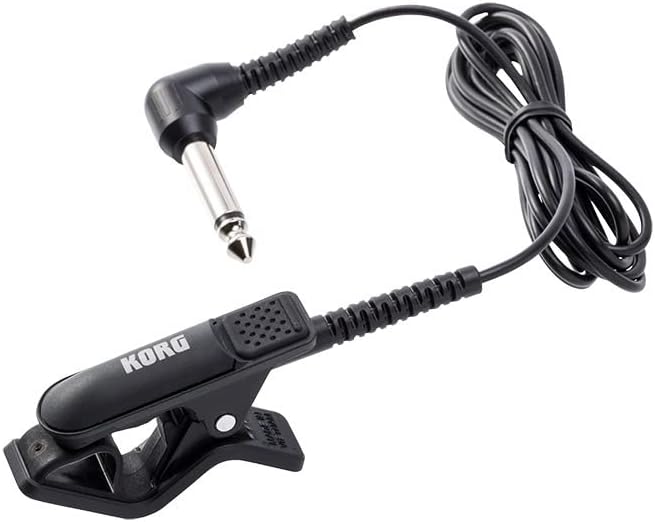
Image: The Korg CM-300 Contact Microphone, showing its clip, cable, and 1/4-inch TS plug. This plug connects directly to a compatible tuner.
6. പരിപാലനം
Proper maintenance will ensure the longevity and optimal performance of your Korg CM-300 Contact Microphone:
- വൃത്തിയാക്കൽ: Wipe the microphone body and cable with a soft, dry cloth. Avoid using abrasive cleaners, solvents, or excessive moisture, as these can damage the rubber and electronic components.
- സംഭരണം: When not in use, store the microphone in a clean, dry place away from extreme temperatures and direct sunlight. Avoid tightly coiling the cable to prevent kinks and damage.
- കേബിൾ കെയർ: Handle the cable gently. Do not pull on the cable to disconnect the plug from the tuner. Always grasp the plug itself. The updated strain-relief slits are designed to reduce stress, but proper handling is still crucial.
- Clip Inspection: Periodically check the clip and its internal rubber grip for any signs of wear or damage. A damaged clip may not provide secure attachment or optimal vibration transfer.
7. പ്രശ്നപരിഹാരം
If you encounter issues with your Korg CM-300, consider the following:
- No Signal on Tuner:
- Ensure the 1/4-inch TS plug is fully inserted into the tuner's input jack.
- Verify that the tuner is powered on and functioning correctly (test with another input source if possible).
- Check the microphone cable for any visible damage or kinks.
- Ensure the clip is securely attached to the instrument and making good contact.
- Inaccurate Tuning/Interference:
- Confirm the microphone is attached to a part of the instrument that vibrates strongly and clearly (e.g., bell, bridge, headstock).
- Minimize external noise sources if possible, although the CM-300 is designed for noisy environments, extreme noise can still affect performance.
- Ensure the tuner's settings are appropriate for the instrument being tuned.
- Loose Clip:
- Re-position the clip to a more secure location on the instrument.
- Check the internal rubber grip for wear; if worn, the grip may be compromised.
8 സ്പെസിഫിക്കേഷനുകൾ
| ഫീച്ചർ | വിശദാംശങ്ങൾ |
|---|---|
| മോഡലിൻ്റെ പേര് | CM-300 |
| ബ്രാൻഡ് | കോർഗ് |
| കണക്റ്റിവിറ്റി ടെക്നോളജി | XLR (Note: Product description states 1/4-inch TS Plug, this specification might be a general category or error in source data. Please refer to product description for actual connector type.) |
| കണക്റ്റർ തരം | XLR (Note: Product description states 1/4-inch TS Plug, this specification might be a general category or error in source data. Please refer to product description for actual connector type.) |
| പ്രത്യേക ഫീച്ചർ | ക്ലിപ്പ്-ഓൺ ഡിസൈൻ |
| അനുയോജ്യമായ ഉപകരണങ്ങൾ | Amplifier, Audio Interface, Tuners |
| നിറം | കറുപ്പ് |
| മെറ്റീരിയൽ | റബ്ബർ |
| ഇനത്തിൻ്റെ ഭാരം | 0.01 ഔൺസ് |
| ഉൽപ്പന്ന അളവുകൾ | 9.1 x 9.1 x 9.1 ഇഞ്ച് |
| മൈക്രോഫോൺ ഫോം ഫാക്ടർ | Lavalier (Clip-on) |
| പവർ ഉറവിടം | കോർഡഡ് ഇലക്ട്രിക് |
| സിഗ്നൽ-ടു-നോയിസ് അനുപാതം | 76 ഡി.ബി |
| ചാനലുകളുടെ എണ്ണം | 1 |
| പോളാർ പാറ്റേൺ | ഏകദിശ |
| യു.പി.സി | 663701771404 |
| നിർമ്മാതാവ് | കോർഗ് |
| ആദ്യ തീയതി ലഭ്യമാണ് | ഒക്ടോബർ 9, 2018 |
Note: Some specifications like "Connectivity Technology" and "Connector Type" are listed as XLR in the provided data, but the product description clearly states "1/4-inch TS Plug". Please rely on the product description for the correct connector type.
9. വാറൻ്റിയും പിന്തുണയും
For warranty information and technical support regarding your Korg CM-300 Contact Microphone, please refer to the official Korg website or contact Korg customer service directly. Keep your proof of purchase for any warranty claims.
കൂടുതൽ സഹായത്തിന്, നിങ്ങൾക്ക് സന്ദർശിക്കാവുന്നതാണ് ആമസോണിലെ കോർഗ് സ്റ്റോർ.


